

Catalog · How the catalog works
mario-and-luigi

Mario & Luigi - Originally for DOS, but ported to SDL2.
- ★ 1 on GitHub
Anyone may press Interesting, signed in or not. It helps others find this project.
README
Mario & Luigi - SDL2 Port
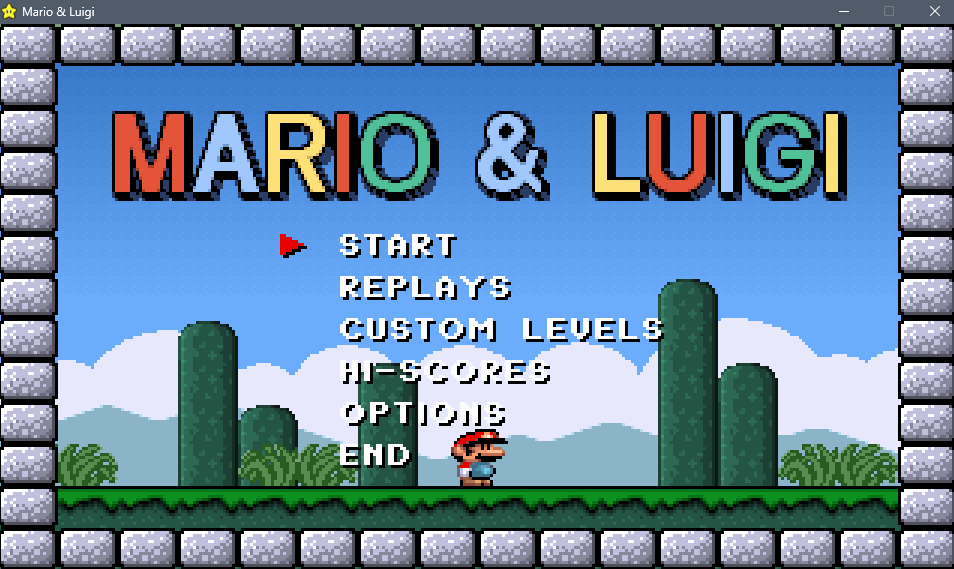
A faithful port of Mario & Luigi (1994) by Mike Wiering from DOS (Turbo Pascal + VGA Mode 13h) to modern Windows using SDL2 and Free Pascal.
The original game is a side-scrolling platformer for DOS featuring 6 worlds, two-player mode (Mario & Luigi), enemies, power-ups, pipes, and PC speaker sound effects. This port preserves all gameplay, visuals, and audio identically while replacing all DOS/hardware-specific code with SDL2 equivalents.
This port was made based on the original MARIOSRC.ZIP release, not based on the GitHub repo that was featured on Hacker News recently.
You can play the original on the Internet Archive's DOSBOX for browsers.
Building
Requirements
- Free Pascal Compiler 3.2.2+ (i386/Win32)
- SDL2 development library (
SDL2.dll, included) - SDL2-for-Pascal bindings (included in
SDL2-for-Pascal/)
Compile
Run the build script:
build.batOr compile manually:
fpc -Mtp -Sg -FuSDL2-for-Pascal MARIO.PASPlace SDL2.dll in the same directory as MARIO.exe and run.
Compiler Flags
| Flag | Purpose |
|---|---|
-Mtp |
Turbo Pascal mode (Integer = 16-bit, matches original overflow behavior) |
-Sg |
Allow goto statements (used in game loop) |
-Fu |
Unit search path for SDL2-for-Pascal bindings |
What Was Ported
The original game used extensive x86 inline assembly and direct hardware access. Every hardware-dependent component was rewritten in pure Pascal + SDL2:
Graphics (VGA256.PAS)
- VGA Mode 13h planar rendering → Linear byte framebuffer arrays
- Hardware page flipping (CRTC registers) → Two software framebuffer pages
- Hardware scrolling (CRTC start address) → Viewport offset applied during presentation
- VGA palette registers (ports $3C8/$3C9) → SDL palette arrays, converted to ARGB during rendering
- PushBackGr/PopBackGr (VGA latch-copy sprite save/restore) → Heap-based stack with byte array storage
- All drawing primitives (DrawImage, PutImage, Fill, etc.) → Pure Pascal framebuffer operations
- Renders to a 320x182 software surface, scaled 3x to a 960x546 window via SDL2 renderer
Input (KEYBOARD.PAS)
- INT 09h keyboard interrupt handler → SDL2 event polling
- Direct port $60/$61 scancode reading → SDL scancode-to-AT-scancode mapping
- Demo recording/playback from linked OBJ file → Typed constant array extracted from DEMOKEYS.OBJ
Audio (MUSIC.PAS + BUFFERS.PAS)
- PC speaker via ports $42/$43/$61 → SDL2 audio callback generating square waves at 44100 Hz
- Music sequence player with note sustain tracking to match PC speaker behavior
- Sound effect priority system ensuring one-shot beeps survive the audio callback timing
Joystick (JOYSTICK.PAS)
- Direct port $201 polling → SDL2 joystick API
Timing
- DOS timer tick (
$0000:$046C) →SDL_GetTicks div 55 - Frame pacing → 14ms minimum per frame (~71 fps, matching original DOS speed)
Sprite Data
- VGA planar format (
.$00files with inlineasm dbblocks) → Linear byte-per-pixel format (.000files converted to typed constants via Python scripts) - 170+ sprite include files auto-generated from original game assets
Level Data (WORLDS.PAS)
- Assembler
db/dwblocks in procedures → Typed constant byte arrays extracted via Python script
Other Replacements
uses Crt(Sound/NoSound/Delay) → SDL2 audio + SDL_DelayCPU286unit → Empty stub{$L DEMOKEYS.OBJ}→ Extracted to typed constant- VGA vertical blanking (CRTC SetYStart/SetYEnd) → Window sized to exact content area
- Executable name checksum protection → Removed
Running
All game assets (sprites, levels, fonts, palettes) are compiled directly into the executable as typed constants. To run the game standalone you only need two files:
| File | Description |
|---|---|
MARIO.exe |
Game executable (all data embedded) |
SDL2.dll |
SDL2 runtime library |
Place both files in the same folder and run MARIO.exe.
Controls
Menu
| Key | Action |
|---|---|
| Up / Down | Navigate menu |
| Enter | Select |
| Escape | Back / Quit |
Gameplay
| Key | Action |
|---|---|
| Left / Right | Move |
| Alt | Jump |
| Ctrl / Space | Run / Fire (fire mode) |
| Down | Duck / Enter pipe |
| Up | Look up / Enter pipe |
| P | Pause |
| S | Toggle status bar |
| Q | Toggle sound on/off |
| Escape | Quit |
Joystick is also supported.
Levels
The game features 6 worlds with a second harder "Turbo" loop after completion (12 progression stages total). See LEVELS.md for a complete level map, visual themes, pipe system details, and progression breakdown.
Project Structure
sdl2_port/
  MARIO.PAS          Main program
  PLAY.PAS           Game loop
  VGA256.PAS         SDL2 graphics engine (core)
  KEYBOARD.PAS       SDL2 input handling
  MUSIC.PAS          SDL2 audio (square wave synthesis)
  BUFFERS.PAS        Game state, types, shared audio vars
  PALETTES.PAS       VGA palette management
  FIGURES.PAS        Tile/sprite initialization & rendering
  BACKGR.PAS         Background rendering (parallax, bricks, etc.)
  PLAYERS.PAS        Player movement & rendering
  ENEMIES.PAS        Enemy AI & rendering
  TMPOBJ.PAS         Temporary objects (fireballs, particles)
  BLOCKS.PAS         Breakable/bouncing blocks
  GLITTER.PAS        Sparkle/particle effects
  STARS.PAS          Background star field
  STATUS.PAS         HUD status bar
  TXT.PAS            Text rendering (Swiss bitmap font)
  WORLDS.PAS         World/level data management
  JOYSTICK.PAS       SDL2 joystick support
  CPU286.PAS         Stub (originally 286 detection)
  build.bat          Build script
  icon.ico           Application icon
  mario.rc           Windows resource script
  sprites/           170 auto-generated sprite include files
  data/              Level data, fonts, palettes, backgrounds
  SDL2-for-Pascal/   SDL2 Pascal bindings (MPL/zlib licensed)
Credits
- The original game and its source code were created by Mike Wiering in 1994. All credit for the original code goes to its author. You can find the original source at wieringsoftware.nl.
- SDL2 Port: Created with assistance from Claude (Anthropic)
- SDL2-for-Pascal: PascalGameDevelopment community
- The characters "Mario", "Luigi", and all related names, images, and concepts are the registered trademarks and copyright of Nintendo Co., Ltd. This project is not affiliated with, authorized, or endorsed by Nintendo in any way.
- This project is strictly non-commercial. It is provided for free, and no profit is being made from its existence or distribution. Do not attempt to sell or commercialize this software.