

delphi-rabbitmq-rest-starter

Send and receive messages using the RabbitMQ REST API, Indy, and Delphi 2009+
- Active · last change 10-4-2026
- ★ 1 on GitHub
README
Delphi & Free Pascal RabbitMQ REST API Starter Kit
A lightweight, working example demonstrating how to send and fetch messages from RabbitMQ using standard HTTP REST endpoints in Delphi and Free Pascal / Lazarus.
🚀 Quick Start
This project contains a minimal codebase showing how to use native HTTP clients (such as TNetHTTPClient or IdHTTP) to communicate with the RabbitMQ Management Plugin API.
Features Included:
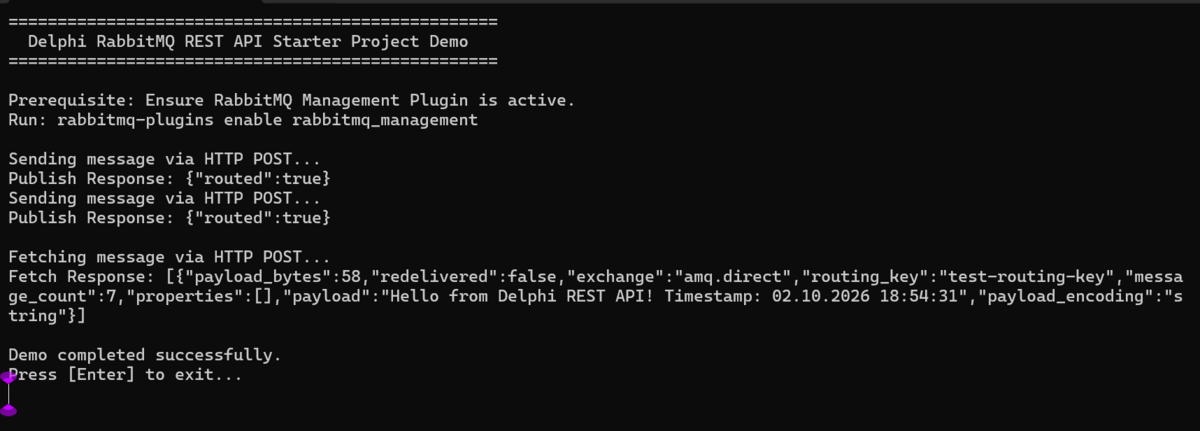
- Send Message: Publishes a payload to a specific exchange using
POST /api/exchanges/vhost/name/publish. - Fetch Message: Retrieves a payload from a queue using
POST /api/queues/vhost/name/get(Request/Response pattern).
🛠️ Prerequisites & Environment Setup
To run this demo successfully, your development environment and RabbitMQ broker must be properly configured.
1. RabbitMQ Broker Configuration
This starter kit relies on RabbitMQ's Management Plugin, which is not enabled by default. Open your server terminal or command prompt and run the following command to enable it:
rabbitmq-plugins enable rabbitmq_management- Default Port: This activates the HTTP REST API on port
15672. - Queue Setup: Before running the application, log into your RabbitMQ Management Dashboard (
http://localhost:15672), create a queue namedtest-queue, and bind it to theamq.directexchange using the routing keytest-routing-key.
2. Delphi IDE Configuration
-
Open Delphi and load the
RabbitMQRestDemo.dprproject. -
Select your target platform (Win32 or Win64) in the Project Manager.
-
Build the project (
Ctrl + F9). -
Run the application!
🔍 Troubleshooting & Common Errors
If the starter kit fails to run or connect, check these common error messages and their solutions:
❌ HTTP Protocol Error: 401 Unauthorized
- Cause: Your username or password credentials are incorrect.
- Fix: Check
RABBITMQ_USERandRABBITMQ_PASSin the.dprcode. If you are accessing RabbitMQ remotely, note that the defaultguest/guestcredentials only work from localhost by default. You will need to create an administrative user in the RabbitMQ dashboard for remote access.
❌ HTTP Protocol Error: 404 Not Found
- Cause 1: The RabbitMQ Management Plugin is not enabled.
- Fix 1: Run
rabbitmq-plugins enable rabbitmq_managementand restart the broker. - Cause 2: The specific Exchange or Virtual Host does not exist.
- Fix 2: Verify that the default Virtual Host
/is properly URL-encoded as%2Fin your request path. If your queue or exchange has custom naming, double-check spelling and case sensitivity.
❌ Socket Error # 10061: Connection Refused
- Cause: The application cannot find a running broker at the specified IP address or port.
- Fix: Ensure RabbitMQ is running locally (check your Windows Services or Docker containers). Verify you are targeting port
15672(the Management port) and not5672(the native AMQP protocol port).
Using the demo with Lazarus
The demo can also be compiled with Lazarus / Free Pascal (FPC).
Requirements
- Lazarus with a recent Free Pascal compiler
- RabbitMQ with the Management plugin enabled
- RabbitMQ Management API available at
http://localhost:15672/ - A RabbitMQ user with permission to access the Management API
Opening the project
Open the Lazarus project file:
RabbitMQRestDemo.lpiin Lazarus.
If Lazarus asks to locate the project source files or Indy units, add the required Indy source directories to the project's search path.
Indy
The demo uses Indy for HTTP communication. Make sure a Lazarus-compatible version of Indy 10 is available in the FPC/Lazarus environment.
Depending on how Indy was installed, you may need to add the Indy source directories to:
Project → Project Options → Compiler Options → Paths → Other unit files
Typically the relevant Indy directories include:
Indy10/Lib
Indy10/Lib/Core
Indy10/Lib/System
Indy10/Lib/Protocols
The exact paths depend on where Indy is installed.
Running the demo
Start RabbitMQ and make sure the Management API is enabled. Then run the demo from Lazarus.
The default Management API URL is:
http://localhost:15672/The demo uses the RabbitMQ Management REST API to perform operations such as declaring exchanges/queues and publishing messages.
For the default RabbitMQ virtual host /, the / character must be URL-encoded as %2F. For example:
http://localhost:15672/api/exchanges/%2F/amq.direct/publishDo not replace %2F with /, as that changes the meaning of the RabbitMQ API URL.
Troubleshooting
If Lazarus reports missing Indy units, check the project's unit search path and make sure the required Indy directories are included.
If the demo compiles but fails to connect, first verify that RabbitMQ's Management API is reachable in a browser:
http://localhost:15672/The default RabbitMQ Management API port is 15672.
For authentication, the demo uses RabbitMQ's HTTP API credentials rather than the AMQP connection settings.
💡 Get Help Beyond the Basics
Struggling with advanced enterprise architectures, message persistence, or network dropouts?
Bypass the trial-and-error of raw HTTP setups. Upgrade to Habari STOMP Client for native, robust connectivity out of the box.
👉 Get Free Basic Support and Your 3-Month Trial Here
⚠️ Is the REST API Right for Your Production App?
While the HTTP REST API is excellent for quick integration testing, DevOps scripting, or low-frequency monitoring, it introduces severe architectural bottlenecks when used as a primary messaging layer in commercial Delphi applications:
1. The Speed Bottleneck (HTTP Overhead)
Every single message sent or received via REST requires a brand new HTTP connection lifecycle: TCP Handshake ➡️ TLS Negotiation ➡️ HTTP Header Parsing ➡️ Connection Tear-down. This introduces massive latency. For high-throughput applications, this approach is 10x to 50x slower than a native messaging protocol.
2. Request/Response vs. Real-Time Streaming
The REST API forces a strict Request/Response architecture. To receive new messages, your Delphi application must constantly "poll" (query) the RabbitMQ server at set intervals (e.g., every 500ms).
- Too fast: You waste massive CPU, thread overhead, and network bandwidth on empty responses.
- Too slow: Your application suffers from lag and cannot react to data in real time.
3. No Native Message Broker Features
By relying on HTTP, your Object Pascal applications lose access to enterprise messaging features like:
- Native asynchronous message streaming (Server-to-Client push notifications)
- Client-side acknowledgments (
ACK/NACK) to guarantee zero data loss - Complex transaction management (
COMMIT/ABORT)
⚡ The Solution: High-Performance Native STOMP Streaming
To achieve true, event-driven streaming with lightning-fast throughput, your applications should bypass HTTP and communicate over a native wire protocol like STOMP (Simple Text Orientated Messaging Protocol).
Upgrade to Habari STOMP Client Components
The Habari STOMP Client libraries bridge this gap perfectly for the Delphi and Free Pascal ecosystems. Instead of restrictive HTTP polling, Habari establishes a single, persistent, secure TCP socket stream to RabbitMQ.
| Feature | This REST API Starter Kit | Habari STOMP Client |
|---|---|---|
| Architecture | Synchronous Request/Response | True Asynchronous Streaming |
| Data Delivery | Periodic Manual Polling | Instant Server-Side Push |
| Performance | High Latency / High Overhead | Ultra-Low Latency / High Throughput |
| Reliability | Manual error handling | Heartbeating / Automatic Failover on connect |
| Licensing | Free / Open Source | Commercial Enterprise Support |
Get Production Ready Today
Don't waste engineering hours writing custom boilerplate code to handle connection drops or polling loops.
👉 Download the 3-Month Complete Trial (€30.00) at Habarisoft.com
Full source code, multi-broker support (RabbitMQ, ActiveMQ, Artemis), and production-tested demos included.
License
This starter kit is licensed under the MIT License. Feel free to use it for basic testing and prototyping.