

Catalog · How the catalog works
NDBGRID

Enhanced TDBGrid for VCL applications
- ★ 1 on GitHub
Anyone may press Interesting, signed in or not. It helps others find this project.
README
NDBGRID
Enhanced TDBGrid for Delphi & C++Builder VCL Applications
NDBGRID is a modern, feature-rich replacement for the standard TDBGrid, designed for professional VCL applications in Delphi and C++Builder. The component was originally written in C++ and has been translated to Delphi for broader compatibility. The original C++ version is included as a compressed archive (OldCppComponent.7z) in the root of this repository.
Features
- Interactive Sorting: Clickable column headers automatically generate the
ORDER BYclause for your dataset. - Smart Tooltips: Automatic tooltip expansion for cell values that do not fit in the column width.
- Custom Events: Extended event set for advanced grid interaction and customization.
- VCL Styles Support: Seamless integration with VCL styles for a modern UI.
- Easy Integration: Drop-in replacement for TDBGrid with additional properties and events.
Screenshots
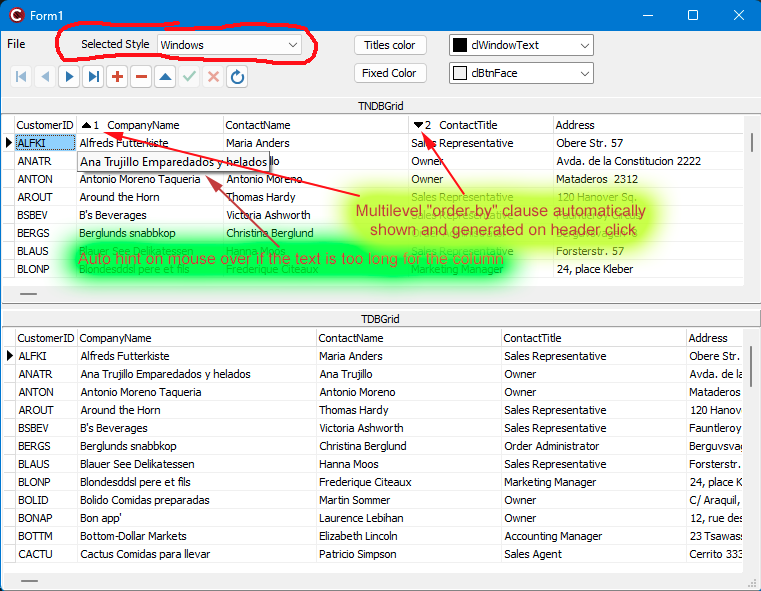Interactive sorting and advanced column features
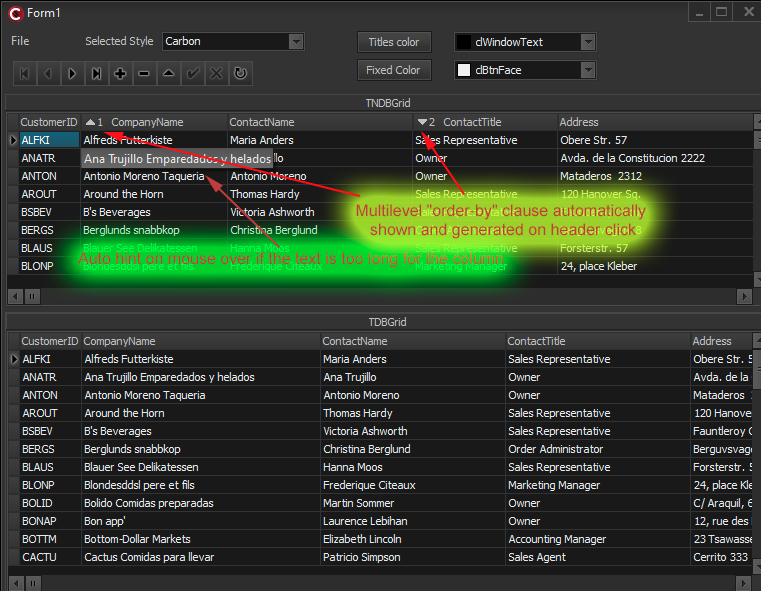Full VCL styles support for a modern look
Installation
- Open the
Delphifolder. - Run
install.batto build and register the component packages in your IDE. - Restart RAD Studio. The
TNDBGridcomponent will appear in the Tool Palette for both Delphi and C++Builder. - To uninstall, run
uninstall.batin the same folder.
Troubleshooting
If install.bat fails with an MSBuild warning that it cannot load *.tasks from C:\Windows\Microsoft.NET\Framework\v2.0.50727, followed by MSB4036 for the CreateItem task, check the MSBuild DefaultToolsVersion setting. A system-wide value of 2.0 can make MSBuild 4 look for tasks in the .NET Framework 2.0 folder even when where msbuild resolves to the .NET Framework 4 executable. This happens before the Delphi package is compiled and does not indicate a source-code error.
Run the installer from a normal command prompt and check which MSBuild is being used:
call "C:\Program Files (x86)\Embarcadero\Studio\<version>\bin\rsvars.bat"
where msbuild
msbuild -version
The installer explicitly selects MSBuild ToolsVersion 4.0. If building manually, add /tv:4.0 to the MSBuild command. Alternatively, an administrator can inspect DefaultToolsVersion under HKLM\SOFTWARE\Microsoft\MSBuild\4.0 (and HKLM\SOFTWARE\WOW6432Node\Microsoft\MSBuild\4.0) and correct a stale 2.0 setting. Avoid changing machine-wide registry settings unless you understand the effect on other build tools.
Usage
- Drop
TNDBGridonto your form (just like TDBGrid). - Connect it to your
TDataSource. - Configure columns, events, and properties as needed to leverage advanced features.
Demos
Two demo projects are provided in the Test folder:
Test/Delphi/— Delphi demo project (see the walkthrough)Test/Cpp/— C++Builder demo project
Explore these demos to see practical usage examples in both supported languages.
For detailed architecture, API, build, and customization notes, see the technical documentation. The component source is available in the Delphi folder.
Paths & Configuration
Include Path:
<repo>\DelphiLibrary Path:
$(BDSCOMMONDIR)\Bpl
$(BDSCOMMONDIR)\Bpl\$(Platform)
Original C++ Component
The original version of this component, written in C++, is available as OldCppComponent.7z in the root of this repository. This archive contains the legacy C++ source code for reference or migration purposes.
License
This project is licensed under the MIT License. You are free to use, modify, and distribute it, subject to the conditions in the license.