

DS18B20-FPC-Pi-GUI

Reads temperature from DS18B20 sensors Includes linearization for maximum achievable accuracy up to ±0.03 °C
- Active · last change 8-19-2026
- ★ 1 on GitHub
README
DS18B20-FPC-Pi-GUI
A Free Pascal project (Typhon) for displaying temperatures from multiple DS18B20 sensors on a Raspberry Pi with a graphical user interface (GUI).
🌞 Features
- Reads multiple DS18B20 sensors via GPIO (1-Wire)
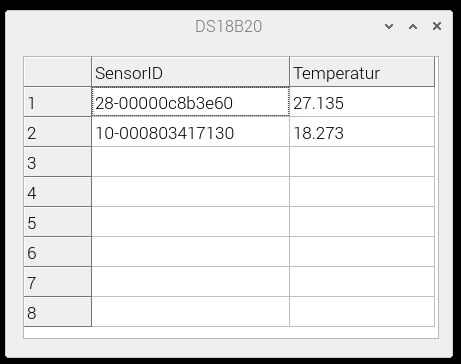
- Displays temperatures in a GUI (not a console program)
- Automatic update of values every second
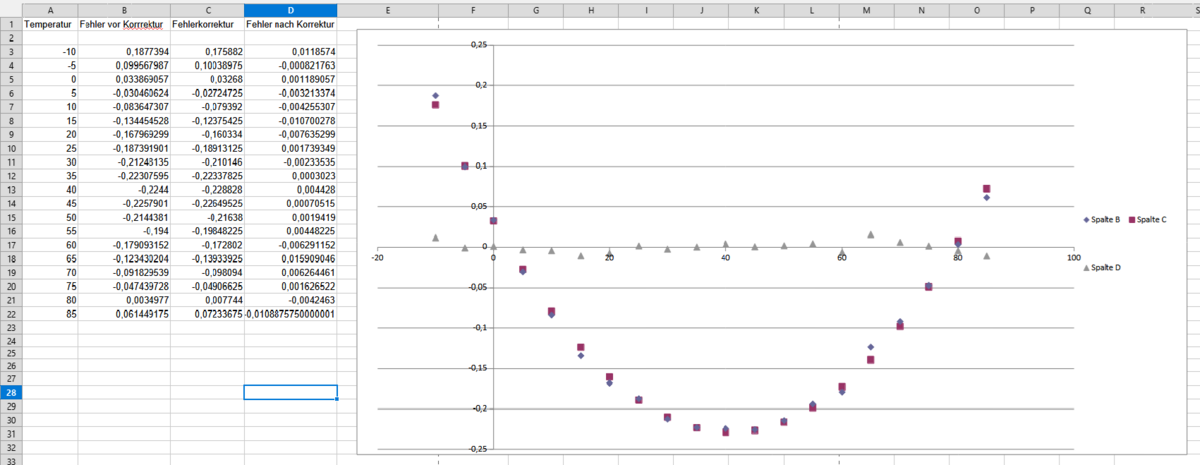
- Linearization of sensor readings to reduce typical nonlinearity
- Displays sensor IDs in a grid
⚖️ Technical Details
- Programmed with Free Pascal using Typhon
- If using Lazarus, some file suffixes may need to be changed
- Developed for Raspberry Pi on Linux (uses
/sys/bus/w1/devices/...) - No additional libraries required (pure FPC project)
- Sensor values are updated approximately every 1 second (12-bit resolution)
- GUI starts automatically
📊 Linearization
The typical accuracy of the DS18B20 is ±0.5 °C. By applying a polynomial correction formula based on the manufacturer’s data, deviations can be reduced to ±0.03 °C.
Note: A constant offset may still be required externally for individual sensor calibration.
📷 Screenshots
Linearization in Calc
Example Application
🔧 Installation
- Enable 1-Wire in
/boot/config.txt:dtoverlay=w1-gpio - Reboot the Pi.
- Compile the project using Typhon or use the binary
- Run the application (GUI starts automatically).
Alternatively, you can use the graphical interface of raspi-config to enable the 1-Wire bus:
- Go to Advanced Options → Interfacing Options
- Enable 1-Wire and set it to Enabled
- Reboot the Raspberry Pi to apply the changes
✨ License
This project is licensed under the MIT License.
Erstellt von RaspberryFpc