

vcl-reports-localize

This example localizes DevExpress Report Viewer/Report Designer for Delphi/C++Builder
- Active · last change 8-5-2026
- ★ 1 on GitHub
README
DevExpress Reports for Delphi/C++Builder — Localize the Report Viewer and Report Designer
This example localizes DevExpress VCL Reports components.
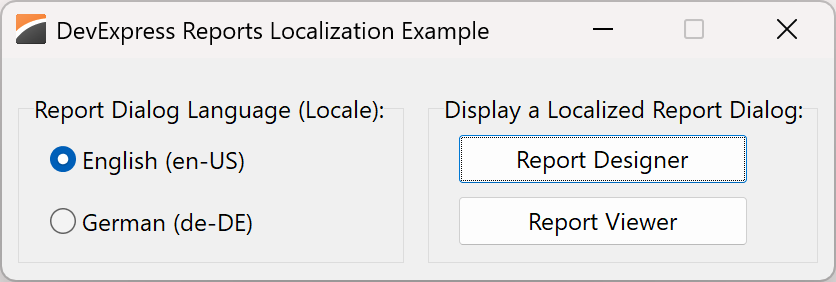
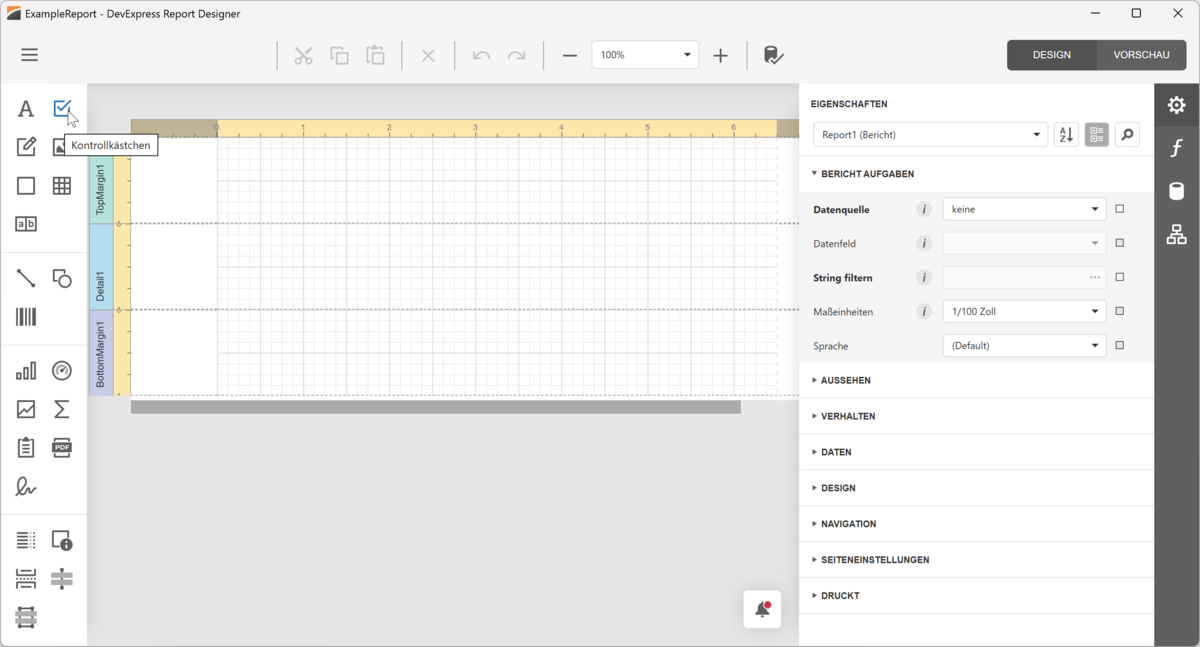
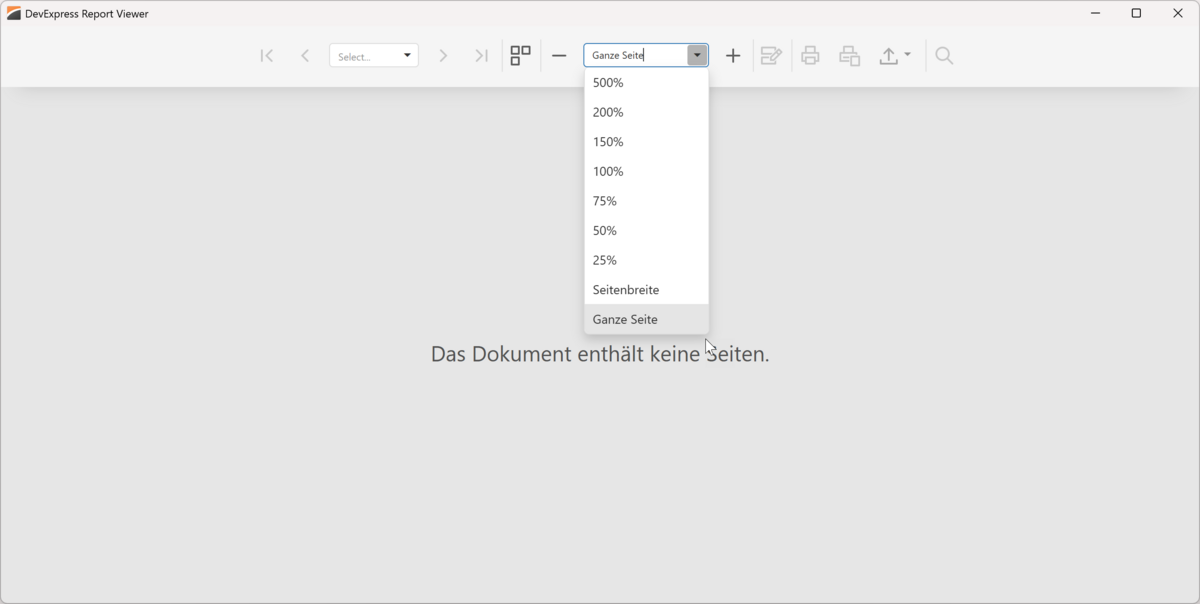
The [DevExpress Reports for Delphi/C++Builder][vcl-reports-intro] fully support UI localization. The localization example in this repository allows users to select between English (default) and German (localized) versions of two built-in DevExpress dialogs: [Report Designer][dx-report-designer] and [Report Viewer][dx-report-viewer]. The example includes projects for both Delphi and C++Builder.
Prerequisites
[DevExpress Reports Prerequisites][req]
Implementation Details
To localize the DevExpress Report Designer and Report Viewer in your Delphi or C++Builder application, you must:
- Use the [DevExpress UI Localization Service][l10n-service] to obtain localization files for DevExpress VCL Report Viewer and Designer. These files contain UI string translations for specific languages/locales. Refer to the following guide to learn more: [Localize Core Reporting Components: Use JSON Files][l10n-json-files].
- Extract downloaded files to a [localization] folder next to your compiled application executable. Note that projects in this repository output their executables to the same location. This allows both projects to use the same localization files.
- Assign a language identifier (also known as [locale][locale] or [culture identifier][culture]) to the
[TdxReport.Language]
property to switch the Report Designer/Report Viewer to the desired language:
Delphi
dxReport1: TdxReport;

// Switch Report UI to German
dxReport1.Language := 'de-DE'
C++Builder
TdxReport *dxReport1;

// Switch Report UI to German
dxReport1->Language = "de-DE";
For a step-by-step guide, refer to the following help topic: [Report Viewer and Designer UI Localization][viewer-designer-l10n].
This example does not localize report content. To localize report content in your project, refer to the following guide: [Report Content Localization][report-content-l10n].
The localization mechanism described in this example applies only to the DevExpress Report Designer and Report Viewer. Other DevExpress VCL components support localization using [resource files and the Localizer Editor][localize-an-application].
Files to Review
- [uMainForm.pas] (Delphi) and [uMainForm.cpp] (C++Builder) load an example report from [ExampleReport.repx]. Event handlers assigned to [TcxRadioButton] components switch localization language between English and German.
- [localization/*.de.json][localization] files contain localized UI strings.
Documentation
- [VCL Report Viewer and Designer UI Localization][viewer-designer-l10n]
- [VCL Reports Localization][reports-l10n]
- [DevExpress UI Localization Service][l10n-service]
- [ExpressReports Application Deployment Requirements][req]
- API reference:
- TdxReport
- TdxReport.Layout
- [TdxReport.Language]
[vcl-reports-intro]: https://docs.devexpress.com/VCL/405469/ExpressReports/vcl-reports [dx-report-viewer]: https://docs.devexpress.com/XtraReports/401850/web-reporting/web-document-viewer [dx-report-designer]: https://docs.devexpress.com/XtraReports/119176/web-reporting/web-end-user-report-designer [reports-l10n]: https://docs.devexpress.com/VCL/405597/ExpressReports/vcl-reports-localization [report-content-l10n]: https://docs.devexpress.com/VCL/405599/ExpressReports/localization/vcl-report-localization [viewer-designer-l10n]: https://docs.devexpress.com/VCL/405598/ExpressReports/localization/vcl-report-viewer-and-designer-localization [l10n-service]: https://docs.devexpress.com/GeneralInformation/16235/localization/localization-service [l10n-json-files]: https://docs.devexpress.com/XtraReports/400932/web-reporting/common-features/localization/localization-in-asp-net-core-reporting-applications#use-json-files [localize-an-application]: https://docs.devexpress.com/VCL/154039/ExpressCrossPlatformLibrary/how-to/localize-an-application
[TdxReport.Language]: https://docs.devexpress.com/VCL/dxReport.TdxReport.Language [TcxRadioButton]: https://docs.devexpress.com/VCL/cxRadioGroup.TcxRadioButton
[locale]: https://learn.microsoft.com/en-us/globalization/reference/glossary#locale [culture]: https://learn.microsoft.com/en-us/dotnet/fundamentals/runtime-libraries/system-globalization-cultureinfo#culture-names-and-identifiers
[localization]: ./localization/ [uMainForm.pas]: ./Delphi/uMainForm.pas [uMainForm.cpp]: ./CPB/uMainForm.cpp [ExampleReport.repx]: ./ExampleReport.repx
More Examples
- [Store Report Layouts in REPX Files][file-example]
- [Store Report Layouts in a Database][database-example]
[file-example]: https://github.com/DevExpress-Examples/vcl-reports-store-layout-template-file [database-example]: https://github.com/DevExpress-Examples/vcl-reports-store-layout-template-database
Localized Report Dialogs Preview
Localized Report Designer:
Localized Report Viewer:
Does This Example Address Your Development Requirements/Objectives?


(you will be redirected to DevExpress.com to submit your response)