

Eagle

Watch your filesystem like an eagle - Everything alternative for Linux.
- Active · last change 5-29-2026
- ★ 1 on GitHub
README
Eagle
Eagle is a fast file-search utility that can monitor file-system changes in real time. Obviously inspired by Everything, which I missed since moving to Linux.
Don't get me wrong, there's options out there - FSearch and ANGRYsearch come to mind - but I couldn't find one that's also aimed at communicating the search data with other apps.
Features
Main
- scans your folders ahead of time, delivering instant search results when you need them
- can keep real-time watch on your folders, so your search results are accurate
- supports IPC to allow other programs to get instant search results
Others
- allows searching in filename and (optionally) in path
- display size and timestamp (can show pretty size and only date)
- context menu to open file/folder, copy name/path
- customizable actions for [Ctrl | Alt | Shift] + Click, double-click & middle-click
- tray icon (can close/minimize/start minimized to tray)
- autorun
Screenshots
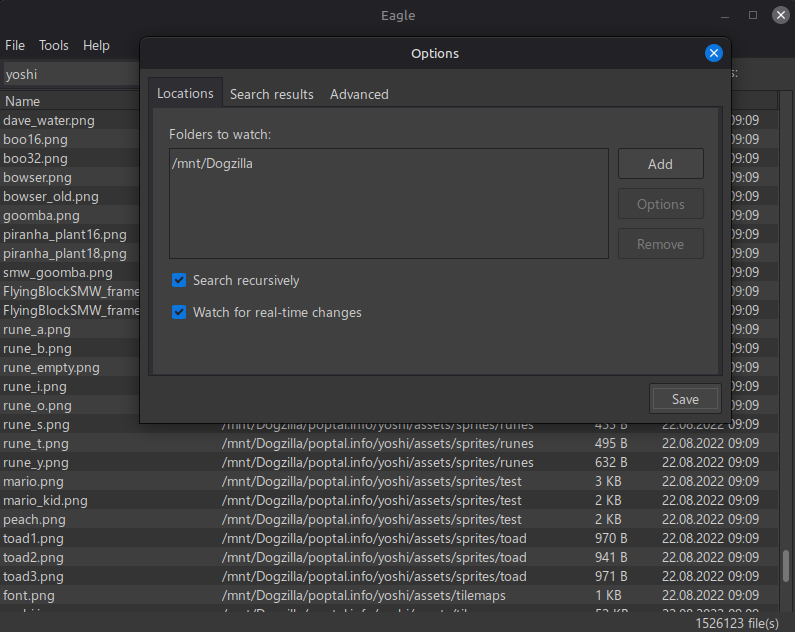
You can see a first scan (around 318k files) and folder-watch here.

Note: media files can be outdated, sorry!
IPC - how to search using Eagle
If you want fast searches/listings from within your own app, you can implement your own duplex IPC and ask Eagle for the results. There is a sample app in the repo (EagleChick) to get you started. Remember to set Eagle to allow IPC (in Options).
Supported pipe commands:
listfolder
listfolder
    -o  options to select what data to return
        - must be specified
        - can be any combination of the following: **npsdu** (name, path, size, date, unix)
        - combination order is irrelevant
        - if present, 'u' overrides 'd'

    -f  flat/single folder (non-recursive). Recursive by default.

    path to search. Use quotation marks if there are spaces in it.
Example usage:
listfolder -o=nps /mnt/partition/folderThis will return a list with the names, paths and sizes of all the files in the specified folder (recursively).
Example results:
base64_name|base64_path|size|*base64_name|base64_path|size|*
Note: Eagle must be configured to search for that particular folder (or one of its parent folders). Otherwise, oops.
search
search
    -o  same as above

    -p  search in paths, too

    -s  if the keyword contains spaces, it will be treated as multiple separate keywords (wip)

    keyword to search for. Use quotation marks if there are spaces in it.
Example usage:
search -o=np testThis will return a list with the names and paths of all the files that match the test keyword.
Example results:
base64_name|base64_path|*base64_name|base64_path|*
show
Used by Eagle itself to ping the running instance to pop up. You can create a global keyboard shortcut to launch Eagle and this will make sure there's only one instance running - and you get the search window popping up and ready to go.
Shouldn't be used by other apps, but hey... I'm just a readme file, I can't stop you!
Future plans
- multiple search options - in progress
- add option to list files in a treeview
- mark files changed in the last X minutes / hours