

DelayStarter

Launching apps after connecting to the Internet / Запуск приложений после подключения к интернету
- Active · last change 4-29-2026
- ★ 1 on GitHub
README

 ← Choose language | Выберите язык
DelayStarter
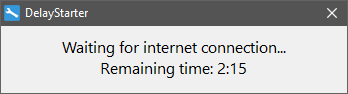
Utility for launching applications after a countdown timer or upon internet connection. If the internet is unavailable, the apps will wait for a connection instead of launching immediately, displaying a countdown timer.
Setup
- Add the full paths of the required applications to
Apps.txt. To pass launch arguments, use the|separator, e.g.C:\Windows\System32\notepad.exe|C:\log.txt. You can also use other files. To do this, use the-flaunch parameter, for example:DelayStarter -f apps2.txt. - Add a shortcut of the application to Windows startup folder
%AppData%\Microsoft\Windows\Start Menu\Programs\Startup. - You can change the parameters and modes in the
Setup.iniconfiguration file.
| Parameter | Description |
|---|---|
WaitInternet |
Mode: 1 — launch apps after internet connection is detected, 0 — launch apps after the timer expires. |
WriteLaunchTime |
When using WaitInternet=1, saves the elapsed time to LaunchTime after internet is detected, so the timer shows an approximate wait time on next boot. |
LaunchTime |
Countdown timer. In WaitInternet=0 mode — time after which apps are launched. In WaitInternet=1 mode — shown as an approximate estimated wait time. |
PlaySound |
Play a sound when the timer expires or internet connection is detected. |
SoundFile |
Path to a .wav file. A Windows system sound can be used. |
Screenshots
Download
Supports Windows XP, 7, 8, 8.1, 10, 11.
Feedback
r57zone[at]gmail.com