

SSEEidtArmorTools

Advanced Armor Sanitization and Balancing for Requiem / Skyrim AE.
- Active · last change 9-29-2026
- ★ 1 on GitHub
README
🏷️ The NameCode System (MO2 Metadata)
The script identifies mods by scanning the Notes field in your Mod Organizer 2 entries.
How to Tag a Mod:
Add the NameCode to your mod's Notes in the MO2 UI.
Pattern: [Any Text] CF_[MaterialCode][SmithingLevel]
Example Note: Dark Elf Blader - CBBE 3BA CF_En74
Supported Material Codes
| Category | Material | Code |
|---|---|---|
| Light Armor | Leather | Lr |
| Light Armor | Scaled | Sd |
| Light Armor | Elven | En |
| Light Armor | Glass | Gs |
| Light Armor | Dragonscale | De |
| Heavy Armor | Iron | In |
| Heavy Armor | Steel | Sl |
| Heavy Armor | Dwarven | Dn |
| Heavy Armor | Steel Plate | Se |
| Heavy Armor | Orcish | Oh |
| Heavy Armor | Ebony | Ey |
| Heavy Armor | Daedric | Dc |
| Heavy Armor | Dragonplate | Dp |
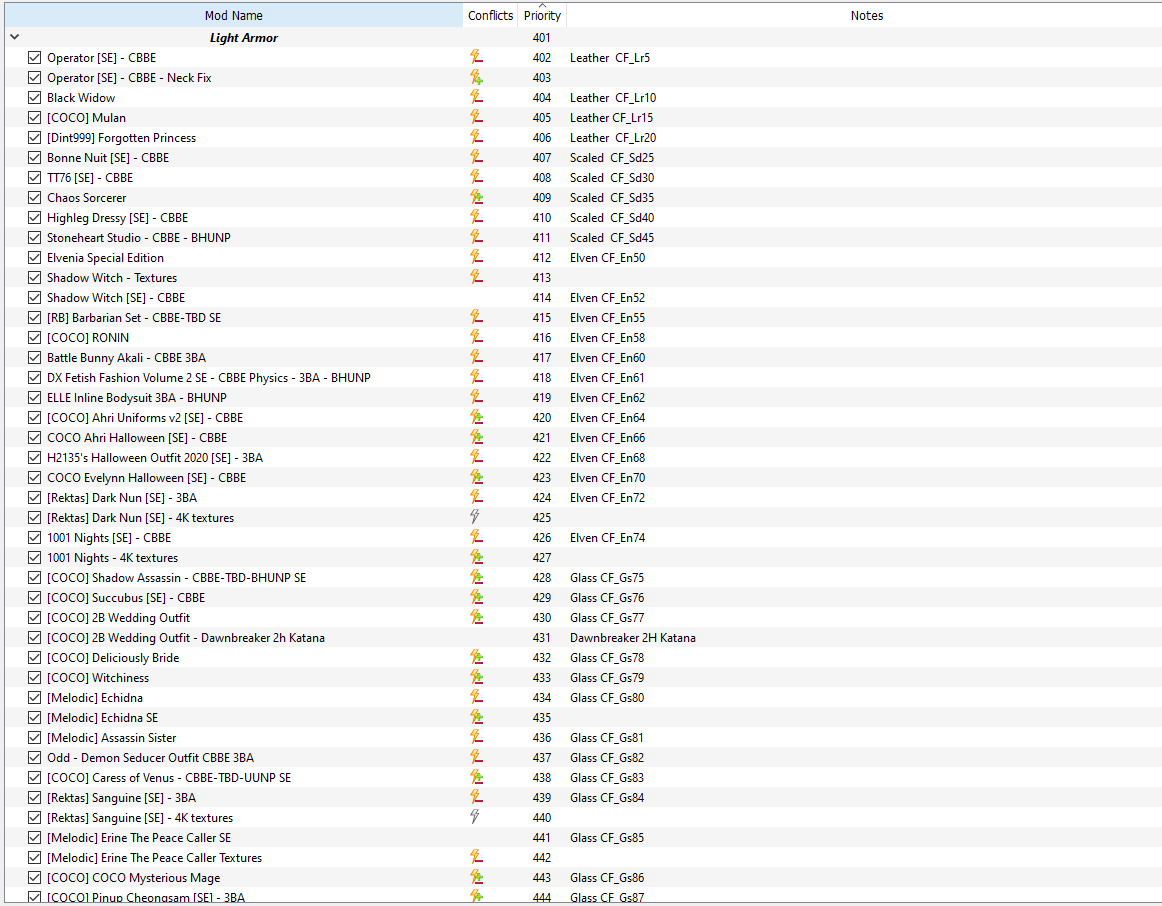
Note on Scaling: In the example above,
74represents the Smithing Skill required. The script uses this number to calculate the actual Character Level requirement automatically.
⚖️ Non-Linear Progression (Skill vs. Level)
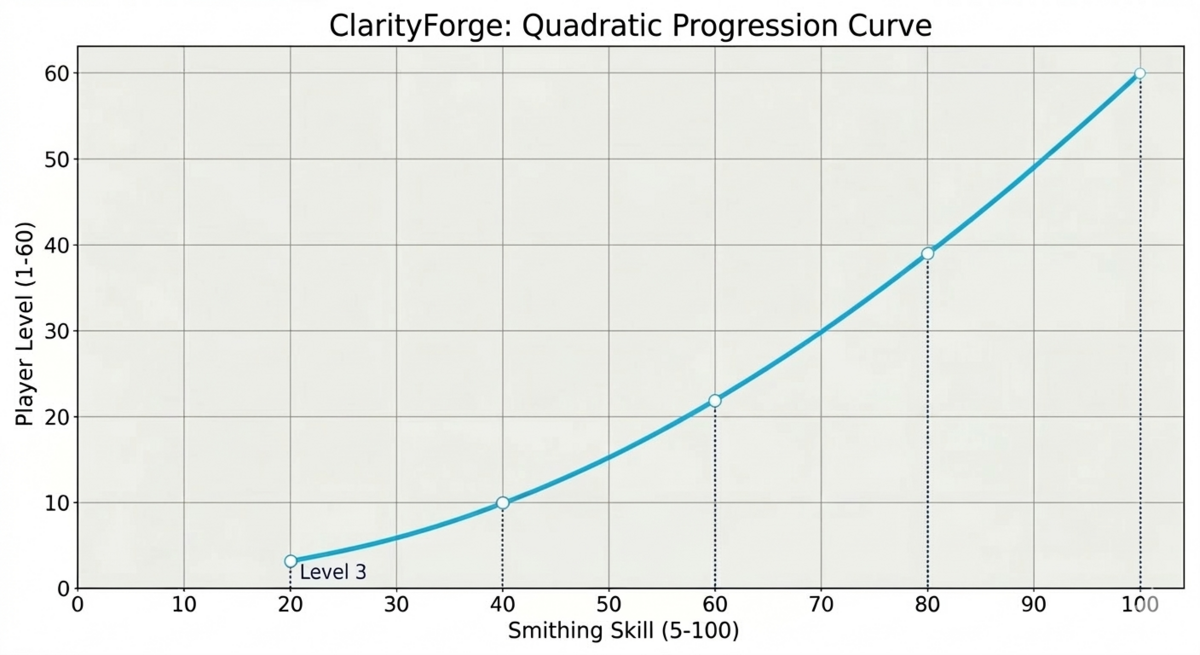
ClarityForge distinguishes between your Crafting Skill and your Character Level. By entering a Smithing Level in the MO2 Note, the script generates a balanced Character Level requirement using a Quadratic Curve.
The Level Formula:
$$PlayerLevel = 1 + (59 \times (\frac{SmithingSkill}{100})^2)$$
| Smithing Skill (Tag) | Character Level Req |
|---|---|
| 5 | Level 1 |
| 20 | Level 3 |
| 40 | Level 10 |
| 60 | Level 22 |
| 74 | Level 33 |
| 80 | Level 39 |
| 100 | Level 60 |
🧩 Compatibility & Overhauls (3BFTweaks / Requiem)
- Perk-Free Gating: Set
IS_PERK_REQUIREDtoFalseto ensure compatibility with overhauls that change Perk IDs. Crafting relies strictly on your numerical Smithing Skill and Character Level. - Jewelry & Circlet Logic: Items in Slot 42 (Circlet), Ears, Rings, or Amulets are forced to Clothing. This prevents them from breaking "Mage Armor" perks.
- Helmet Definition: Items using Slot 30 (Head) or Slot 31 (Hair) are treated as functional Armor.
🛠️ Mandatory Script Setup
- Global Path Configuration:
Set your physical MO2 mods directory in
ClarityForge.pas:const MO2_MODS_DIR = 'D:\GAMES\MO2\mods\';

- Record Preparation (BOD2 Flags): Ensure armor records have correct First Person Flags. This distinguishes Gameplay Slots (Cuirass, Boots) from Visual Slots (Capes, Accessories).
📖 The Crafting Manual System
ClarityForge generates a Unique Crafting Manual for every processed mod to keep your forge menu clean.
- Unlock Requirement: You must have the manual in your inventory to see or craft the items.
- Dynamic Naming: Manuals use the
.espname + material + level. - Example:
[COCO] 2B Wedding Outfit Elven Lv 74 Book - Pricing: The gold value scales with tier:
SmithingReq * 50. (Level 74 manual = 3,700g). - Forge Cleanup (Nullification): Original recipes are rendered "homeless" by removing their Workbench Keyword, preventing menu clutter.
⚙️ Internal Logic & Safety
The "One BOD2 Flag" Rule
For proper classification, each record should ideally have exactly one primary body slot set.
- Full Body Suits: If a mod uses a single record to cover Body, Hands, and Feet, the script defaults it to Cuirass logic.
- Conflict Warning: Since a suit occupies multiple slots, the player cannot equip separate boots or gauntlets alongside it; the engine will swap the items to prevent slot overlap.
Visual Slot Finalization
- Exploit Protection: Injects Dummy Enchantments into accessories to prevent "Enchantment Swapper" exploits.
- Normalized Stats: Accessories and Jewelry are set to Weight 0.1 and Armor Rating 0.
🚫 Critical Warnings
- Metadata Dependency: If the
CF_tag is missing from the MO2 Note, the script will skip the file. - One BOD2 Flag Rule: Each record must have exactly one primary
BOD2flag set for proper classification (Helmet, Hands, etc.).