

MagicRuler

Measure the size (in pixels) of on-screen controls, windows, or images.
- Active · last change 7-4-2026
- ★ 1 on GitHub
README
MagicRuler
MagicRuler는 Windows 화면 위에 항상 표시되는 작은 픽셀 자 프로그램입니다.
MagicRuler is a small always-on-top pixel ruler for Windows.
한국어
주요 기능
- 가로자 / 세로자 모드
- 시작 위치와 단위 간격 설정
- 반투명 표시
- 현재 커서 위치 표시
- 측정 대상 가이드라인 표시
- Magnetic 모드
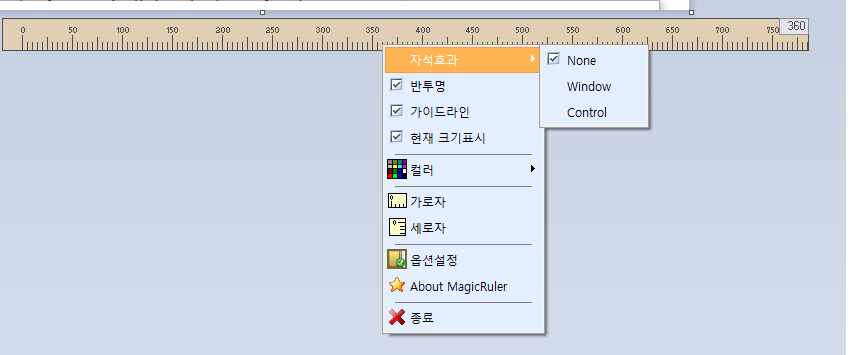
None: 일반 자 모드Window: 마우스 위치의 윈도우 기준으로 자동 부착Control: 마우스 위치의 컨트롤 핸들 기준으로 자동 부착
- 한국어 / 영어 UI 지원
언어 파일
UI 문구는 실행 파일과 같은 폴더의 UTF-8 key=value 언어 파일에서 읽습니다.
Kor.lang: 한국어Eng.lang: 영어
팝업 메뉴에서 언어를 변경할 수 있습니다.
언어 > 한국어 또는 Language > English
선택한 언어는 레지스트리에 저장되며 다음 실행 때 다시 적용됩니다.
사용 방법
- 자 위에서 마우스 오른쪽 버튼을 누르면 팝업 메뉴가 열립니다.
- 팝업 메뉴에서 가로자 / 세로자 모드를 선택합니다.
자석효과 > 윈도우또는자석효과 > 컨트롤을 선택하면 마우스 아래 대상에 자동으로 붙어 크기를 측정합니다.옵션설정에서 색상, 시작 위치, 단위, Magnetic 타입, 현재 위치 표시를 설정합니다.- `Ctrl + `` 키로 현재 마우스 위치의 Magnetic 대상에 수동으로 맞출 수 있습니다.
Shift + 방향키로 자를 1픽셀씩 이동할 수 있습니다.
빌드
대상 환경:
- Delphi 12
- Windows VCL Application
Delphi에서 MagicRuler.dpr을 열어 빌드합니다.
배포 시 실행 파일과 함께 아래 언어 파일을 포함해야 합니다.
Kor.langEng.lang
참고
Windows 10 이후 환경에서 Window Magnetic 모드는 DWM extended frame bounds를 사용합니다. 그래서 보이지 않는 resize border 영역을 제외하고 실제 보이는 윈도우 영역 기준으로 측정합니다.
English
Features
- Horizontal and vertical ruler modes
- Configurable start position and unit interval
- Alpha blended ruler window
- Current cursor position display
- Guide lines for measured targets
- Magnetic mode
None: normal ruler behaviorWindow: automatically attaches to the window under the mouseControl: automatically attaches to the control handle under the mouse
- Korean and English UI support
Language Files
UI text is loaded from UTF-8 key=value language files placed next to the executable.
Kor.lang: KoreanEng.lang: English
You can switch languages from the popup menu.
Language > Korean or Language > English
The selected language is saved in the registry and restored on the next run.
Usage
- Right-click the ruler to open the popup menu.
- Select horizontal or vertical ruler mode from the popup menu.
- Select
Magnetic > WindoworMagnetic > Controlto automatically attach the ruler to the target under the mouse and measure its size. - Use
Optionsto change color, start position, unit interval, Magnetic type, and current position display. - Press `Ctrl + `` to manually snap to the current Magnetic target.
- Hold
Shiftand use the arrow keys to move the ruler by 1 pixel.
Build
Target environment:
- Delphi 12
- Windows VCL Application
Open and build MagicRuler.dpr in Delphi.
When distributing the program, include these language files next to the executable:
Kor.langEng.lang
Notes
On Windows 10 and later, Window Magnetic mode uses DWM extended frame bounds. This excludes the invisible resize border and measures the visible window bounds.