

Catalog · How the catalog works
LazBrook

Web App template for FPC/Lazarus using Brook Framework
- ★ 1 on GitHub
Anyone may press Interesting, signed in or not. It helps others find this project.
README
LazBrook
Web App template for FPC/Lazarus using Brook Framework [work in progress].
Purpose
Building complex webserver applications has become relatively easier with frameworks and libraries for backend development. Although JS frameworks are now the most popular and the tooling has become very mature, the challenge of maintaining and growing webserver applications can only be avoided when every developer strictly adhere to the standards of their chosen dev-stack.
LazBrook library is built on Silvio's,BrookFramework. The intention is
- One codebase, cross-platform binaries + as gui, console or lib. This library gives you a starting point to create your application but with the flexibility to compile as:
- GUI application with inbuilt webserver
- Console application (by simply defining compiler flags)
- Library (dll, so, dylib) - where you can compile the existing code as a library, which can be loaded dynamically by a container application. The library implements a way to identify it as a LazBrook webserver and it can announce all the endpoints that it currently handles. This makes it easier to build and maintain microservices.
- Route and handler declaration: To allow a self-explanatory definition of routes and route-handlers
- Built-in file server with caching (implemented with ETAG).
- Framework for user authentication and authorisation
- Request sentry: that checks each incoming request:
- does the requested url require authentication? If yes, redirect to login page
- is the user session still valid? if not, redirect to login page
- is the user authorized to make the request? if not, reply with an error.
- manage additional security methods.
- To serve as a template for web applications built with Lazarus and Brookframework. In many instances, it is easier to understand how a framework is to be used when we can take a working template and customize it for our needs.
Dependencies
Lazbrook requires the following packages to be registered/installed in Lazarus:
Note: fp_sugar was developed specifically to construct fully formed html pages in Lazarus with the additional intention of defining functions that return html snippets that we can use as components or reuse (example page header, footer, menu) across all application pages. I have been using this library for 5 years and it helped me immensely to build readable, reusable code.
Route definition
You can define routes like this
const
    pcreUser = '(?P<user>[\w\-\._@\s]+)'; // creates a named group called "user"
    UserRoutes: TLazBrookRoutes = (
            (
                entryPoint: '/users';
                comment:    'Users endpoint';
                endpoints : (
                    (
                        regex: '/';
                        name: 'User Home';
                        comment:'';
                        default:true;
                        methods:[rmGET];
                        routeClass: TRouteGetUserList;
                    ),

                    (
                        regex: CONCAT('/(', pcreUser,'/details)');
                        name: 'User Details';
                        comment:'';
                        default:false;
                        methods: [rmGET, rmPOST];
                        routeClass: TRouteGetUserDetails;
                    ),

                    (
                        regex: CONCAT('/(', pcreUser,'/login)');
                        name: 'User Login';
                        comment:'';
                        default:true;
                        methods:[rmPOST];
                        routeClass: TRoutePostDoLogin;
                    ),
                    (
                        regex: CONCAT('/elevate');
                        name: 'Elevate User';
                        comment:'';
                        default:true;
                        methods:[rmGET];
                        routeClass: TRouteGetUserDetails;
                    )

                )
            )
        );
Notice that you can assign a TRoutexxx class to the endpoints which will handle the incoming request. This makes it easy to know how each server endpoint is defined. Additionally, you can also assign a factory method to the endpoint defintion where you can implement complex initialization of the TRoutexxx handler class.
Notice also that multiple endpoints have been marked with "default: true". This is to show that the last endpoint to be registered as default=true will be made as default. Previous assignments will be overwritten.
The comment field is specifically there to add documention for the endpoint. The library supports generation of list of all endpoints supported by the server, where the comment field can serve as a good source of information about the capabilities of the server.
How to use
- Open and compile the lazbrook package in Lazarus. Then you can include this package with any application you are building.
- Copy the appropriate files from the folder "/deploy" to your binary output folder.
- Define your routes as constants, while also creating TRoutexxx classes that will implement your logic (You can use any naming convention for your classes. They just need to be derived from TBrookURLRouteClass)
Console applications
- Set your LCLWidgetType to nogui in your project's Compiler Options.
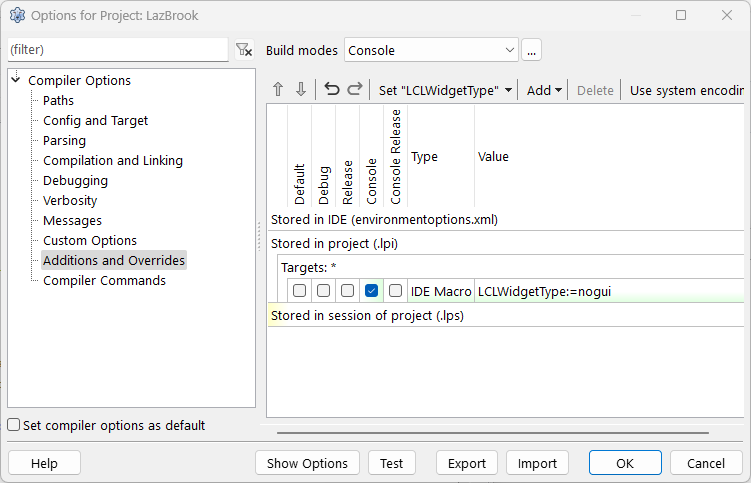
- Recommend the use of complier defines to control the code that gets compiled. Note that console applications may not always use an Application.Run. You would have to implement your own main loop with readln or fppause.
Example projects
There are 3 example projects that demonstrate how to use LazBrook.
- gui - This project can be compiled as a console application as well. See build "console" in project options.
- library - This project compiles to a library.
- library_container - An application that can load and run a lazbrook library. The logic of how to interrogate a library and how manage the server is implemented.
Todo
- Server configuration files. To be able to build console applications that can be initialized with a configuration file.
- User class, User list, Authentication and Authorization classes - to serve as base class for implementation in your application
- Sentry class - that sits before a request is processed and also finalizes any additional cookies or headers before the request is sent back to the browser. The intent is for you to derive custom sentry classes that can handle specific business rules.