Catalog · How the catalog works
Stampy

A simple Windows application to track your working hours.
- ★ 1 on GitHub
Anyone may press Interesting, signed in or not. It helps others find this project.
README
Stampy
Stampy is a very basic, portable Windows application to track your working hours.
All your data is stored locally!
Installation
To use this application, no installation is needed.
On first time use, just download the latest release and extract the content of the zip file to a folder of your choice.
If you want to update the application, only extract and replace the executable!
⚠️ Important:
Avoid replacing StampyWorkingHours.sqlite3 during updates.
Otherwise you will lose all your data!
Simple Mode
In Simple Mode only the necessary buttons to change your working state are displayed.
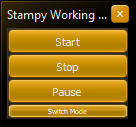
When the window is closed in Simple Mode, the application won't stop but it minimizes into the system tray.
Hovering the mouse over the tray icon will display the status, work time and pause time for the current day.
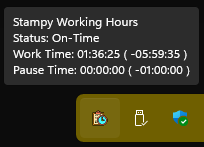
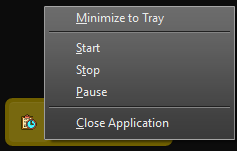
Additionally, right-clicking the Stampy tray icon will open a context menu allowing you to record a start, stop or pause.
Editing and Deleting Entries
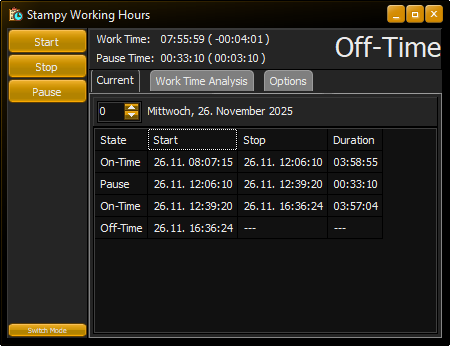
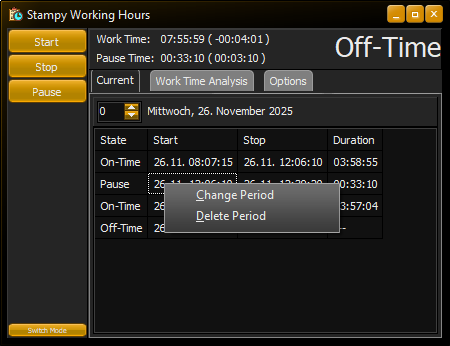
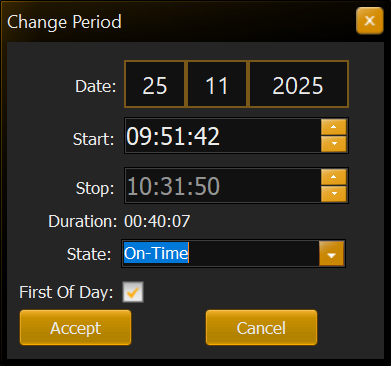
You can edit or delete an entry by right-clicking it in the timetable.
The displayed day can be changed using the arrow buttons next to the date or by directly entering an offset relative to the current day.
Work Time Analysis
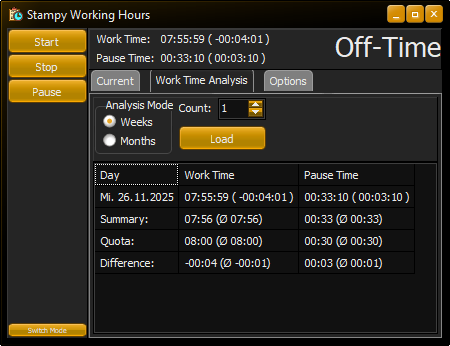
The Work Time Analysis tab allows you to analyze the recorded working time on a weekly or monthly basis.
The number of weeks or months to analyze can be specified using the arrow buttons next to Count or by directly editing that number.
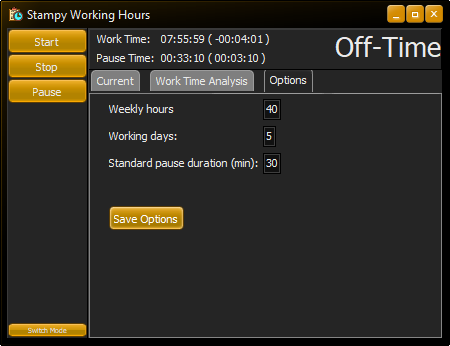
The calculations use the configured options on the Options tab to determine your working hours, your quota and the difference between those two values (i.e. overtime or missing hours).