

Catalog · How the catalog works
pas-term-game

Pascal terminal game
- ★ 10 on GitHub
Anyone may press Interesting, signed in or not. It helps others find this project.
README
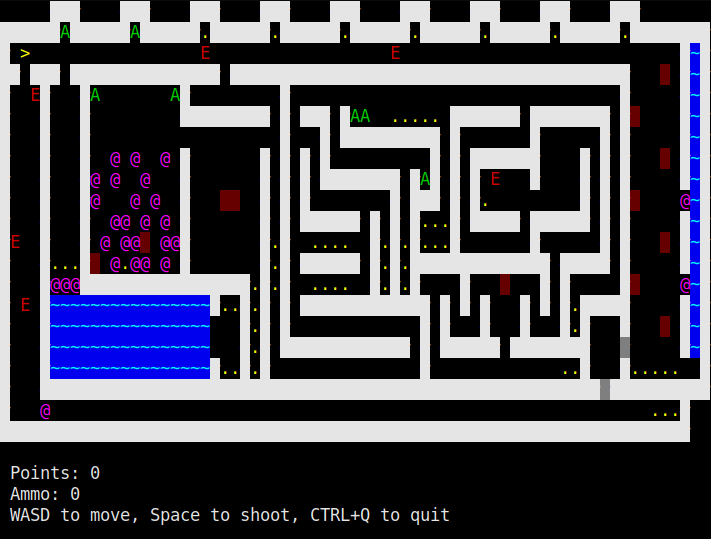
<h1 align="center">Pascal Terminal Game</h2> Just a simple 2D terminal game made in Pascal
Compiling and running
Linux
Run compile as bash in the terminal:
bash compileIf you dont want it to check for fpc, use the -nc parameter.
Then cd into levels and run the default levels by running run as bash:
cd levels
bash run
Making a level
Levels are stored in files, the name doesnt matter. To create a level, make a new file and put the map inside curly braces (make sure the curly braces are on the start of the line and not on the same line as the map start/end)
Note: All the map lines have to be the same width, if some line is longer than the first one it will get cut off.
List of usable characters and what they mean:
#: Solid wall@: Pushable boxP: Player spawn (Default spawn position is X 1 Y 1).: PointA: AmmunitionD: Door (Opens after all points were collected)H: Horizontaly moving deadly wallV: Vertically moving deadly wallE: Randomly moving deadly enemyB: Invisible barrier (Player can pass)N: Invisible barrier (Player cant pass)~: Water (Boxes cant be pushed onto water)G: Grass (Decoration)- Space: Floor (Nothing)
If you use a character not listed here, it will be turned into a floor. To run your map, simply put the file name in the program command line parameters (you can put multiple file names and multiple maps will be ran after eachother)
Controls
WASD- Move- Space - Shoot
CTRL+Q- QuitCTRL+N- Quit the current map and go to the next one