

pascalonia

Custom Avalonia widgetset target for Lazarus based projects. With zero code changes required.
- Active · last change 2-14-2026
- ★ 1 on GitHub
README
pascalonia
experimental poc exploring how much work it takes for avalonia to act as a target widgetset for lazarus lcl apps. the key constraint: zero changes on the application side. you just compile with --ws=avalonia and your app renders through avalonia/skia with the fluent theme.
surprisingly, it already works for basic apps. canvas is interactive including scroll. communication happens over ipc (stdin/stdout with length-prefixed json), so in theory it could run over tcp/ip as a thin-client renderer. the json protocol is just for testing — the transport layer is interface-based, swap it for anything.
heads up: the patching script modifies your lazarus installation to add the avalonia widgetset. back up your lazarus tree first, or adjust the script to point elsewhere.
what it looks like
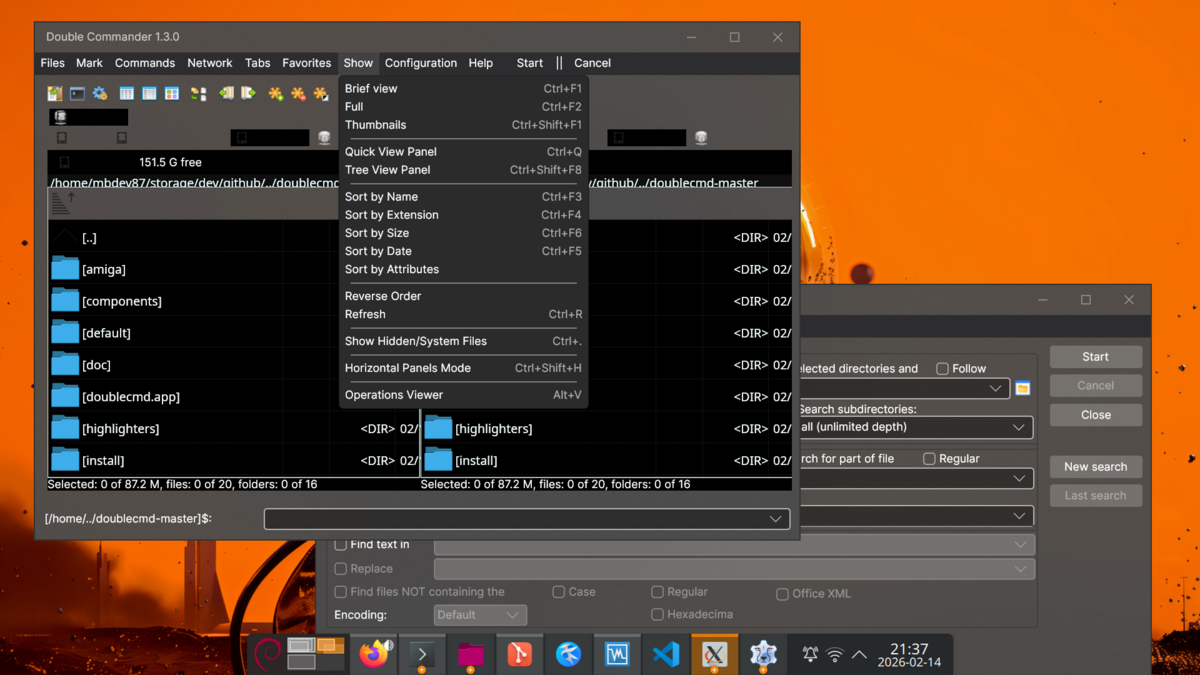
double commander
double commander with file panels, menus, toolbar, find dialog, scrollable lists.
lazarus ide
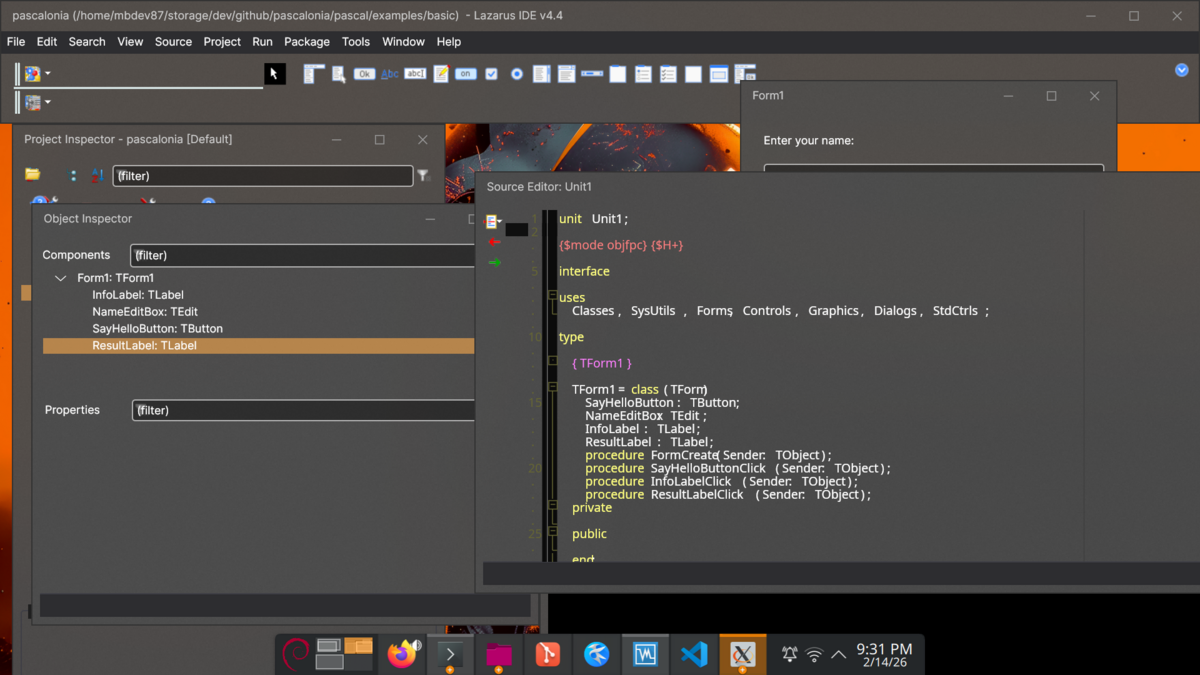
the lazarus ide itself (248k+ lines) compiled and runs with the avalonia widgetset. menus, toolbars, treeview with expand/collapse, synedit with syntax highlighting, object inspector — all rendering through avalonia over ipc pipes.
implemented widgets
- window — title, size, centering, menu bar
- button — click events, mnemonics
- label — text, autosize
- textbox — text input, change events
- checkbox — checked state, toggle events
- radiobutton — grouped selection
- combobox — dropdown items, selection
- groupbox — bordered container with title
- panel — container with alignment
- menu / menuitem — full menu hierarchy, shortcuts, separators
- toolbar — button strips
- progressbar — determinate progress
- numericupdown — spin edit
- listbox — scrollable item list
- treeview — hierarchical nodes with expand/collapse
- scrollbar — standalone scrollbar
- trackbar — slider
- pagecontrol / tabsheet — tabbed pages
- splitter — resizable panels
everything else falls through to the base TWinControl handling, which is why even complex apps like the lazarus ide "sort of work" — unknown controls still get a handle and render as containers.
how it works
fpc app <--> [ipc transport] <--> avalonia renderer (skia/fluent)the pascal app spawns the avalonia renderer as a subprocess. ui commands (createControl, setProperty) flow from fpc to avalonia. user events (click, textChanged) flow back. the protocol is length-prefixed json over stdin/stdout but the transport is abstracted behind interfaces on both sides.
build
# build the avalonia renderer
cd dotnet/Pascalonia && dotnet build

# patch your lazarus installation (one-time, re-run after widgetset changes)
./scripts/patch-lazarus.sh ~/fpcupdeluxe/lazarus

# build any lcl app with the avalonia widgetset
cd pascal/examples/basic && lazbuild --ws=avalonia pascalonia.lpi
requirements
- fpc 3.2.2, lazarus 4.4
- .net 10.0, avalonia 11.3.11
- linux x86_64 (other platforms untested but plausible)