

Fixed-Mond-Rainmeter-Widget

Here is the "Mond" Rainmeter Widget that broke due to not being able to use yahoo weather anymore and is now connected via OpenWeather (openweathermap.org)
- Active · last change 11-14-2025
- ★ 1 on GitHub
README
Mond Rainmeter Widget (Fixed & Enhanced)

A fully repaired, modernized, and enhanced version of the classic Mond Rainmeter skin, originally created by ApexXx-SenSei. This fork fixes the deprecated weather API, restores all functionality, adds new data fields (humidity, feels like, wind speed, sunrise/sunset), and includes a complete set of custom weather icons.
This repository provides a stable, working, and feature-rich version of the Mond widget that uses the OpenWeatherMap API instead of the defunct service used in the original skin.
Table of Contents
- Credits & Disclaimer
- Key Features
- Requirements
- Installation & Setup Guide
- Customization
- Troubleshooting
- File Structure Explained
- License
Credits & Disclaimer
Original Creator
All credit for the original Mond skin concept, visual design, and layout belongs entirely to ApexXx-SenSei. This repository is a community-driven effort to preserve and modernize a beloved Rainmeter skin.
This repository does NOT claim ownership of the original Mond design. The contributions here are strictly repairs, modernization, API integration, and the creation of new icon assets to ensure full functionality.
My Contributions
This fork was created to address the non-functional state of the original widget. My work involved:
- Complete API Overhaul: Replaced the deprecated weather service with the modern OpenWeatherMap API.
- Code Refactoring: Rewrote significant portions of the WebParser logic and regular expressions for stable JSON parsing.
- Feature Enhancement: Added new measures for Feels Like, Humidity, Wind Speed, Sunrise, and Sunset.
- Timezone Correction: Implemented logic to correctly display local sunrise/sunset times based on the API-provided timezone offset.
- Icon Creation: Designed and created a full set of 13 unique weather icons in the original flat art style to cover all possible weather conditions from the API.
- Bug Squashing: Fixed numerous bugs related to variable passing, encoding errors, and incorrect file paths.
Key Features
| Feature | Status | Description |
|---|---|---|
| OpenWeather API | ✅ | Fully working integration with the free OpenWeatherMap API. |
| Complete Weather Data | ✅ | Displays Temperature, Condition, Feels Like, Humidity, and Wind Speed. |
| Sunrise & Sunset | ✅ | Accurately shows local sunrise and sunset times. |
| Full Icon Set | ✅ | 13 unique, custom-made icons for all weather conditions. |
| Stable Parsing | ✅ | Reliable JSON parsing to prevent errors and missing data. |
| Original Aesthetics | ✅ | Preserves the beautiful, minimalist design of the original Mond skin. |
| Included Resources | ✅ | Comes with the Anurati font and original (non-working) files for reference. |
Requirements
- Rainmeter: The latest version must be installed. You can download it from rainmeter.net.
- OpenWeather Account: A free account is required to get an API key. This is mandatory for the weather widget to function.
Installation & Setup Guide
Follow these steps carefully to get the widget running.
Step 1: Install the Skin
- Go to the Releases page of this repository.
- Download the latest
.rmskinfile. - Double-click the
.rmskinfile to install the widget automatically with Rainmeter.
Step 2: Get Your OpenWeather API Key
This is the most important step. The widget will not work without a valid API key.
- Create a free account at openweathermap.org/users/sign_up.
- After signing in, navigate to the "API keys" tab.
- Copy the default key provided, or create a new one.
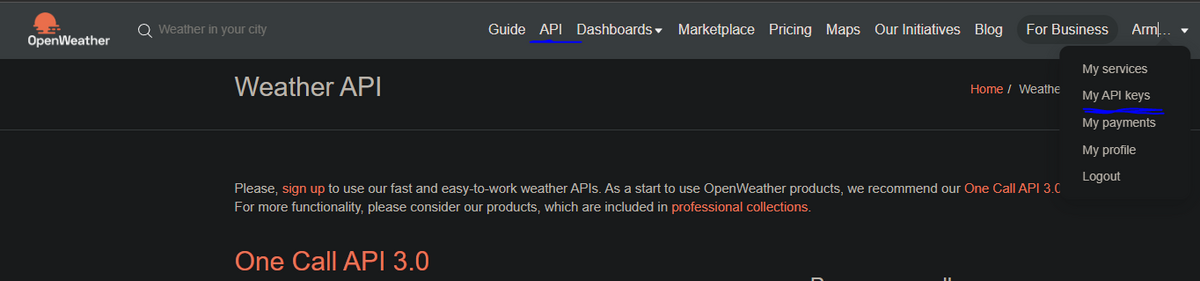
Important: It can take 5-20 minutes for a new API key to become active. If the widget shows "0" or missing data at first, wait a while and refresh.
Step 3: Configure the Widget
You need to tell the widget your API key and location.
- In Rainmeter, find the Mond folder.
- Navigate to
@Resources. - Right-click
Variables.incand select "Edit". This will open the file in Notepad. - Find the following section and edit the values:
; --- OpenWeatherMap API Settings ---
; Get your free API key from openweathermap.org

OWM_API_KEY=YOUR_API_KEY_HERE

; Enter your location query (e.g., q=London,UK or lat=48.85&lon=2.35)
OWM_QUERY=q=Fairfax,US- Replace
YOUR_API_KEY_HEREwith the key you copied from OpenWeather. - Change
q=Fairfax,USto your desired location (e.g.,q=NewYork,USorq=Tokyo,JP). - Save the file and close it.
- In Rainmeter, click the "Refresh all" button in the bottom left.
The weather widget should now display data for your location!
Customization
All major settings are in the Mond\@Resources\Variables.inc file.
- Change Temperature Units:
- Set
TempSymbol=Ffor Fahrenheit. - Set
TempSymbol=Cfor Celsius.
- Set
- Change Time Format (Clock):
- Set
Format=Ifor 12-hour time. - Set
Format=Hfor 24-hour time.
- Set
- Scale the Widget:
- Simply scroll your mouse wheel up or down while hovering over any part of the widget to resize it.
Troubleshooting
| Problem | Solution |
|---|---|
| Weather shows "0" or is blank | Your API key is likely not active yet. Wait 20 minutes and refresh the skin. Also, double-check that you copied the key correctly into Variables.inc with no extra spaces or quotes. |
| Icons are not showing | Ensure the folder structure is correct: Skins\Mond\@Resources\WeatherIcons\ should contain all the .png icon files. If you installed manually, make sure you copied everything. |
| Sunrise/Sunset time is wrong | This version automatically handles timezone offsets provided by the API. If the time is still incorrect, your location might be ambiguous. Try using a more specific query in OWM_QUERY, like q=Paris,FR instead of just q=Paris. |
File Structure Explained
@Resources/Variables.inc: The main configuration file. This is where you set your API key, location, and units.@Resources/WeatherIcons/: Contains all 13.pngfiles for the weather conditions.Weather/Weather.ini: The core logic for the weather widget, including all API calls and parsing.Clock/Clock.ini: The logic for the clock widget.Player/Player.ini: The logic for the music player widget.Backups of Original Files/: Contains the original, non-working.inifiles for historical reference and educational purposes.
License
The original design and layout of the Mond Rainmeter skin are the intellectual property of ApexXx-SenSei. This repository is distributed under the MIT License, which applies only to the modifications, fixes, and new assets created for this fork. You are free to use, modify, and distribute this fixed version for personal use. Please do not sell or commercialize this skin.