

Catalog · How the catalog works
flatpaint_release

flatpaint_release
- ★ 1 on GitHub
Anyone may press Interesting, signed in or not. It helps others find this project.
README
关于Pascal和Lazarus
嗯,我相信Pascal依然是写桌面app最好的语言。
我依然相信Lazarus(Delphi)是写桌面app最好的IDE。
契机
我很想说,我的目的是告别macos上收费轻量级修图软件。
我受够了 macOS 上那种“只是临时修个图,还要付费订阅/看广告/开网页”的工具了。
每当需要临时修一下图的时候,就会发现功能十分阳春的软件都要$10,或者广告满天飞,或者大部分功能要付费后使用,要不然就是网页版网页版网页版,就非常之……不爽 -_-||。
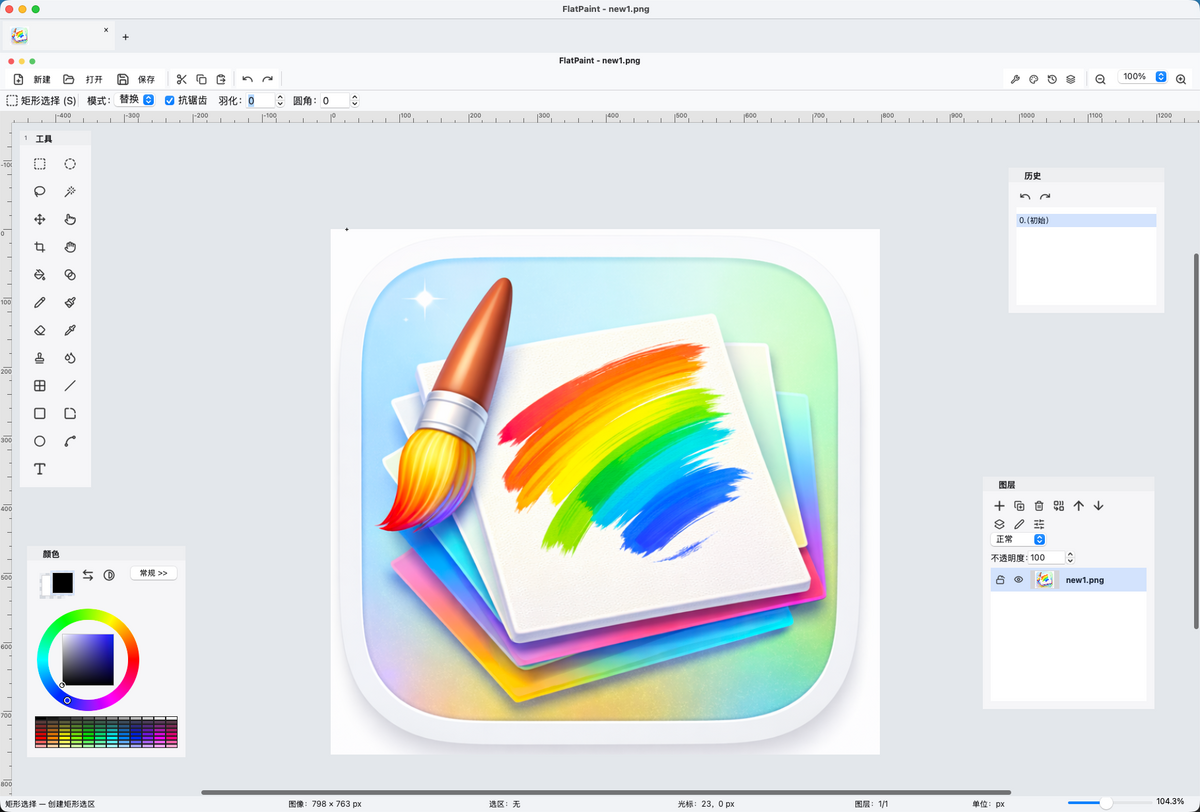
所以自己做了一个:FlatPaint。
它不是那种大而全的软件,目标很直接: 把日常最常用的轻量位图编辑功能,做成一个本地、小而实用的 app。
已经有的功能包括图层、选区、画笔、文字、基础图形、裁剪缩放旋转翻转、导出控制等。 适合拿来处理截图、简单修图、画标注、做轻量编辑。
如果你也正好想找一个免费本地工具,可以试试看。
二进制不开源,虽然写得不是很好,也是谨防某些个人或者组织白X。
关于二进制bundle包的版权声明见License,简述如下:
本软件对个人用途、教育用途及非营利性用途免费开放使用。
凡涉及批量部署、纳入正式生产环境或业务工具链、作为下游客户交付内容的一部分、预装、SaaS、OEM 或再分发等情形,均须事先取得作者另行授权。
未经授权,任何个人或企业不得对本软件进行二次打包、转售,亦不得通过修改作者标识、版权信息、版本信息等方式冒充官方版本。
本软件的软件名称、图标、作者签名发布的官方安装包及官方二进制发行包的相关权利,均由作者保留。
FlatPaint
A lightweight raster image editor for macOS Apple Silicon, with a partial-open release of reusable public libraries.
一款基于 Lazarus/FPC的 macOS Apple Silicon 下的轻量级位图编辑器,同时发布了部分可复用公共库的开源版本(for FPC & Lazarus)。
FlatPaint is designed for practical desktop image editing with a compact application structure and a clear separation between the end-user app and the reusable libraries behind it.
FlatPaint 面向实际桌面图像编辑场景,将可复用库明确分离。
本软件的二进制包为暂不开源但免费使用。并没有额外的$99加入apple developer,所以二进制包可能会有安全警告,请移步设置里开启。
Why FlatPaint
FlatPaint focuses on the parts of raster editing that matter most in day-to-day use: layers, selections, painting tools, drawing tools, transforms, export controls, and platform-native integration on macOS.
FlatPaint 有常用的功能:图层、选区、绘画工具、绘图工具、图像变换、导出控制,以及 macOS 平台上的原生集成体验。
This repository also includes a partial-open release pack for several reusable FPC / Lazarus-related libraries extracted from the project.
本仓库同时包含一个部分开源发布包,用于公开发布从项目中拆分出的若干 FPC / Lazarus 相关可复用库。
Highlights
功能
- Multi-layer raster editing with undo / redo and blend modes
支持多图层位图编辑,并具备撤销 / 重做与混合模式 - Selection tools including rectangle, ellipse, lasso, magic wand, move selection, and move pixels
提供完整选区工具,包括矩形、椭圆、套索、魔棒、移动选区与移动像素 - Paint tools including pencil, brush, eraser, fill, gradient, clone, and recolor
提供常用绘画工具,包括铅笔、画笔、橡皮、填充、渐变、仿制与重着色 - Drawing tools including text, line, rectangle, rounded rectangle, ellipse, and freeform drawing
提供绘图工具,包括文字、直线、矩形、圆角矩形、椭圆与自由绘制 - Image and layer operations such as crop, resize, rotate, flip, and general layer editing
支持裁剪、缩放、旋转、翻转以及常规图层操作 - Export options dialog with preview and format-specific controls
提供带预览的导出选项对话框,并支持按格式提供专属参数控制 - Baseline compatibility import for XCF / KRA / PDN formats (partial by design)
提供对 XCF / KRA / PDN 格式的基础兼容导入能力(按设计为部分支持) - System clipboard integration and macOS-native menu / appearance bridges
集成系统剪贴板,并提供 macOS 原生菜单与外观桥接能力
Platform
平台支持
- Target platform: macOS Apple Silicon (
arm64/aarch64)
目标平台:macOS Apple Silicon(arm64/aarch64) - Minimum supported macOS version:
11.0(Big Sur)
最低支持的 macOS 版本:11.0(Big Sur) - Main release artifact:
FlatPaint.app
主发布产物:FlatPaint.app
Release Package
发布包内容
Release binaries are available on the Releases page:
可以在 Releases 页面下载预编译二进制文件:
FlatPaint-macos-arm64.dmg— macOS disk image (drag to Applications)
FlatPaint-macos-arm64.dmg—— macOS 磁盘映像(拖入 Applications 即可安装)FlatPaint-macos-arm64.zip— macOS application bundle zip
FlatPaint-macos-arm64.zip—— macOS 应用程序包压缩文件fp-*.zip— library source packages
fp-*.zip—— 库源码压缩包SHA256SUMS.txt— checksum file
SHA256SUMS.txt—— 校验文件
Open Libraries
开源库
The following reusable libraries are included in the public release:
以下可复用库已包含在公开发布内容中:
fp-raster-core— pure FPC raster core library
fp-raster-core—— 纯 FPC 光栅核心库fp-viewport-kit— pure FPC viewport / zoom / ruler helpers
fp-viewport-kit—— 纯 FPC 视口 / 缩放 / 标尺辅助库fp-lcl-raster-bridge— LCL bridge betweenTRasterSurfaceandTBitmap
fp-lcl-raster-bridge——TRasterSurface与TBitmap之间的 LCL 桥接层fp-lcl-clipboard-meta— clipboard metadata helper for LCL
fp-lcl-clipboard-meta—— 面向 LCL 的剪贴板元数据辅助库fp-macos-lcl-bridge— macOS Cocoa bridge units for Lazarus LCL
fp-macos-lcl-bridge—— 面向 Lazarus LCL 的 macOS Cocoa 桥接单元
Each library folder includes:
每个库目录都包含:
README.md— usage and scope
README.md—— 用法与范围说明LICENSE
LICENSE—— 许可证文件build.sh— standalone smoke build script
build.sh—— 独立 smoke build 构建脚本examples/smoke_test.lpr
examples/smoke_test.lpr—— 基础冒烟测试示例
To build and verify all libraries at once, run libs/verify_libs.sh.
运行 libs/verify_libs.sh 可一次性构建并验证所有库。