

Catalog · How the catalog works
djOldPascalCode

Old isometric level editor and widgets/windowing system written in the '90s using Turbo Pascal by David Joffe
- ★ 1 on GitHub
Anyone may press Interesting, signed in or not. It helps others find this project.
README
Old isometric level editor and widgets/windowing system written in the '90s using Turbo Pascal by David Joffe.
Contents:
- (1) DJ Windowed Application Framework (DJWIN)
- (2) What is it?
- (3) Known issues
- (4) Quickstart
- (5) Program structure
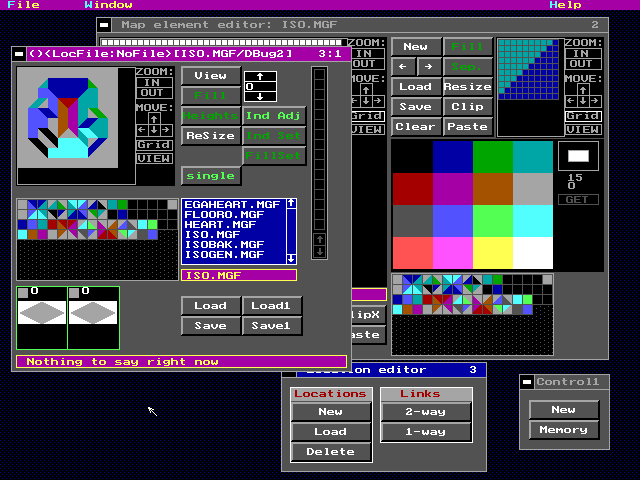
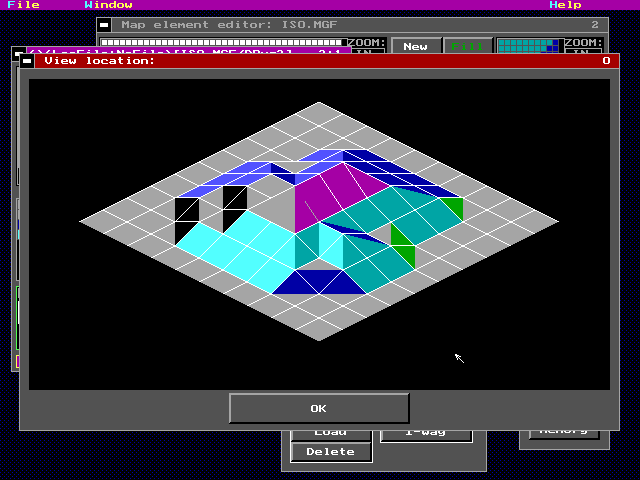
(1) DJ Windowed Application Framework (DJWIN)
Name: David Joffe Date: 12/26/1998 Email: djoffe@geocities.com URL: http://www.geocities.com/SoHo/Lofts/2018/
All code is Copyright (C) David Joffe 1994-1998. I am placing the code in the public domain. I would like it if you gave me credit if you use anything from this, and also I would like it if you would just drop me an email to let me know if you do actually use this for anything, however inane it might be.
The code is rather a mess and is not really documented. The program has many bugs, none of which are documented. At one stage I attempted to start documenting djwin; you can have a look at DJWIN\W_WIN.TXT, but it probably won't be much use to you.
I have not even really so much as looked at this code in about three years, so there may be some surprises in there :)
(2) What is it?
There are two parts:
DJWIN\ An "application framework", written in Object Oriented pascal. Not unlike TurboVision in concept. ED\ An isometric graphic/landscape editor created with DJWIN.
This was originally something of a programming exercise for me; I had just finished high school, and decided to learn Object Oriented programming. I quickly realised that OOP was very well suited to Graphical User Interface design, and so I went about whipping this up, generally having a lot of fun.
(3) Known issues:
- The program tends to hang if you try close any windows.
- The menus only work with the keyboard, not the mouse.
(4) Quickstart:
- Ensure you have a mouse driver loaded (not sure if you need this if running in a DOS box under Windows95; I found I had to restart in DOS mode and run a mouse driver.)
- Change to the ED directory. There are two executables, ED and EDD. I can't remember what the difference was, but I think one of them was real-mode and one was protected mode. They both seem to work. Use ED.EXE, it seems to give fewer problems.
- The program asks to select a mode. Try them out. You need VESA. The program CAN work in standard EGA/VGA 16-color modes with EGAVGA.BGI, but I think you may need to recompile it.
- Try out "file/new" to create both a graphics editor and a landscape editor. Stick to ISOGEN.MGF for isometric landscapes, whenever it asks you.
- Use the "Load1" INSIDE the isometric landscape editor to load .MF1 files. There are two included, foobar and foobar2. (No other "load" buttons work; not the "Load" button in the isometric landscape editor, nor the "Load" button in the so-called "Location" editor (I can't quite remember what exactly "Location Editors" were for; I think one isometric world was supposed to consist of various isometric landscape subsections.))
(5) Program structure:
The program is structured as follows:
DJWIN\ The application framework. ED\ The isometric graphics/landscape editor created using djwin.
I never really created anything other than ED with DJWIN, so I am not entirely sure that the functionality of DJWIN and of ED are seperated as well as they should be. I vaguely remember creating a very basic test app, right when I started .. hmmm .. should try dig that up.
Menus, if I remember correctly, follow their own design.
Applications derive from TApplication, which has a (very) few methods, basically, init, Run, HandleMenuCommand. ED derives from TApplication, with TEd (ED\ED.PAS).
A "TApp" is a "sub-application" running in its own window inside a TApplication desktop, for example, the graphics editor and landscape editors derive from TApp. TApp derives from TWindow.
A special type of window is a dialog box, a TDialog, which also derives from TWindow. (see DJWIN\W_WIN.PAS).