

Catalog · How the catalog works
IrisWebClient

The Rich GUI web application for InterSystems IRIS database.
- ★ 1 on GitHub
Anyone may press Interesting, signed in or not. It helps others find this project.
README
📘 Full Docker Installation Guide:
IrisWebClient runs on Windows and Linux hosting
The Rich GUI web application for the InterSystems IRIS database
A modern web client built with Delphi + uniGUI and connected to
InterSystems IRIS via ODBC.
The application demonstrates full CRUD operations, referential property handling,
and IRIS-native filtering using implicit JOINs.
Features
<ul> <li>Multiplatform Deployment — Windows and Linux supported <ul> <li>Linux: Standalone ELF executable, Apache module</li> <li>Windows: Service, Standalone EXE, ISAPI</li> </ul> </li>
<li>Full CRUD (Create, Read, Update, Delete) for IRIS persistent classes</li>
<li>Insert/Update of Referential Properties <ul> <li>Person → Spouse</li> <li>Employee → Company</li> </ul> </li>
<li>IRIS Implicit JOIN Filtering <ul> <li>Filter by nested referential fields</li> <li>Examples: <ul> <li>Person.Spouse.Name</li> <li>Employee.Company.Name</li> <li>Address.City</li> </ul> </li> </ul> </li>
<li>Rich web UI built with uniGUI</li> <li>ODBC connectivity for SQL access to IRIS</li> <li>Zero‑installation browser client</li> </ul>
Quick Start
How to Test
If you want to test the app without installing anything: [https://demo.irisclient.org](https://demo.irisclient.org)
Login: demo
Password: demo
IrisWebClient – Docker Installation Guide
ODBC Installation Guide
Architecture Overview
<ul>
<li>Frontend: uniGUI (Delphi) https://unigui.com/ </li>
<li>Backend: InterSystems IRIS https://www.intersystems.com/</li>
<li>Connectivity: IRIS ODBC driver, used over standard FireDAC data access library in Delphi</li>
<li>Data Model: Person, Employee, Company, Address (with referential relationships)</br>
ObjectScript-Native-API-demo
</li>
</ul>
CRUD Demonstration
The application implements full CRUD for all major entities:
<table> <tr> <th>Entity</th> <th>Create</th> <th>Read</th> <th>Update</th> <th>Delete</th> <th>Referential Fields</th> </tr> <tr> <td>Person</td> <td>✔</td> <td>✔</td> <td>✔</td> <td>✔</td> <td>Spouse, Address</td> </tr> <tr> <td>Employee</td> <td>✔</td> <td>✔</td> <td>✔</td> <td>✔</td> <td>Company</td> </tr> <tr> <td>Company</td> <td>✔</td> <td>✔</td> <td>✔</td> <td>✔</td> <td>—</td> </tr> </table>
Referential Property Handling
The application demonstrates how to:
<ul> <li>Insert and update objects with references.</li> <li>Display referential fields in grids.</li> <li>Resolve nested properties (e.g., Person.Spouse.Name).</li> <li>Maintain referential integrity through UI controls.</li> </ul>
Filtering with IRIS Implicit JOIN
IRIS automatically resolves referential properties in SQL queries.
This application shows how to filter by nested properties without writing explicit JOINs.
<pre><code> SELECT * FROM ONAPI.Person WHERE Spouse->Name LIKE 'A%' </pre></code>
Installation on Windows host
<ul>
<li>Install IRIS</li>
<li>Load sample classes to IRIS</br>
use ObjectScript-Native-API-demo</br>
<pre><code>git clone https://github.com/r-cemper/ObjectScript-Native-API.git</code></pre>
load classes
<pre><code>
USER>do $system.OBJ.LoadDir("...\ObjectScript-Native-API\src\ONAPI","ck")
</code></pre>Run the database installation. This is an interactive process; you will be asked how many Persons, Employees, and Companies to create.
<pre><code>USER>do ##class(ONAPI.demo).Run()</code></pre> </li> <li>Configure ODBC DSN
Create a 'User DSN' for InterSystems IRIS ODBC driver
</li>
<li>Build the uniGUI IrisWebClient.exe application in Delphi</br>
Delphi 12 CE was used to create this aplication, but the application should build </>
with no problems on any modern Delphi version since uniGUI is only third-party dependency,</br>
but indeed the breakthrough technology.
</li>
<li>Update connection.ini with ODBC connection parameters and make sure the file is located in the same directory as IrisWebClient.exe
<pre><code> DataSource=...
User_Name=...
Password=...
ODBCDriver=InterSystems IRIS ODBC35
Database=...
DriverID=ODBC</code></pre>
</li>
<li>Make sure login.html is located in the same directory as IrisWebClient.exe.</li>
<li>Run IrisWebClient.exe and navigate your browser to the default address and port:</br>
http://localhost:8077</li>
</ul>
Screenshots
Main Dashboard
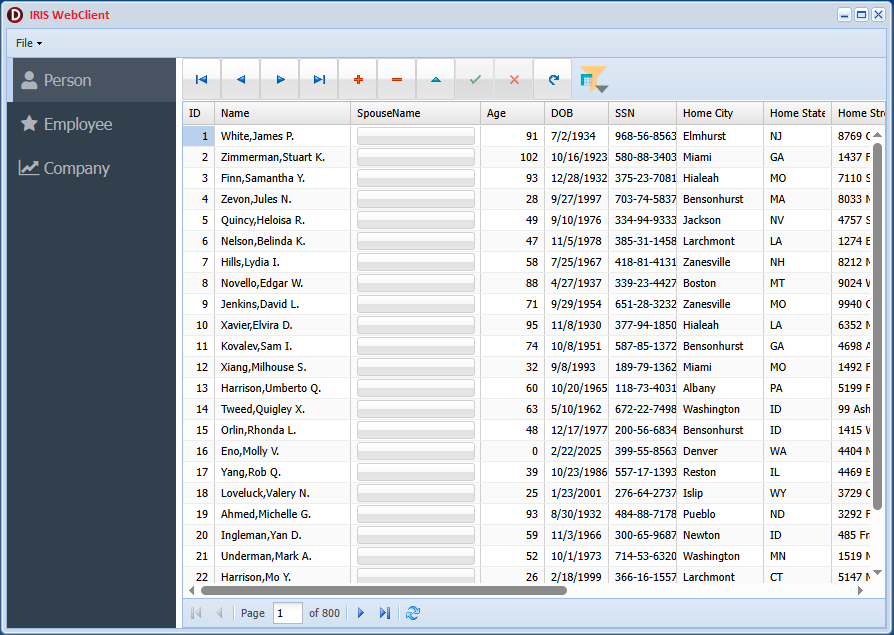 Use implicit JOIN to select referential fields.
<pre><code>SELECT *, Spouse->Name AS SpouseName FROM ONAPI.Person
</code></pre>
This works perfectly fine with FireDAC over IRIS ODBC.
IRIS ODBC does accept object‑projection syntax (->) when the SQL is passed through FireDAC unchanged
</br>
Assigning referential properties
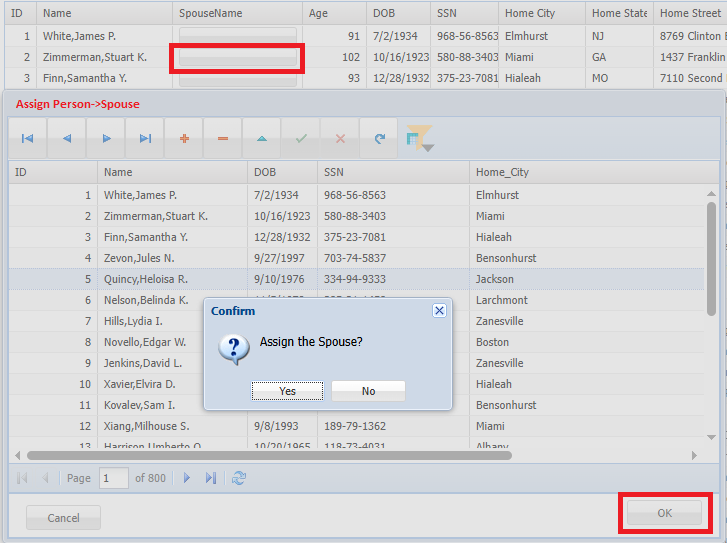 Select a Person, click button in SpouseName column, select a Spouse, click 'OK' to confirm assignment
Implementation using ODBC layer as FireDAC dataset. Assign referetial field with reference ID and do Post.
<pre><code>
FTargetDataSet.Edit;
FTargetDataSet['Spouse'] := qryPersonDict['ID'];
FTargetDataSet.Post;
</pre></code>
</br>
Searchable Lookup Combobox
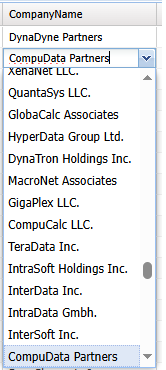 Assign <code>Employee->Company</code> by selecting a company in the searchable lookup combobox.
Lookup persistent fields in Delphi provide a true No‑Code solution.
Simply configure the Lookup properties in the Object Inspector.
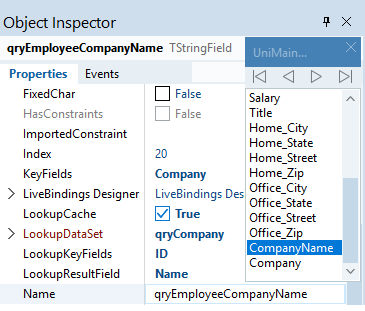 </br>
Filtering using referential properties
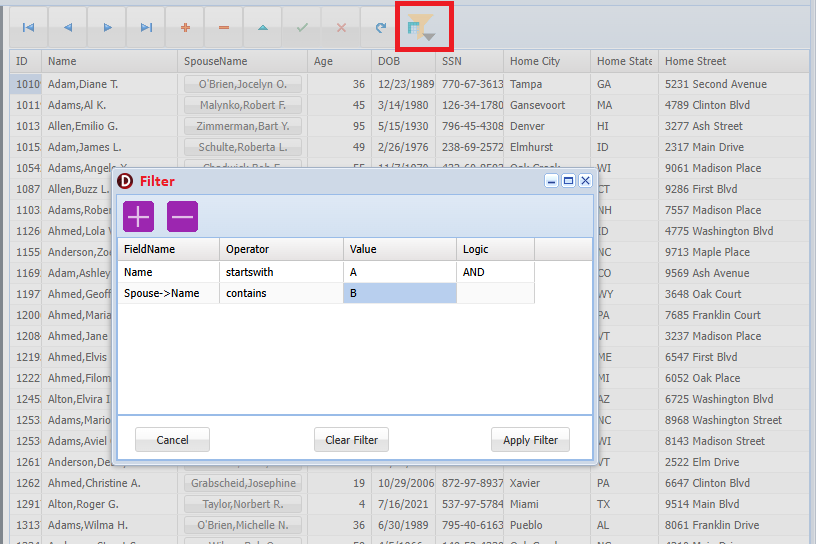 Use 'Filter' button to call Filter dialog and add add filtering criteria
</br>
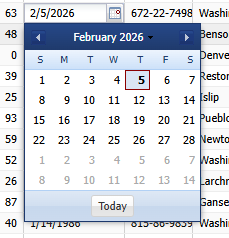
Calendar widget in the Grid
License
MIT LICENSE