

Catalog · How the catalog works
Archiver

Archiving utility (Windows console, uses FTP)
- ★ 1 on GitHub
Anyone may press Interesting, signed in or not. It helps others find this project.
README
Archiver
Archiving utility (Windows console, uses FTP)
Syntax
Archiver host "user" "password" listFile [localBaseFolder [remoteBaseFolder]]Example usage
Folder layout
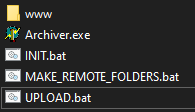
[www]
Archiver.exe
INIT.bat
MAKE_REMOTE_FOLDERS.bat
UPLOAD.bat
INIT.BAT
@ATTRIB +A /S /D www\*.*Initializes all files and directories (subfolders) under www folder with Archive flag. Note that when a file is modified Windows turns on the Archive flag. Unfortunately Windows doesn't do it for directories when their contents change.
MAKE_REMOTE_FOLDERS.bat
@echo off
dir www /ad /b /s > upload.list

archiver ftpServerIPaddressOrDNSname "ftpUser" "ftpPassword" upload.list fullPathTo_www_folder httpdocs

pause
del upload.list- Scans folder www for directories (subfolders) and generates an upload.list with the full pathnames.
- Creates the folders on the remote (ignoring any already existing) and clears archive flag for those that were uploaded/created remotely succesfully.
- Waits for keypress to close
- Deletes upload.list file (press CTRL+C at step 3 to retain upload.list)
UPLOAD.bat
@echo off
dir www /aa /b /s > upload.list

archiver ftpServerIPaddressOrDNSname "ftpUser" "ftpPassword" upload.list www httpdocs

pause
del upload.list- Scans folder www for modifications (files for which Windows had set the Arcive flag - and folders for which archive bit was manually set) and generates an upload.list with the full pathnames.
- Uploads changed files (also creates remote folders if archive flag had been set for them) and clears archive flag for those that were uploaded/created remotely succesfully.
- Waits for keypress to close
- Deletes upload.list file (press CTRL+C at step 3 to retain upload.list)