

Catalog · How the catalog works
batalla-naval-pascal

Small console Pascal program based on the classic tabletop game: Battleship.
- ★ 1 on GitHub
Anyone may press Interesting, signed in or not. It helps others find this project.
README
Batalla Naval Pascal
Overview
This is the final exercise of a small programming book (in spanish) titled "Introducción a la Programación" by Gustavo Du Mortier [ISBN 987-526-317-6]. This was my first programming learning source; it uses Pascal and the IDE Irie Pascal. For this project I used a more modern IDE: Lazarus.
The exercise is about programming a simple Battleship-like game on console; in a 10x10 grid and with three ships per player, being the second player controlled by the CPU.
I just randomly remembered this book and decided to complete this exercise I never did back when I was studying with this little book. ChatGPT and DeepSeek were my allies to remind me the Pascal codes I needed.
Controls
Just enter the row number, then the column number. If you hit the CPU's ship it will be marked as an 'X' on the top grid, or a '+' if missed. The bottom board shows were your ships are positioned (randomly from the beginning), displaying an 'O' for the boat, or an 'X' if it was destroyed.
You take turns with the CPU (whoever goes first is chosen randomly), and the CPU also has its two boards, but they are not displayed. The CPU chooses the coordinates randomly and pauses 2-5 seconds to simalute it is 'thinking'.
Wins whoever destroy all their opponent's ships first.
You can enter 'exit' to exit the game. You can enter 'bot' to enter bot_mode, which makes the CPU take control of the player's turns, becoming a CPU v CPU game. After entering 'bot' you still have to enter a valid coordinate, but after that the game goes automatically. There is not hard-coded way to turn off the bot_mode.
Screenshot
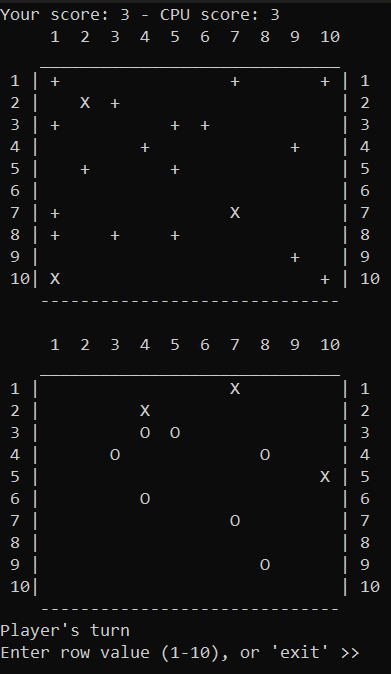
In this screenshot are ten ships, but in the final version there are three.
Compilation
Run bstallanaval.lpi (yes, that 's' is a typo) with Lazarus installed, then run the program (F9).
Experience
- I had no idea there was still modern IDE's for Pascal; Lazarus even let you create a GUI with a visual designer.
- I did not know Pascal also had pointers and dynamic memory.
- The Val function to validate the input is pretty nice.
- Taking the time to properly design the program before coding pays off.
- Battleship goes old REALLY fast.
Oddities
- For some reason the game eats the first line/s of strings in the console, so sometimes the scores don't appear.
- A message of '{player} win!' should appear after someone wins but it does not.
- While the CPU is 'thinking' you can input the coordinates even though you can't see them until the CPU is done.