

Catalog · How the catalog works
minecraft-server-map

Minecraft Server Mapper is a application developed in Pascal which router multiple minecraft servers on the same server based on the provided IP.
- ★ 1 on GitHub
Anyone may press Interesting, signed in or not. It helps others find this project.
README
Minecraft-Server-Map
Minecraft Server Mapper is a application developed in Pascal which router multiple minecraft servers on the same server based on the provided server adress.
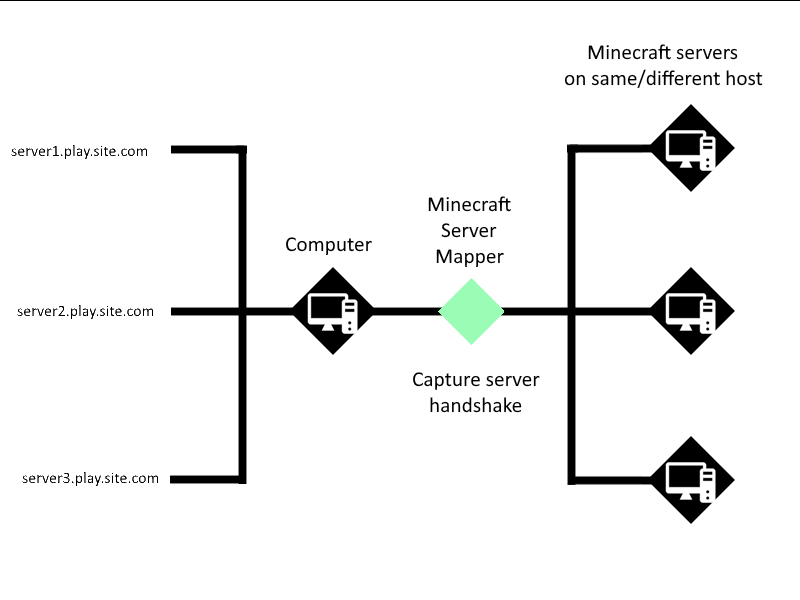
This app allows you to host multiple minecraft servers on the same device and It will act as a proxy between the servers and the clients.
This functions by capturing the handshake of the client, and than comparing a list of all avalabile servers.
Latest up to date version
This version of the software was written in Lazarus, but in the meantime, I created a new version on Embaracadero Delphi 12 with more features, and which is more up to date. This version will no longer get updates. The new version is here:
https://github.com/Codrax/minecraft-server-mapper/edit/main/README.md
Dependencies
The app works as the single file executable, but for update checking functionality, the folder shared-lib is required in the same location as the executable.
Setting up
- Download the latest release
- Run the executable with the
--createparameter to automatically create the configuration files - Edit
config.jsonandservers.jsonwith your prefered settings - Start the application
Configuration files
Configuration - config.json
| Property | Description | Default |
|---|---|---|
| listen-port | The port that the server will listen to. | 25565 |
| check-update | Check for updates on app startup. | true |
| file-monitor-delay | The time in milliseconds to wait before checking if any changes were made to the configuration files. 0 to disable | 3000 |
| allow-default-mapping | Redirect all connections that do not map to any of the servers to default-mapping |
false |
| default-mapping | The default mapping | Type: Mapping info |
Servers - servers.json
This is an JSON array of Mapping info. The mapping info is as follows
| Property | Description |
|---|---|
| address | The address to match in order to redirect to this server. Ex: play.site.com |
| host | The network address to reditect data to. Ex: localhost or 192.168.1.101 |
| port | The port of the host that packets will go to. Note: DO NOT set to be the same as the listener port, that will cause recursion |
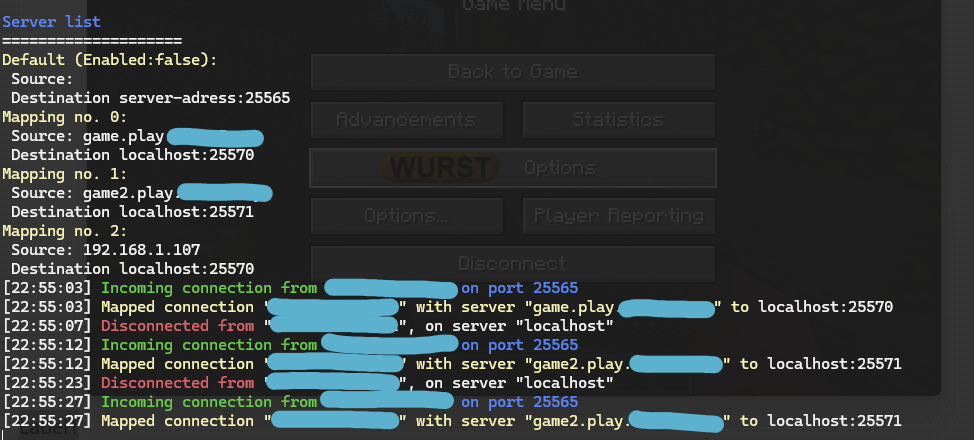
Image of console output
Compiling
To compile this application, just install the Lazarus IDE version 2.2.6 together with Indy Internet Direct 10. The shared-lib executables need libssl, which you will need to find an compile with make. They should be avalabile here. Or you can use the pre-compiled version I have included.
Function
This application, uses a modified TIdMappedPortTCP from Indy, which captures the first handshake the client sends to the server, afterwhich, the Outbound connections is either established or discarded If there is a valid match for the adress.
Examples
The config.json file
{
  "listen-port" : 25565,
  "check-update" : true,
  "file-monitor-delay" : 3000,
  "allow-default-mapping" : false,
  "default-mapping" : {
    "host" : "server-adress",
    "port" : 25565
  }
}
The servers.json file
[
  {
    "address" : "game.play.site.com",
    "host" : "localhost",
    "port" : 25570
  },
  {
    "address" : "game2.play.site.com",
    "host" : "192.168.1.104",
    "port" : 25571
  },
  {
    "address" : "192.168.1.107",
    "host" : "localhost",
    "port" : 25570
  }
]
Great resources
Here are some great resources that I used in this project
- This article from Kilian Decaderincourt
- This protocol wiki