

IA-GEMINI-DELPHI

Uso da IA Gemini no Delphi
- Quiet · last change 9-15-2024
- ★ 1 on GitHub
README
IA Gemini Delphi
Uso da IA Gemini no Delphi
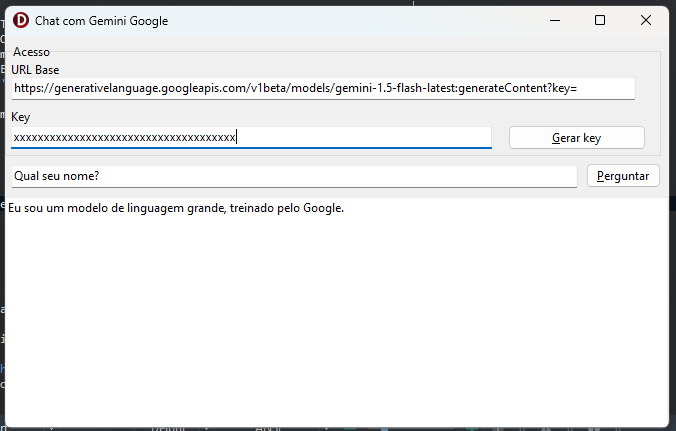
procedure TfrmPrincipal.btnPerguntaClick(Sender: TObject);
begin
 {$Region 'POST'}
  RESTClient1.BaseURL := lURLBase + lKey;

  Prompt      := TStringList.Create;
  JSONBody := TJSONObject.Create;
  try
    Prompt.Add(edtPergunta.Text);

    ContentsArray := TJSONArray.Create;
    PartsArray := TJSONArray.Create;
    PartsArray.AddElement(TJSONObject.Create.AddPair('text', Prompt.Text));
    ContentsArray.AddElement(TJSONObject.Create.AddPair('parts', PartsArray));
    JSONBody.AddPair('contents', ContentsArray);

    RESTRequest1.Params.ParameterByName('body4E6B89C7FD1E4198BD64C5BE65C5188E').Value := JSONBody.ToString;
  finally
    JSONBody.Free;
    Prompt.Free;
  end;

  RESTRequest1.Execute;
 {$EndRegion 'POST'}
end;procedure TfrmPrincipal.btnPerguntaClick(Sender: TObject);
begin
{$Region 'Retorno'}
Retorno := RESTRequest1.Response.JSONValue as TJSONObject;
Candidates := Retorno.GetValue<TJSONArray>('candidates');
if Candidates.Count > 0 then
begin
Content := Candidates.Items[0].GetValue<TJSONObject>('content');
Parts := Content.GetValue<TJSONArray>('parts');
if Parts.Count > 0 then
begin
Text := Parts.Items[0].GetValue<string>('text');
memResposta.Text := Text;
end;
end;
{$EndRegion 'Retorno'}
end;