

WinScriptAdvanced

WinScriptAdv content plugin for Total Commander, runs your scripts for files and folders and displays returned script info into columns
- Active · last change 11-21-2024
- ★ 1 on GitHub
README
WinScript Advanced (x32, x64) (c) Alexander Shyshko, (aka Alex Shy), 2016

PHP and AHK scripts:
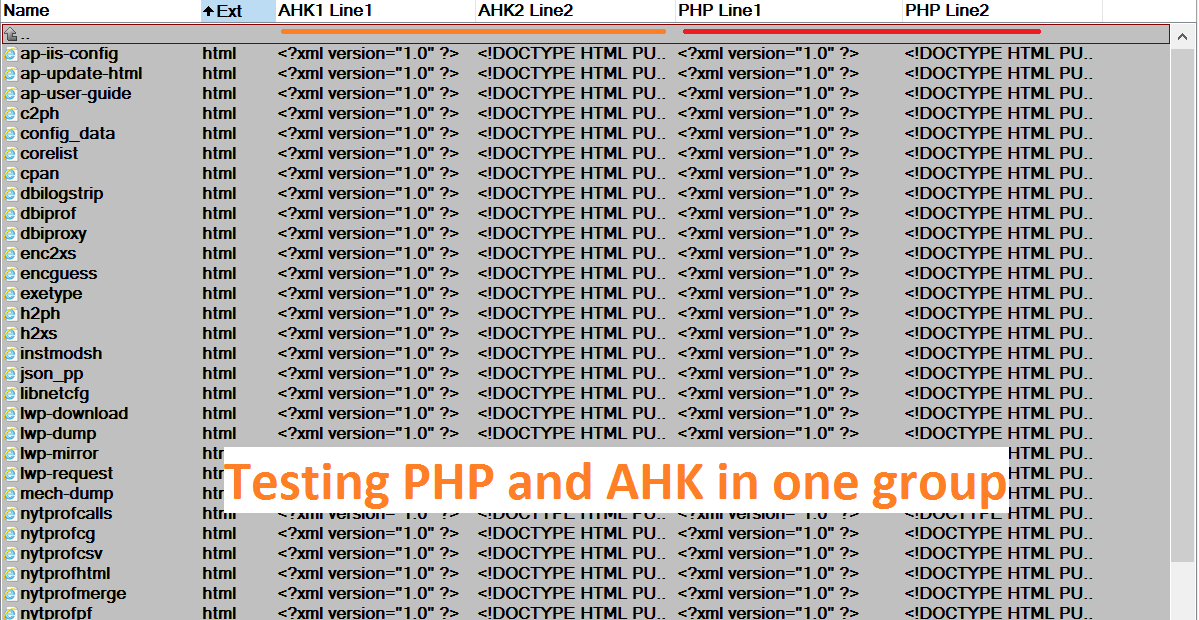
============================================================== General Info
WinScriptAdv content plugin for Total Commander runs your scripts for files and folders and displays returned fom script info into columns.
You can write your own scripts for getting any useful information from the file\folder or parse its
name, for sorting files in a desired order, for complex file renaming with Multi-Rename Tool, etc.You can activate unlimited scripts count in one group of columns (in one panel) - they will work together.
Each script can have multiple columns (up to 21) and display info simultaneously with other scripts that
also can be with multiple columns.Features:
* Multiple columns per one script (up to 21);
* Unlimited number of simultaneously working scripts in one group of columns;
* Custom title name for any column;
* Supported scripting languages:
   VBS,               (via COM interface)
   JS,  	           (via COM interface)
   Python (*.py)      (via COM interface)
   AutoHotKey (*.ahk) (via exe parser)
   PHP (*.php)        (via exe parser)
           AutoIt (*.au3)     (via exe parser)
PowerShell (*.ps1) (via exe parser, always running)VBS, JS and PowerShell - are languages that come with Windows (built-in), they do not required separate installation.
What script engines from listed here are fastest?
1. Engines that works via COM interface - VBS, JS, Python.
2. PowerShell - because it always running (-noexit flag)
Languages that works via exe parser are usually slower in this plugin, because for each file WinScriptAdv needs to launch and close exe parser.Compatible with scripts that was created for another plugin with name script_wdx (By Lev Freidin),
you do not need to fix them.
Scripts for WinScriptAdv have the same format as in script_wdx - one variable with name "filename" and result
variables with names: content, content1, content2, ... content20 (so totally 21).============================================================== How to create a script for WinScriptAdv:
1. WinScriptAdv sends to global variable 'filename' (fixed name for all scripts and engines)
    a full path (long, unicode) to the file or folder ("c:\myFolder" - without end slash).
Use this variable name in your script to get a path to the file or folder that your script will process.2. Return the result(s) of the script work to the variables with name 'content', 'content1',
'content2' ... 'content20' (so totally there are 21 content variables, and the latest is "content20").Example:
MyScript.vbs:Dim oFSO, f
Set oFSO = CreateObject("Scripting.FileSystemObject")
Set f = oFSO.OpenTextFile (filename, 1, False)
content = f.Read(1024)
f.CloseOk, now we have working example of our script.
If you need more columns (var with name "content" - is the first column),
you can use "content1", "content2" etc variables in your script.
Copy that script to MyScript.vbs file, and put it in the Script folder. You can find
it in the folder where WinScriptAdv was installed.See examples in Script folder.============================================================== How to add and activate a script in WinScriptAdv
1. Copy script file (e.g MyScript.vbs) to Script folder2. Open options.ini
Add new section:[MyScript]
Script=MyScript.vbs
content=Title of first column
extensions=*
FoldersPaths=0If you have more than one "content" variable in your script, add them also:
content1=My second column
content2=My third column5\.Go to [Script] section and add our new script to the list of active scripts:
[Script]
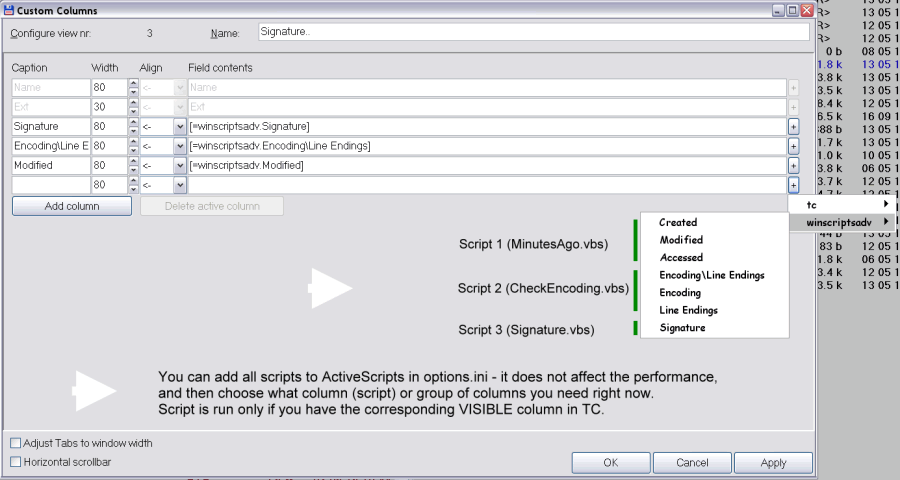
ActiveScripts=CheckEncoding|Signature|MyScriptSave options.ini file.Btw, You can add all scripts to ActiveScripts - it does not affect the performance,
cause script runs only if you have the corresponding visible column in TC. You can
create groups of columns (scripts) that you need, and can easily switch between these groups
with TC (click right mouse button on columns - and select another group of columns\scripts )__________________________________________________________________That's almost all. Now we need to add a new column(s) in TC:1. Restart Total Commander.
2. Click right mouse button on columns and select 'Configure custom columns' from popup menu.
3. Then click "New" > "Add Column" > button "+" >> Select "winscriptadv" >> "Title of first column",
click OK button.That's all folks! Now you see your column and script result
in front of each file.
__________________________________________________________________================================================================== How to add any new custom script parser (interpreter)
See examples in options.ini in [ExeScriptParsers] section. Ask on forum if you have some problems.