

Catalog · How the catalog works
ClickGame-lazarus

IDLE game developed in Lazarus (Free Pascal).
- ★ 1 on GitHub
Anyone may press Interesting, signed in or not. It helps others find this project.
README
Click Bajt
Click Bajt is a simple interactive text-based game that combines a shop management aspect with an incremental clicker mechanic. The player can make purchases from a variety of items in the shop, accumulate currency, and automate the process to increase their earnings over time.
Features
Shop Management
- The game consists of a shop with various items available for purchase.
- Each item has a specific value, cost, and the option to automate the purchase (auto-click).
Currency System
- Players have a balance of currency ("Zostatok") that they can use to buy items from the shop.
Incremental Clicker Mechanic
- Players can manually click on certain items in the shop to make purchases and increase their currency balance.
- Some items can be automated to generate currency at a specific rate per second ("autoPeniaze").
Save and Reset
- Players can save their progress and later resume the game from where they left off.
- There's an option to reset the game and start from scratch.
Controls
- Use the arrow keys to navigate the menu options.
- Press ENTER to select an option.
- In the game, use arrow keys to move the cursor, and ENTER to interact with the shop items.
How to Play
- Start the Game:
- Run the program, and you'll be presented with a menu.
- Use the arrow keys to select an option and press ENTER.
- Shop Management:
- Navigate through the shop items using arrow keys.
- Press ENTER to make a purchase or interact with an item.
- Incremental Clicking:
- Manually click on certain items to make purchases and increase your currency balance.
- Automation:
- Some items can be automated to generate currency automatically.
- Keep an eye on your "Zostatok" and automate purchases strategically.
- Saving Progress:
- Use the "Ulozit" (Save) option in the menu to save your progress.
- Progress can be resumed later from the main menu.
- Resetting the Game:
- Use the "Vymazat priebeh" (Reset Progress) option to start the game from the beginning.
- Exiting the Game:
- Choose the "Koniec" (End) option to exit the game.
Screenshots
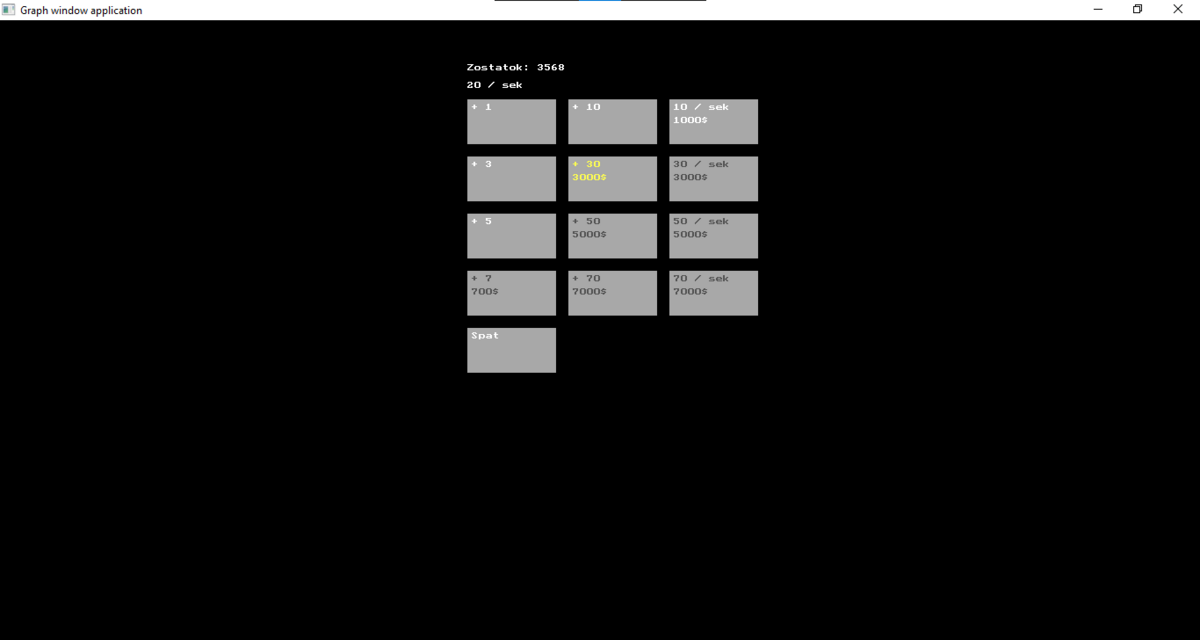
Feel free to enjoy the game and see how efficiently you can manage your shop to maximize earnings!