

RhythmSharp

R# - osu!mania account booster/bot
- Quiet · last change 8-17-2020
- ★ 15 on GitHub
README
RhythmSharp

| If you like my project and if it helped you in any way, consider buying me a cup of coffee! | https://www.patreon.com/rwdkor |
|---|
RhythmSharp(=R#) - Reworked version of RoKo
Official Discord : Discord
This project aims to automatically boost a account of osu!mania. R# provides many features like auto-playing bot with humanizer, tasks, scheduler, and etc... Additionally, the article below goes over all the details involved during the development of R#. Toward the end, it also considers possible improvements. Make sure to read it.
This project was created solely for research and educational purposes. The usage of this project for malicious purposes in-game is against peppy's terms of service.
Thanks to
- @fs-c for his bot logics
- @andy1279 the master developer in this project
- @NotActualHuman reported/fixed many bugs
- ddxoft - DD94687.32.dll library
- and everyone who support me/this project
Features
- Supports latest version of osu!(stable, Not tested with custom build)
- Multithreaded keystroke sending
- User-friendly GUI Design (Not Console!)
- Absolutely fully-automated account boosting
- Automatic beatmap detection
- Automatic beatmap selector
- Customizable tasks
- Botting scheduler
- Advanced humanizer/randomizer
- High performance optimized
- Supports Mirror, Half, DoubleTime(Nightcore) Mode
- Supports custom key-layout in game (=No need to change key anymore!)
- 'Streamming proof' Feature!
Summary
https://github.com/rwdkor/RhythmSharp#introductionIntroduction
osu! is on/offline rhythm game developed by peppy.
https://github.com/rwdkor/RhythmSharp#what-is-osumaniaWhat is osu!mania?
osu!mania mode has been widely used in almost all of the major rhythm games. It require good hand and/or leg coordination where the notes (with their quantity depending on BPM and difficulty) move on a conveyer. The player will have to press the correct key for that specific note in time.
Notes are the hit circles of osu!mania. The falling notes must be tapped on the judgement line, with correct key corresponding to each of the note it falls to. More keys corresponding to the falling notes must be tapped simultaneously if the notes fall simultaneously.
Excerpt descriptions from official game page.
That said, our goal is to create a computer program capable of pressing correct keys when each note falls.
https://github.com/rwdkor/RhythmSharp#what-are-you-going-to-doWhat are you going to do?
The goal of the game is to press the button at the right time to process the note. Furthermore, the ranking of the account is determined by the quantity of Performance Points(PP).
If bot automatically pick a song and play the game superbly, resulting in a pp, and ranking will rise.
https://github.com/rwdkor/RhythmSharp#how-can-it-be-completedHow can it be completed?
https://github.com/rwdkor/RhythmSharp#reading-the-notesReading the notes
Some investigation reveals that it is possible to determine the timing of the notes using less sophisticated techniques. Even though this task can be performed by reading beatmap, the simplest option is to read game's memory.
https://github.com/rwdkor/RhythmSharp#getting-the-time-offsetGetting the time offset
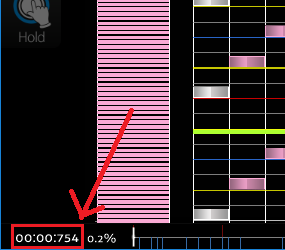
Once we have the timing of the notes, we need to know the time of the game to hit it. In-game beatmap editor provides the exact time, so we will use this to get the time offset.
https://github.com/rwdkor/RhythmSharp#selecting-the-beatmapSelecting the beatmap
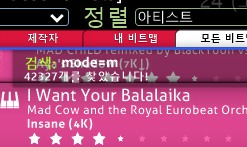
The game provides search system, so we will use this to select beatmap.
https://github.com/rwdkor/RhythmSharp#the-pipelineThe Pipeline
In this section, we will see how to put these steps together to create a program that automatically farms pp.
https://github.com/rwdkor/RhythmSharp#overviewOverview
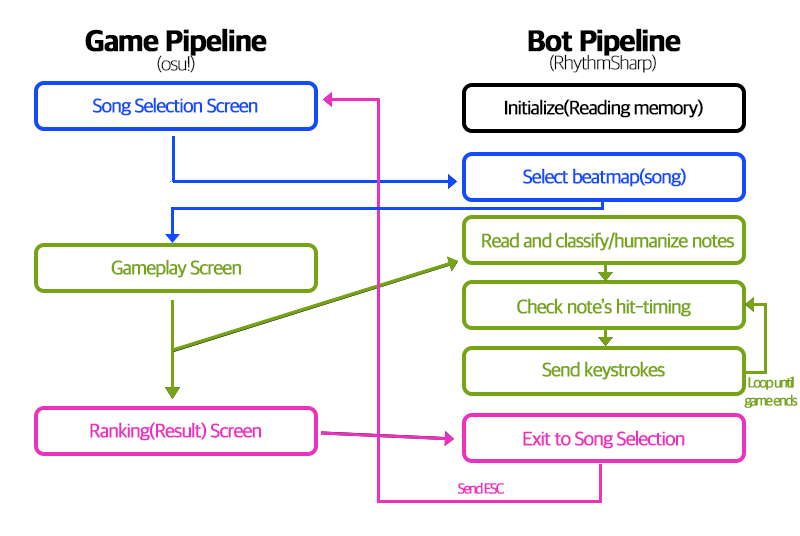
Each step of this pipeline will be thoroughly explained in the sections below. Also, the experimental results obtained during the development of this project will be presented.
https://github.com/rwdkor/RhythmSharp#initializeInitialize
https://github.com/rwdkor/RhythmSharp#getting-the-time-offsetGetting the time offset
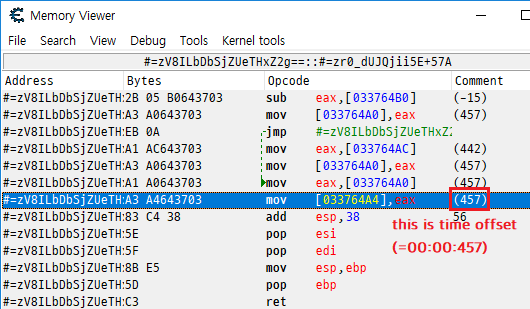
I also read game's memory to get the time offset.
Just scanned directly with Cheat Engine, and I found the function that manages time offset.
https://github.com/rwdkor/RhythmSharp#getting-current-status-of-the-gameGetting current status of the game
Before selecting a song, we need to know the game is ready to select song. I was struggled with only a simple scan, so I decided to decompile osu!
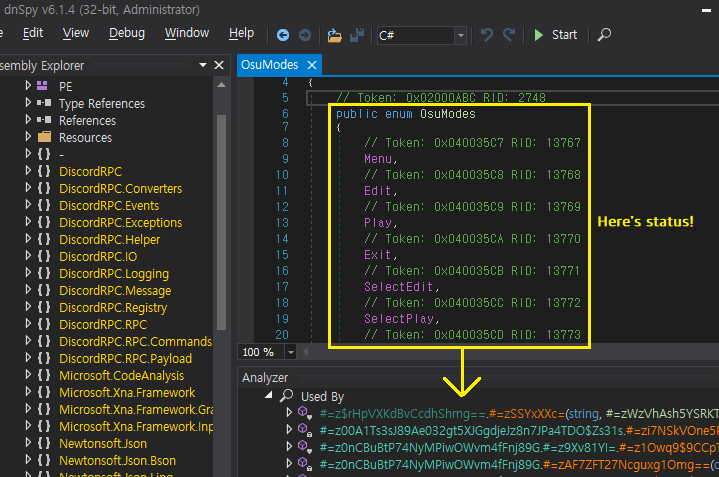
Also I made a simple cheat engine script to check status.
[ENABLE]
// Current Status (4 Bytes)
// (+1) A1 ? ? ? ? A3 ? ? ? ? A1 ? ? ? ? A3 ? ? ? ? 83 3D ? ? ? ? 00 0F 84 ? ? ? ? B9 ? ? ? ? E8
// 00 : Menu
// 01 : Edit
// 02 : Play
// 03 : Exit
// 04 : SelectEdit
// 05 : SelectPlay
// 06 : SelectDrawings
// 07 : Rank
// 08 : Update
// 09 : Busy
// 10 : Unknown
// 11 : Lobby
// 12 : MatchSetup
// 13 : SelectMulti
// 14 : RankingVs
// 15 : OnlineSelection
// 16 : OptionsOffsetWizard
// 17 : RankingTagCoop
// 18 : RankingTeam
// 19 : BeatmapImport
// 20 : PackageUpdater
// 21 : Benchmark
// 22 : Tourney
// 23 : ChartsaobScanRegion(Current_Status, 0x00000000, 0x7FFFFFFF, A1 ? ? ? ? A3 ? ? ? ? A1 ? ? ? ? A3 ? ? ? ? 83 3D ? ? ? ? 00 0F 84 ? ? ? ? B9 ? ? ? ? E8)
define(Current_Status,Current_Status+1)
registerSymbol(Current_Status)[DISABLE]
unregisterSymbol(Current_Status)Results:

https://github.com/rwdkor/RhythmSharp#select-beatmapSelect Beatmap
I used the game's own feature. This is really simple, so no detailed explanations here.
https://github.com/rwdkor/RhythmSharp#read-and-classify-humanize-notesRead and classify/humanize notes
https://github.com/rwdkor/RhythmSharp#reading-notesReading notes
Notes are stored in each beatmap file (*.osu)
[HitObjects]
64,192,93,5,0,0:0:0:0:
192,192,153,1,0,0:0:0:0:
320,192,213,1,0,0:0:0:0:
448,192,273,1,0,0:0:0:0:
64,192,333,1,0,0:0:0:0:
192,192,393,1,0,0:0:0:0:
320,192,453,1,0,0:0:0:0:
Sorted like this: ColumnX, ColumnY, Timing, Etc...
I used to open beatmap file directly, but there was exception like converted map(standard mode map) or column mismatching(seems like 7k map, but actually 8k map).
So I decided to read game's memory and finally found array of 'HitObjects'.
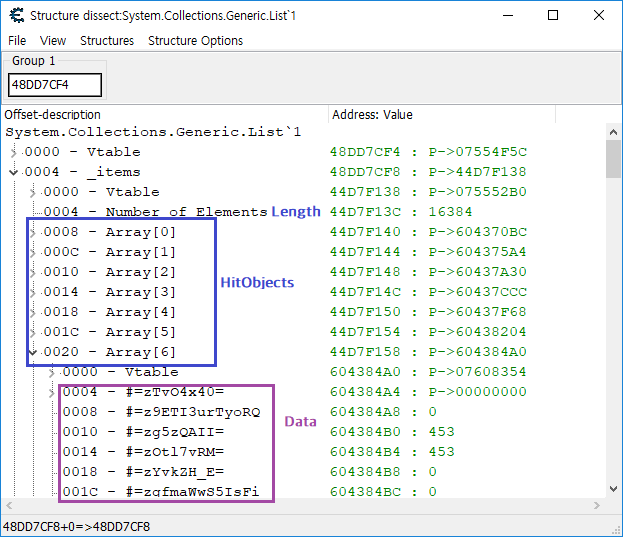
You can see more details on source code.
https://github.com/rwdkor/RhythmSharp#classify-and-humanize-notesClassify and humanize notes
Classifing notes is really easy. Look at below codes.
if (timestart < timeend) then
begin
  HitObject.NoteType := 1; //long note down
  HitObject.Timing := timestart;
  bData.HitObjects.Add(HitObject);

  HitObject.NoteType := 2; //long note up
  HitObject.Timing := timeend;
  bData.HitObjects.Add(HitObject);
end
else
begin
  HitObject.NoteType := 0; //short note
  HitObject.Timing := timestart;
  bData.HitObjects.Add(HitObject);
end;

//Add to each array
~~snip~~
KeyManager[bData.HitObjects[i].Key].HitObjects.Add(HitObject);
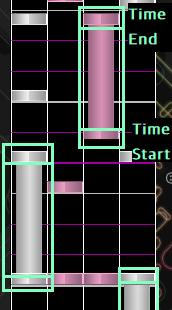
All notes have time pairs, TimeStart and TimeEnd. If TimeStart is less than TimeEnd, it is obviously long note.
Humanizer?
It was hard to humanize notes. At first, I tried to put a miss in a specific ratio, but the result was abnormal depending on the difficulty of the map.
You can see old codes on RoKo repo.
I changed the humanize method, humanizing notes by KPS(key per second). It looked more human-like by adjusting the ratio according to the KPS(=almost same as difficulty).
But humanization is still not perfect, so it needs improvement!
https://github.com/rwdkor/RhythmSharp#check-notes-hit-timingCheck note's hit-timing
We need to compare current time and note's hit-timing to hit notes! Copy/Pasted the logic from fs-c's github, just i was too lazy to code myself.
https://github.com/rwdkor/RhythmSharp#send-keystrokesSend Keystrokes
We need to know what to press before sending a keystrokes. Usually, you can use the default key layout, but someone can change the key layout like 'Q-W-O-P'.
Modified key layout is stored in 'osu!.@@.cfg' file, like this.
ManiaLayouts7K = Q W E Space I O P
ManiaLayoutSelected7K = 0
ManiaLayouts8K = Q W E R Space I O P
ManiaLayoutSelected8K = 0
ManiaLayouts4K = Q W O P
ManiaLayoutSelected4K = 0
Of course, we can read this file directly. However, I decided to read key layout stored in memory. just for fun
Finding custom key layout in memory was a bit complicated and painful, so I'm going to skip the detailed explanation.
https://github.com/rwdkor/RhythmSharp#result-and-possible-improvementsResult and Possible Improvements
https://github.com/rwdkor/RhythmSharp#resultResult
Screenshot of RhythmSharp / Supports Korean and English. (since I'm Korean)
https://github.com/rwdkor/RhythmSharp#possible-improvementsPossible Improvements
- [ ] Discord notification (or telegram, pushbullet, etc..)
- [ ] Improve humanizer more human-like using statistics.
- [ ] Automatic song selection in multiplayer - Like Maid Bot!
- [ ] Random mode support
- [x] Getting custom key layouts from memory