Catalog · How the catalog works
where-is-my-car

Android application to register and to find the parked car
- ★ 1 on GitHub
Anyone may press Interesting, signed in or not. It helps others find this project.
README
Where is my car? is an Android application to register the localization and to find a parked car. It has been uploaded to Google Playstore.
Requirements:
- Android device with OS version 6.0.1 or higher
- Internet connection.
- Localization sensor.
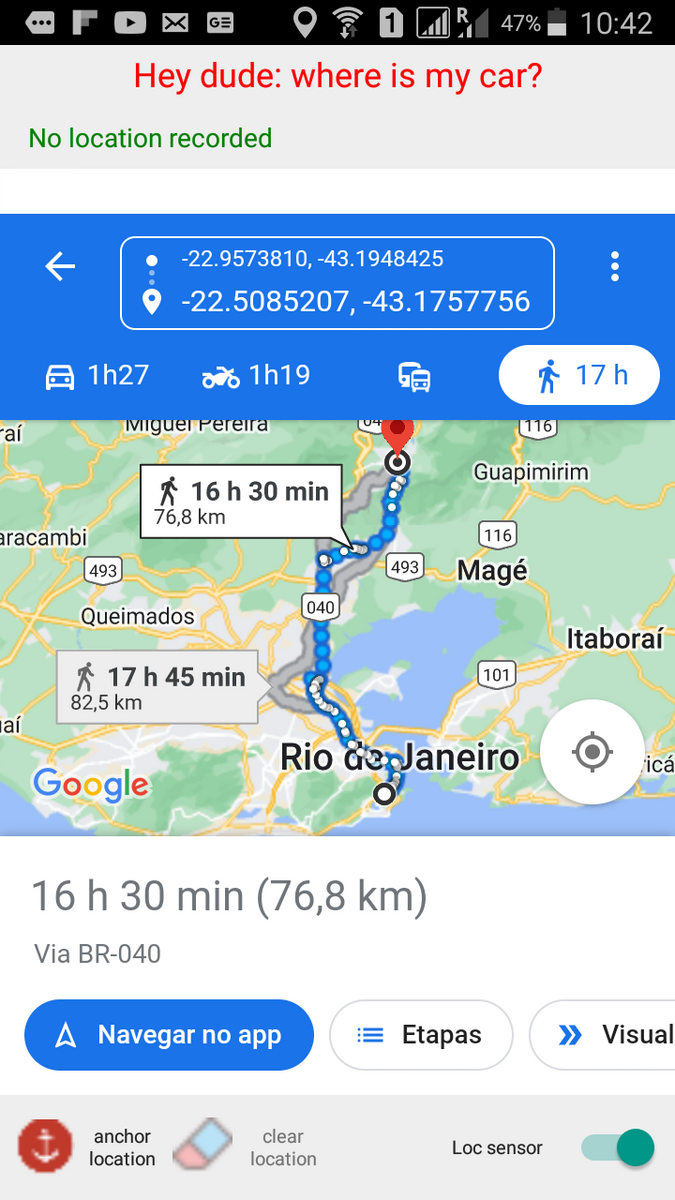
This application allows to record the localization of the car once parked, and when returning to the car the app shows the path from the current localization to the parked car. This path is updated as it is gone through.
The app presents three simple commands:
- A switch to activate or desactivate the localization sensor.
- An anchor button to record the current localization.
- A clear button to delete the localization recorded.
Once the localization sensor is turned on, if no localization is recorded, the current localization is shown on a map. The anchor button is enabled and the clear button is disabled. The current localization can be recorded (or anchored) by clicking the anchor localization button. If a localization is recorded, once the localization sensor is turned on, the app shows the path from the current localization up to the recorded one. The anchor button is disabled and the clear button is enabled. Details about the recorded localization, such as name of the street, number, ZIP code, state and country, are exhibed on a sliding panel by clicking the detail button. Once the car is found, the recorded localization can be cleared by clicking the clear button.
This application presents the Google maps site on the web panel, which is written in the current language of the device.
This a Delphi coded application developed using RAD Studio 10.2 Tokio IDE. The project has all the files necessary to be opened with RAD Studio version 10.2 or higher. Once the project is opened with the IDE, the app can be deployed on a connected Android device with the USB Debugging option enabled (see how to enable the USB Debugging option in https://docwiki.embarcadero.com/RADStudio/Sydney/en/Enabling_USB_Debugging_on_an_Android_Devicee