

Catalog · How the catalog works
delphi-dmvcframework-htmx-todo

DelphiMVCFramework Todo Sample, using HTMX and TemplatePro
- ★ 21 on GitHub
Anyone may press Interesting, signed in or not. It helps others find this project.
README
Delphi-HTMX-Todo
A small Todo web application showing htmx support in DMVCFramework: partial page updates with no JavaScript on the page, just server-rendered HTML fragments.
It uses:
- DMVCFramework 3.5.x — Delphi MVC web framework (wizard-style layout)
- htmx — partial page updates without JavaScript
- TemplatePro — server-side template rendering
- MVCActiveRecord — ORM for database operations
- SQLite (via FireDAC) — storage
Tested on MS Windows but it should work also for Linux.
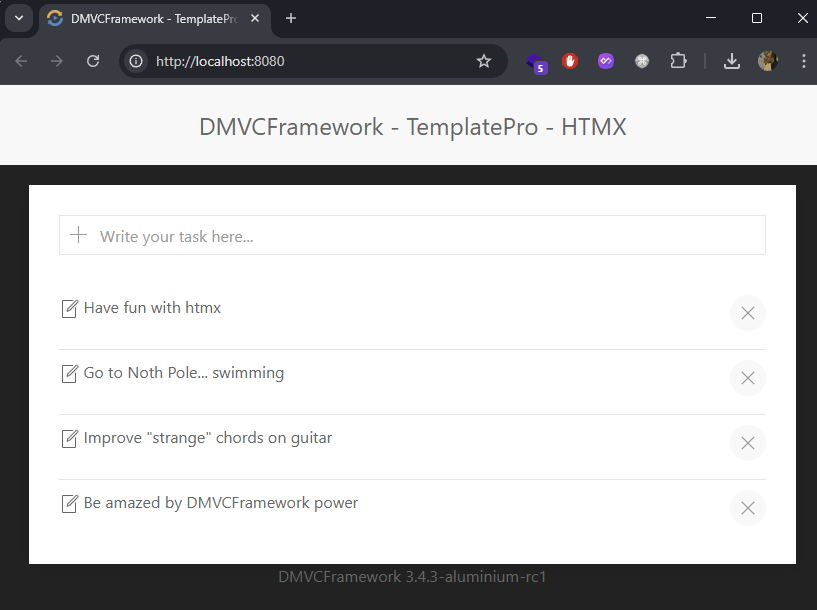
Screenshot
Features
- Create, edit (inline), and delete todos — all via htmx partial swaps, no full reloads.
- Click a todo to edit it inline; press Enter to save or Esc to cancel.
- Server-side validation: a todo
contentcannot be empty and is capped at 200 characters (declarative[MVCRequired]/[MVCMaxLength]validators on the entity → HTTP422on violation), mirrored by client-sidemaxlength. - Anti mass-assignment: the server-assigned
idis annotated with[MVCDoNotDeserialize], so a POST/PUT body cannot inject or overwrite it. - Delete confirmation via
hx-confirmon the delete button. - Graceful error UX: client-side
hx-validate+requiredprevent empty submits in the browser; server errors render a themed UIKit error page for browser navigations (details hidden unlessdmvc.error.show_detailsis set) and RFC 7807 problem+json for API clients. - Security headers: Content-Security-Policy (CDN origins allow-listed),
X-Frame-Options: DENY,Referrer-Policy,nosniff;X-Powered-Bydisabled. - ETag + gzip on responses; colored console log plus a rotating file log in
bin/logs/. - Reproducible database: the SQLite file and schema are created at startup
from
bin/schema.sqlif missing — no binary database needs to be shipped.
Project layout
| File | Role |
|---|---|
delphitodohtmx.dpr |
Console entry point — Boot (dotEnv, LoggerPro, profiler), SQLite bootstrap, TMVCServerFactory.CreateIndyDirect (native Indy, no WebBroker) |
EngineConfigU.pas |
ConfigureEngine: controllers, TemplatePro view engine, filters (static files, security headers + CSP, ETag, compression, ActiveRecord), exception handler |
BootConfigU.pas |
Boot: dotEnv configuration, LoggerPro console+file appender, profiler |
Controllers.MainU.pas |
REST endpoints (htmx-driven) |
Entities.TodoU.pas |
TTodo ActiveRecord model with validation |
FDConnectionConfigU.pas |
SQLite connection definition + EnsureSqliteDatabase |
bin/.env |
Configuration (port, view path, view cache, request size, ...) |
bin/schema.sql |
Database schema, applied at startup if needed |
bin/templates/home.html |
Main page layout (add form + list) |
bin/templates/todo/_item.html |
Single todo item fragment (partial update) |
bin/templates/todo/_form.html |
Inline edit form fragment |
bin/templates/_baselayout.html |
Base layout (UIKit CSS/JS, htmx, error handler) |
bin/templates/error.html |
Browser error page served by UseExceptionHandler |
How it works
The controller checks Context.Request.IsHTMX in OnBeforeAction and sets
ViewData['ispage']. The base layout renders the full HTML page only for regular
browser requests; for htmx requests it renders just the requested fragment.
| Method & path | Action | Returns |
|---|---|---|
GET / |
list all todos | home page or #todoItems partial |
POST /add |
create a todo | todo/_item (appended to the list) |
GET /edit/:id |
edit form for a todo | todo/_form (swaps the row) |
PUT /edit/:id |
update a todo | todo/_item (replaces the row) |
DELETE /delete/:id |
delete a todo | empty body (removes the <li>) |
GET /todos/:id |
single todo fragment | todo/_item (used by Esc-cancel) |
Missing ids return 404; an empty or over-long content returns 422 (validation).
Note the framework's default Content-Type is application/json (REST-first):
this server-side-view app forces text/html in the engine config.
Build & run
This is a Delphi project — it requires the Delphi IDE or the command-line compiler (Delphi 11 Alexandria or newer; developed with Delphi 13 Florence). DMVCFramework 3.5.x sources are expected on the library path.
- Open
delphitodohtmx.dprojin the IDE and build, or from the command line:rsvars.batfrom the Delphibinfolder, thenmsbuild delphitodohtmx.dproj /p:Config=Debug /p:Platform=Win64. - Run the executable from the
bin/directory (it loads.envand templates from there). The server defaults to port 8080 (dmvc.server.portinbin/.env) and listens with the native Indy server: pressCTRL+Cto shut it down. - Navigate to
http://localhost:8080.
On first run the app creates bin/todo.db from bin/schema.sql if it does not
already exist, so a fresh checkout runs out of the box.
Configuration
All runtime knobs live in bin/.env (loaded via dotEnv):
| Key | Default | Meaning |
|---|---|---|
dmvc.server.port |
8080 |
HTTP listen port |
dmvc.view_path |
templates |
TemplatePro view folder |
dmvc.view_cache |
false |
Cache server-side views (use true in production) |
dmvc.max_request_size |
10000 |
Max request body size in bytes |
dmvc.profiler.enabled |
true |
Enable request profiling |
dmvc.profiler.warning_threshold |
2000 |
Log requests slower than this (ms) |
dmvc.error.show_details |
false |
Show exception messages on the error page (development only) |
dmvc.expose_x_powered_by |
false |
Emit the X-Powered-By header |
License
See the DMVCFramework repository for licensing terms.