

darest

Darest - Auto-generated REST API from your database schema
- Active · last change 1-22-2026
- ★ 21 on GitHub
README
Darest - Auto-generated REST API from your database schema
Darest (Delphi Auto REST) is a powerful application that automatically exposes database tables as RESTful API endpoints using FireDAC and the Horse framework. With integrated Swagger/OpenAPI documentation, Darest makes it easy to create, configure, and deploy database-backed REST APIs without writing endpoint code manually.
Features
Core Functionality
- Automatic REST API Generation: Connects to any FireDAC-supported database and automatically creates REST endpoints for tables and views
- CRUD Operations: Full support for Create, Read, Update, and Delete operations
- Fine-Grained Permissions: Configure visibility and access permissions (Select, Insert, Update, Delete) per table
- Multiple Database Support: Works with any database supported by FireDAC (SQL Server, MySQL, PostgreSQL, Oracle, SQLite, etc.)
Integrated Swagger Documentation
- OpenAPI 3.0 Specification: Automatically generates Swagger/OpenAPI documentation for all exposed endpoints
- Interactive UI: Built-in Swagger UI for testing and exploring the API
- Dynamic Updates: Documentation updates automatically when table permissions change
Configuration Management
- Persistent Configuration: Stores database connections and table permissions in SQLite
- Multiple Configurations: Save and switch between different database configurations
- Auto-Connect: Optional automatic connection on startup
- Login Prompt: Configurable database authentication
Architecture
Darest is built with a modular architecture:
?????????????????????????????????????????????????????????????????????????????????????????????????????????????????????????????????????????????????????????????????????????????????
???                    Darest Application                   ???
?????????????????????????????????????????????????????????????????????????????????????????????????????????????????????????????????????????????????????????????????????????????????
???  UI Layer (VCL)                                         ???
???  ?????? Main UI (Configuration & Control)                   ???
???  ?????? Config UI (Database Setup & Permissions)            ???
?????????????????????????????????????????????????????????????????????????????????????????????????????????????????????????????????????????????????????????????????????????????????
???  Business Logic Layer                                   ???
???  ?????? TDataBaseConnector (Core Logic)                     ???
???  ?????? Configuration Management                            ???
???  ?????? Schema Discovery                                    ???
?????????????????????????????????????????????????????????????????????????????????????????????????????????????????????????????????????????????????????????????????????????????????
???  REST API Layer (Horse Framework)                       ???
???  ?????? Dynamic Endpoints (/data/:table)                    ???
???  ?????? Swagger Documentation (/swagger)                    ???
???  ?????? Schema Information (/schema)                        ???
???  ?????? Static File Middleware                              ???
?????????????????????????????????????????????????????????????????????????????????????????????????????????????????????????????????????????????????????????????????????????????????
???  Data Access Layer (FireDAC)                            ???
???  ?????? Database Connection & Query Execution               ???
?????????????????????????????????????????????????????????????????????????????????????????????????????????????????????????????????????????????????????????????????????????????????
Key Components
| Component | Purpose |
|---|---|
Darest.Logic.pas |
Core business logic, REST server management, and Swagger generation |
Darest.EndPoints.pas |
Horse framework endpoint definitions (GET, POST, PUT, DELETE) |
Darest.Types.pas |
Type definitions, configuration persistence, and helper functions |
Darest.ConfigUI.pas |
Database configuration and table permissions UI |
Darest.Main.UI.pas |
Main application window and server control |
Darest.Helpers.pas |
Utility functions and helpers |
Installation
Prerequisites
- Delphi (tested with recent versions supporting FireDAC)
- Required libraries:
- Horse: RESTful web framework for Delphi
- Horse.Jhonson: JSON middleware for Horse
- Horse.CORS: CORS support (optional)
- Horse.JWT: JWT authentication (optional)
- FireDAC: Database connectivity (included with Delphi)
[!WARNING] FireDAC Driver Availability: The available database drivers depend on your Delphi edition:
- Community Edition: Limited driver support (excludes commercial databases like MS SQL Server, Oracle, DB2)
- Professional/Enterprise/Architect: Full driver support for all databases
Verify that your Delphi edition includes the driver for your target database before attempting to connect. Darest will only work with databases supported by your installed FireDAC drivers.
Building from Source
- Clone the repository:
git clone <repository-url> - Open
Darest.dprojin Delphi IDE - Install required dependencies via Boss (Delphi Package Manager):
boss install horse boss install horse-jhonson - Build the project (Shift+F9)
- Run the application (F9)
Swagger UI Setup
[!IMPORTANT] Darest includes a bundled Swagger UI for API documentation. The
swagger/folder must be present in the same directory as the Darest executable.
For Development:
- The
swagger/folder is included in the repository - When running from the IDE, ensure the folder is in your output directory (e.g.,
Win32/Debug/swagger/), however I'd recommend changing the Project setup and declare a destination folder for the binary.
For Deployment:
- Copy the entire
swagger/folder to the same directory asDarest.exe - The folder structure should be:
YourDeploymentFolder/
????????? Darest.exe
????????? swagger/
???   ????????? index.html
???   ????????? swagger-ui.css
???   ????????? swagger-ui-bundle.js
???   ????????? swagger-initializer.js
???   ????????? ... (other Swagger UI files)
????????? Darest.db (created automatically)
Alternative: Download Latest Swagger UI
If you prefer to use the latest version of Swagger UI:
- Download from: https://github.com/swagger-api/swagger-ui/releases/latest
- Extract the
dist/folder contents to yourswagger/folder - Ensure
swagger-initializer.jsis configured (Darest updates this automatically)
Usage
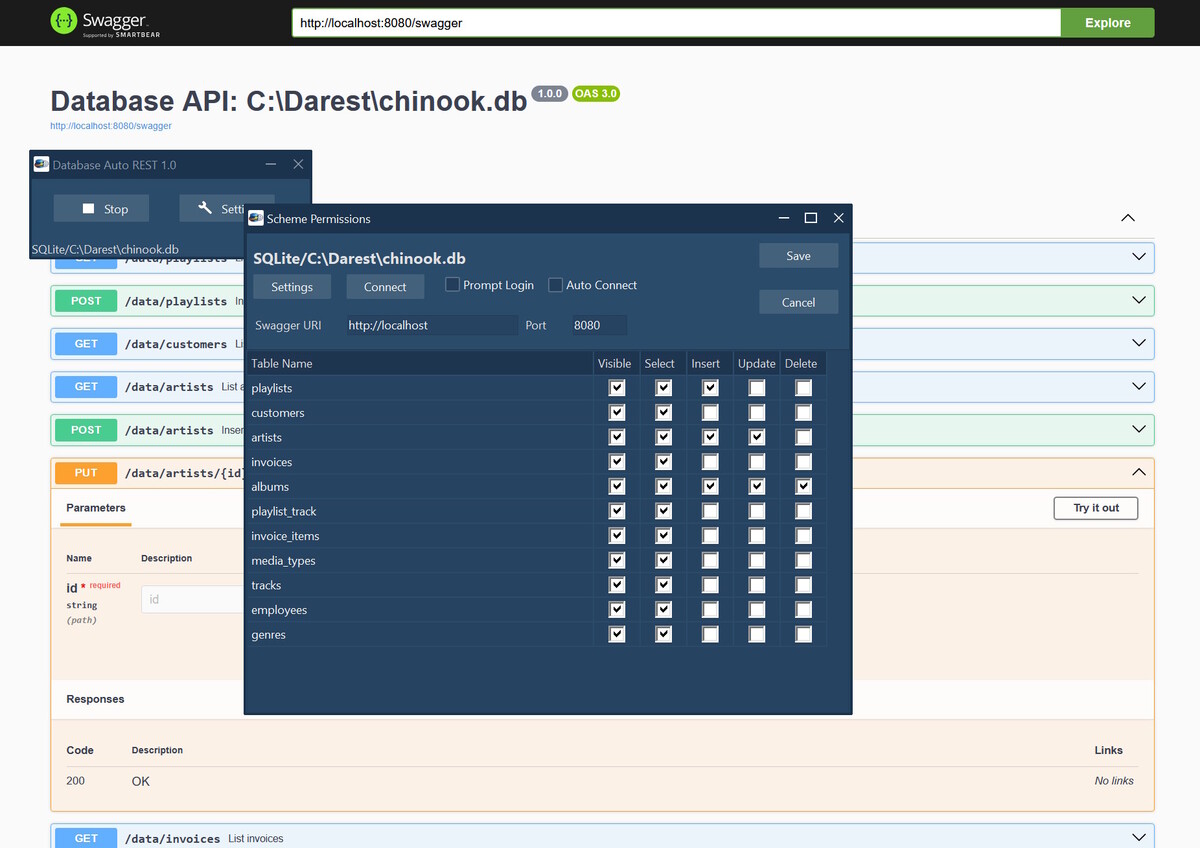
First-Time Setup
- Launch Darest: Run the compiled executable
- Configure Database Connection:
- Click the configuration button to open the database setup dialog
- Select your database driver (MSSQL, MySQL, PostgreSQL, etc.)
- Enter connection parameters:
- Server/Host
- Database name
- Username/Password
- Port (if required)
- Test the connection
- Configure Table Permissions:
- After connecting, Darest will discover all tables and views
- For each table, configure:
- Visible: Show in API documentation
- Select: Allow GET requests
- Insert: Allow POST requests
- Update: Allow PUT requests
- Delete: Allow DELETE requests
- Set Service Port:
- Configure the port for the REST API (default: 9000)
- Set the service host URL for Swagger documentation
- Save Configuration: Your settings are automatically persisted to SQLite
Starting the REST Server
- Click Start Server in the main UI
- The REST API will be available at
http://localhost:<port> - Access Swagger UI at
http://localhost:<port>/orhttp://localhost:<port>/swagger
API Endpoints
Once the server is running, the following endpoints are automatically available:
Core Endpoints
| Endpoint | Method | Description |
|---|---|---|
/ |
GET | Swagger UI homepage |
/swagger |
GET | OpenAPI 3.0 JSON specification |
/schema |
GET | Database schema information (tables, columns, types) |
Data Endpoints (per table)
For each table with permissions enabled:
| Endpoint | Method | Description | Parameters |
|---|---|---|---|
/data/:table |
GET | List records with pagination | ?limit=N&offset=M |
/data/:table/:id |
GET | Get single record by ID | - |
/data/:table |
POST | Insert new record | JSON body with field values |
/data/:table/:id |
PUT | Update existing record | JSON body with field values |
/data/:table/:id |
DELETE | Delete record by ID | - |
Example Requests
List all customers (with pagination):
GET http://localhost:9000/data/customers?limit=10&offset=0Get specific customer:
GET http://localhost:9000/data/customers/123Create new customer:
POST http://localhost:9000/data/customers
Content-Type: application/json

{
  "name": "John Doe",
  "email": "john@example.com",
  "phone": "555-1234"
}
Update customer:
PUT http://localhost:9000/data/customers/123
Content-Type: application/json

{
  "email": "newemail@example.com",
  "phone": "555-5678"
}
Delete customer:
DELETE http://localhost:9000/data/customers/123Schema Endpoint
The /schema endpoint returns detailed information about your database structure:
{
  "tables": [
    {
      "name": "customers",
      "columns": [
        {
          "name": "id",
          "type": "INTEGER",
          "nullable": false,
          "primaryKey": true
        },
        {
          "name": "name",
          "type": "VARCHAR(100)",
          "nullable": false
        }
      ]
    }
  ]
}
Project Structure
Darest/
????????? Darest.exe              # Main executable
????????? Darest.db               # SQLite configuration database (auto-created)
????????? swagger/                # Swagger UI files (REQUIRED)
???   ????????? index.html
???   ????????? swagger-ui.css
???   ????????? swagger-ui-bundle.js
???   ????????? swagger-initializer.js  # Auto-updated with host/port
???   ????????? ... (other UI assets)
????????? [FireDAC drivers]       # Database-specific DLLs if needed
A version with a web interface is a great idea too. Horse has already everything, so we could compile it for Linux too (with the correct Delphi version, of course).
Configuration Files
Darest stores configuration in the following locations:
| File | Location | Purpose |
|---|---|---|
config.db |
Application directory | SQLite database storing all configurations |
swagger/ |
Application directory | Swagger UI static files |
swagger-initializer.js |
swagger/ directory | Swagger configuration (auto-updated with host/port) |
Security Considerations
[!WARNING] Darest is designed for rapid API development and internal use. For production deployments, consider implementing:
- Authentication: Add JWT or API key authentication using Horse.JWT
- Authorization: Implement role-based access control
- CORS Configuration: Restrict allowed origins in production
- HTTPS: Use a reverse proxy (nginx, IIS) with SSL/TLS
- Input Validation: Add validation middleware for request payloads
- Rate Limiting: Prevent abuse with request throttling
- SQL Injection Protection: FireDAC parameterized queries provide basic protection, but validate input
Advanced Configuration
Custom Port Configuration
The default port is defined in Darest.Types.pas:
const
  SERVICE_PORT = 9000;
You can change this in the UI or modify the constant before compilation.
Adding Custom Middleware
To add custom Horse middleware, edit Darest.Logic.pas in the StartRESTServer method:
// Example: Add CORS
THorse.Use(CORS);

// Example: Add custom logging
THorse.Use(procedure(Req: THorseRequest; Res: THorseResponse; Next: TProc)
begin
  WriteLn('Request: ' + Req.RawWebRequest.PathInfo);
  Next;
end);
Database Driver Configuration
Darest supports all FireDAC drivers available in your Delphi installation. Database connectivity depends on:
- Your Delphi Edition: Community Edition has limited driver support
- Installed Driver Units: The appropriate FireDAC driver units must be included in the project
- Runtime Libraries: Some databases require client libraries (DLLs) to be present
Supported Databases (by Delphi Edition)
Community Edition (Free):
- ✅ SQLite (
FireDAC.Phys.SQLite) - ✅ MySQL/MariaDB (
FireDAC.Phys.MySQL) - ✅ PostgreSQL (
FireDAC.Phys.PG) - ✅ InterBase/Firebird (
FireDAC.Phys.IB,FireDAC.Phys.FB) - ❌ MS SQL Server (requires Professional or higher)
- ❌ Oracle (requires Professional or higher)
- ❌ DB2, Informix (require Professional or higher)
Professional/Enterprise/Architect Editions:
- ✅ All Community Edition databases
- ✅ Microsoft SQL Server (
FireDAC.Phys.MSSQL) - ✅ Oracle Database (
FireDAC.Phys.Oracle) - ✅ DB2, Informix, and other enterprise databases
Adding Custom Database Support
To add support for additional databases:
- Verify the driver is available in your Delphi edition
- Include the appropriate FireDAC driver units in your project
- Add required client libraries (DLLs) to your deployment folder if needed
- Configure connection parameters in the Darest UI
- The driver is automatically detected from the connection string
[!TIP] For databases requiring client libraries (e.g., Oracle, MS SQL Server with native driver), ensure the appropriate DLLs are in your application directory or system PATH.
Troubleshooting
Server Won't Start
- Check Port Availability: Ensure the configured port is not in use
- Firewall: Allow the application through Windows Firewall
- Database Connection: Verify database is accessible and credentials are correct
Tables Not Appearing
- Permissions: Check database user has SELECT permission on system tables
- Schema: Ensure you're connected to the correct database/schema
- Refresh: Use the reload schema function after database changes
Swagger UI Not Loading
- Static Files: Verify the
swagger/folder exists in the application directory - Path Configuration: Check
STATIC_HTML_FOLDERconstant inDarest.Types.pas - Browser Cache: Clear browser cache and reload
Contributing
Contributions are welcome! Please follow these guidelines:
- Fork the repository
- Create a feature branch (
git checkout -b feature/amazing-feature) - Follow Delphi coding conventions
- Add comments in English
- Test your changes thoroughly
- Commit your changes (
git commit -m 'Add amazing feature') - Push to the branch (
git push origin feature/amazing-feature) - Open a Pull Request
License
This project is licensed under the MIT License - see the LICENSE file for details.
MIT License Summary
- ✅ Commercial use
- ✅ Modification
- ✅ Distribution
- ✅ Private use
- ⚠️ Liability and warranty limitations apply
Credits
Developed by: Magno Lima
Built with:
- Horse - RESTful framework for Delphi
- Swagger UI - API documentation interface
Support
For issues, questions, or feature requests, please open an issue on GitHub.
Darest - Turning databases into REST APIs, automatically.