

CommPass

Command Passer. Drag and drop commands wherever you need them
- Quiet · last change 9-10-2020
- ★ 1 on GitHub
README
CommPass, i.e. Command Passing
This is a Delphi application to emulate typing
Why?
Because I’ve had enough of having to constantly look for different commands and I even have to type or copy-paste to the right place. The program here will help with this problem. I just put the XML as a sample, of course it is free to edit.
How
to use ComPass?
Just drag the necessary line and drop it where you need it and the text will appear there just as you would have typed
For example like this:
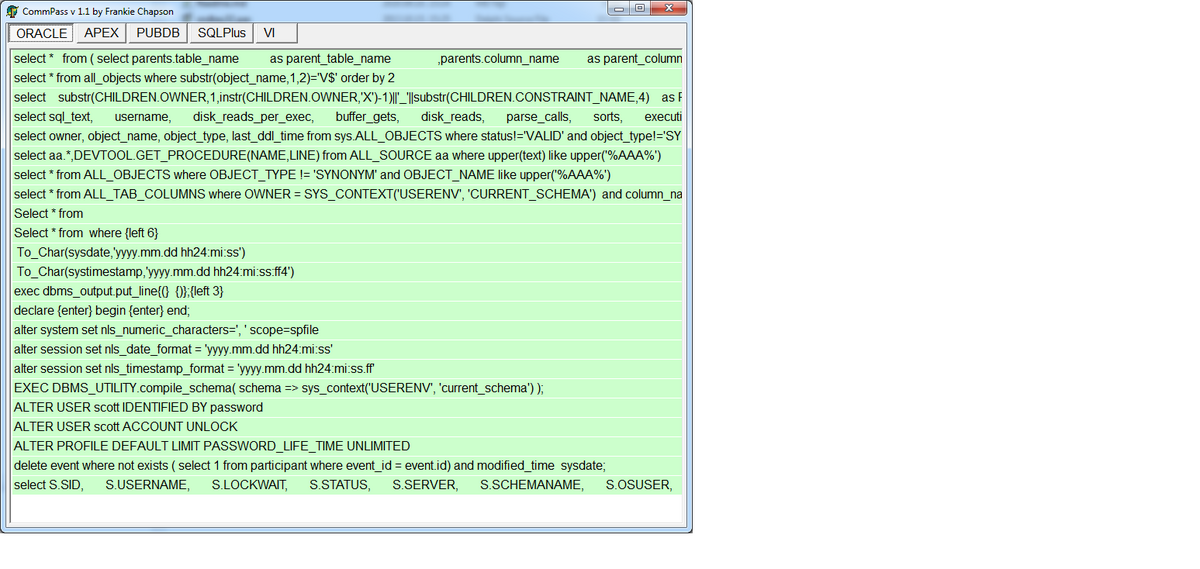
Exe version
Here is the compiled exe:
https://drive.google.com/open?id=1hAUgXvj4DJPT4usZZSDy9YwL7gI8NET8
the ComPass works?
When the program starts, it builds up the GUI from the CommPass.XML file in the same directory with it. (just must be restarted at startup, i.e. after xml editing, there is no refresh) I put a sample xml there.
TABs will become TABs.
Comment lines appear in red and cannot move.
There are two ways to drop a string:
KBDEMU: writes the string to the keyboard buffer. This is worth using less often because though doing it the standard Windows way, many of the programs aren't even prepared to do it right handle these messages so that they are absorbed after a specified length. However, it is not goes differently, eg in Windows CMD window.
CP, i.e. copy-paste. Put the string on the clipboard, then the string specified in "With" with kbd put it in the buffer. Since it's usually not too long, there's no problem with programs yet.
What you need to know about the keyboard string. In KBDEMU mode, use the special tokens for the following tokens can be used. See below!
In copy-paste mode, only the
{LT}    = < (less than)
{GT}    = > (greater than)
{AT}    = @ (at)
{ENTER} = CHR(13)
implemented because so far I only needed these, but you can add something else if needed, of course only if there is a character equivalent. (you can see a lot of examples of different uses in XML)
Supported modifiers:
+ = Shift
^ = Control
% = Alt
! = AltGr
Supported special characters
{ = Begin key name text (see below)
} = End key name text (see below)
Supported characters:
Supported key names (surround these with braces):
LT = < (less than)
GT = > (greater than)
AT = @ (at)
BKSP, BS, BACKSPACE
BREAK
CAPSLOCK
CLEAR
SOUTH
DELETE
DOWN
END
ENTER
ESC
ESCAPE
F1
F2
F3
F4
F5
F6
F7
F8
F9
F10
F11
F12
F13
F14
F15
F16
HELP
HOME
INS
LEFT
NUMLOCK
PGDN
PGUP
PRTSC
RIGHT
SCROLLLOCK
TAB
UP