

RetroMul

A cross-platform, extendable, multi-emulator written by Delphi FMX
- Active · last change 11-5-2026
- ★ 25 on GitHub
README
RetroMul
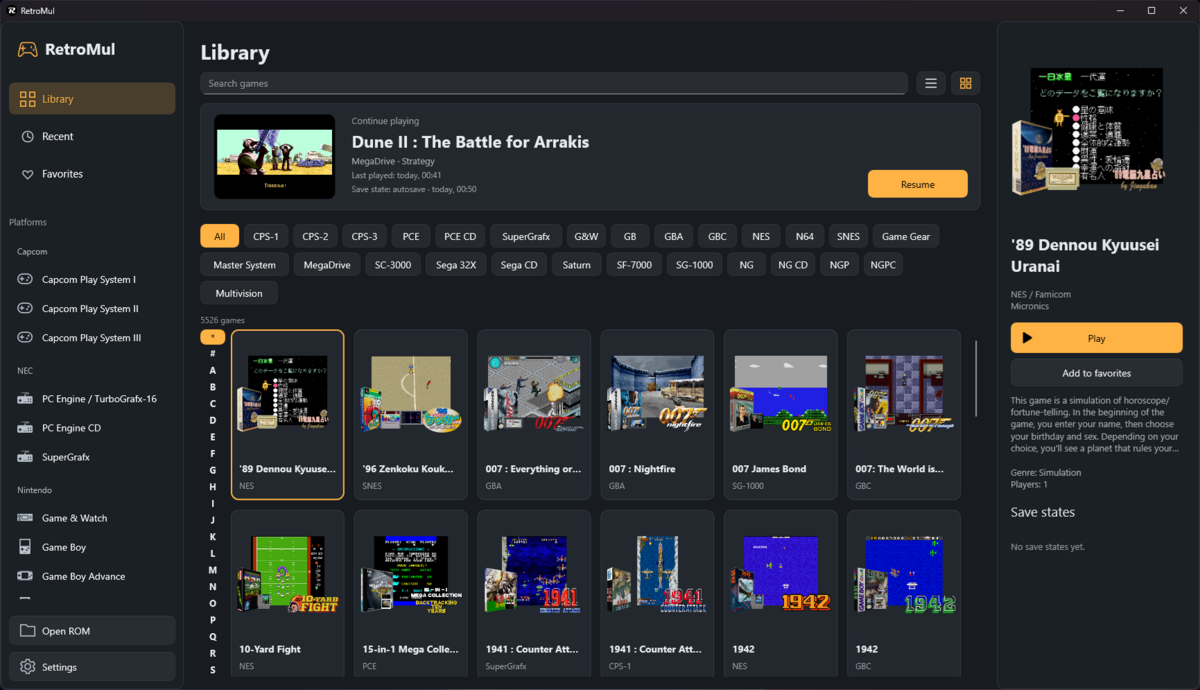
RetroMul is a multi-system retro game emulator written in Delphi with a FireMonkey interface. It runs games for NES / Famicom, Game Boy, Game Boy Color, Game Boy Advance, SEGA Mega Drive / Genesis, SEGA CD / Mega-CD, SEGA 32X, SEGA SG-1000 / SC-3000 / SF-7000, Othello Multivision, SEGA Master System / Mark III, SEGA Game Gear, Super Nintendo, Neo Geo MVS / AES, Neo Geo CD, Neo Geo Pocket / Pocket Color, Bandai WonderSwan / WonderSwan Color, Sony PlayStation, Capcom Play System I / II / III, and the PC Engine / TurboGrafx / SuperGrafx family. The repository also includes RetroTune, a companion music player, and RetromulTerm, a Windows console frontend.
Supported systems and ROM formats
The table covers all 45 registered systems. Supported images and ROM sets can also be loaded from .zip, .7z, and .rar archives. Disc images must retain their required companion files and tracks.
| System | ROM formats |
|---|---|
| Atari 2600 | .a26; .bin, .rom in the system folder |
| Atari 5200 | .a52, Atari 5200 .car; .bin, .rom in the system folder; BIOS embedded |
| Atari 7800 | .a78, .bin, .rom |
| Atari Jaguar | .j64, .bin, .rom |
| Atari Jaguar CD | .cue, .chd, .cdi, .mds, .nrg, .ccd, multi-disc .m3u |
| Atari Lynx | .lnx, .lyx, BS93 .o / .com / .bll; BIOS embedded |
| ColecoVision | .col, .cv, .rom, .bin |
| NES / Famicom | .nes; Famicom Disk System .fds, .qd |
| Famicom Disk System | .fds, .qd |
| Game Boy | .gb, .gbx |
| Game Boy Color | .gbc, .gbx |
| Game & Watch | .gw, .mgw, catalogued MAME .zip sets with SVG screens |
| Game Boy Advance | .gba |
| Nintendo 64 (experimental) | .z64, .n64, .v64 |
| Nintendo DS (experimental) | .nds |
| SEGA Mega Drive / Genesis | .md, .bin, .gen, .smd |
| SEGA CD / Mega-CD | .cue, .iso, .chd, .mds, .nrg |
| SEGA 32X | .32x, .bin, .gen, .md, .smd |
| SEGA SG-1000 | .sg (legacy .sms images in sg1000/) |
| SEGA SC-3000 | .sc |
| SEGA SF-7000 | .sf7, .sf, .dsk (external IPL required) |
| Othello Multivision | .mv |
| SEGA Master System / Mark III | .sms |
| SEGA Game Gear | .gg |
| MSX1 | .rom, .mx1, .dsk, .cas, .wav |
| MSX2 | .rom, .mx2, .dsk, .cas, .wav |
| MSX2+ | .rom, .mx2, .mxp, .dsk, .cas, .wav |
| SEGA Saturn | .iso, .cue, .chd, .mds, .nrg; BIOS images .bin, .rom, .bios |
| SEGA Dreamcast | .gdi, .cdi, .chd, .cue, .iso, .mds, .nrg, homebrew .elf, multi-disc .m3u |
| Sony PlayStation (PS1) | .cue, .chd, .iso, .mds, .nrg, raw .bin, PS-X .exe, multi-disc .m3u |
| Sony PSP (experimental) | .elf, .prx, .pbp, encrypted executables, ISO9660 .iso, CISO v1 .cso; single-image archives; commercial compatibility is being validated |
| ZX Spectrum family / clones | .sna, .z80, .tap, .tzx, .trd, .scl, .dsk, .dck, .pro, .kdi, .ide, .mmc |
| Super Nintendo / Super Famicom | .sfc, .smc, .swc, .fig |
| Neo Geo MVS / AES | Named MAME ROM sets in .zip, .7z, .rar; unencrypted NeoSD .neo images |
| Neo Geo CD / CDZ | .iso, .cue with BIN/PCM WAV tracks, .chd, .mds, .nrg |
| Neo Geo Pocket | .ngp, .ngc |
| Neo Geo Pocket Color | .ngp, .ngc |
| WonderSwan | .ws, .wsc (model detected from the image) |
| WonderSwan Color | .wsc, .ws |
| Capcom Play System I (CPS-1) | Named arcade ROM sets in .zip, .7z, .rar |
| Capcom Play System II (CPS-2) | Named arcade ROM sets in .zip, .7z, .rar |
| Capcom Play System III (CPS-3) | Supported SIMM / No-CD ROM sets in .zip, .7z, .rar |
| PC Engine / TurboGrafx-16 | .pce, single-HuCard archives |
| SuperGrafx | .sgx, .pce, single-HuCard archives |
| PC Engine CD / Duo / Arcade Card | .cue, .iso, .chd, .mds, .nrg (built-in System Cards 1/2/3) |
Features
- Browse a game library in grid or list view with cover art and information from
gamelist.xml, search by title, filter by system or initial letter, and keep favorites and recently played games. ROM files can also be opened directly or dropped onto the desktop application. - Assign keyboard keys, controller buttons, axes, and D-pad directions for each system and controller port. View the active bindings in the in-game controls help.
- Play with an Android screen gamepad, including NES / Dendy turbo buttons and six-button SEGA controls.
- Use multiple controllers, NES Four Score, and SNES Multitap in compatible games.
- Pause, reset, save and restore game states with preview images, and keep battery-backed saves. Continue games from saved states in the library.
- Switch to fullscreen, resize the game display, and capture screenshots.
- Configure video filtering, audio, Game Boy palettes and boot ROMs, and system-specific hardware and peripherals. Supported settings can be applied during a game.
- Customize Game Boy / Game Boy Color frame blending, separate monochrome background and sprite palettes, layer visibility, sprite limits, CPU speed (100–400%), and individual sound-channel volume. Game Boy Color also offers LCD color correction. Higher CPU speeds and relaxed sprite limits can change game behavior.
- Use Game Boy / Game Boy Color / Game Boy Advance cartridge rumble and cartridge motion inputs on supported devices; tilt and rotation depend on available device sensors.
- Use supported NES peripherals, including Zapper, Power Pad, Family BASIC and Subor keyboards, Miracle Piano, and the Famicom Data Recorder. Four Score must be disabled when using Zapper, Power Pad or Miracle Piano.
- Use an English, Russian or Portuguese interface, with language selection in settings (or custom).
- Listen to native streaming audio. Supported audio platforms include Windows, Linux, Android, macOS, and iOS.
Compatibility depends on the game's cartridge hardware, protection, and peripherals. Mapper or ROM-set support does not imply complete hardware accuracy or full gameplay compatibility for every game. Save-state formats can change between builds.
Getting started
Desktop shortcuts during gameplay:
| Key | Action |
|---|---|
P |
Pause / resume |
R |
Reset |
F1 |
Help |
F5 |
Save the quick state |
F6 |
Load the quick state |
F8 |
Take a screenshot |
These shortcuts are suspended while an emulated NES or Subor keyboard is active.
Source layout
| Directory | Responsibility |
|---|---|
apps/retromul |
Emulator frontend, with ui, controllers, settings, input and platform modules |
apps/retrotune |
Music player project and forms |
apps/terminal |
Windows console frontend |
source/runtime |
Shared contracts, emulator factory, timing, snapshots, configuration, storage and catalog |
source/platforms/<id> |
Adapters, registration, settings, controls and all frontend integration for the matching core folder |
source/cores |
System-specific emulation, cartridges, audio machines and firmware |
source/hardware |
Shared CPU, audio-chip and video implementations |
source/media |
ROM identification, CD access and native CHD decoding |
source/music |
Reusable decoders, trackers, playback, synthesis and export |
source/ui |
Shared FMX controls, SVG rendering and shaders |
apps/*/*.dproj |
Explicit relative unit search paths and module references |
source/platforms/RetroMul.Platforms.pas |
Explicit platform composition and calls to platform class registration methods |
dependencies |
Git submodules: DelphiWinUI3, FMXVibration, FMXInput and PCMAudio |
Initialize dependencies with git submodule update --init --recursive. Their repository URLs and pinned commits are unchanged; the logical submodule names in .gitmodules are retained so existing Git metadata continues to work. DelphiWinUI3's nested submodules remain part of that dependency. Do not add dependency contents to the parent repository as ordinary files.
RetroTune
RetroTune features, supported music formats, and Delphi integration
RetroTune is the companion player for retro game music, chiptunes, tracker modules, MIDI / General MIDI, and WAV audio. Its decoder registry and threaded PCM player can also be used in another Delphi application without the RetroTune interface.
- Play NES NSF/NSFe, SNES SPC, Game Boy GBS, Commodore SID, Atari music, VGM/VGZ, and a wide range of Spectrum tracker and chip-dump formats.
- Listen to MSX / Master System KSS, PC Engine HES, Amiga AHX/HVL/MOD, Dreamcast DSF/MiniDSF, TIATracker, TurboSound, TurboFM, IMF/DRO, XGM/XGM2, and digital tracker music.
- Play MIDI with GeneralUser GS, TimGM6mb, FluidR3 GM, or a custom SF2 bank. Switching banks preserves the selected track, position, and playback state.
- Extract supported music from Spectrum TAP and TR-DOS disk containers.
- Select tracks, pause and resume playback, seek, and adjust volume.
- Choose from eleven audio visualizations, including spectrograms, stereo spectra, phase correlation, and RMS/peak meters.
- Inspect file information, track durations, metadata, and the supported-format reference.
- Export a selected track to WAV in the background, with progress and cancellation.
- Use an English or Russian interface. The system language is selected automatically at startup; other languages use English.
See RetroTune format details for supported variants and limitations.
Supported music formats
The following table lists every extension registered by the RetroTune application. Extensions identify specific supported variants; they do not imply support for every unrelated format that uses the same suffix.
| Format / family | Extensions |
|---|---|
| NES Nintendo Sound Format, NSF2, NSFe | .nsf, .nsf2, .nsfe |
| SNES SPC | .spc |
| Game Boy Sound | .gbs |
| Commodore 64 SID (PSID) | .sid |
| Video Game Music, compressed VGM | .vgm, .vgz |
| Mega Drive / Genesis GYM | .gym |
| Mega Drive XGM / XGM2, compiled XGM2 | .xgm, .xgm2, .xgc |
| MSX / Sega Master System KSS | .kss |
| PC Engine HES | .hes |
| Dreamcast DSF / MiniDSF | .dsf, .minidsf |
| Amiga AHX, HivelyTracker | .ahx, .hvl |
| Amiga SoundTracker / ProTracker MOD | .mod |
| Atari 2600 TIATracker, cartridge music | .ttt, .a26 |
| Atari SAP, Raster Music Tracker | .sap, .rmt |
| Atari Music ProTracker with samples, 15 kHz sample bank | .md1, .d15 |
| AY executable music (ZX Spectrum / CPC) | .ay |
| ASC Sound Master | .as0, .asc |
| Fast Tracker | .ftc |
| Global Tracker | .gtr |
| Pro Sound Creator | .psc |
| Pro Sound Maker | .psm |
| Pro Tracker 1 / 2 / 3, including PT3 TurboSound | .pt1, .pt2, .pt3 |
| SQ-Tracker | .sqt |
| Sound Tracker editor / compiled modules | .s, .st1, .st3, .stc |
| Sound Tracker Pro | .stp |
| AY register log | .psg |
| ST Sound YM | .ym |
| VTX AY / YM | .vtx |
| CPC AYC | .ayc |
| AY text register dump | .debugay |
| Vortex Tracker text module | .txt |
| TurboSound container | .ts |
| TFM Music Maker | .tf0, .tfe |
| TurboFM compiled / register dump | .tfc, .tfd |
| Multitrack audio container | .mtc |
| SAM Coupe E-Tracker / SAA1099 | .cop, .etc, .sng |
| Spectrum tape containing E-Tracker music | .tap |
| TR-DOS disk image / SINCLAIR disk archive containing music | .trd, .scl |
| Chip Tracker | .chi |
| Digital Music Maker | .dmm |
| Digital Studio | .dst |
| SQ Digital Tracker | .sqd |
| Sample Tracker | .str |
| Extreme Tracker, Extreme / ProDigiTracker raw modules | .et1, .d, .m |
| ProDigiTracker | .pdt |
| id Software AdLib IMF, DOSBox RAW OPL | .imf, .dro |
| Standard MIDI / General MIDI, RIFF MIDI, karaoke audio | .mid, .midi, .rmi, .kar |
| RIFF/WAVE PCM / IEEE Float audio | .wav |
SID playback supports PSID; RSID is outside the supported variant. IMF uses 700 Hz timing. .xgc refers to compiled XGM2. .sng refers to raw SAM Coupe E-Tracker modules; .txt refers to Vortex Tracker modules. TAP/TRD/SCL are music containers, not general tape/disk program emulators. KAR plays the MIDI audio; lyrics are skipped. WAV supports mono/stereo PCM 8/16/24/32-bit and IEEE Float 32/64-bit, including the corresponding WAVE_FORMAT_EXTENSIBLE subformats.
MiniDSF needs its referenced library files beside the source file. MD1 needs the companion .d15 or .d8 sample bank; .d8 is a companion file, not a separately registered playable format. MIDI needs a SoundFont2 bank. Standard banks are plain GeneralUser-GS.sf2, TimGM6mb.sf2, and FluidR3_GM.sf2 files in the sf2 directory beside the executable, with their license notices. The Windows RetroTune build prepares that directory automatically. Custom SF2 files can be selected separately; the banks are not embedded in the EXE.
Using the player in another Delphi application
TTunePlayer in source/music/playback/RetroTune.Player.pas owns the playback thread and PCM device; it does not depend on FireMonkey or RetroTune.Main. Add source/music/decoders, source/music/common, source/music/chips, source/music/playback, and dependencies/PCMAudio to your project's unit search path. Other decoders can additionally require source/music/trackers (including its amiga directory), source/runtime, source/runtime, the relevant source/hardware directories and system-specific core directories. The complete decoder set's paths are listed in apps/retrotune/RetroTune.dproj.
Decoder units register their formats in their initialization sections. This standalone console example enables WAV and MIDI; add the other RetroTune.Decoder.* units used by RetroTune.dpr to enable their formats. Keep dependent decoder units when using containers. For MIDI, prepare the sf2 directory beside your application's EXE, or call SetMidiSoundFont with a custom SF2 path before opening the MIDI file.
The example plays the default track for up to ten seconds, checks asynchronous playback errors, and releases the player even if playback fails:
program StandaloneTune;

{$APPTYPE CONSOLE}

uses
  System.SysUtils, System.Classes,
  RetroTune.Decoder, RetroTune.Player,
  RetroTune.Decoder.WAV, RetroTune.Decoder.MIDI;

begin
  try
    if ParamCount <> 1 then
      raise Exception.Create('Usage: StandaloneTune <music.wav|music.mid>');

    // Optional for MIDI: SetMidiSoundFont('C:\Music\MyBank.sf2');
    var Decoder := TTuneDecoders.Open(ParamStr(1));
    var Info := Decoder.GetInfo;
    var Player := TTunePlayer.Create(Decoder);
    try
      Player.SetVolume(80); // 0..100
      Player.SelectTrack(Info.DefaultTrack); // Track indexes start at zero.
      Player.Play;
      var Started := TThread.GetTickCount64;
      repeat
        var State := Player.Status;
        if State.Error <> '' then
          raise Exception.Create(State.Error);
        if State.State = TTunePlayerState.Finished then
          Break;
        TThread.Sleep(20);
      until TThread.GetTickCount64 - Started >= 10000;
      Player.Stop;
    finally
      Player.Free; // Terminates and joins the worker; closes the audio device.
    end;
  except
    on E: Exception do
    begin
      Writeln(E.ClassName, ': ', E.Message);
      ExitCode := 1;
    end;
  end;
end.
Run it as StandaloneTune.exe "C:\Music\song.mid" or pass a WAV file. Player.Pause pauses and Player.Play resumes; Player.Seek(30.0) requests an asynchronous seek to 30 seconds (Player.Status.Seeking reports progress). SelectTrack resets the selected track to its beginning. Status and the player control methods synchronize access internally. After creating the player, use those methods rather than calling the same decoder's Render or SelectTrack from another thread. Read metadata before handing the decoder to the player, as above.
Audio output is selected by PCM.Audio.Factory: WaveOut on Windows, ALSA on Linux, AudioTrack on Android, and Audio Queue on macOS/iOS. Your own application still needs the normal platform audio setup. No RetroTune forms, Application.Initialize, or Application.Run are required for the console example.