

Catalog · How the catalog works
Delphi_pimono

A desktop AI coding assistant built with Delphi
- ★ 2 on GitHub
Anyone may press Interesting, signed in or not. It helps others find this project.
README
PiMono Agent
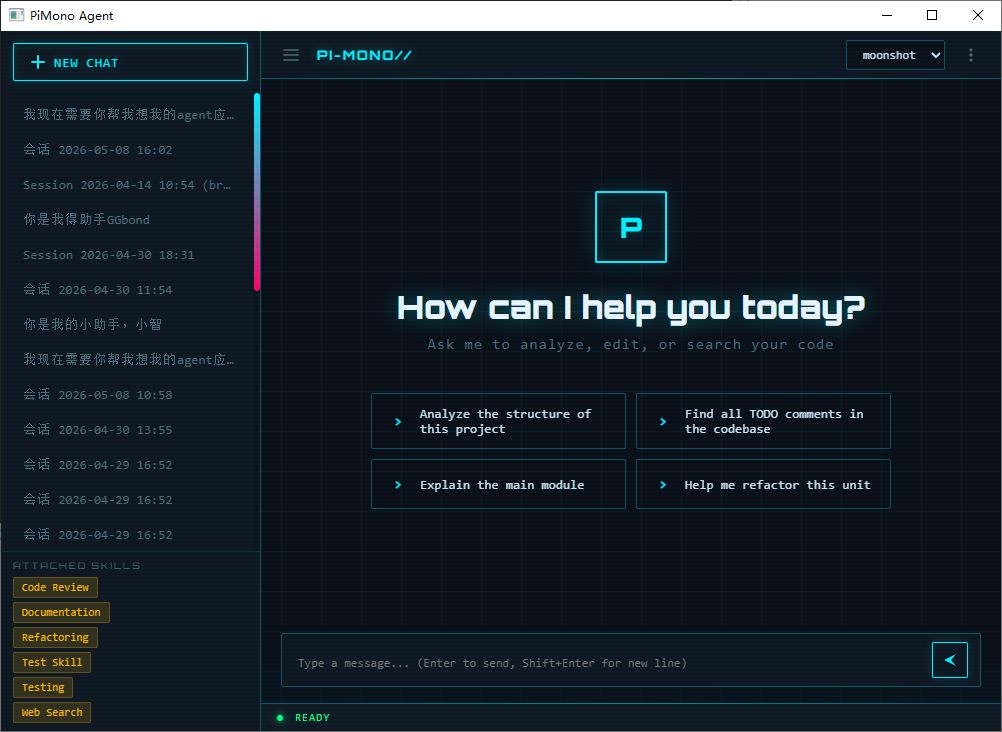
A desktop AI coding assistant built with Delphi + WebView2
Features • Getting Started • Architecture • Tech Stack • License
What is PiMono Agent?
PiMono Agent is a native Windows desktop application that connects to OpenAI-compatible LLM APIs and provides an interactive AI coding assistant experience. It features a modern WebView2-based chat UI, a state-machine-driven agent loop with tool calling, and a rich set of built-in tools for file operations, shell commands, Git, and web search.
Features
Agent Engine
- State-machine driven agent loop — automatically iterates between reasoning and tool calls until task completion
- SSE streaming — real-time token-by-token response rendering (~30fps throttled)
- Tool calling — structured JSON tool use with confirmation dialogs for destructive operations
- MaxTurns limit — prevents infinite agent loops
- Thinking/extended thinking support — configurable reasoning depth levels
Built-in Tools
| Tool | Description |
|---|---|
| File Read/Write/Edit | Read, create, and edit files with three-tier fuzzy matching |
| File Search | ls directory listing, find by name pattern, grep content search |
| Bash | Execute shell commands with real-time output streaming |
| Git | status, diff, log, blame, show, commit operations |
| Web Search | Multi-provider search (Google, DuckDuckGo, Brave, SearXNG, Tavily, etc.) |
Session Management
- Create, load, rename, delete, and export sessions
- Session branching — fork a conversation from any point
- Session popup — open a session in a separate window
- Auto-save with configurable intervals
Context Management
- Tool Result Slimming — automatically compresses large tool outputs
- LLM-powered compaction — summarizes older messages when context overflows
- Emergency truncation — hard cutoff when context exceeds model limits
- Token estimation — real-time context window usage tracking
UI / UX
- WebView2 chat interface — modern HTML/CSS/JS UI with smooth animations
- Markdown rendering — full support for headings, bold, italic, code blocks, tables, links
- Syntax-highlighted code blocks — language detection, one-click copy
- Theme system — multiple built-in themes (cyberpunk-neon, light, dark, etc.)
- Onboarding wizard — guided first-run setup for API configuration
- Session sidebar — searchable session list with context menu
- Settings panel — configure models, tools, permissions, search providers
Configuration
- Multi-model profiles — configure multiple LLM endpoints with different parameters
- Tool permissions — granular control over file access paths, command execution, confirmation requirements
- Skill/Prompt templates — reusable prompt templates with references and examples
- Search provider configuration — API keys, max results, fetch options per provider
Other
- Undo log — all file write/edit operations are reversible (Ctrl+Z)
- Localization framework — bilingual UI (Chinese/English)
- Structured logging — configurable log levels with file rotation
Getting Started
Prerequisites
- Delphi 11.x Alexandria (or later)
- Microsoft Edge WebView2 Runtime (download)
- WebView4Delphi library (included in
_WebView4Delphi/) - An OpenAI-compatible API endpoint (OpenAI, Azure OpenAI, local LLM, etc.)
Build
- Clone the repository:
git clone https://github.com/YOUR_USERNAME/PiMonoDelphi.git cd PiMonoDelphi - Open
PiMono.dprojin Delphi IDE - Ensure WebView4Delphi library paths are correctly configured. The
_WebView4Delphidirectory contains the library source. - Build and run
First Run
On first launch, the onboarding wizard will guide you through:
- Setting your API endpoint URL (e.g.,
https://api.openai.com/v1) - Entering your API key
- Selecting a model name (e.g.,
gpt-4o,claude-sonnet-4-20250514) - Configuring your working directory
Alternatively, manually edit PiMono.json in the application directory:
{
  "Api": {
    "Endpoint": "https://api.openai.com/v1",
    "ApiKey": "sk-...",
    "Timeout": 120,
    "EnableStreaming": true
  },
  "Model": {
    "Name": "gpt-4o",
    "MaxTokens": 4096,
    "Temperature": 0.7
  },
  "Directories": {
    "Working": "C:\\Projects\\MyProject"
  }
}
Architecture
PiMonoDelphi/
????????? AI/                         # LLM API layer
???   ????????? AI.IModel.pas           # Model interface (IAgentModel)
???   ????????? AI.CustomAPIAdapter.pas # OpenAI-compatible API adapter (SSE streaming)
???   ????????? AI.ModelConfig.pas      # Model configuration types
????????? Core/                       # Agent engine
???   ????????? Core.Agent.pas          # Agent loop (state machine, tool dispatch)
???   ????????? Core.AgentState.pas     # Agent state definitions
???   ????????? Core.AgentFactory.pas   # Agent factory
???   ????????? Core.Messages.pas       # Message types (TContentBlock, TChatMessage)
???   ????????? Core.Events.pas         # Event system (streaming, tool calls, state changes)
???   ????????? Core.SessionManager.pas # Session CRUD, branching, export
???   ????????? Core.Compaction.pas     # Context compaction (LLM summarization)
???   ????????? Core.ToolResultSlim.pas # Tool result compression
???   ????????? Core.UndoLog.pas        # File operation undo system
???   ????????? App.Main.pas            # Application bootstrap & DI wiring
????????? Tools/                      # Built-in tools
???   ????????? Tools.ITool.pas         # Tool interface & base class
???   ????????? Tools.ToolRegistry.pas  # Tool registration & lookup
???   ????????? Tools.FileTools.pas     # File read/write/edit/ls/find/grep
???   ????????? Tools.BashTool.pas      # Shell command execution
???   ????????? Tools.GitTool.pas       # Git operations
???   ????????? Tools.WebSearchTool.pas # Multi-provider web search
???   ????????? Tools.CommandRunner.pas # Async process runner
????????? Settings/                   # Configuration
???   ????????? Settings.Config.pas     # Config type definitions & serialization
???   ????????? Settings.SettingsManager.pas # Config load/save/validate
???   ????????? Settings.SkillStore.pas # Prompt template management
????????? UI/                         # Delphi VCL forms
???   ????????? UI.MainForm.pas         # Main window (WebView2 host)
???   ????????? UI.WebViewBridge.pas    # WebView2 ??? Delphi bridge
???   ????????? UI.SessionChatForm.pas  # Popout session window
???   ????????? UI.ThemeManager.pas     # Theme management
????????? WebUI/                      # WebView2 frontend
???   ????????? index.html              # Main HTML
???   ????????? js/app.js               # Application controller
???   ????????? js/bridge.js            # JS???Delphi bridge layer
???   ????????? js/chat.js              # Chat rendering engine
???   ????????? js/sidebar.js           # Session sidebar
???   ????????? js/settings.js          # Settings panel
???   ????????? js/onboarding.js        # First-run wizard
???   ????????? js/theme.js             # Theme engine
???   ????????? css/styles.css          # Base styles
???   ????????? css/themes.css          # Theme definitions
????????? Utils/                      # Utilities
???   ????????? Utils.JsonHelper.pas    # JSON parsing helpers
???   ????????? Utils.Markdown.pas      # Markdown processor
???   ????????? Utils.Logger.pas        # Logging framework
???   ????????? Utils.TokenEstimator.pas # Token counting estimation
???   ????????? Utils.Localization.pas  # i18n support
????????? Tests/                      # Test suite
???   ????????? AI/                     # AI layer tests
???   ????????? Core/                   # Core engine tests
???   ????????? Settings/               # Settings tests
???   ????????? HGM/                    # UI utility tests
???   ????????? Mocks/                  # Test mocks
????????? HGM/                        # Custom UI components (VCL)
????????? _WebView4Delphi/            # WebView4Delphi library
????????? docs/                       # Documentation (Chinese)
????????? img/                        # Screenshots & assets
Data Flow
User Input ??? WebView2 (JS) ??? WebViewBridge ??? Core.Agent ??? LLM API (SSE)
                    ???                              ???
Chat Renderer ??? Events ??? Tool Execution ??? Tool Result- User types a message in the WebView2 chat interface
- JavaScript
bridge.jsserializes and sends to Delphi viaWebViewBridge Core.Agentappends the message and starts the agent loop- Agent calls the LLM API via
AI.CustomAPIAdapterwith SSE streaming - Streaming tokens are forwarded as events back to the WebView2 UI
- When the LLM requests a tool call, the agent dispatches to the appropriate tool
- Tool results are appended and the loop continues until the LLM returns a final text response
Tech Stack
| Component | Technology |
|---|---|
| Language | Object Pascal (Delphi 11.x) |
| UI Framework | VCL + WebView2 (Microsoft Edge) |
| WebView Bridge | WebView4Delphi |
| Frontend | HTML5 / CSS3 / Vanilla JavaScript |
| Markdown | marked.js + highlight.js |
| HTTP/SSE | THTTPClient (System.Net.HttpClient) |
| JSON | System.JSON (built-in) |
| Testing | Custom DUnit-like framework |
Supported LLM Providers
PiMono uses an OpenAI-compatible API adapter, supporting any provider that implements the OpenAI chat completions API:
- OpenAI (GPT-4o, GPT-4, etc.)
- Anthropic (Claude) via compatible proxy
- Google Gemini via compatible endpoint
- Azure OpenAI Service
- Local LLMs (Ollama, vLLM, LM Studio, etc.)
- Any custom OpenAI-compatible endpoint
Roadmap
- [ ] Multi-modal message support (image input)
- [ ] Clipboard image paste
- [ ] Token usage statistics & cost estimation
- [ ] MCP (Model Context Protocol) client support
- [ ] System tray & background running
- [ ] Prompt template library
- [ ] Drag-and-drop file sending
- [ ] RAG local knowledge base
- [ ] Auto-update mechanism
- [ ] Plugin/extension system
License
This project is licensed under the MIT License — see the LICENSE file for details.
Built with Delphi & WebView2