

TWLazUI

"A modern, Tailwind CSS-inspired UI component library for Lazarus and Free Pascal, powered by BGRABitmap." (Pustaka komponen UI modern bergaya Tailwind CSS untuk Lazarus dan Free Pascal, ditenagai oleh BGRABitmap.)
- Active · last change 10-6-2026
- ★ 29 on GitHub
README
TWLazUI LCL Components
TWLazUI LCL Components is a custom user interface (UI) component library package for Lazarus and Free Pascal. This project brings the modern, clean, and minimalist design aesthetics typical of TWLazUI CSS to desktop application development (VCL/LCL).
Powered by BGRABitmap, this library offers advanced graphic rendering such as true alpha transparency, ultra-smooth anti-aliasing, rounded corners, and drop shadow effects that cannot be achieved by native operating system components.
🎨 Screenshots
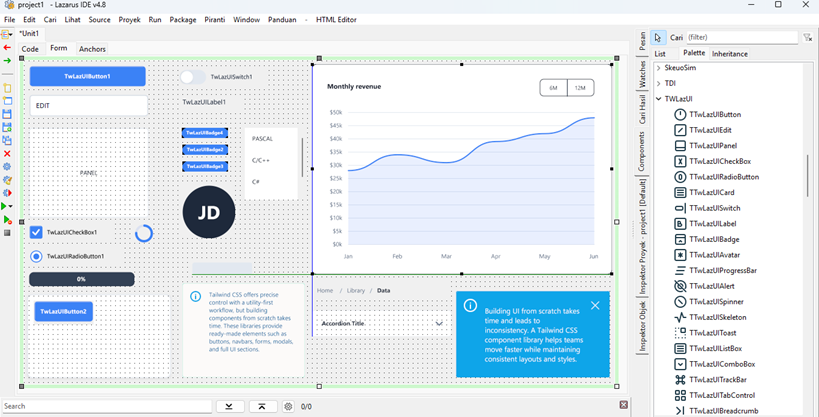
✨ Key Features
- TWLazUI Aesthetics: Default colors, corner radii (rounded-md, rounded-full), and proportions are adapted directly from the TWLazUI CSS design system.
- High-Quality Rendering: Uses BGRABitmap algorithms for vector drawing, smooth curves, and alpha blending without black backgrounds (flicker-free).
- 100% Design-Time Safe: All components are secured against infinite loop traps when
AutoSizeis active. Freeze-free when designing in forms! - Full Customization: Supports changing theme colors (Primary, Secondary, Success, Danger) as well as custom colors (
clCustom) directly through the Object Inspector. - Component Palette Icons: Neatly integrated into the Lazarus Component Palette with Heroicons-style icons.
📦 Component List (27 Components)
This library covers almost all modern UI needs for your application:
🧩 Basic & Layout
TTWLazUIButton- Modern button with states (Hover, Pressed, Disabled).TTWLazUIPanel- Basic container panel.TTWLazUICard- Card with a floating drop shadow effect.TTWLazUISkeleton- Gray loading placeholder effect.TTWLazUISidebar- Side navigation menu.
📝 Form & Input
TTWLazUIEdit- Text input box with a focus ring.TTWLazUICheckbox- Checkbox with vector animation.TTWLazUIRadioButton- Rounded option (radio button).TTWLazUISwitch- iOS/TWLazUI-style toggle switch (On/Off).TTWLazUIComboBox- Dropdown selection list.TTWLazUIListBox- Vertical item list.TTWLazUITrackBar- Value slider.
📊 Data Display & Chart
TTWLazUILabel- Text label with sharp typography control.TTWLazUIBadge- Status indicator pill label.TTWLazUIAvatar- Rounded profile photo or automated text initials.TTWLazUIStringGrid- Modern-styled data table.TTWLazUILineChart- Smooth Bezier curve chart with transparent gradients.
🧭 Navigation & Progress
TTWLazUITabControl- Navigation tabs (Underline and Pills variants).TTWLazUIBreadcrumb- Hierarchical breadcrumb navigation.TTWLazUIAccordion- Vertical collapsible menu (Collapse/Expand).TTWLazUIStepper- Process/wizard step indicator with line connectors.TTWLazUIProgressBar- Static progress indicator bar.TTWLazUISpinner- Rotating circular loading icon.
🔔 Feedback & Overlay
TTWLazUIAlert- Static message box (Info, Warning, Error).TTWLazUIToast- Floating pop-up notification.TTWLazUITooltip- Hover information balloon.TTWLazUIModalOverlay- Dark background for modal dialog boxes.
🛠️ System Requirements (Prerequisites)
Before installing this package, ensure your Lazarus meets the following requirements:
- Lazarus IDE (Version 2.2 or newer, v3.0+ recommended).
- BGRABitmap (Package
bgrabitmap.lpk). You can easily install it via the Online Package Manager (OPM) inside Lazarus.
🚀 Installation Guide
- Download or Clone this repository to your computer:
- Open the Lazarus IDE application.
- Go to the Package menu -> Open Package File (.lpk)...
- Locate and select the
TWLazUI_components.lpkfile from the folder you just downloaded. - In the Package window, click the Compile button to ensure there are no errors.
- If the Compile is successful, click the Use -> Install button.
- Lazarus will ask if you want to rebuild the IDE. Click Yes.
- Wait for the compilation process to finish. Lazarus will restart automatically.
- Done! Look for the TWLazUI LCL tab in your Component Palette.
👨💻 Usage Guide
Simply drag and drop components from the TWLazUI LCL palette into your Form. Use the Object Inspector to modify properties such as:
ThemeColor: Choose from color presets (twPrimary, twSuccess, twDanger, etc.).RoundedStyle: Adjust the corner curvature (twRoundedSM, twRoundedMD, twRoundedFull).Variant: For Tabs or Buttons, choose the Outline, Solid, or Pills style.
☕ Support the Project
If you find TWLazUI helpful and want to support its ongoing development, consider buying me a coffee or sending a tip. Any support is deeply appreciated!
💡 Your support keeps the momentum going!
Every contribution directly fuels my passion, energy, and motivation to continuously build, maintain, and release even more useful open-source desktop applications for the developer community.
📄 License
This project is licensed under the MIT License. You are free to use, modify, and distribute this library for both personal and commercial projects. See the LICENSE file for more information.
🙌 Acknowledgments
- Tailwind CSS - For the incredible design system inspiration, color palettes, and aesthetics.
- BGRABitmap - An amazing graphics library that enables transparent rendering and anti-aliasing in Lazarus.
- streamlinehq - Visual icon references for the Component Palette.