

Catalog · How the catalog works
CyberUI-Component

A cyberpunk-themed visual component library for Lazarus and Free Pascal. Features 18 math-rendered tactical controls for sci-fi dashboards and simulations.
- ★ 7 on GitHub
Anyone may press Interesting, signed in or not. It helps others find this project.
README
CyberUI - Sci-Fi Tactical Component Library for Lazarus
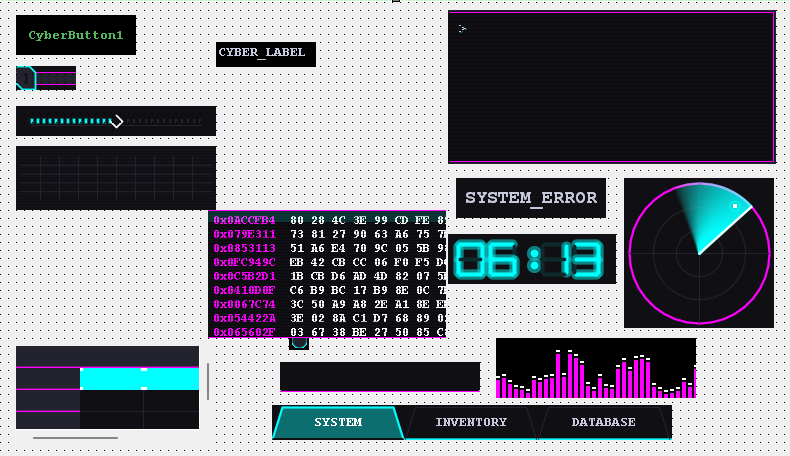
About CyberUI
CyberUI is a highly optimized, cyberpunk-themed visual component library for the Lazarus IDE and Free Pascal. Designed specifically for tactical dashboards, system monitors, and "Visual Operator" simulation games, it relies on pure mathematical rendering (Trigonometry and Polylines) via BGRABitmap. This guarantees maximum stability without relying on fragile, version-dependent rendering functions.
- Standalone Rendering: Built entirely from scratch using native geometry for bulletproof compilation.
- Dynamic Theme Engine: Switch globally between "Neon Cyan", "Crimson Protocol", and "Retro Amber" instantly.
- Rule-Based Ready: Designed to visualize local, rule-based logic engines with immediate visual feedback.
Included Components
The package equips your IDE with 18 specialized components ready to be dropped into your interface:
| Component Category | Included Controls | Description |
|---|---|---|
| Data Streams | TCyberTerminal, TCyberHexDump |
Interactive text consoles and raw hex memory stream simulators with CRT effects. |
| Tactical Systems | TCyberRadar, TCyberReticle |
Sweeping radar scanners and rotating HUD targeting crosshairs. |
| Energy & Signals | TCyberPowerCore, TCyberWaveform |
Pulsing energy reactor indicators and dynamic audio/signal equalizers. |
| Strategic Maps | TCyberHexGrid |
Interactive hexagonal node maps for network topology or tactical grids. |
| Input & Controls | TCyberKnob, TCyberProgressBar |
Draggable rotary dials and segmented loading bars for manual resource allocation. |
| Typography | TCyberGlitchLabel, TCyber7Seg |
Distorted title labels and classic mechanical 7-segment digital displays. |
| Structural | TCyberPanel, TCyberDivider, etc. |
Core layout elements with glowing, chamfered futuristic aesthetics. |
Installation
- Install the BGRABitmap library via the Online Package Manager in Lazarus.
- Clone or download this repository to your local machine.
- Open the Lazarus IDE and go to Package -> Open Package File (.lpk).
- Navigate to the repository's
src/folder and selectcyberui.lpk. - Click Compile, then click Use -> Install.
- Allow Lazarus to rebuild the IDE. The components will now appear under the "CyberUI" tab in your Component Palette.
The PANOPTICON Demo
Included in the demo/ directory is Project PANOPTICON, a master MVP demonstrating an autonomous network defense dashboard. Open Panopticon.lpi to see the components reacting in real-time to a simulated anomaly engine. Click the main "PANOPTICON" title while the demo is running to cycle through the built-in color themes.
☕ Support the Project
If you find Admiral helpful and want to support its ongoing development, consider buying me a coffee or sending a tip. Any support is deeply appreciated!
💡 Your support keeps the momentum going!
Every contribution directly fuels my passion, energy, and motivation to continuously build, maintain, and release even more useful open-source desktop applications for the developer community.