

Catalog · How the catalog works
PascalFramework

Pascal Framework is a foundational library for Free Pascal, Lazarus and Delphi applications.
- ★ 1 on GitHub
- ✦ 1 finds this interesting
Anyone may press Interesting, signed in or not. It helps others find this project.
README

Sphere 10 Pascal Framework
Sphere 10 Pascal Framework is Sphere10's reusable Object Pascal library for Lazarus/Free Pascal (LCL) and Delphi (VCL). It provides data-bound visual grids, multi-step wizards and configurable caches, together with the supporting utilities applications need: buffered streams, scoped resource cleanup, generic collection helpers, data sources, multicast events, date/time helpers and UI event throttling.
The components work together: visual grids consume data sources that handle filtering, sorting and paging; wizard screens share a typed model and can change their route at runtime; caches control how values are fetched, retained and released. Use the units directly in a project or add the optional Lazarus or Delphi package. The examples below show their individual APIs. Open Sphere10PascalFramework.dproj in Delphi or Sphere10PascalFramework.lpi in Lazarus to run one application with Visual grid, Wizard/events, Cache, Refresh throttle and Utilities sections. Both projects use the same entry point and demo sources.
The supplied projects target Delphi 13 Community Edition, Lazarus 2.1 / Free Pascal 3.2.0 and Lazarus 4.8 / Free Pascal 3.2.2 on Windows. Delphi uses VCL; Lazarus uses LCL's Win32 widgetset, including for Win64 applications. See build instructions and the test guide for the compiler-specific commands and verification scope. The CI workflow builds the Lazarus package and demo and runs FPCUnit; its badge reports hosted GitHub results separately from local Delphi and Lazarus checks.
Units
| Unit | Description |
|---|---|
| UVisualGrid.pas | Data-bound LCL/VCL grid with Single/Auto/Manual paging, text/numeric filters, single/multi-column sorting, cell/row/multi-row selection, custom rendering, popup menus, optional background fetching, an owned refresh throttle, cooperative refresh suspension and a customizable loading card with input control. |
| UCache.pas | Generic caches with fetch callbacks, explicit/bulk writes, bulk-fetch and preloaded caches, invalidation, fixed/sliding expiration, capacity and eviction policies, entry pins, staleness checks, null-value policies, lifecycle events and disposal policies. |
| UWizard.pas | Typed-model wizard screens in one host window, with validation, Back/Next navigation, dynamic route insertion/replacement/removal, finish/cancel vetoes, retryable completion and lifecycle notifications. |
| UMemory.pas | Scope-owned cleanup of objects and allocated memory through TDisposables, reverse-order disposal, allocation/reallocation helpers, explicit ownership transfer and shared disposal-policy definitions. |
| UCommon.pas | Managed cleanup through TScope; shared helpers for arrays, Variants, date/time arithmetic, durations, bytes/hex, statistics, result diagnostics, multicast events, thread-targeted notifications, files and CPU information. |
| UCommon.Collections.pas | Composable predicates/comparers and transformation adapters for global functions, object methods and nested callbacks, plus list filtering, removal, slicing and transformation helpers. |
| UCommon.Data.pas | Named Variant rows and column schemas, text/numeric search expressions, filter/sort criteria and generic data sources with filtering, sorting, paging and opt-in invalidatable snapshots. |
| UStreams.pas | A bounded read-ahead stream decorator with configurable buffer size, optional ownership and length caching, logical positioning and synchronous writes. |
| UCommon.UI.pas | Application forms with lifecycle events and owned-object cleanup, the TLoadingCircle visual indicator, control docking and image helpers, and throttled/coalesced UI notifications. |
| UConcurrency.pas | Shared-memory synchronization with concurrent readers, one exclusive writer, upgradeable reads, optional recursion, timed acquisition and thread ownership checks. |
Each framework unit starts with an alphabetical Public types in this unit table, with a one-line description of each supported type.
The bundled Generics.Collections library supplies the Free Pascal lists, dictionaries, queues, stacks and sets; Delphi uses its native RTL generics. UI components select Lazarus LCL or Delphi VCL through compiler conditionals. The supplied projects configure those paths.
Examples
Visual grid
TVisualGrid combines Single/Auto/Manual paging, single-expression or per-column search, single/multi-column sorting and cell, row or multiple-row selection. Configure column widths/stretching, fonts/alignment, custom cell renderers, selection callbacks, popup menus and extra toolbar controls through the same grid unit.
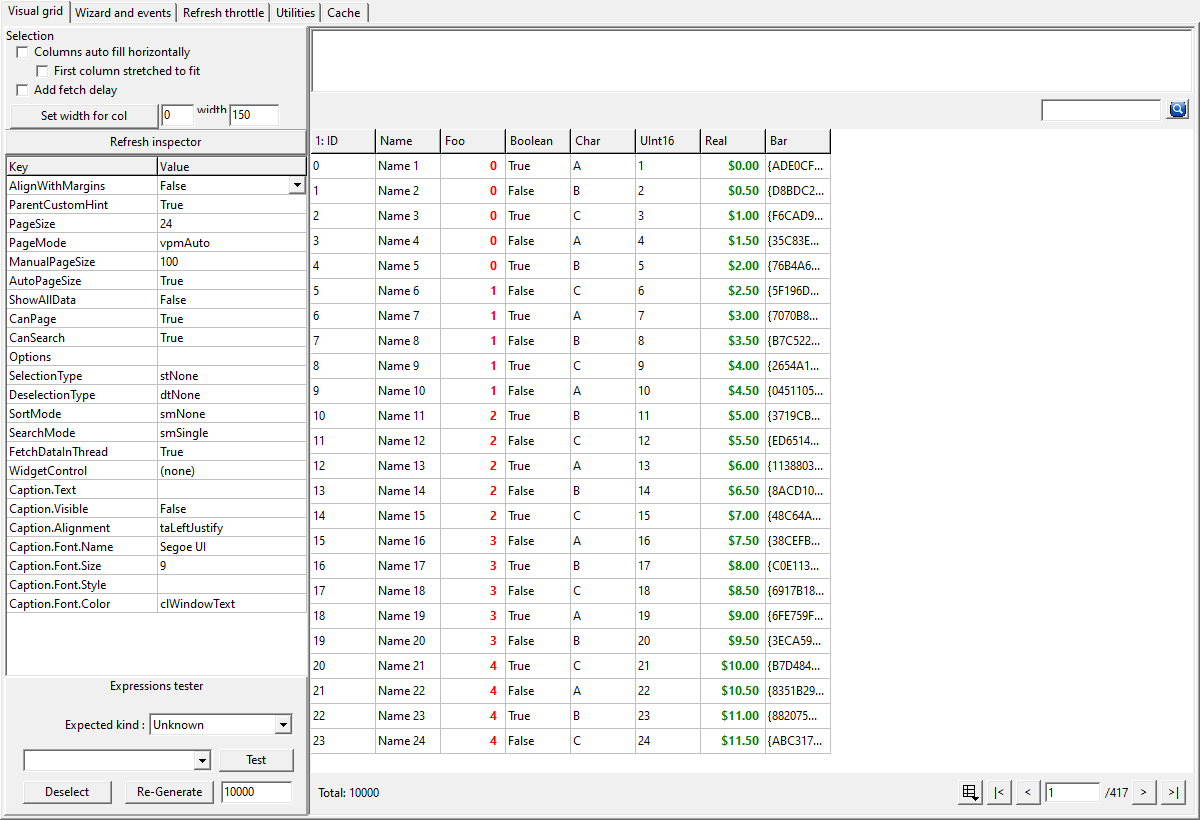
The shared Delphi/Lazarus demo has eight columns, a generated 10,000-record source and a live property editor. The Real column uses the DollarValue renderer. The same application contains the wizard, cache, throttle and utility demonstrations.
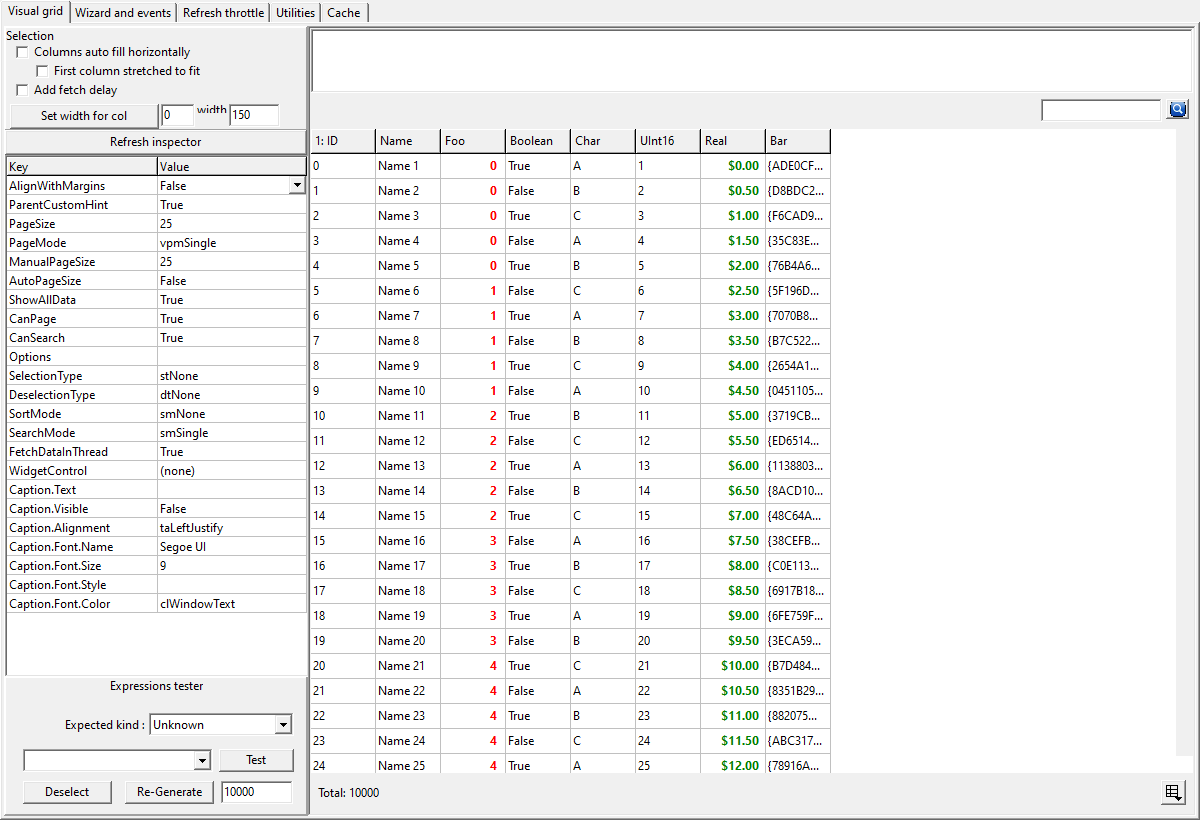
Use the square paging button in the footer to choose Single, Auto or
Manual. Its menu checks the current mode; its tooltip names that mode.
You can also set PageMode in code:
| Mode | Displays | Paging controls |
|---|---|---|
Single (vpmSingle) |
Every matching row in one page, with native scrolling. | Paging button. |
Auto (vpmAuto) |
The complete rows that fit the viewport; horizontal scrolling remains available. | Paging button and navigation. |
Manual (vpmManual) |
A positive ManualPageSize, retained independently of Auto sizing. |
Paging button, page size and navigation. |

Changing mode starts at page zero and resets scrolling to the top-left.
Assigning the current mode preserves the viewport and does not fetch again. Single applies filtering and sorting to the complete result. Returning to
Manual restores its remembered size. The selector remains available for empty
or single-page results; vgoAutoHidePaging hides unnecessary navigation.
The compact icon button sits immediately before the first-page button in a
right-anchored group. Navigation compacts before moving totals or the manual size
editor onto another row; wrapping is used when the compact controls still cannot fit.
Footer controls remain fully visible when fonts or display scaling change.
Before reconfiguring a provider for a new selection, call
grid.CancelActiveFetch, update the provider settings, then call RefreshGrid.
Cancellation requests cooperative worker exit and rejects its result without
waiting. It retains the accepted rows and leaves pending input, the throttle
and manual loading cards unchanged. Keep the provider alive until its worker
has retired; cancellation does not dispose it.
Implement three methods in TCustomDataSource<T>; it supplies filtering, sorting, paging and conversion to named Variant rows.
uses Classes, Variants, Generics.Collections, UCommon.Data;

type
  TNameSource = class(TCustomDataSource<String>)
  protected
    function GetColumns : TDataColumns; override;
    procedure FetchAll(const AContainer : TList<String>); override;
    function GetItemField({$IFDEF FPC}constref{$ELSE}const{$ENDIF} AItem : String; const ABindingName : String) : Variant; override;
  end;

function TNameSource.GetColumns : TDataColumns;
begin
  Result := TDataColumns.Create(TDataColumn.From('Name'));
end;

procedure TNameSource.FetchAll(const AContainer : TList<String>);
begin
  AContainer.Add('Ada');
  AContainer.Add('Grace');
end;

function TNameSource.GetItemField({$IFDEF FPC}constref{$ELSE}const{$ENDIF} AItem : String; const ABindingName : String) : Variant;
begin
  Result := AItem;
end;
Attach it to TVisualGrid from your form:
uses Controls, Forms, UCommon.Data, UCommon.UI, UVisualGrid;

procedure ShowNames(AForm : TForm; AContainer : TWinControl);
var
  source : TNameSource;
  grid : TVisualGrid;
begin
  source := TNameSource.Create(AForm);
  source.SnapshotCacheEnabled := true;
  grid := TVisualGrid.Create(AForm);
  grid.FetchDataInThread := false;
  grid.ManualPageSize := 25; // Remember this size when Manual is selected.
  grid.PageMode := vpmAuto;
  with grid.AddColumn('Name') do begin
    Binding := 'Name';
    Filters := SORTABLE_TEXT_FILTER;
  end;
  AContainer.AddControlDockCenter(grid); // A panel or page on the form.
  grid.DataSource := source; // Fetch the first page.
end;
Set grid.PageMode := vpmSingle to display the full result, or vpmManual to
use the remembered 25-row page. New grids default to Manual with 100 rows.
The existing AutoPageSize and ShowAllData properties select Auto and Single.
Custom data sources must treat a nonpositive requested page size as unbounded;
the grid's public PageSize remains its positive finite capacity.
flowchart LR
    request["Refresh request"] --> throttle["Grid throttle"]
    throttle --> source["Data source<br/>filter, sort, page"]
    source --> grid["Display page"]
Each grid owns a RefreshThrottle, whose default
temNone mode keeps immediate refresh behavior. Enable five-second leading and
trailing admission before assigning DataSource. Here FGrid is an existing
form field of type TVisualGrid:
uses UCommon, UCommon.UI, UVisualGrid;

procedure TMyForm.ConfigureGridRefresh;
begin
  FGrid.RefreshThrottle.Interval := TTimeSpan.FromSeconds(5);
  FGrid.RefreshThrottle.Mode :=
    TThrottledEventMode.temNotifyOnEventBurstStartAndFinished;
  FGrid.RefreshThrottle.OnWaitingChanged.Add(GridWaitingChanged);
end;

procedure TMyForm.GridWaitingChanged(Sender : TObject);
begin
  if FGrid.RefreshSuspended then Exit; // Preserve an application-owned hold card.
  if FGrid.RefreshThrottle.Waiting then
    FGrid.ShowLoading('Please Wait', 'Synchronizing')
  else
    FGrid.HideLoading;
end;
The first request can fetch immediately. Every later client request, including
paging, filtering, sorting, source replacement and resizing, restarts that grid's
quiet timer and retains the latest parameters. While waiting, resizing changes
layout without fetching. After five quiet seconds, one pending request is admitted
with the latest parameters; if its own older fetch is still active, it waits for
that worker to complete. This replay does not restart Waiting. A single input gets
no duplicate ordinary delivery. Internal result layout and worker replay do not
create new inputs. A user completion
handler that calls RefreshGrid does create a new input. Each grid is independent:
node/network state and another grid's worker cannot extend its Waiting state.
Call this configuration and state handler on the UI thread; remove the listener
before destroying a listener that has a shorter lifetime than the grid.
Throttling is optional. The default RefreshThrottle.Mode = temNone admits
requests immediately without arming a quiet timer, while still coalescing requests
behind an active worker. Applications with an explicit busy lifecycle can keep
that mode and use RefreshSuspended to hold queries until their work finishes.
Use RefreshSuspended when application policy must temporarily prevent provider
queries independently of the throttle. Visual layout and refresh requests still
retain the latest parameters. Suspension requests cooperative cancellation of an
active worker without joining it; its obsolete result or error is discarded.
Providers should check their worker's termination flag while doing lengthy work.
For example, an application can pause a view during a background import:
procedure TMyForm.ImportStarted;
begin
  FGrid.RefreshSuspended := True;
  FGrid.ShowLoading('Please Wait', 'Importing');
end;

procedure TMyForm.ImportFinished;
begin
  FGrid.HideLoading;
  FGrid.RefreshThrottle.Cancel; // Cancel while suspended: no early query.
  FGrid.RefreshSuspended := False; // Resume one latest retained request.
end;
Call these methods on the UI thread. Resuming normally respects any remaining throttle wait; the explicit cancellation above admits the latest page immediately, once a canceled older worker has retired. Suspension contains no application, node or networking dependency and does not change the throttle's timer contract.
Call RefreshGrid after changing source data. For worker fetching, set
FetchDataInThread := true, keep the grid/source alive until completion, and keep
source callbacks free of LCL/VCL control access. Publish UI state through the
grid's completion event on the main thread. The worker queues completion directly;
the grid does not poll for a finished fetch. Its owned dispatcher retires the
worker, publishes the page once and discards queued callbacks safely on disposal.
See the unified grid demo for rendering and selection.
The preserved SQLite adapter recipe is reference
source for the older optional mORMot integration, with no separate application target.
Enable SnapshotCacheEnabled when the data source can retain a stable dataset between updates. It keeps one raw snapshot and one current filtered/sorted view, so changing pages converts only the visible rows; changing search or sort reuses the raw snapshot. Caching is off by default. After changing the backing data, invalidate the snapshot before refreshing:
procedure RefreshNames(ASource : TNameSource; AGrid : TVisualGrid);
begin
  ASource.InvalidateSnapshot;
  AGrid.RefreshGrid;
end;
InvalidateSnapshot marks the next fetch for rebuilding without waiting for an active fetch. An in-flight fetch can finish its previous snapshot. Object items remain borrowed: keep them alive while cached snapshots are reused and while fetches are active.
The default FetchPage still loads the initial raw
dataset through FetchAll; caching makes subsequent pages cheaper, not that
initial load. Sources with indexed or database-native paging can override the
virtual method to retrieve only their requested records and return accurate
counts/page bounds. Arbitrary filtering and sorting must still apply to the
complete selected query before choosing its page.
Outstanding grid refreshes retain the previous rows and show a compact bordered loading card after 200 ms, including requests waiting for the refresh throttle. After a page completes, an internal capacity refit does not keep Updating visible over accepted rows. A newer client request keeps its waiting feedback. The card uses TLoadingCircle, stays visible through fetch admission and disappears after completion or cancellation; quick cached pages avoid flashing it.
A failed provider keeps the accepted rows and replaces automatic loading with its error. Synchronous providers also propagate the original exception to their caller. A successful retry clears the error; caller-owned loading remains independent.
Use ShowLoading / HideLoading to hold a card while
waiting for external work, independently of a page fetch. Supply a title,
optional subtitle and optional TGraphic; the grid copies the graphic so its
caller retains ownership. Omitting the image uses the loading circle.
grid.ShowLoading('Please Wait', 'Importing records', MyLoadingImage);
// Grid, search and paging input are disabled; completed rows remain visible.
// Programmatic refreshes can still publish replacement pages.
grid.RefreshGrid;
// Call when the external work and required page publication have finished:
grid.HideLoading;
The optional fourth parameter, ADisableInput, defaults to true. Pass false
for a card that permits interaction. LoadingVisible reports this held state;
IsUpdating continues to report only an asynchronous page fetch. Fetch completion
cannot dismiss a held card. HideLoading restores the current fetch/error
presentation and its input restrictions without changing the grid's Enabled
property. Call these UI methods on the main thread.
Loading circle
TLoadingCircle displays an animated loading
indicator. Set Active on the UI thread while work runs; freeing the control
stops its owned animation timer. The same control supports LCL and VCL.
uses Classes, Controls, UCommon.UI;

function AddLoadingCircle(AOwner : TComponent; AParent : TWinControl) : TLoadingCircle;
begin
  Result := TLoadingCircle.Create(AOwner);
  Result.Parent := AParent;
  Result.SetBounds(12, 12, 36, 36);
  Result.Active := true;
  // Set Result.Active := false when the operation finishes.
end;
The port retains Martin R. Gagné's original copyright and license in the unit source.
Caching
TActionCache<TKey, TValue> memoizes fetches, accepts explicit writes and supports invalidation. Configure fixed or sliding expiration, least-used, largest, smallest, oldest, idle, ASAP or no-policy eviction, pinned entries and on-demand staleness checks. Null handling can cache nil, return it without caching, or reject it; fetch/removal events report each lifecycle phase. Typed callback adapters accept global functions, object methods and nested functions. Subclasses supply CheckStaleness for application-specific stale checks.
Policies and callback types are declared at unit scope. For example,
TCacheExpirationPolicy configures any cache without a generic base alias.
program BasicCache;
{$IFDEF FPC}{$mode Delphi}{$H+}{$ENDIF}

uses SysUtils, UCommon, UMemory, UCache;

type
  TStringCache = TActionCache<Integer, String>;

function Fetch(const AKey : Integer) : String;
begin
  Result := 'value ' + IntToStr(AKey);
end;

function Estimate(const AValue : String) : SizeInt;
begin
  Result := Length(AValue) * SizeOf(Char);
end;

var
  cache : TStringCache;
begin
  cache := TStringCache.Create(nil,
    TCacheValueFetcher<Integer,String>.FromGlobalFunction(Fetch),
    TCacheSizeEstimator<String>.FromGlobalFunction(Estimate),
    idpNone, TCacheReapPolicy.crpLeastUsed,
    TCacheExpirationPolicy.epSinceFetchedTime,
    TCacheNullValuePolicy.nvpCacheNormally,
    1024, TTimeSpan.FromSeconds(30));
  try
    WriteLn(cache[7]);              // Fetch.
    WriteLn(cache[7]);              // Hit.
    cache.Invalidate(7);
    WriteLn(cache[7]);              // Fetch again.
    cache[8] := 'supplied value';   // Store without fetching.
    cache.Get(8).CanPurge := false; // Pin against automatic eviction.
    cache.Remove(8);               // Explicit removal ignores the pin.
  finally
    cache.Free;
  end;
end.
Cache configuration uses the unit-level TCacheExpirationPolicy,
TCacheReapPolicy, TCacheNullValuePolicy and TCacheStaleValuePolicy types from
UCache, shared by every key/value specialization.
Callbacks, fetcher adapters, events and bulk dictionaries are also unit-level
types, such as TCacheValueFetcher<TKey,TValue> and TCacheBulkValues<TKey,TValue>.
The size estimator defines capacity units. The example
uses Length(AValue) * SizeOf(Char) to count native string payload bytes;
returning 1 instead counts entries. This excludes object/string allocation
overhead. Use epSinceLastAccessedTime for sliding expiration.
Cache operations and callbacks use a recursive lock. Callbacks may access the
same cache again, but must not destroy it. Get exposes a borrowed entry; keep
entries and object values alive while using them outside an operation. The value
indexer copies its result while the lock is held.
The ordinary per-key cache above fetches a missing entry, reuses a fresh entry, and fetches again on the first read after invalidation.
sequenceDiagram
    participant App as Application
    participant Cache as TActionCache
    participant Source as Fetch callback
    App->>Cache: cache[7]
    Note over Cache: No cached entry
    Cache->>Source: Fetch(7)
    Source-->>Cache: Fetched value
    Cache->>Cache: Store fetched value
    Cache-->>App: Return fetched value
    App->>Cache: cache[7]
    Note over Cache: Cached entry<br/>is fresh
    Cache-->>App: Return cached value
    App->>Cache: Invalidate(7)
    Cache->>Cache: Mark entry invalidated
    App->>Cache: cache[7]
    Note over Cache: Cached entry<br/>is invalidated
    Cache->>Cache: Remove invalidated entry
    Cache->>Source: Fetch(7)
    Source-->>Cache: Fetched value
    Cache->>Cache: Store fetched value
    Cache-->>App: Return fetched value
Object caches use idpFreeAndNil to free admitted objects on removal or destruction. A rejected explicit write leaves ownership with its caller. Returned metadata and owned values are borrowed. See more cache examples for object ownership, notifications, capacity and callback adapters.
Bulk-Fetch Caching
TBulkFetchActionCache<TKey,TValue> loads a complete dictionary in one provider call. Its first read, ContainsCachedItem or GetAllCachedValues loads that snapshot. Ordinary missing, expired or stale reads refresh the source at most once per request. With FetchOnceOnly = True, reads retain loaded values despite expiry or invalidation. ForceRefresh replaces the snapshot; Purge clears it for a later reload. Bulk Reap validates its arguments and returns zero without evicting snapshot entries.
uses Classes, SysUtils, Generics.Collections, UCommon, UMemory, UCache;

type
  TCatalogue = TBulkFetchActionCache<Integer,String>;

procedure FetchCatalogue(AValues: TCacheBulkValues<Integer,String>);
begin
  // Replace these entries with one database/query result for the whole catalogue.
  AValues.Add(1,'apple');
  AValues.Add(2,'pear');
end;

procedure ShowCatalogue(AOutput: TStrings);
var
  resources: TDisposables;
  cache: TCatalogue;
  snapshot: TArray<String>;
begin
  cache := TCatalogue(resources.AddObject(TCatalogue.Create(nil,
    TCacheBulkValueFetcher<Integer,String>.FromGlobalFunction(FetchCatalogue),
    TCacheExpirationPolicy.epNone,TTimeSpan.MaxValue,True)));
  AOutput.Add(cache[1]);                 // One provider call loads keys 1 and 2.
  AOutput.Add(cache[2]);                 // Uses the already loaded snapshot.
  cache.Invalidate(1);
  AOutput.Add(cache[1]);                 // Fetch-once retains the original value.
  cache.ForceRefresh;                   // Purge first, then fetch the batch again.
  snapshot := cache.GetAllCachedValues; // A copied array of the current values.
  AOutput.Add(IntToStr(Length(snapshot)));
end; // resources frees the cache automatically.
The provider fills a temporary dictionary owned by the cache and must not retain that container. Object/pointer payloads are borrowed, so their owner must keep them alive while the cache or returned values use them. ForceRefresh purges before fetching: provider failure propagates and leaves the old snapshot unavailable; the next read can retry. Individual Remove is unsupported. GetAllCachedValues materializes an array without a per-key fetch; ordinary caches only return current entries, while bulk caches first load an uninitialized snapshot. Object values in that array remain borrowed.
TPreloadedCache<TKey,TValue> borrows an existing dictionary and reads it into a fetch-once snapshot. Keep that original dictionary and its payloads alive until the cache is freed; ForceRefresh sees later edits.
type
  TCatalogueValues = TDictionary<Integer,String>;
  TPreloadedCatalogue = TPreloadedCache<Integer,String>;

procedure ShowPreloaded(AOutput: TStrings);
var
  resources: TDisposables;
  source: TCatalogueValues;
  cache: TPreloadedCatalogue;
begin
  source := TCatalogueValues(resources.AddObject(TCatalogueValues.Create));
  source.Add(1,'apple');
  cache := TPreloadedCatalogue(resources.AddObject(
    TPreloadedCatalogue.Create(nil,source)));
  AOutput.Add(cache[1]);   // apple
  source[1] := 'apricot';
  AOutput.Add(cache[1]);   // apple: existing snapshot
  cache.ForceRefresh;
  AOutput.Add(cache[1]);   // apricot: refreshed source
end; // reverse registration order frees cache before source.
The complete executable examples cover ordinary global/object/nested callbacks, interface wrappers, typed notifications, a cache subclass with stale detection, entry metadata, explicit BulkLoad, bulk-fetch caches and preloaded dictionaries. BulkLoad remains sequential explicit admission: duplicate keys use the last value, a later failure keeps earlier successful writes, and no provider is called.
Wizards
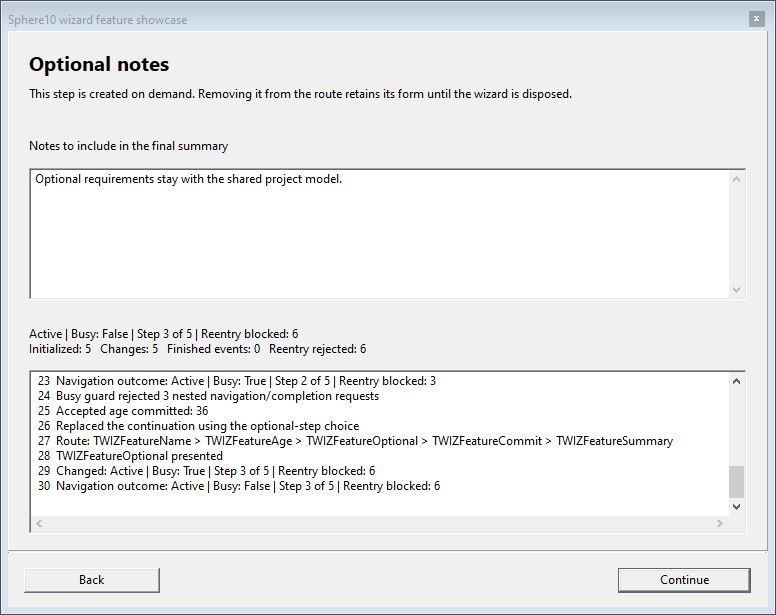
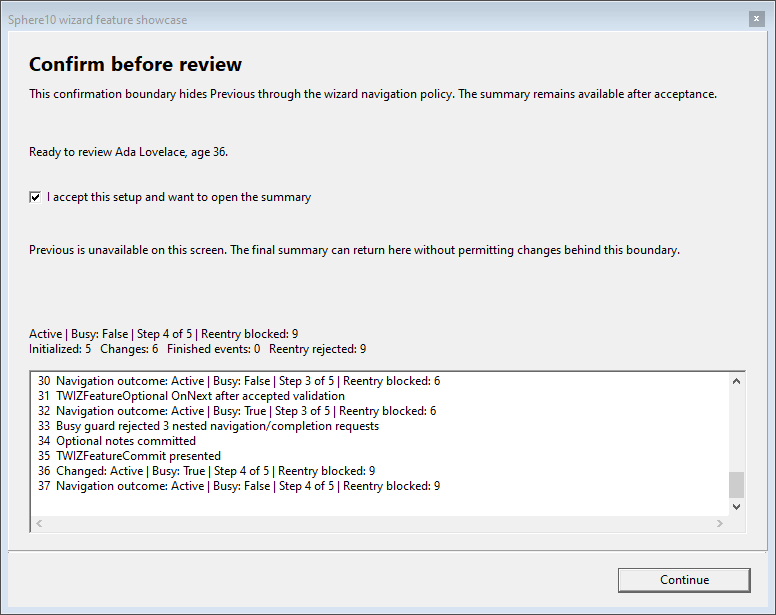
TWizard<T> and TWizardForm<T> host model-bound screens in one modal window, with validation, Back/Next navigation, dynamic branches and retryable finish/cancel vetoes. Lifecycle events and busy-state guards report changes and reject reentry. The wizard owns its screens; the caller owns the model. Run the included showcase from a Lazarus LCL or Delphi VCL application.
uses Classes, UWizardFeatureModel, UWizardFeatureDemo;

procedure ShowFeatureWizard(AOwner : TComponent);
var
  model : TWizardFeatureModel;
  wizard : TWizardFeatureDemo;
begin
  model := TWizardFeatureModel.Create;
  try
    model.IncludeOptional := true;
    model.FinishOutcome := fcoVetoOnce;
    wizard := TWizardFeatureDemo.Create(AOwner, model);
    try
      wizard.Start(model);
    finally
      wizard.Free;
    end;
    // Inspect model.Name, model.Age and model.Events here.
  finally
    model.Free;
  end;
end;
Open Sphere10PascalFramework.lpi in Lazarus or Sphere10PascalFramework.dproj in Delphi, select Wizard and events and choose Wizard feature showcase. Both projects include these demo units.
flowchart LR
    name["Name"] -->|Validate| age["Age and route"]
    age --> notes["Optional notes"] --> confirm["Confirm"]
    age -->|Skip notes| confirm
    confirm --> summary["Summary"]
    summary -->|Accepted| done["Finished"]
    summary -->|Veto or exception: retry| summary
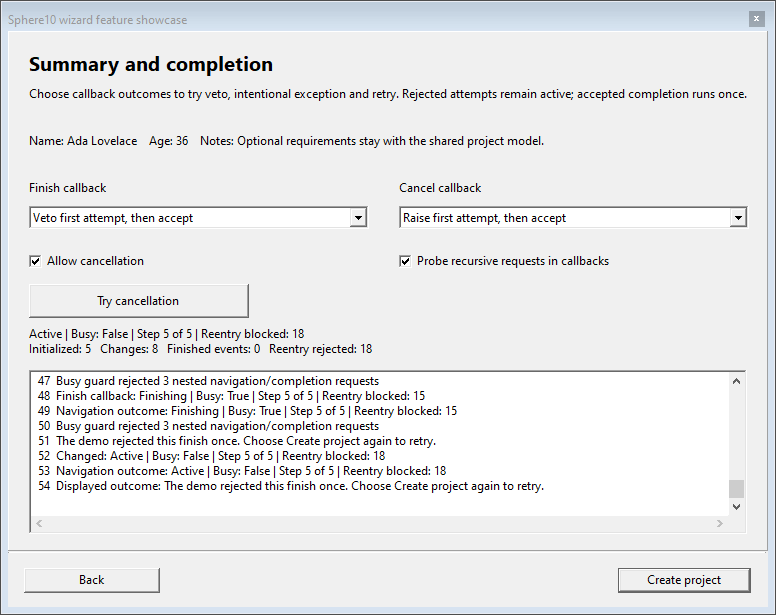
Actual native LCL screens from the showcase:
| Name and validation | Age and route editing |
|---|---|
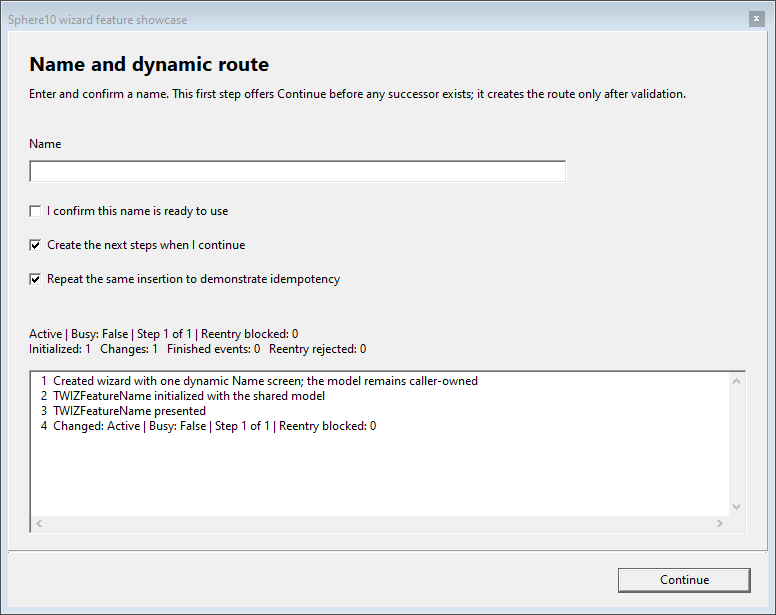 |
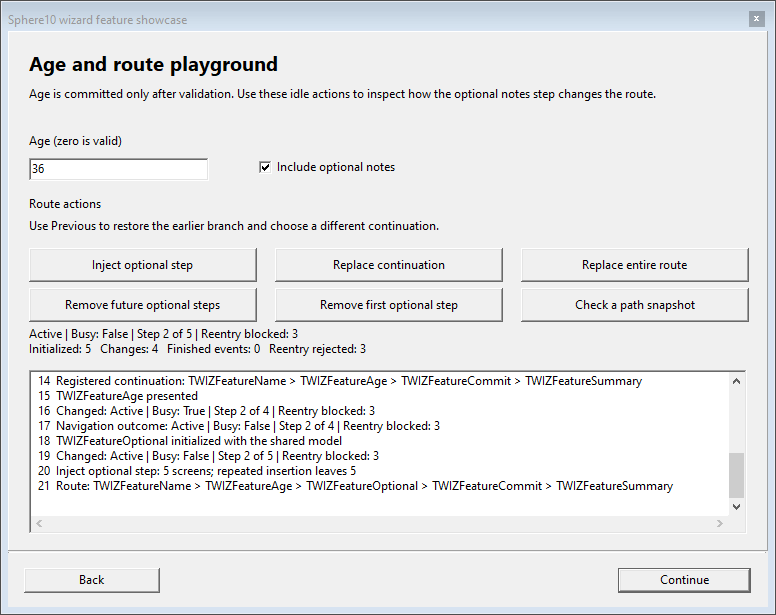 |
| Optional notes | Confirmation boundary |
 |
 |
| Completion and retry | |
 |
Walkthrough and launcher |
Derive screens from TWizardForm<TModel>. Adapt the demo's
Name screen for a minimal dynamic route as
below, adding these units to its implementation uses clause. Model is already
assigned when Initialize runs.
uses UWizard, UWIZFeatureAge, UWIZFeatureCommit, UWIZFeatureSummary;

procedure TWIZFeatureName.Initialize;
begin
  Traits := [wstAssumeHasNext]; // This screen creates its successor later.
  inherited Initialize;
end;

function TWIZFeatureName.Validate(out message : String) : boolean;
begin
  message := '';
  if Trim(FNameEdit.Text) = '' then
    message := 'Enter a name before continuing'
  else if NOT FConfirmedCheckBox.Checked then
    message := 'Confirm the name before continuing';
  Result := message = '';
end;

procedure TWIZFeatureName.OnNext;
begin
  inherited OnNext;
  Model.Name := Trim(FNameEdit.Text);
  UpdatePath(ptInject, [TWIZFeatureAge, TWIZFeatureCommit, TWIZFeatureSummary]);
end;
Use ptReplaceAllNext, ptReplaceAll and ptRemoveNext to replace the continuation, replace the full route or remove future steps. Identical contiguous injections are idempotent. A rejected finish/cancel stays active for retry; accepted completion runs once. See the wizard guide for callback signatures, Back navigation and screen lifetimes.
Managed scopes
TScope is a managed record that runs resource cleanup
when its last owning copy is finalized. Declare a local to retain it through a
procedure, including Exit and exceptions. Its private guardian retains a cleanup
method, so scopes can be returned and copied without pointing to a stack record.
Pass the method to run when the scope ends:
program ManagedScope;

{$IFDEF FPC}{$mode Delphi}{$H+}{$ENDIF}
uses Classes, UCommon, UMemory;

procedure Demo;
var
  Resources: TDisposables;
  Lines: TStringList;

  procedure Work;
  var Scope: TScope;
  begin
    Scope := TScope.Create(Lines.Clear);
    Lines.Add('Working');
    WriteLn(Lines[0]);
  end; // Calls Lines.Clear automatically.

begin
  Lines := Resources.AddObject(TStringList.Create) as TStringList;
  Work;
  WriteLn('Items after scope: ', Lines.Count); // 0
end;

begin
  Demo;
end.
A default scope is empty; IsEmpty tests that state. Create accepts a bound
cleanup method and rejects nil. The callback's target must outlive the scope;
retaining the method does not take ownership of that object. Reset drops this record's
ownership; other copies, including compiler-generated result temporaries, can
retain cleanup until their enclosing routine exits. Keep cleanup on the thread
required by its resource. Cleanup errors propagate; the releasing record is detached first
so a caught failure cannot release that same guardian again.
The shared executable example temporarily
changes a flag, restores it through a custom cleanup, and uses all three lock
scope modes. Neither a caller-side interface variable nor a finally is needed.
Scoped disposal
TDisposables owns several objects and memory blocks
through one record. It releases them in reverse registration order when the
record's scope ends, including when a procedure raises an exception. Its original
implementation remains independent of TScope.
uses Classes, UMemory;

function BuildLocalReport : String;
var
  scope : TDisposables;
  lines : TStringList;
  text : TStringStream;
  output : TMemoryStream;
  scratch : Pointer;
begin
  lines := scope.AddObject(TStringList.Create) as TStringList;
  text := scope.AddObject(TStringStream.Create('Report: ')) as TStringStream;
  output := scope.AddObject(TMemoryStream.Create) as TMemoryStream;
  scope.GetMem(scratch, 256);
  scope.ReallocMem(scratch, 512);
  FillChar(scratch^, 512, 0);
  lines.Add('Ready');
  text.Position := text.Size;
  text.WriteString(lines.Text);
  output.CopyFrom(text, 0);
  Result := text.DataString;
  // Reverse cleanup: scratch, output, text, lines.
end;
Keep the bag in a class field when resources should live as long as their owner:
type
  TReportBuilder = class
  private
    FResources : TDisposables;
    FLines : TStringList;
    FText : TStringStream;
    FOutput : TMemoryStream;
  public
    constructor Create;
    function Build : String;
  end;

constructor TReportBuilder.Create;
begin
  inherited Create;
  FLines := FResources.AddObject(TStringList.Create) as TStringList;
  FText := FResources.AddObject(TStringStream.Create('')) as TStringStream;
  FOutput := FResources.AddObject(TMemoryStream.Create) as TMemoryStream;
end;

function TReportBuilder.Build : String;
begin
  FLines.Clear;
  FText.Size := 0;
  FOutput.Size := 0;
  FLines.Add('Ready');
  FText.WriteString(FLines.Text);
  FOutput.CopyFrom(FText, 0);
  Result := FText.DataString;
end;

function BuildClassReport : String;
var
  report : TReportBuilder;
begin
  report := TReportBuilder.Create;
  try
    Result := report.Build;
  finally
    report.Free; // Finalizes FResources and frees its three objects.
  end;
end;
TReportBuilder needs no destructor solely for those three resources. The
compiler finalizes its managed FResources field when the owner is freed; a
failed constructor also releases resources already registered. If a destructor
must perform additional shutdown work using those resources, do that work before
inherited Destroy; leave their final release to the bag. Register each object
once, and keep component-owned objects with their existing component owner.
Transfer ownership explicitly when a resource must outlive its bag:
function CreateReadyLines : TStringList;
var
  scope : TDisposables;
begin
  Result := scope.AddObject(TStringList.Create) as TStringList;
  Result.Add('Ready');
  scope.RemoveObject(Result); // Caller now owns the returned object.
end;

function CreateOwnedBuffer : Pointer;
var
  scope : TDisposables;
begin
  scope.GetMem(Result, 256);
  FillChar(Result^, 256, 0);
  scope.RemoveMem(Result); // Caller must eventually call System.FreeMem.
end;
Use AddMem to adopt an existing System.GetMem allocation; use the bag's
FreeMem to release a registered allocation early. Objects[...] is the default
property form of AddObject, for example
lines := scope[TStringList.Create] as TStringList. Keep an initialized bag in
its original local variable or class field: do not copy or return the bag, and
do not free a registered object manually. Remove it first to transfer ownership.
If cleanup fails, the bag still attempts all remaining
resources and then propagates the first error.
TDisposePolicy is the shared cleanup-policy enum.
AddObject selects idpFree, and AddMem/GetMem select idpFreeMem.
Consumers such as object caches also accept idpNone, idpNil and
idpFreeAndNil; a cleared stored pointer does not clear a caller's separate
variable. idpRelease is declared, but TDisposables does not implement interface
release through that policy. For reference-counted interfaces, retain an ordinary
interface variable and let the compiler release it.
Arrays and collections
TArrayTool<T> searches and edits dynamic arrays. UCommon.Collections adds list slicing, filtering, sorting and transformations with reusable callbacks.
Array construction, searching, editing and copying
TArrayTool<T> supplies all sixteen operations shown below. Arrays use zero-based
indexes. Remove removes every matching element. InsertAt inserts before an
existing index; use Append to add at the end. Copy allocates independent array
storage but object references still refer to the same objects. Pass the exact
number of enumerable elements to ToArray.
| Operation | Example/result |
|---|---|
Empty, Create |
Empty array or overloads with one through six values. |
Contains |
Boolean membership, optionally returning the index and accepting an equality comparer. |
IndexOf |
Index of a match, or -1; default or supplied equality comparer. |
Add, Append, Prepend, InsertAt |
Grow and insert values. |
Remove, RemoveAt |
Remove all equal values, or one indexed value. |
Swap, MoveItem |
Exchange positions, or move one item while preserving the others' order. |
Copy, Concat |
Copy a whole array/slice, or combine arrays. |
_Length, ToArray |
Open-array length, or materialize an enumerable of known size. |
Comparers, predicates and transformations
The normal entry points are TComparerTool<T>, TPredicateTool<T>,
TListTool<T> and TListTool<T1, T2>. They adapt global functions,
object methods and nested callbacks, compose comparisons/predicates, filter lists
and transform either lists or arrays. Interface variables own their adapters;
the object supplying an object-method callback must outlive every use.
The complete example below also constructs every public adapter class directly:
TNestedComparer, TObjectComparer, TGlobalComparer, TManyComparer,
TInvertedComparer; TNestedPredicate, TObjectPredicate, TGlobalPredicate,
TNotPredicate, TAndManyPredicate, TOrManyPredicate; and
TNestedTransformer, TObjectTransformer, TGlobalTransformer. These are public
for compiler compatibility; the factories are usually simpler for application code.
TListTool.Copy takes a start index and a count, returning a caller-owned new
list. Range, Skip and Take mutate the supplied list and return the signed
size change (new count - old count). Filtering normally keeps object ownership
with the caller; supply idpFreeAndNil only for rejected objects this list owns.
The public spelling of the explicit slot-policy method is DiposeItem.
TSortedHashSetTool<T>.Pop is available only with FPC. It removes and returns
one enumerated value, and rejects an empty set. It is intentionally guarded in
the shared example because Delphi uses its RTL collection types.
Complete checked example: every array operation and every collection adapter type
program ArrayCollectionExamples;
{$IFDEF FPC}{$mode Delphi}{$H+}{$modeswitch nestedprocvars}{$ENDIF}
uses Classes, SysUtils, Generics.Collections, Generics.Defaults,
  UCommon, UCommon.Collections, UMemory;

type
  TIntArrays = TArrayTool<Integer>;
  TIntComparerArrays = TArrayTool<IComparer<Integer>>;
  TIntPredicateArrays = TArrayTool<IPredicate<Integer>>;
  TIntComparerTools = TComparerTool<Integer>;
  TIntPredicateTools = TPredicateTool<Integer>;
  TIntListTools = TListTool<Integer>;
  TIntTextTransforms = TListTool<Integer,String>;
  {$IFDEF FPC}TIntSetTools = TSortedHashSetTool<Integer>;{$ENDIF}

procedure Require(ACondition: Boolean; const AMessage: String);
begin
  if not ACondition then raise Exception.Create(AMessage);
end;

procedure RequireArray(const AActual: TArray<Integer>; const AExpected: array of Integer);
var I: Integer;
begin
  Require(Length(AActual)=Length(AExpected),'Array length');
  for I:=0 to High(AActual) do Require(AActual[I]=AExpected[I],'Array value');
end;

procedure ArrayMethods;
var
  values, snapshot, middle, combined: TArray<Integer>;
  equality: IEqualityComparer<Integer>;
  index: SizeInt;
  scope: TDisposables;
  list: TList<Integer>;
begin
  values := TIntArrays.Empty;
  Require(Length(values)=0,'Empty');
  // Create has overloads for one through six values.
  values := TIntArrays.Create(10);
  RequireArray(values,[10]);
  values := TIntArrays.Create(10,20);
  RequireArray(values,[10,20]);
  values := TIntArrays.Create(10,20,30);
  RequireArray(values,[10,20,30]);
  values := TIntArrays.Create(10,20,30,40);
  RequireArray(values,[10,20,30,40]);
  values := TIntArrays.Create(10,20,30,40,50);
  RequireArray(values,[10,20,30,40,50]);
  values := TIntArrays.Create(10,20,30,40,50,60);
  RequireArray(values,[10,20,30,40,50,60]);

  values := TIntArrays.Create(10,20,30);
  TIntArrays.Add(values,40);               // 10,20,30,40
  TIntArrays.Append(values,50);            // 10,20,30,40,50
  TIntArrays.Prepend(values,0);            // 0,10,20,30,40,50
  TIntArrays.InsertAt(values,2,15);         // 0,10,15,20,30,40,50
  TIntArrays.Swap(values,0,6);             // 50,10,15,20,30,40,0
  TIntArrays.MoveItem(values,6,0);         // 0,50,10,15,20,30,40
  TIntArrays.Remove(values,20);            // 0,50,10,15,30,40
  equality := TEqualityComparer<Integer>.Default;
  TIntArrays.Remove(values,50,equality);   // 0,10,15,30,40
  TIntArrays.RemoveAt(values,0);           // 10,15,30,40
  RequireArray(values,[10,15,30,40]);

  snapshot := TIntArrays.Copy(values);
  middle := TIntArrays.Copy(values,1,2);   // 15,30
  combined := TIntArrays.Concat([
    middle,TIntArrays.Create(50,60)]);     // 15,30,50,60
  values[0] := 99;                                 // snapshot still starts with 10.
  RequireArray(snapshot,[10,15,30,40]);
  RequireArray(middle,[15,30]);
  RequireArray(combined,[15,30,50,60]);
  Require(TIntArrays.Contains(combined,30,index),'Contains/out');
  Require(index=1,'Contains/out index');
  Require(TIntArrays.Contains(combined,60,equality,index),'Contains/comparer');
  Require(index=3,'Contains/comparer index');
  Require(not TIntArrays.Contains(combined,999),'Contains/bool');
  Require(TIntArrays.IndexOf(combined,50)=2,'IndexOf');
  Require(TIntArrays.IndexOf(combined,15,equality)=0,'IndexOf/comparer');
  Require(TIntArrays._Length(combined)=4,'_Length');
  list := scope.AddObject(TList<Integer>.Create) as TList<Integer>;
  list.AddRange(combined);
  values := TIntArrays.ToArray(list,list.Count);
  RequireArray(values,[15,30,50,60]);
  Writeln('PASS all TArrayTool methods and overloads');
end;

function Ascending({$IFDEF FPC}constref{$ELSE}const{$ENDIF} ALeft,ARight: Integer): Integer;
begin
  Result := TComparer<Integer>.Default.Compare(ALeft,ARight);
end;

function Even({$IFDEF FPC}constref{$ELSE}const{$ENDIF} AValue: Integer): Boolean;
begin
  Result := (AValue mod 2)=0;
end;

function NumberText({$IFDEF FPC}constref{$ELSE}const{$ENDIF} AValue: Integer): String;
begin
  Result := 'item '+IntToStr(AValue);
end;

type
  TCallbacks = class
    function Compare({$IFDEF FPC}constref{$ELSE}const{$ENDIF} ALeft,ARight: Integer): Integer;
    function Positive({$IFDEF FPC}constref{$ELSE}const{$ENDIF} AValue: Integer): Boolean;
    function Text({$IFDEF FPC}constref{$ELSE}const{$ENDIF} AValue: Integer): String;
  end;

function TCallbacks.Compare({$IFDEF FPC}constref{$ELSE}const{$ENDIF} ALeft,ARight: Integer): Integer;
begin
  Result := Ascending(ALeft,ARight);
end;
function TCallbacks.Positive({$IFDEF FPC}constref{$ELSE}const{$ENDIF} AValue: Integer): Boolean;
begin
  Result := AValue>0;
end;
function TCallbacks.Text({$IFDEF FPC}constref{$ELSE}const{$ENDIF} AValue: Integer): String;
begin
  Result := 'object '+IntToStr(AValue);
end;

procedure CollectionAdapters;
var
  scope: TDisposables;
  callbacks: TCallbacks;
  globalCompare: TGlobalComparerFunc<Integer>;
  objectCompare: TObjectComparerFunc<Integer>;
  nestedCompare: TNestedComparerFunc<Integer>;
  globalPredicate: TGlobalPredicateFunc<Integer>;
  objectPredicate: TObjectPredicateFunc<Integer>;
  nestedPredicate: TNestedPredicateFunc<Integer>;
  globalTransform: TGlobalTransformFunc<Integer,String>;
  objectTransform: TObjectTransformFunc<Integer,String>;
  nestedTransform: TNestedTransformFunc<Integer,String>;
  globalComparer,objectComparer,nestedComparer,combinedComparer,invertedComparer: IComparer<Integer>;
  globalFilter,objectFilter,nestedFilter,both,either,negated: IPredicate<Integer>;
  globalTransformer,objectTransformer,nestedTransformer: ITransformer<Integer,String>;
  list, copied: TList<Integer>;
  numbers: TArray<Integer>;
  texts: TArray<String>;
  {$IFDEF FPC}setOfNumbers: TSortedHashSet<Integer>; popped: Integer;{$ENDIF}

  {$IFDEF FPC}
  function CompareInScope(constref ALeft,ARight: Integer): Integer;
  begin
    Result := Ascending(ALeft,ARight);
  end;
  function UnderTen(constref AValue: Integer): Boolean;
  begin
    Result := AValue<10;
  end;
  function ScopedText(constref AValue: Integer): String;
  begin
    Result := 'nested '+IntToStr(AValue);
  end;
  {$ENDIF}
begin
  callbacks := scope.AddObject(TCallbacks.Create) as TCallbacks;
  globalCompare := Ascending; objectCompare := callbacks.Compare;
  globalPredicate := Even; objectPredicate := callbacks.Positive;
  globalTransform := NumberText; objectTransform := callbacks.Text;
  {$IFDEF FPC}
  nestedCompare := CompareInScope; nestedPredicate := UnderTen; nestedTransform := ScopedText;
  {$ELSE}
  nestedCompare :=
    function(const L,R: Integer): Integer
    begin
      Result := Ascending(L,R);
    end;
  nestedPredicate :=
    function(const V: Integer): Boolean
    begin
      Result := V<10;
    end;
  nestedTransform :=
    function(const V: Integer): String
    begin
      Result := 'nested '+IntToStr(V);
    end;
  {$ENDIF}

  // The factories return reference-counted interfaces. These concrete adapters
  // are also public, although declared for compiler compatibility.
  globalComparer := TGlobalComparer<Integer>.Create(globalCompare);
  objectComparer := TObjectComparer<Integer>.Create(objectCompare);
  nestedComparer := TNestedComparer<Integer>.Create(nestedCompare);
  combinedComparer := TManyComparer<Integer>.Create(
    TIntComparerArrays.Create(globalComparer,objectComparer));
  invertedComparer := TInvertedComparer<Integer>.Create(combinedComparer);
  Require(invertedComparer.Compare(1,2)>0,'Concrete comparer adapters');
  Require(nestedComparer.Compare(1,2)<0,'Nested comparer');
  globalComparer := TIntComparerTools.FromFunc(globalCompare);
  objectComparer := TIntComparerTools.FromFunc(objectCompare);
  nestedComparer := TIntComparerTools.FromFunc(nestedCompare);
  combinedComparer := TIntComparerTools.Many([globalComparer,objectComparer]);
  invertedComparer := TIntComparerTools.Inverted(combinedComparer);
  Require(invertedComparer.Compare(1,2)>0,'Comparer tool');
  Require(TIntComparerTools.AlwaysEqual.Compare(1,2)=0,'AlwaysEqual');

  globalFilter := TGlobalPredicate<Integer>.Create(globalPredicate);
  objectFilter := TObjectPredicate<Integer>.Create(objectPredicate);
  nestedFilter := TNestedPredicate<Integer>.Create(nestedPredicate);
  both := TAndManyPredicate<Integer>.Create(
    TIntPredicateArrays.Create(globalFilter,objectFilter));
  either := TOrManyPredicate<Integer>.Create(
    TIntPredicateArrays.Create(globalFilter,nestedFilter));
  negated := TNotPredicate<Integer>.Create(globalFilter);
  Require(both.Evaluate(2) and not both.Evaluate(-2),'And predicate');
  Require(either.Evaluate(3) and not either.Evaluate(11),'Or predicate');
  Require(negated.Evaluate(3),'Not predicate');
  both := TIntPredicateTools.AndMany([globalFilter,objectFilter]);
  either := TIntPredicateTools.OrMany([globalFilter,nestedFilter]);
  negated := TIntPredicateTools.NegatePredicate(globalFilter);
  Require(both.Evaluate(2) and either.Evaluate(3) and negated.Evaluate(3),'Predicate tool');
  globalFilter := TIntPredicateTools.FromFunc(globalPredicate);
  objectFilter := TIntPredicateTools.FromFunc(objectPredicate);
  nestedFilter := TIntPredicateTools.FromFunc(nestedPredicate);
  both := TIntPredicateTools.TruePredicate;
  either := TIntPredicateTools.FalsePredicate;
  Require(both.Evaluate(0) and not either.Evaluate(0),'Constant predicates');

  globalTransformer := TGlobalTransformer<Integer,String>.Create(globalTransform);
  objectTransformer := TObjectTransformer<Integer,String>.Create(objectTransform);
  nestedTransformer := TNestedTransformer<Integer,String>.Create(nestedTransform);
  Require(globalTransformer.Transform(2)='item 2','Global transformer');
  Require(objectTransformer.Transform(2)='object 2','Object transformer');
  Require(nestedTransformer.Transform(2)='nested 2','Nested transformer');
  numbers := TIntArrays.Create(1,2,3,4);
  texts := TIntTextTransforms.Transform(numbers,globalTransformer);
  Require((Length(texts)=4) and (texts[3]='item 4'),'Interface array transform');
  list := scope.AddObject(TList<Integer>.Create) as TList<Integer>;
  list.AddRange(numbers);
  texts := TIntTextTransforms.Transform(list,objectTransformer);
  Require(texts[0]='object 1','Interface list transform');
  // Function-adapter overloads work on both arrays and lists.
  texts := TIntTextTransforms.Transform(numbers,globalTransform);
  Require(texts[0]='item 1','Global array transform');
  texts := TIntTextTransforms.Transform(numbers,objectTransform);
  Require(texts[0]='object 1','Object array transform');
  texts := TIntTextTransforms.Transform(numbers,nestedTransform);
  Require(texts[0]='nested 1','Nested array transform');
  texts := TIntTextTransforms.Transform(list,globalTransform);
  Require(texts[0]='item 1','Global list transform');
  texts := TIntTextTransforms.Transform(list,objectTransform);
  Require(texts[0]='object 1','Object list transform');
  texts := TIntTextTransforms.Transform(list,nestedTransform);
  Require(texts[0]='nested 1','Nested list transform');
  TIntListTools.FilterBy(list,globalFilter); // list now contains 2,4.
  list.Sort(invertedComparer); // 4,2.
  Require((list.Count=2) and (list[0]=4) and (list[1]=2),'List filter/sort');
  Require(TIntListTools.RemoveBy(list,objectFilter)=2,'Remove matching items');
  list.AddRange([10,20,30,40]);
  copied := scope.AddObject(TIntListTools.Copy(list,1,2)) as TList<Integer>;
  Require((copied.Count=2) and (copied[0]=20) and (copied[1]=30),'Copy count');
  Require(TIntListTools.Range(list,1,3)=-1,'Range size delta'); // 20,30,40
  Require(TIntListTools.Skip(list,1)=-1,'Skip size delta');    // 30,40
  Require(TIntListTools.Take(list,1)=-1,'Take size delta');    // 30
  TIntListTools.DiposeItem(list,0,idpNil); // Zero the slot; this does not remove it.
  Require((list.Count=1) and (list[0]=0),'Explicit item policy');
  {$IFDEF FPC}
  setOfNumbers := scope.AddObject(TSortedHashSet<Integer>.Create) as TSortedHashSet<Integer>;
  setOfNumbers.Add(1); setOfNumbers.Add(3);
  popped := TIntSetTools.Pop(setOfNumbers);
  Require((setOfNumbers.Count=1) and not setOfNumbers.Contains(popped),'Sorted set Pop');
  {$ENDIF}
  Writeln('PASS public comparer, predicate, transformer and collection adapter types');
end;

begin
  ArrayMethods;
  CollectionAdapters;
end.
Results and diagnostics
TResult carries a Variant value and timestamped debug, info, warning or error messages. IsSuccess/IsFailure reflect error status; ToString formats the collected diagnostics.
uses UCommon;

function ValidateName(const AName : String) : TResult;
begin
  if AName = '' then
    Exit(TResult.Failure('Enter a name'));
  Result := TResult.Success('Name accepted');
  Result.Value := AName;
end;
Dates, bytes and statistics
TDateTimeHelper and TTimeSpan provide calendar/duration arithmetic, parsing and formatting. Hex2Bytes/Bytes2Hex convert binary data; TVariantTool compares numeric/text Variants; TStatistics accumulates count, sum, min/max, mean and variance without keeping every sample.
uses SysUtils, UCommon;

procedure CommonExample;
var
  expires : TDateTime;
  bytes : TBytes;
  stats : TStatistics;
begin
  expires := TDateTime.Now.AddMinutes(5);
  bytes := Hex2Bytes('00FF');
  WriteLn(Bytes2Hex(bytes));                // 00FF.
  stats.Reset;
  stats.AddDatum(10);
  stats.AddDatum(20);
  stats.AddDatum(30);
  WriteLn(stats.Mean:0:1);                  // 20.0.
  WriteLn(TVariantTool.NumericGTE(21, 18));  // TRUE.
end;
TBox<T> wraps a typed value in an object; TFileTool.AppendText appends plain UTF-8 text followed by CRLF, without a BOM or binary length prefix; TCPUTool.GetLogicalCPUCount reports logical processors.
Delphi's TFileStreamHelper.WriteString writes UTF-8 bytes without adding a newline.
File encoding happens at the stream boundary: Delphi supplies native Unicode;
FPC callers use Lazarus's UTF-8 String convention.
Buffered streams
TBufferedStream combines small reads from a wrapped
TStream into larger reads using a fixed buffer, 64 KiB by default. It accepts
forward-only streams, supports the wrapped stream's seeking and resizing, and
writes immediately. Buffer size must be positive.
Each Read performs at most one wrapped read and can return a short result;
the input stream determines blocking behavior.
uses Classes, UStreams;

function ReadHeader(const AFileName: String): Cardinal;
var
  LInput: TStream;
begin
  LInput := TFileStream.Create(AFileName, fmOpenRead or fmShareDenyWrite);
  try
    // Buffer small serialized fields; denied writes make length caching valid.
    LInput := TBufferedStream.Create(LInput, 64 * 1024, True, True, True);
    LInput.ReadBuffer(Result, SizeOf(Result));
  finally
    LInput.Free;
  end;
end;
Pass False for ownership to leave the input open. Access it through the decorator
while buffering: its logical position can precede the wrapped stream's physical
position. FlushUnreadData returns unread bytes to a seekable input before
handing it back. Disposal does not rewind borrowed inputs; forward-only inputs
cannot recover unread bytes. Writing or resizing with unread buffered data also
requires seeking to restore the logical position first.
The same worked example runs in the Delphi and Lazarus demo under Utilities → Core API.
EnableReadBuffering and EnableStreamLengthCaching both default to True;
the fourth and fifth constructor arguments configure length caching and read
buffering respectively. Length caching retains one successful Size query as
an Int64; writes and resizing invalidate it, including failed or partial changes.
Set EnableStreamLengthCaching := False for inputs that can grow independently.
Construction never queries the input size or position.
EnableBuffering and DisableBuffering switch both flags. Disabling read buffering
frees the private BufferedData allocation and delegates reads, writes and seeks
directly. Size still follows EnableStreamLengthCaching, independently of read
buffering. BufferSize retains the configured capacity; enabling
allocates it again. With unread bytes, disabling throws without changing either
flag or seeking implicitly. Consume those bytes or call FlushUnreadData first;
if rewinding is unsupported, it throws and preserves the unread bytes.
For direct reads with cached length, set only EnableReadBuffering := False.
procedure ReadSections(AInput: TBufferedStream);
var
  LHeader: Cardinal;
  LBlock: array[0..32767] of Byte;
begin
  // Read-ahead combines the small fields of a serialized header.
  AInput.EnableBuffering;
  AInput.ReadBuffer(LHeader, SizeOf(LHeader));
  AInput.FlushUnreadData;
  // This section supplies its own bulk buffer, so avoid the intermediate copy.
  AInput.DisableBuffering;
  AInput.ReadBuffer(LBlock, SizeOf(LBlock));
  AInput.EnableBuffering;
end;
SynchronizePosition remains an alias for FlushUnreadData. The flags can also
be set separately; length caching keeps working while read buffering is disabled.
Multicast events
TNotifyManyEvent adds/removes several object-method listeners and invokes them together. Thread notification helpers can queue individual listeners for the UI main thread.
uses Classes, UCommon;

type
  TDocument = class
  private
    FChanged : TNotifyManyEvent;
    procedure HandleChanged(Sender : TObject);
  public
    procedure Demonstrate;
  end;

procedure TDocument.HandleChanged(Sender : TObject);
begin
  WriteLn('Document changed');
end;

procedure TDocument.Demonstrate;
begin
  FChanged.Add(HandleChanged);
  try
    FChanged.Invoke(Self);
  finally
    FChanged.Remove(HandleChanged);
  end;
end;
Add(HandleChanged, True) dispatches on the main thread: calls already there run
immediately; worker calls are queued. Queued senders and receivers must remain
alive until delivery.
Read/Write Locking
TReadWriteLock protects shared memory with multiple concurrent readers or one exclusive writer. Hold a read lock while inspecting shared data and a write lock while changing it.
Use upgradeable read when an inspection may lead to a change. One thread can reserve that mode while other readers continue; its write waits for those readers to leave. Timed acquisition and optional recursion support controlled contention.
Retain a TScope local to release an acquisition automatically:
uses UCommon, UConcurrency;

procedure ChangeValue(Gate: TReadWriteLock; var Value: Integer);
var
  Scope: TScope;
begin
  Scope := Gate.EnterWriteScope;
  Inc(Value);
end; // Also releases on Exit or an exception.

function ReadValue(Gate: TReadWriteLock; var Value: Integer): Integer;
var
  Scope: TScope;
begin
  Scope := Gate.EnterReadScope;
  Result := Value;
end;

procedure ChangeIfNeeded(Gate: TReadWriteLock; var Value: Integer);
var
  Scope: TScope;
begin
  Scope := Gate.EnterUpgradeableReadScope;
  if Value = 0 then ChangeValue(Gate, Value);
  // ChangeValue's write scope has ended; this upgradeable scope remains held.
end;
Each scope owns one typed acquisition. Copies retain that same acquisition;
they do not acquire another lock. Keep the lock alive until every scope copy
ends, and finalize lock scopes on the acquiring thread. For code shared with
FPC, a plain nested begin/end does not create a shorter managed-local lifetime;
use a helper procedure as above when an inner write must finish earlier.
Always retain the returned record instead of discarding it.
The lower-level Acquire*Lock, TryAcquire*Lock and Release*Lock methods remain
available for explicit ownership:
uses UConcurrency;

procedure LockExample;
var
  gate: TReadWriteLock;
  value: Integer;
begin
  gate := TReadWriteLock.Create(lrpNoRecursion);
  try
    value := 0;
    gate.AcquireWriteLock;
    try
      Inc(value);
    finally
      gate.ReleaseWriteLock;
    end;

    // Other threads may hold their own read locks concurrently.
    if gate.TryAcquireReadLock(0) then
    try
      WriteLn(value);
    finally
      gate.ReleaseReadLock;
    end;

    // Choose upgradeable mode before work that may need a write.
    gate.AcquireUpgradeableReadLock;
    try
      if value = 1 then begin
        gate.AcquireWriteLock;
        try
          value := 2;
        finally
          gate.ReleaseWriteLock;
        end;
      end;
      // The surrounding upgradeable acquisition is still held here.
    finally
      gate.ReleaseUpgradeableReadLock;
    end;
  finally
    gate.Free;
  end;
end;
Promotion uses AcquireWriteLock or TryAcquireWriteLock while the same thread
holds upgradeable read ownership. This is allowed with lrpNoRecursion, as in
the example. The write acquisition is additional:
ReleaseWriteLock releases only that write acquisition; the surrounding
ReleaseUpgradeableReadLock remains necessary. The nested try/finally blocks
above preserve that balance when protected work raises an exception. Recursive
acquisitions likewise require one matching typed release for each acquisition;
the lock never guesses which mode a caller intends to release.
Each TryAcquire*Lock accepts integer milliseconds: -1 waits indefinitely,
0 tests immediately, and a positive value bounds the wait; for example,
TryAcquireWriteLock(5000) waits up to five seconds. A failed attempt
retains any outer acquisition. lrpNoRecursion is the default;
lrpSupportsRecursion permits nested ownership, including a writer taking a read
lock. Ordinary read ownership cannot become write or upgradeable ownership.
Waiting writers take precedence over new readers. There is no FIFO guarantee.
Release every acquisition on the thread that acquired it. Is*LockHeld and
Recursive*Count describe the calling thread; CurrentReadCount counts distinct
explicit read owners, excluding upgradeable-only access. Stop and join consumers
before freeing the lock. Dispose rejects active owners/waiters without changing
their state; finite TryAcquire calls allow consumers to check their own cooperative
cancellation between waits. See the shared regression cases.
Throttled UI events
Open Refresh throttle in the shared demo to test repeated Notify clicks against a real grid and counted data source. Its countdown and event log show immediate delivery, quiet-period resets and one trailing refresh. Timing walkthrough.
TThrottledEvent coalesces repeated UI events. Select immediate, interval, burst-end or burst-start-and-end delivery; inspect suppressed-call counts and notification timestamps. Create an owned event, then call its Notify from UI handlers.
uses Classes, UCommon, UCommon.UI;

function CreateRefreshEvent(AOwner : TComponent; AHandler : TNotifyEvent) : TThrottledEvent;
begin
  Result := TThrottledEvent.Create(AOwner);
  Result.Interval := TTimeSpan.FromMilliseconds(250);
  Result.Mode :=
    TThrottledEventMode.temNotifyOnEventBurstFinished;
  Result.Add(AHandler);
end;
An active LCL/VCL message loop is required. temNotifyOnEventBurstFinished waits for
one full Interval without another Notify call; each new event restarts that
quiet period. temNotifyOnEventBurstStartAndFinished adds an eligible immediate
leading notification to the same trailing behavior. Use
temNotifyEveryInterval for periodic delivery during a continuous burst instead.
Each deferred input in the two quiet-burst modes cancels and rearms the native
timer for a full Interval; periodic mode retains its already armed deadline.
Polling application state must not call Notify unless a new event occurred.
Once the previous burst has ended with its trailing callback, a new input starts
a new leading notification without an additional delivery-based cooldown.
The two quiet-burst modes expose Waiting and OnWaitingChanged for driving a busy UI independently of data-fetch completion:
procedure BindBusyState(AEvent : TThrottledEvent; AStateChanged : TNotifyEvent);
begin
  AEvent.OnWaitingChanged.Add(AStateChanged);
  AStateChanged(AEvent); // Also apply the initial state.
end;
The state-change handler reads TThrottledEvent(Sender).Waiting to show or hide
its busy presentation. State and timer changes are committed before listeners
run. The first input starts waiting and delivers immediately in start-and-end
mode; each further input restarts the quiet timer. After silence, one pending
delivery runs and waiting ends. A single input ends waiting without a duplicate
delivery. Node, network and worker state do not enter this calculation.
BurstActive is an alias for Waiting. The older Started/Finishing/Finished
events remain available. Cancel and changing Mode clear waiting without an
ordinary delivery or a fabricated quiet finish; state-change listeners still
receive the transition. Exceptions from callbacks propagate while leaving the
timer/state coherent. A running page fetch can retain its own loading UI after
the throttle's busy presentation has ended.
The optional Postpone API is an explicit new request
to delay a delivery, retained for existing callers. A consumer requiring only
refresh-input quiet periods should use Notify and Waiting, without an external
finishing veto or polling another service's status.
Form ownership and docking
TApplicationForm adds first-activation/destruction events, configurable close behavior and AutoDispose for form-owned noncomponent objects. AddControlDockCenter fills a container; SetImageListPicture copies an image-list entry into a TImage. Controls retain normal component ownership.
uses Classes, Controls, ExtCtrls, UCommon.UI;

procedure PrepareForm(AForm : TApplicationForm; AContainer : TWinControl);
var
  names : TStringList;
  panel : TPanel;
begin
  names := AForm.AutoDispose(TStringList.Create) as TStringList;
  names.Add('Ada');
  panel := TPanel.Create(AForm);
  panel.Caption := names[0];
  AContainer.AddControlDockCenter(panel);
end;
Application forms hide on Close by default; hidden forms still own their resources.
Data rows and search expressions
Column names, named row bindings, grid column names and
Binding/SortBinding/DisplayBinding use native String. Data-source overrides
must declare GetItemField(...; const ABindingName: String) too. This retains
Unicode text in Delphi and the normal Lazarus text conventions in FPC. The
search-expression tokenizer keeps its explicit UTF-8 input/token contract;
that byte-level parser boundary is separate from schema and UI names.
TDataRow and TDataColumns expose named fields through a managed Variant. Filter/sort criteria describe text and numeric comparisons and sort directions; data sources choose null ordering. TSearchExpressionService parses numeric comparisons, inclusive/exclusive intervals and text-match expressions. Use one schema ID for each consistent column set; field names are case-sensitive.
uses SysUtils, Variants, UCommon.Data;

type
  TPersonSchema = class end;

procedure ShowPerson;
var
  columns : TDataColumns;
  row : Variant;
  expression : TExpressionRecord;
begin
  columns := TDataColumns.Create(
    TDataColumn.From('ID', true), TDataColumn.From('Name'));
  row := TDataRow.New(PtrInt(TPersonSchema), columns);
  row.ID := 7;
  row.Name := 'Ada';
  WriteLn(VarToStr(row.Name));
  expression := TSearchExpressionService.Parse('>=18');
  // ekNum, nckNumericGTE, Values[0] = '18'.
  expression := TSearchExpressionService.Parse('[10,20]'); // Inclusive interval.
  expression := TSearchExpressionService.Parse('Ada%');  // Text prefix.
end;
Complete API recipes
Run Utilities in the shared Delphi/Lazarus demo for the complete array, disposal, core and UI recipes. The Cache tab also has Run complete cache API. Recipes display their results in the memo. Array, core and UI recipes also check expected outcomes.
| Recipe | Demonstrates |
|---|---|
| Arrays and collections | Every array operation and overload; all public comparer, predicate, list and transformation adapters. |
| Scoped resources | Several owned objects and memory blocks; automatic cleanup in local scopes and class-owned bags; ownership transfer. |
| Caches | Per-key and bulk-fetch caches, preloaded dictionaries, callback families, entry metadata, notifications and subclassed stale checks. |
| Core utilities | Results, dates, statistics, Variants, files, buffered streams, queued notifications, read/write locking, data sources, search expressions and common UI helpers. |
| Grid and wizard APIs | Column callbacks, selection, native adapters, typed wizard models, dynamic routes, host windows and lifecycle callbacks. |
The public type index maps each public Framework type to its worked example, including aliases, records and helpers. Empty placeholders and platform-only APIs are identified explicitly. Bundled third-party collection types are outside this index.
Open, build and test
Open the appropriate main project from the repository root:
| Project | Purpose |
|---|---|
| Sphere10PascalFramework.dproj | Delphi/VCL app: grid, wizard/events, cache, throttle and utility demonstrations. |
| Sphere10PascalFramework.lpi | The same app and shared Pascal sources under Lazarus/FPC. |
Automated unit tests are separate from the demo application; see the
test guide. Optional reusable library packages and project
groups are described in the package guide.
For Free Pascal, use Delphi mode and add src/Sphere10 and src/Generics.Collections to the unit
search path. Its UI units use Lazarus LCL; the supplied projects configure their
paths. Package installation is optional; see the package guide.
For Delphi, open Sphere10PascalFramework.dproj and press F9 to build and run the
unified demo. It references src/Sphere10 directly and needs no installed package.
The optional runtime package is a library build target; the runnable demo is the
first project in the group.
The same units use VCL forms/resources under Delphi and LCL under Free Pascal;
keep each platform's paired .dfm/.lfm resources. Delphi uses its RTL generics,
so add only src/Sphere10 to a Delphi source project's unit search path.
Community Edition users should compile through the IDE.
Build the demo and optional runtime package separately: a source-based demo build
does not establish package compatibility. Run the native Delphi probes to check
VCL behavior; FPC's -MDelphi is a language mode and does not substitute for an
Embarcadero compiler build. The test guide lists suite coverage
and native checks for grid refresh, loading, wizard windows and reader/writer locks.
Run the unit suite and the real modal wizard check on Windows:
.\tests\RunTests.ps1 `
  -FpcPath 'D:\Pascal\fpc\bin\x86_64-win64\fpc.exe' `
  -LazarusDirectory 'D:\Pascal\lazarus'

.\tests\RunWizardNativeTests.ps1 `
  -FpcPath 'D:\Pascal\fpc\bin\x86_64-win64\fpc.exe' `
  -LazarusDirectory 'D:\Pascal\lazarus'
Replace the tool paths for your installation. The native probe checks one stable wizard window, hidden inactive screens and retry/cancel behavior on a private desktop. See the test guide for coverage and fixture selection.
License and copyright
Copyright © 2017–2026 Herman Schoenfeld.
Sphere 10 Pascal Framework is distributed under the MIT License. Third-party components retain their own licenses and copyright notices in their source directories.