

Catalog · How the catalog works
HTML-To-Delphi-FMX

AI agent skills for converting HTML/CSS UI designs into native Delphi FireMonkey (FMX) interfaces. Supports Codex, GitHub Copilot, and other AI coding agents.
- ★ 32 on GitHub
Anyone may press Interesting, signed in or not. It helps others find this project.
README
HTML to Delphi FMX — Version 2
English | Bahasa Indonesia
Create native, Designer-editable Delphi FireMonkey UI from HTML/CSS, screenshots, wireframes, or a written brief. Version 2 expands the original HTML conversion workflow into six complementary agent skills, including direct UI creation and review of existing FMX screens.
The skills work inside your Delphi project: they inspect its conventions, map the component hierarchy, integrate native styles, and produce editable .fmx/.pas files. This repository provides the skills, example inputs, and recorded results; your target project supplies the application and Delphi toolchain.
Explore the V2 study: English website · English presentation · Indonesian presentation · Prompt guide
Previous version: V1 English archive · V1 Indonesian archive
Why these skills exist
Mobile FMX interfaces need layout decisions suited to small screens, scrolling content, and touch navigation. Desktop design habits carried over from VCL can leave those decisions unresolved. Mapping every HTML wrapper to another FMX container can also produce a component tree that is difficult to understand and maintain.
These workflows give each page region, section, card, and container a concrete purpose. Fixed controls stay editable in the RAD Studio Designer, while changing records use reusable cards. Project design guidance keeps colors, typography, spacing, and styles consistent between screens.
What changed in V2
| Area | Version 1 | Version 2 |
|---|---|---|
| Input | HTML/CSS, including Google Stitch exports | HTML/CSS, screenshots, wireframes, and written briefs |
| Skills | HTML mapping, CSS styling, and HTML conversion | The original three plus screenshot mapping, direct creation, and UI review |
| Study | NovaPOS dashboard across several model attempts | One healthcare wireframe through four workflows using the same agent model |
| Guidance | Native component mapping and style conversion | Refined hierarchy, design continuity, style ownership, list/card binding, and verification guidance |
Available skills
| Skill | Use it for | Main output |
|---|---|---|
html-to-fmx-mapping |
Planning the component hierarchy from HTML/CSS | Markdown UI map |
screenshot-to-fmx-mapping |
Planning from a screenshot or wireframe image | Markdown UI map |
css-to-fmx-style |
Converting CSS roles into compatible native FMX resources | .style and style mapping in standalone mode |
html-to-fmx |
Implementing an HTML/CSS design as native FMX | .fmx/.pas pages and reusable cards, UI/style mappings |
create-fmx-ui |
Creating a new screen from a brief, wireframe, or screenshot | .fmx/.pas pages and reusable cards, project-native appearance and mapping |
review-fmx-ui |
Reviewing, fixing, or enhancing an existing FMX screen | Findings, or authorized corrections within the established hierarchy |
Keep all six skill directories together, including their supporting files. html-to-fmx runs HTML mapping and CSS styling; create-fmx-ui runs screenshot mapping for image input and consumes shared FMX references. review-fmx-ui uses the existing screen and shared references to review or change it in place.
The current skill name is create-fmx-ui. The healthcare experiment originally referred to it as create-delphi-fmx-ui.
Choose a workflow
| Your source or task | Starting skill |
|---|---|
| HTML/CSS or a Google Stitch HTML export | html-to-fmx |
| Wireframe, screenshot, or written screen brief | create-fmx-ui |
| A structure plan before implementation | html-to-fmx-mapping or screenshot-to-fmx-mapping |
| CSS-to-FMX style conversion only | css-to-fmx-style |
An existing .fmx/.pas screen to inspect or improve |
review-fmx-ui |
A standalone mapping request produces Markdown. A creation/conversion request continues through implementation and the checks available in the target environment. With review-fmx-ui, ask for a review to receive findings, refine/fix to correct evidenced defects, or enhance to request visual or UX improvements.
Component and style ownership
The shared pattern separates fixed page structure from variable data:
Page / TFrame
├─ Header
├─ Scroll content
│  ├─ Search and fixed categories
│  ├─ Upcoming appointment section
│  └─ Doctors section / TListBox
│     └─ TListBoxItem                 runtime record
│        └─ DoctorCard / TFrame      reusable .fmx + .pas
└─ Bottom navigation
Fixed page and card controls are serialized in .fmx; Pascal binds data and creates variable list items. Sections, cards, and fixed grids retain meaningful ownership. Row actions, input routing, and list geometry follow the skill guidance and the target project's contracts.
Creation and conversion reuse the target application's DESIGN.md or equivalent, or establish a concise guide when one is missing. create-fmx-ui defaults to the main form's design-time StyleBook and traces the effective runtime style loader. Request an external .style destination explicitly when that is the intended output. Review/refinement preserves the established component hierarchy and behavior unless a structural change is explicitly requested.
Getting started
Copy the complete six-skill package from .agents/skills/ into the target Delphi project's .agents/skills/ directory. From this repository:
$fmxSkillDest = 'D:\Path\To\DelphiProject\.agents\skills'
New-Item -ItemType Directory -Force -Path $fmxSkillDest | Out-Null
Copy-Item -Path .\.agents\skills\* -Destination $fmxSkillDest -Recurse -Force
Open the target project in Codex and select the desired skill. If newly copied skills are not available in the session, restart the session. Adjust every source/output path to your target project.
Create from a wireframe
Copy the healthcare wireframe to docs/ui/wireframe.png in your target project, or use its actual location in the prompt.

$create-fmx-ui

Create a Healthcare Appointment App page from docs/ui/wireframe.png.
Include doctor/symptom search, health categories, an upcoming appointment,
a popular doctor list, and bottom navigation with messages and a profile.

Inspect the target Delphi project and its DESIGN.md or equivalent.
Keep the UI native and Designer-editable. Use a reusable doctor-card
TFrame for variable records. Follow the existing style and navigation
contracts, and report the build/Designer/runtime checks actually run.
Convert HTML/CSS
Use the NovaPOS HTML, the agent-generated healthcare HTML, or your own exported page. Copy the source and its assets into the target project, or provide their actual paths.
$html-to-fmx

Convert docs/ui-dashboard.html into a native Delphi FMX dashboard page.
Inspect the target project, its design guide, assets, and effective
StyleBook first. Execute the mapping and styling workflows. Keep fixed
controls editable in .fmx and use reusable TFrame cards for variable
records. Integrate the styles and report the checks actually run.
PROMPTS.md includes all six skill entrypoints, review/refinement examples, and an explicit demo-data follow-up. The healthcare website provides the shared brief and the four experiment routes, with copy buttons. Those are refined guide prompts based on the author's description, rather than verbatim records of every original prompt.
V2 study: Healthcare Appointment App
The input was a rough hand-drawn wireframe for patients to find doctors, view upcoming consultations, explore health categories, and communicate with healthcare providers. It specifies search, categories, an upcoming appointment, a popular doctor list, and bottom navigation.
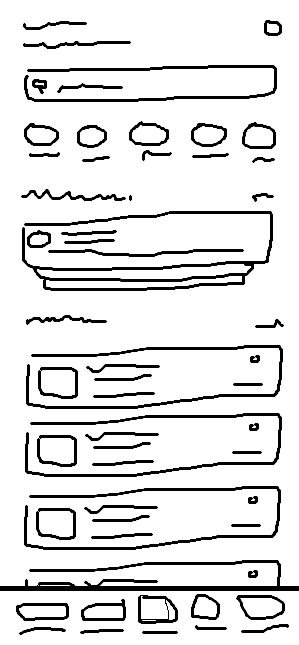
All four agent workflows used GPT-6.1 Sol with High reasoning, the same wireframe, and the same healthcare brief. This study compares workflows. Google Stitch's design generation is an additional stage in Method 1.
| Method | Workflow |
|---|---|
| 1 | Google Stitch MCP → HTML export → html-to-fmx |
| 2 | Wireframe + brief → create-fmx-ui |
| 3 | screenshot-to-fmx-mapping → separate mapping document → create-fmx-ui |
| 4 | Agent-generated HTML/CSS → html-to-fmx |
Method 2 still performs screenshot mapping internally. Method 3 stages that work separately before implementation.
Runtime results
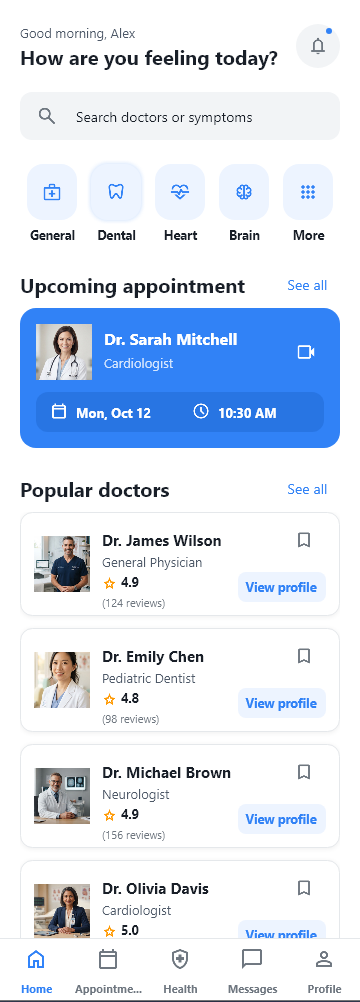
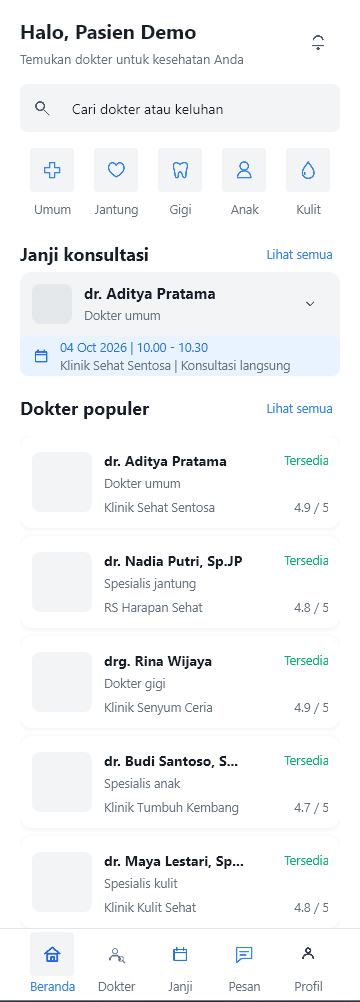
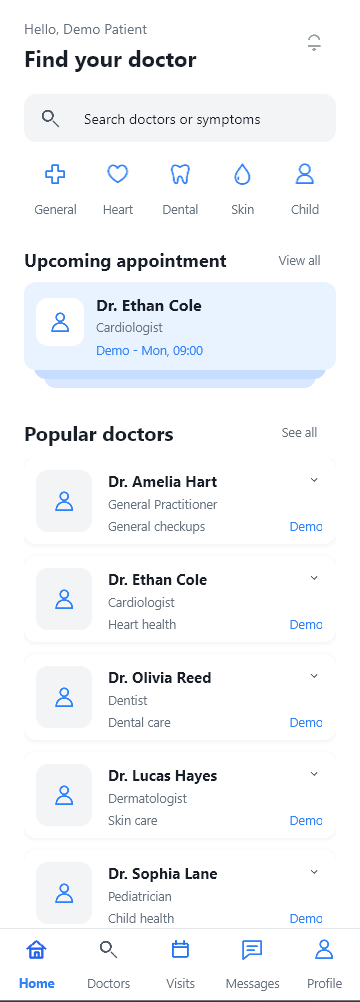
The captures include the follow-up card implementation and fictional dummy data. Some application labels remain in Indonesian.
| 1. Google Stitch + HTML | 2. Direct UI creation | 3. Separate mapping | 4. Agent-generated HTML |
|---|---|---|---|
 |
 |
 |
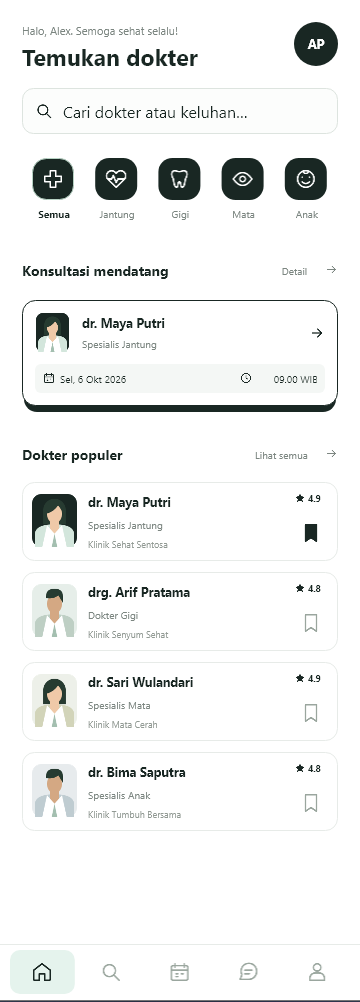 |
| Designer hierarchy | Designer hierarchy | Designer hierarchy | Designer hierarchy |


Recorded time
| Method | Initial UI | Cards + dummy data | Total |
|---|---|---|---|
| 1. Google Stitch + HTML | 32m 49s | 6m 06s | 38m 55s |
| 2. Direct UI creation | 23m 25s | 2m 27s | 25m 52s |
| 3. Separate mapping | 8m 16s + 41m 54s | 5m 12s | 55m 22s |
| 4. Agent-generated HTML | 14m 40s | 8m 53s | 23m 33s |
The total includes the follow-up needed to use the existing cards on the page and populate them. In Method 3, mapping took 8m 16s and implementation took 41m 54s; the mapping stage alone does not explain the longer duration. These times describe this experiment and exclude API integration.
Author's conclusions
- Component hierarchy: The four results were approximately 90% similar overall in the author's assessment. This is an observational estimate, without a formal component-tree metric.
- Design colors: Methods 1–3 followed the color rules in
DESIGN.md. Method 4 departed from them; its HTML-generation prompt did not explicitly mention that file. An explicit instruction at the HTML stage is a suggested refinement for a future run. - Method 1: More polished visual grouping and more complete assets, while following the wireframe. Third fastest overall at 38m 55s.
- Method 2: Followed the wireframe, with rougher visuals similar to Method 3. Second fastest at 25m 52s and required the least additional card work: 2m 27s.
- Method 3: Closest to the wireframe layout in the author's judgment, but less satisfactory visually and the longest at 55m 22s. The separate map did not produce a visible gain in polish in this run.
- Method 4: Visually satisfying despite its palette deviation. Fastest overall at 23m 33s, only 2m 19s ahead of direct UI creation.
The shared gap: the cards existed, but the page still needed them
All four initial results already included reusable cards. The page frames had not yet implemented and populated those cards, so the author used this additional prompt:
Add dummy data using the card you have already created.
This is the English translation of the original follow-up. A more explicit version is:
Add fictional dummy data using the cards already created. Implement them
on the UI page: create list items, attach card instances, and populate
them through the existing bindings. Load demo data once when the page
is created. Preserve later data bindings, including empty results.
This is an opt-in demo step. For production screens, bind actual project data and keep loading, empty, and error states intact.
V1 background: NovaPOS
Version 1 established the HTML → component map → native styles → FMX workflow with a NovaPOS dashboard generated by Google Stitch. The source HTML and browser reference remain available.

This selected GPT-6 Sol Medium result shows Designer structure and the runtime before and after GPT-6 Sol High refinement:
| Designer hierarchy | Initial runtime | After refinement |
|---|---|---|
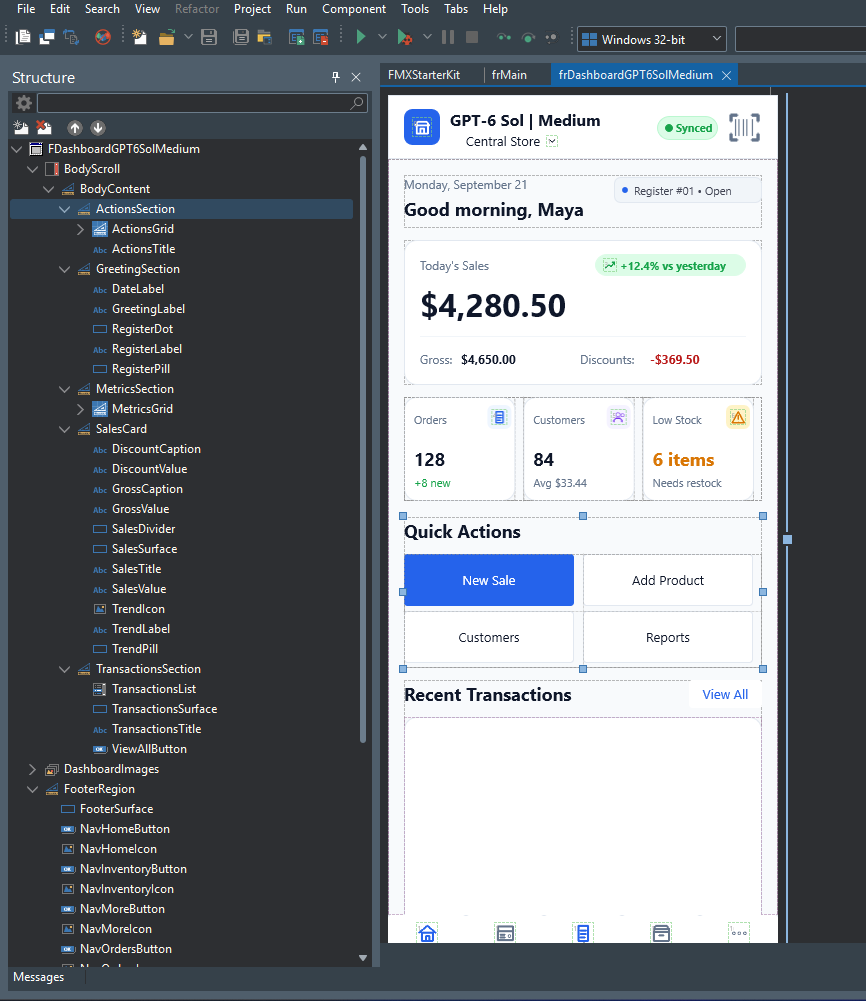 |
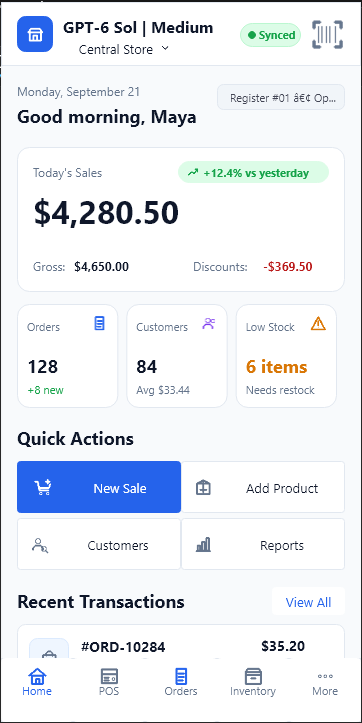 |
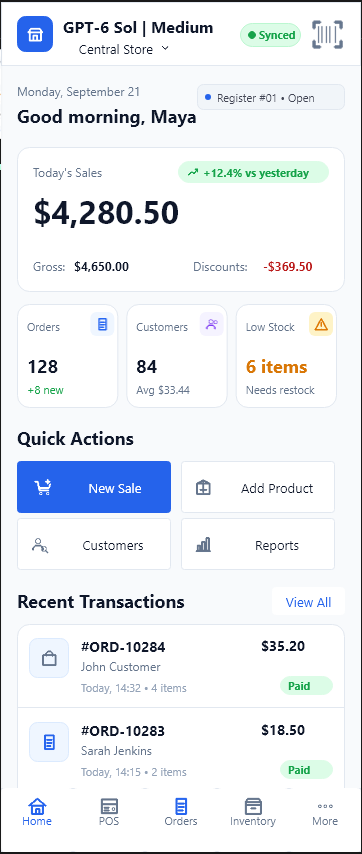 |
The main lessons carried into V2 were similar component hierarchies across attempts and the value of refining an existing UI. In the author's V1 assessment, GPT-6 Astra Light → GPT-6 Sol High gave the strongest visual result, while GPT-6 Sol Medium → GPT-6 Sol High offered the preferred balance of result and cost. DeepSeek's results used a Codex harness and remained pure DeepSeek, without GPT refinement.
The original model attempts ran concurrently; later sequential retests of two models improved their results. Those observations belong to the V1 experiment and do not form a current model ranking or a comparison with V2 timings. Full model tables, recorded costs, and historical notes are preserved in the V1 archive.
Native FMX scope and verification
The target is pure native Delphi FMX, with fixed controls editable in the Designer. Skia is optional when the target project already uses it. Choose icons and image assets that fit your application's visual style and use the project's existing asset integration.
Inspect component ownership, styles, assets, bindings, and navigation for each new screen. Build it, open it in the Designer, and inspect runtime behavior on the supported targets when the toolchain is available. Report source checks, build, Designer, runtime, and device checks separately. Existing screenshots show the recorded outputs; they do not establish new API integration, performance, or device acceptance. The runtime platform of the V2 captures was not specified.
The Delphi demo project and generated implementation documents are local work excluded from the public package. The NovaPOS HTML preview loads external fonts and Tailwind; the English case-study website includes its assets locally and requires no build step. To preview or publish that website, see its README.
Repository layout
.agents/skills/                 Six canonical agent skills and supporting files
docs/ui-dashboard.html          V1 NovaPOS HTML input
docs/ui-wireframe.html          V2 agent-generated healthcare HTML input
docs/result/VERSION.1.0.0/      V1 README/prompt archives and available results
docs/result/VERSION.2.0.0/      Wireframe, Designer/runtime captures, presentations
  static-website/               English case study with local assets and downloads
PROMPTS.md                      Copy-ready prompts for the V2 skill package
README.md / README-ID.md        Current English and Indonesian documentation
SOURCES.md                      Documentation and third-party references
LICENSE / CONTRIBUTING.md       License and contribution guidance
License and contributions
This repository uses the MIT License. See CONTRIBUTING.md for contribution guidance and SOURCES.md for technical references.