

SkeuoCom

SkeuoSimControls is a custom component library for Lazarus/Free Pascal. Built with BGRABitmap, it provides 20+ realistic, skeuomorphic UI controls (gauges, knobs, oscilloscopes, radar, switches) designed for simulation software, audio interfaces, and industrial dashboards.
- Active · last change 10-4-2026
- ★ 16 on GitHub
- 1 finds this interesting
README
SkeuoCom
** SkeuoCom** is a custom component library for Lazarus / Free Pascal, specifically designed for building realistic, skeuomorphic user interfaces (UI).
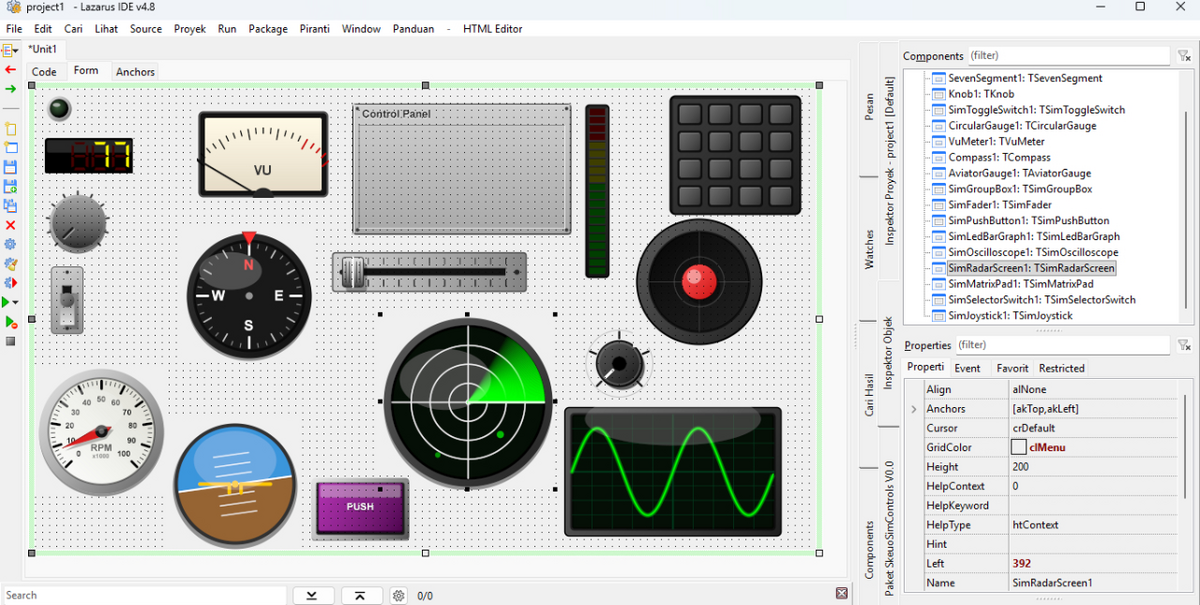
Built on top of the BGRABitmap graphic engine, these components offer high-quality, anti-aliased rendering perfectly suited for simulation software, avionics dashboards, industrial control panels, and audio software interfaces (Virtual Instruments/Mixers).
🚀 Key Features
- 20+ Interactive Components: Ranging from simple switches to dynamic radar screens and oscilloscopes.
- High-Quality Rendering: Utilizes BGRABitmap for smooth gradients, drop shadows, glowing elements, and glass reflections.
- Highly Customizable: Tweak colors, value ranges, and component states directly through the Lazarus Object Inspector.
- Self-Contained: Rendering is purely drawn via mathematical code and BGRABitmap (no reliance on external bitmap assets for UI logic).
🎛️ Component List (SkeuoSim Palette)
- Indicators & Displays:
TLEDIndicator,TSevenSegment,TSimLedBarGraph,TSimLcdDisplay - Switches & Buttons:
TSimToggleSwitch,TSimPushButton,TSimSafetySwitch,TSimMatrixPad - Dials & Sliders:
TKnob,TSimFader,TSimSelectorSwitch,TSimThrottleLever,TSimJoystick - Gauges:
TCircularGauge,TLinearGauge,TVuMeter,TCompass,TAviatorGauge - Advanced Screens:
TSimOscilloscope,TSimRadarScreen - Misc:
TSimGroupBox,TSimAudioJack
📦 Prerequisites
- Lazarus IDE (Latest version recommended).
- BGRABitmap package (Easily installable via the Online Package Manager / OPM in Lazarus).
🛠️ Installation Guide
- Clone or download this repository.
- Open Lazarus IDE.
- Go to Package -> Open Package File (.lpk).
- Select the
SkeuoSimControls.lpkfile from thesourcefolder. - Click Compile. Ensure the compilation is successful without errors.
- Click Install and allow Lazarus to rebuild.
- Once Lazarus restarts, you will find a new tab named "SkeuoSim" in your Component Palette.
☕ Support the Project
If you find SkeuoCom helpful and want to support its ongoing development, consider buying me a coffee or sending a tip. Any support is deeply appreciated!
💡 Your support keeps the momentum going!
Every contribution directly fuels my passion, energy, and motivation to continuously build, maintain, and release even more useful open-source desktop applications for the developer community.
📜 License
MIT License