

lazpolkit

LazPolKit is an example Lazarus GUI application to demonstrate how to run a Lazarus application on GNU/Linux with administrative rights. The application makes use of PolicyKit to invoke a password dialog upon startup for obtaining administrative privileges.
- Quiet · last change 2-23-2019
- ★ 1 on GitHub
README
LazPolKit
LazPolKit is an example Lazarus GUI application to demonstrate how to run a Lazarus application on GNU/Linux with administrative rights. The application makes use of PolicyKit to invoke a password dialog upon startup for obtaining administrative privileges.
PolicyKit (or PolKit) is a component for controlling system-wide privileges in Unix-like operating systems. It is installed by default on modern GNU/Linux distributions.
Using this example application as a reference, you can easily add PolicyKit functionality to your own Lazarus application in order to obtain administrative privileges.
Prerequisites
The Lazarus IDE was used to develop LazPolKit and is needed to install LazPolKit. Follow the instructions below to install Lazarus.
Installation
Assuming that Lazarus in installed, you can build LazPolKit from the terminal using the following command:
make clean all
After successfully building LazPolKit, you can install it from the terminal using the following command:
sudo make install
To remove LazPolKit, you can run:
sudo make uninstall
Usage
After installation, two executables are available in "/usr/bin": lazpolkit and lazpolkit-pkexec. Both executables run the LazPolKit application. The first one runs with normal user privileges and the latter one with root privileges with the help of PolicyKit.
The LazPolKit application is a GUI application that allows you to run a command and show the output. By default the ls /root command is configured. This command requires administrative privileges, which makes it an ideal test case.
First, start lazpolkit and click the "Run"-button. You'll see the following output:
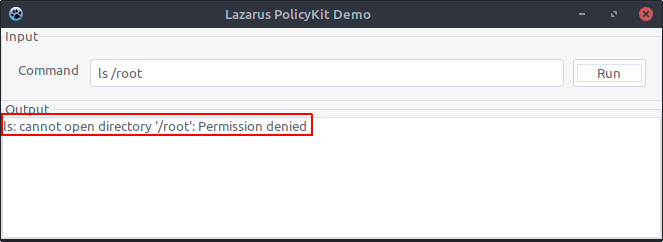
Next, start lazpolkit-pkexec. This time you get prompted to enter the root password to execute the application with administrative privileges. Once it started, click the "Run"-button again. Now you'll see in the output that the command executed successfully:
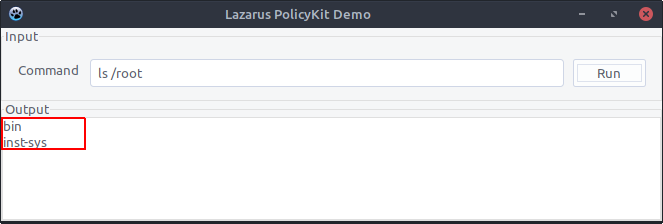
The above demonstration proves that you can in fact run a Lazarus application with administrative privileges. The way it works is that lazpolkit-pkexec is a shell-script that calls the lazpolkit application through PolicyKit:
#!/bin/sh
pkexec "/usr/bin/lazpolkit" "$@"
For this to work, a PolicyKit related configuration file org.lazpolkit.root.policy was copied to the "/usr/share/polkit-1/actions/"-directory during the installation. Its contents are:
<?xml version="1.0" encoding="UTF-8"?>
<!DOCTYPE policyconfig PUBLIC
"-//freedesktop//DTD PolicyKit Policy Configuration 1.0//EN"
"http://www.freedesktop.org/standards/PolicyKit/1/policyconfig.dtd">

<policyconfig>

 <vendor>LazPolKit</vendor>
 <vendor_url>https://github.com/kruizer23/lazpolkit</vendor_url>

 <action id="org.lazpolkit.root">
   <description>Run LazPolKit with elevated privileges</description>
   <message>Please enter your password to run LazPolKit as root</message>
   <icon_name>lazpolkit</icon_name>
   <defaults>
     <allow_any>no</allow_any>
     <allow_inactive>no</allow_inactive>
     <allow_active>auth_admin_keep</allow_active>
   </defaults>
   <annotate key="org.freedesktop.policykit.exec.path">/usr/bin/lazpolkit</annotate>
   <annotate key="org.freedesktop.policykit.exec.allow_gui">true</annotate>
 </action>

</policyconfig>
The following links proved useful when developing LazPolKit:
- [https://askubuntu.com/questions/641593/pkexec-command-in-a-desktop-file](https://askubuntu.com/questions/641593/pkexec-command-in-a-desktop-file)
- [http://forum.lazarus.freepascal.org/index.php?topic=14479.15](http://forum.lazarus.freepascal.org/index.php?topic=14479.15)
Lazarus
To install Lazarus, you can download DEB and RPM packages from SourceForge. However, it is recommended to install the version of Lazarus that is present in the package repositories of your GNU/Linux distribution. Here are the Lazarus installation instructions for most popular GNU/Linux distributions:
Debian: sudo apt install make gdb fpc fpc-source lazarus
Ubuntu: sudo apt install make gdb fpc fpc-source lazarus lcl
Fedora: sudo dnf install make gdb fpc fpc-src lazarus
openSUSE: sudo zypper install make gdb fpc fpc-src lazarus