

Catalog · How the catalog works
cli-fp

A type-safe Free Pascal framework for building powerful CLI applications with rich commands and help systems.
- ★ 38 on GitHub
Anyone may press Interesting, signed in or not. It helps others find this project.
README
⚡ cli-fp: Native CLIs for Free Pascal
cli-fp is a small Free Pascal framework for native command-line programs. It
provides command trees, validated options, generated help and shell completion,
colours, spinners, and progress bars—without third-party runtime dependencies.
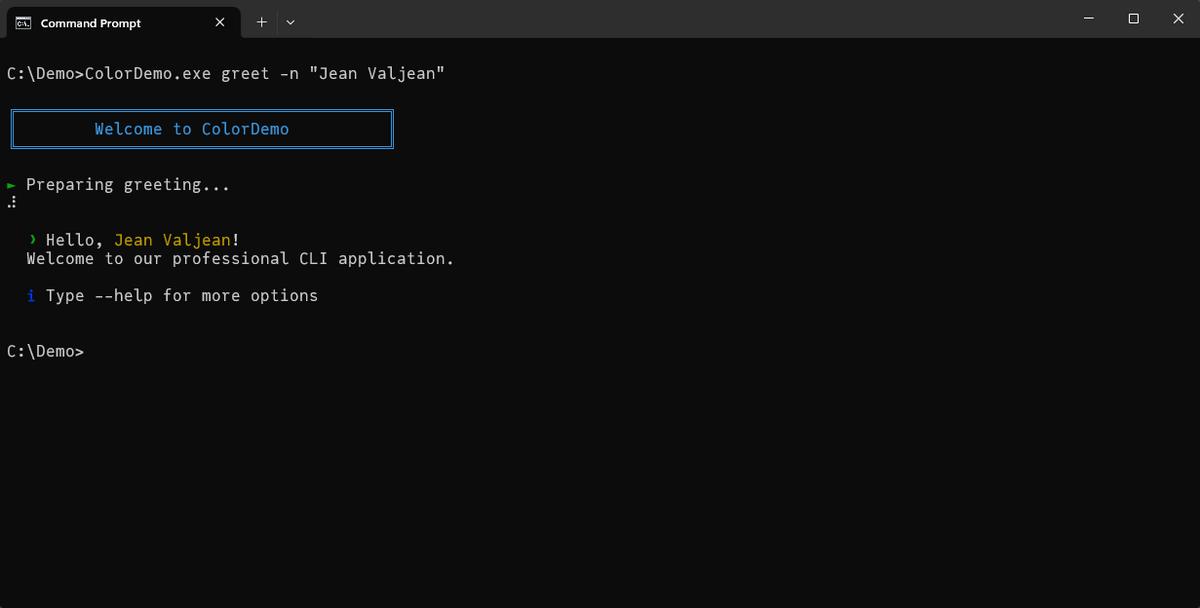
Colours, framed panels, spinners, and status glyphs — all from the framework.
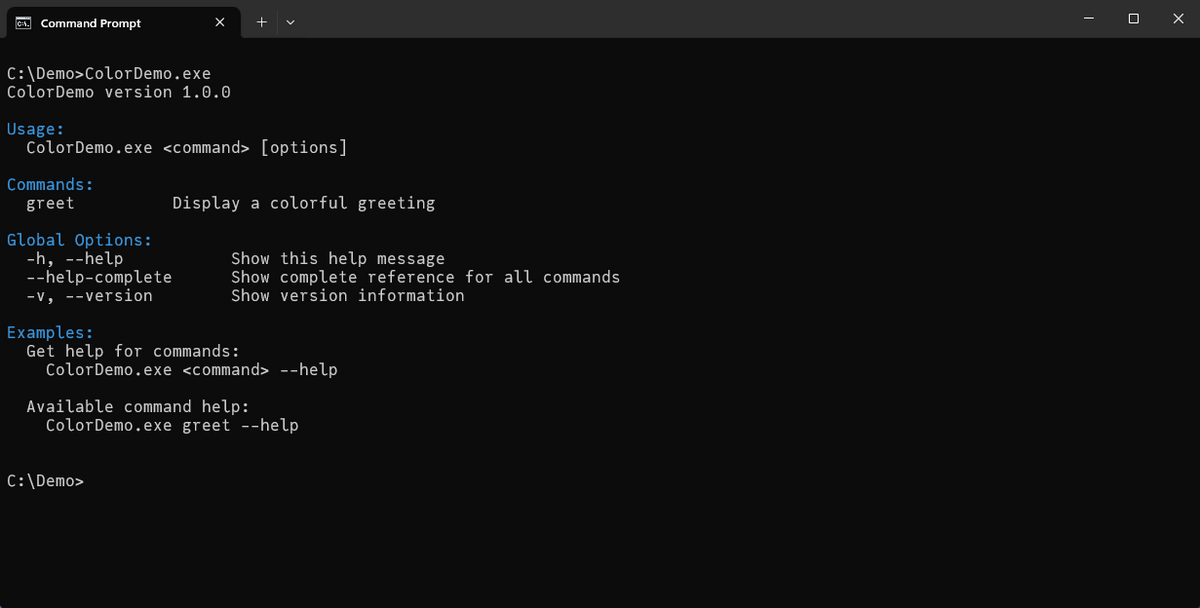
Help output is generated from your command tree, with grouped options and examples.
Prerequisites
- Install Free Pascal; FPC 3.2.2 is
the tested repository version. Check it with
fpc -iV. - Put the
fpcexecutable on yourPATHso the compiler command works from a terminal. - Lazarus is optional. It can use the supplied
package at
packages/lazarus/cli_fp.lpk.
If you start in an empty folder, copy the QuickStartDemo source and compile it with a unit search path pointing at the cloned library:
fpc -Fu/path/to/cli-fp/src QuickStartDemo.lpr-Fu means “add this directory to FPC's unit search path.” If compilation
reports Fatal: Can't find unit CLI.Interfaces, the path is missing or points
to the wrong checkout. In Lazarus, install/open packages/lazarus/cli_fp.lpk
to provide the same unit path through the IDE.
Your first CLI
This complete root-command program is also QuickStartDemo, compiled by the Windows and Linux example smoke checks.
program QuickStartDemo;

{$mode objfpc}{$H+}{$J-}

uses
  CLI.Interfaces, CLI.Application, CLI.Command;

type
  THelloCommand = class(TBaseCommand)
  public
    function Execute: Integer; override;
  end;

function THelloCommand.Execute: Integer;
var
  PersonName: string;
begin
  if not GetParameterValue('--name', PersonName) then
    PersonName := 'World';
  WriteLn('Hello, ', PersonName, '!');
  Result := 0;
end;

var
  App: ICLIApplication;
  Main: THelloCommand;
begin
  Main := THelloCommand.Create('', 'Print a greeting');
  Main.AddStringParameter('-n', '--name', 'Name to greet', False, 'World');
  App := CreateCLIApplication('hello', '1.0.0', Main);
  Halt(App.Execute);
end.
Clone the repository, enter it, then build and run (Bash):
git clone https://github.com/ikelaiah/cli-fp.git
cd cli-fp
fpc -Fu./src ./examples/QuickStartDemo/QuickStartDemo.lpr
./examples/QuickStartDemo/QuickStartDemo --name Ada$ ./examples/QuickStartDemo/QuickStartDemo --name Ada
Hello, Ada!PowerShell equivalent:
git clone https://github.com/ikelaiah/cli-fp.git
Set-Location cli-fp
fpc "-Fu.\src" .\examples\QuickStartDemo\QuickStartDemo.lpr
.\examples\QuickStartDemo\QuickStartDemo.exe --name Ada
The empty name in THelloCommand.Create('', ...) marks the root/default
command, so no command name is needed before --name.
CreateCLIApplication('hello', ...) sets display metadata; it does not rename
the binary. FPC builds QuickStartDemo (Windows: QuickStartDemo.exe).
The factory constructs the application; App.Execute parses and validates
arguments, handles built-ins, and dispatches the selected command.
Keep the command and application references and let the ICLIApplication own
the registered command tree; do not manually free registered commands.
Halt(App.Execute) is the beginner-recommended program tail.
Quick self-checks are:
./examples/QuickStartDemo/QuickStartDemo --help
./examples/QuickStartDemo/QuickStartDemo --version
./examples/QuickStartDemo/QuickStartDemo --name Ada.\examples\QuickStartDemo\QuickStartDemo.exe --help
.\examples\QuickStartDemo\QuickStartDemo.exe --version
.\examples\QuickStartDemo\QuickStartDemo.exe --name AdaThese show generated usage, hello version 1.0.0, and Hello, Ada!,
respectively, with exit status 0. Throughout the guides, tool and myapp
stand for your compiled executable; use its actual path.
Choose a CLI shape
| Shape | Invocation | Start with |
|---|---|---|
| One default action | hello --name Ada |
Root command |
| Named commands | tool greet --name Ada |
Named command |
| Nested commands | tool repo clone --url … |
Subcommand |
Documentation
- Documentation site — navigate by goal.
- Your first cli-fp program — compile and understand the example above.
- How do I...? — short recipes for options, output, completion, the generator, and debugging.
- Current limitations — find the supported boundaries.
- API reference — look up public signatures.
- Technical documentation — architecture and maintainer material.
Examples and generator
The runnable examples progress from QuickStartDemo through root, named, nested, error-handling, colour, and progress applications. They are compiled by the cross-platform cleanup smoke checks.
Use cli-fp-gen when a larger command tree benefits from a
scaffolded project layout. It is optional; the program above is the shortest
way to start.
Platform notes
- Windows and Linux run the repository's CI checks.
- The runtime has no third-party dependencies. The generator uses FCL JSON units.
- Pascal identifiers, including unit names, are case-insensitive. Linux paths and filenames are case-sensitive: use the files' actual paths and FPC's unit-file lookup conventions (this repository uses lowercase unit files).
Contributing
See the contribution guide. On Windows, run:
powershell -ExecutionPolicy Bypass -File tests\run_tests.ps1
powershell -ExecutionPolicy Bypass -File tests\codegen\run_all_tests.ps1
powershell -ExecutionPolicy Bypass -File tests\run_cleanup_smoke.ps1
The Bash equivalents and the full project map are in the contribution guide.
License
cli-fp is available under the MIT License.