Catalog · How the catalog works
Hooks

Keyboard and Mouse hooks as classes
- ★ 40 on GitHub
Anyone may press Interesting, signed in or not. It helps others find this project.
README
Hooks
Keyboard and Mouse hooks as classes
Hooks, I’ve seen a lot of people trying to make a clean solution for hooking messages in an application. So I decided some time ago to implement hooks as a class, with nice events and stuff :)
Winapi.Hooks makes it possible to assign a method pointer to a procedure pointer (with some help from MakeObjectInstance).
For example: If you want to trap ALL keystrokes in your application - simply declare an instance of TKeyboardHook, assign an event handler for OnPreExecute or OnPostExecute, or both.
Set you KeyboadHook active (KeyboardHook.Active := True) and you are out and running ..
Types of Hooks
Different hook types enable an application to monitor a different aspect of the system's message-handling mechanism. For example:
- WH_KEYBOARD hook to monitor keyboard input posted to a message queue;
- WH_MOUSE hook to monitor mouse input posted to a message queue;
- WH_SHELL hook procedure when the shell application is about to be activated and when a top-level window is created or destroyed.
The Winapi.Hook unit defines several hook types:
- TCBTHook - called before activating, creating, destroying, minimizing, maximizing, moving, or sizing a window; before completing a system command; before removing a mouse or keyboard event from the system message queue; before setting the input focus; or before synchronizing with the system message queue.
- TDebugHook - called before calling hook procedures associated with any other hook in the system
- TGetMessageHook - enables an application to monitor messages about to be returned by the GetMessage or PeekMessage function
- TJournalPlaybackHook - enables an application to insert messages into the system message queue.
- TJournalRecordHook - enables you to monitor and record input events (to record a sequence of mouse and keyboard events to play back later by using the WH_JOURNALPLAYBACK Hook).
- TKeyboardHook - enables an application to monitor message traffic for WM_KEYDOWN and WM_KEYUP messages.
- TMouseHook - enables you to monitor mouse messages about to be returned by the GetMessage or PeekMessage function.
- TLowLevelKeyboardHook - enables you to monitor keyboard input events about to be posted in a thread input queue.
- TLowLevelMouseHook - enables you to monitor mouse input events about to be posted in a thread input queue.
LowLevel KeyboardHook example
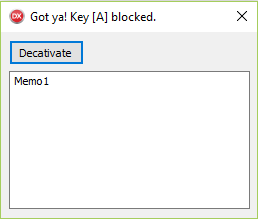
To show you how to use the Winapi.Hooks, here's a section of the keyboard hook demo application:
procedure TFormMain.FormCreate(Sender: TObject);
begin
  FHook := THookInstance<TLowLevelKeyboardHook>.CreateHook(Self);
  FHook.OnPreExecute := procedure(Hook: THook; var HookMsg: THookMessage)
    var
      LLKeyBoardHook: TLowLevelKeyboardHook;
      ScanCode: integer;
    begin
      LLKeyBoardHook := TLowLevelKeyboardHook(Hook);

      if LLKeyBoardHook.LowLevelKeyStates.KeyState <> ksKeyDown then
        exit;

      ScanCode := LLKeyBoardHook.KeyName.ScanCode;

      if not(ScanCode in [VK_NUMPAD0 .. VK_NUMPAD9, VK_0 .. VK_9]) then
      begin
        Caption := 'Got ya! Key [' + LLKeyBoardHook.KeyName.KeyExtName + '] blocked.';
        HookMsg.Result := 1;
      end
      else
        Caption := '';
    end;
end;