Catalog · How the catalog works
MCPFramework4D

MCP Server/Client framework for Delphi and Lazarus
- ★ 6 on GitHub
Anyone may press Interesting, signed in or not. It helps others find this project.
README
MCPFramework4D
Model Context Protocol for Pascal developers.
MCPFramework4D helps you build MCP servers and clients in Delphi 11+ and Lazarus/FPC on Windows, with IDE components, project templates, and sample apps ready for Claude Desktop testing.
Why this project
- Build MCP servers over
stdio - Call local MCP servers from Delphi or Lazarus apps
- Add MCP support to legacy desktop applications through non-visual components
- Start faster with Delphi and Lazarus project wizards
First-glance feature summary
| Area | Delphi 11+ | Lazarus / FPC |
|---|---|---|
| Runtime package | Yes | Yes |
| Design-time package | Yes | Yes |
| Components in IDE | TMCPServerComponent, TMCPServerHostComponent, TMCPClientComponent |
TMCPServerComponent, TMCPServerHostComponent, TMCPClientComponent |
| Project wizards | Yes | Yes |
stdio server hosting |
Yes | Yes |
stdio client transport |
Yes | Yes |
| HTTP client transport | Yes | Not yet |
| HTTP host transport | Yes | Not yet |
Supported MCP surface
Currently implemented and tested around the local Windows workflow:
initializenotifications/initializedpingtools/listtools/call- protocol version negotiation
Supported protocol versions:
2025-11-252025-06-182025-03-262024-11-05
Packages and IDE integration
Delphi
- Runtime package:
package\MCPFramework4D.dproj - Design-time package:
package\MCPFramework4DDesign.dproj - Workspace:
MCPFramework4D_GroupProject.groupproj
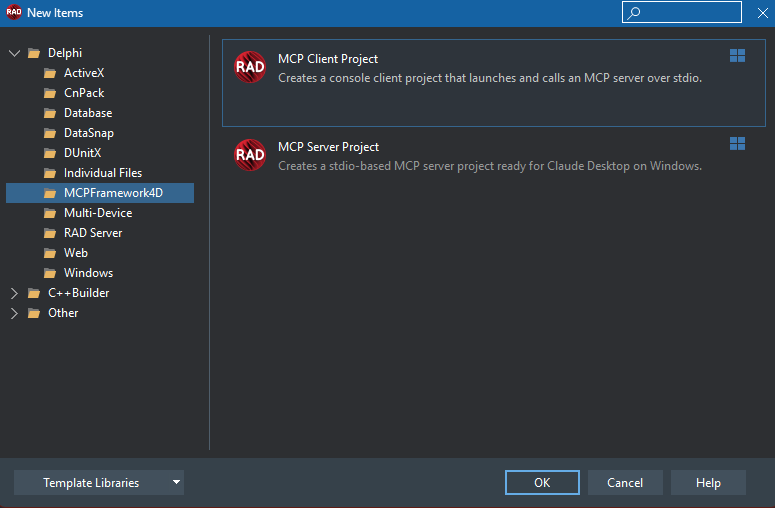
After installing the design-time package, RAD Studio adds:
-
Tool Palette page:
MCPFramework4D -
Components:
TMCPServerComponent,TMCPServerHostComponent,TMCPClientComponent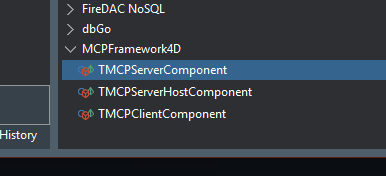
-
New Project entries:
MCP Server ProjectMCP Client Project
Lazarus
- Runtime package:
lazarus\MCPFramework4DRuntime.lpk - Design-time package:
lazarus\MCPFramework4DDesign.lpk
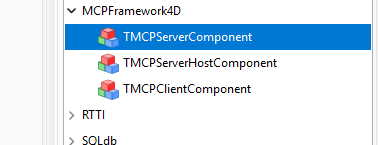
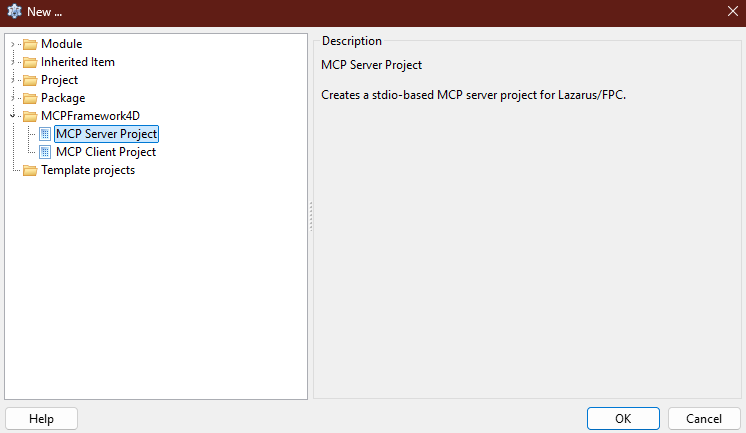
After installing the design-time package, Lazarus adds:
- Component palette page:
MCPFramework4D - Components:
TMCPServerComponent,TMCPServerHostComponent,TMCPClientComponent
- New Project category:
MCPFramework4D
Programming model
Delphi 11+
Delphi uses attribute-based tool registration.
[MCPTool('sample', 'Sample tools')]
TSampleTools = class
public
  [MCPToolMethod('echo', 'Echo a message back')]
  function Echo([MCPToolParam('Message to echo back')] const Text: string): string;
end;
Lazarus / FPC
Lazarus uses explicit descriptor registration.
procedure RegisterMyTool;
var
  LDescriptor: TMCPToolDescriptor;
begin
  LDescriptor := TMCPToolDescriptor.Create('sample', 'Sample tools', TSampleTools);
  with LDescriptor.AddMethod('Echo', 'echo', 'Echo a message back', @InvokeEcho) do
    AddParameter('Text', 'Message to echo back', 'string');
  TMCPToolRegistry.GetInstance.RegisterToolDescriptor(LDescriptor);
end;
Main components
TMCPServerComponent
Use this to expose tools and server metadata from an existing application.
Main capabilities:
- register tools
- handle messages
- run a server over
stdio
TMCPServerHostComponent
Use this to host a TMCPServerComponent over a selected transport.
Main capabilities:
- start and stop hosting
stdiohosting in Delphi and Lazarus- HTTP/HTTPS hosting in Delphi
Note: in Lazarus/FPC, mtHttp currently raises a clear runtime error and is intentionally not enabled yet.
TMCPClientComponent
Use this to connect to and call another MCP server.
Main capabilities:
- connect and disconnect
- list tools
- call tools
- ping
Note: in Lazarus/FPC, TMCPClientComponent currently supports mtStdio. HTTP transport is still Delphi-only.
Samples
The repo includes practical samples instead of toy-only demos:
src\Samples\SimpleServersrc\Samples\SimpleClientsrc\Samples\VclServerDemo
The sample server exposes system-style tools such as:
- machine overview
- memory information
- drive information
- OS information
The VCL demo can run as a normal visible app or be launched by Claude Desktop as an MCP server.
Claude Desktop quick start
Example config:
{
  "mcpServers": {
    "mcpframework4d-sample": {
      "command": "D:\\path\\to\\YourServer.exe",
      "args": []
    }
  }
}
Suggested test prompt:
List the available MCP tools, call one safe sample tool, and summarize whether the server connection is working correctly.There are also ready-to-edit sample config files in the repository for the included demos.
Build notes
- Windows-focused
stdiofirst- no third-party Delphi dependency required for the core
stdioworkflow - Delphi HTTP/S hosting uses Indy units that ship with RAD Studio
- package outputs are separated by compiler/platform/config to reduce cross-version conflicts
Compatibility
- Delphi 11 Alexandria and newer
- Lazarus with Free Pascal on Windows
Common Delphi package issue
If you see something like:
Bad packaged unit format ... Expected version ... Found version ...you are usually loading package binaries from a different Delphi version.
Typical fix:
- Close the IDE.
- Delete old generated outputs such as
package\build,*.dcp,*.bpl,Win32,Win64,*.identcache, and*.local. - Rebuild the runtime package first.
- Rebuild the design-time package second.
Status
This repository is now set up as a dual-purpose Delphi and Lazarus MCP framework with:
- shared runtime code
- IDE components in both environments
- project wizards in both environments
- sample applications for local Claude Desktop testing