App_EXIFTimeEdit

MKVPropEditGUI provides quick and easy way to edit MKV tracks metadata
- Quiet · last change 7-13-2018
- ★ 1 on GitHub
README
EXIFTimeEdit
EXIFTimeEdit is a simple program to correct timestamps inside metadata contained in digital photos. Does not modify other metadata fields and the image itself.
It uses CCR Exif components and is based on its TimeShift demo.
Terminology
EXIF= metadata stored inside JPEG files, just like mp3 tagsEXIF DateTime= The date and time of image creation. In Exif standard, it is the date and time the file was changedEXIF DateTimeOriginal= The date and time when the original image data was generatedEXIF DateTimeDigitized= The date and time when the image was stored as digital data In theory, these 3 values could vary but in practice they tend to be identical until some processing software modifies DateTime field.EXIFTimeEditonly shifts values inDateTimeOriginalandDateTimeDigitizedfields.DateTimefield could be set equal toDateTimeOriginalor left unchanged.- File last modified timestamp = property of a file, not a tag in metadata. Could be set equal to
DateTimeOriginal, to a time of processing or left unchanged.
Features
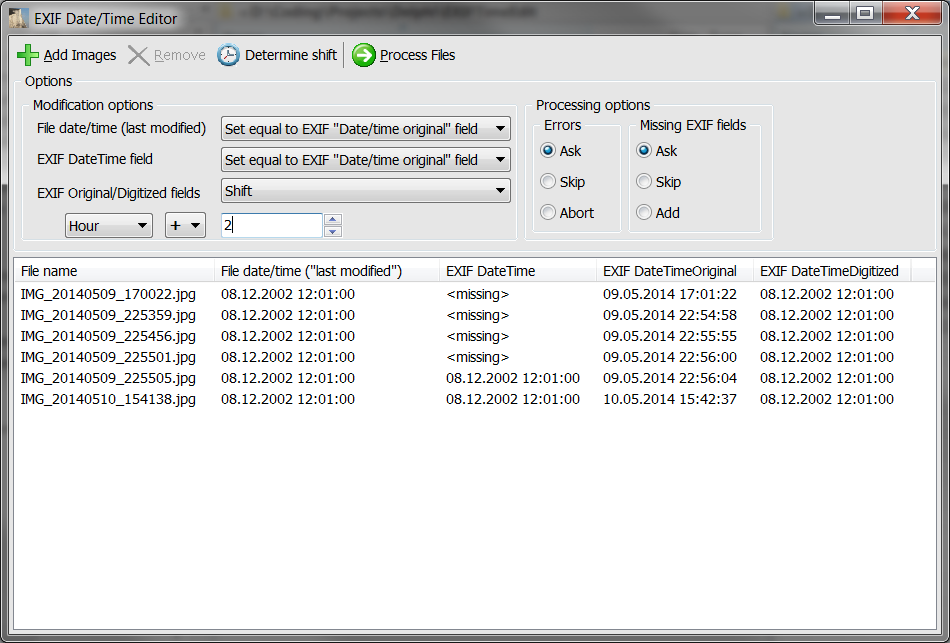
- Adjust timestamps flexibly, i.e. shift only the necessary date part (year/month/day/hour/minute/second) by some value or just set the date part to some value.
- Add EXIF fields if they're missing
- Modify file's last modified property
- Process large numbers of files (limited only by your PC's resources) without application hang.
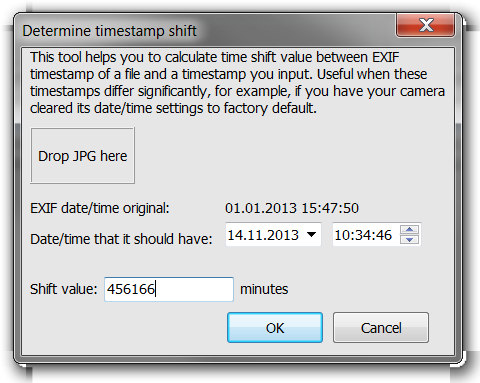
- 'Determine time shift' tool: calculate time shift between selected file's EXIF timestamp and the timestamp you input.
- Processed files remain in the list with changed props, so you can continue adjusting
- Press Ctrl-A to select all items, Del to remove selected items
Possible use cases
- Correct timestamps if your camera's clocks are late by several minutes
- Correct timestamps to the local time zone if you forgot to adjust your camera clocks in a trip
- Correct timestamps if you had your camera's clocks cleared to factory defaults (usually this means complete difference with current time)
- Set last-modified property of a file to EXIF timestamp for sorting by date in Explorer
- Set EXIF date/time to EXIF original/digitized
Usage
-
Add files which you want to modify by "Add images" or drag'n'drop them to the list control
-
Select file's last modified property option (optional)
-
Select EXIF date/time field option (optional)
-
Select modification options (optional):
- Select date part to modify (year/month/etc)
- Select modification action: substract, add or set
- Input a number
OR
- Press "Determine shift"
- Drag'n'drop a file with wrong EXIF timestamp for which you know what the right timestamp should be
- Input that right timestamp, the required shift value will be displayed (in minutes)
- Press OK, the required options will be set
-
Press "Process files"
Screenshots
Main window
'Determine time shift' tool