

DX.Comply

Generate CycloneDX SBOMs for Delphi projects — EU Cyber Resilience Act compliance in one click
- Active · last change 11-5-2026
- ★ 60 on GitHub
README
DX.Comply
Write a Software Bill of Materials from a Delphi build.
Product page: DX.Comply on developer-experts.net (German)
DX.Comply lists the units, packages and DLL names it can see in the build, with a hash where it could open the file. That component list is a starting point for the SBOM part of EU Cyber Resilience Act technical documentation (Annex I Part II, Annex VII). It does not make a product compliant, and it does not produce the rest of the technical file.
Why DX.Comply?
The EU Cyber Resilience Act (CRA), Regulation (EU) 2024/2847, requires manufacturers to keep technical documentation for products with digital elements. That file includes a machine-readable Software Bill of Materials (SBOM). The regulation applies in full from 11 December 2027.
DX.Comply produces build evidence and that component list from a RAD Studio project, together with optional HTML and Markdown reports.
You generate it. You archive it. You never have to submit it anywhere.
SBOM = a structured component list for a piece of software. DX.Comply fills it from the build: unit names, package names and DLL names, plus SHA-256 and SHA-512 hashes when the file could be opened.
Screenshots
Generating an SBOM in the RAD Studio IDE:
| Build Confirmation | Progress and MAP Build | HTML SBOM Report |
|---|---|---|
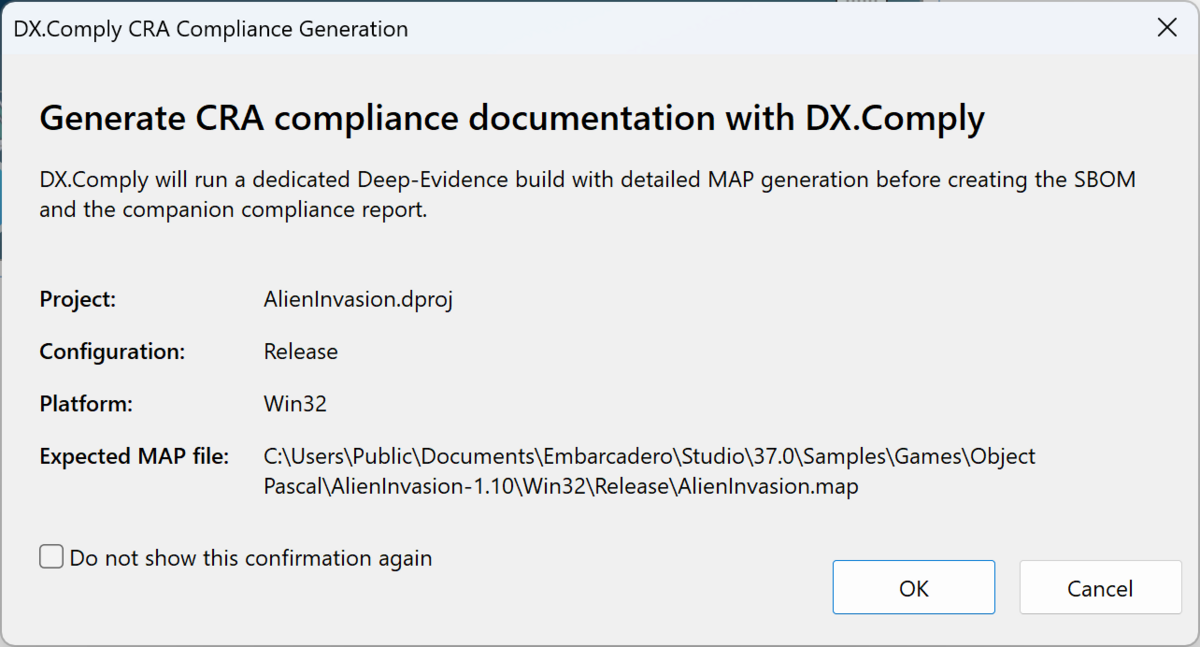 |
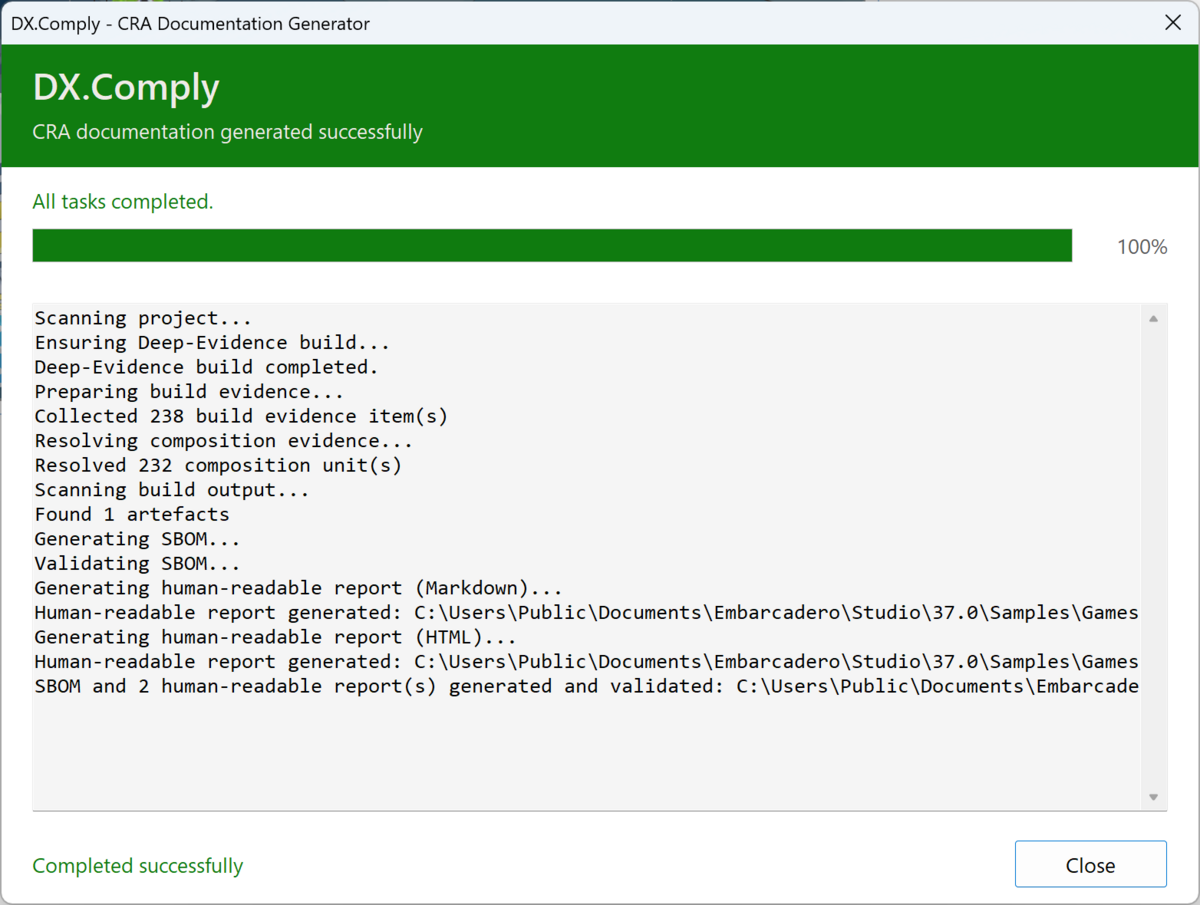 |
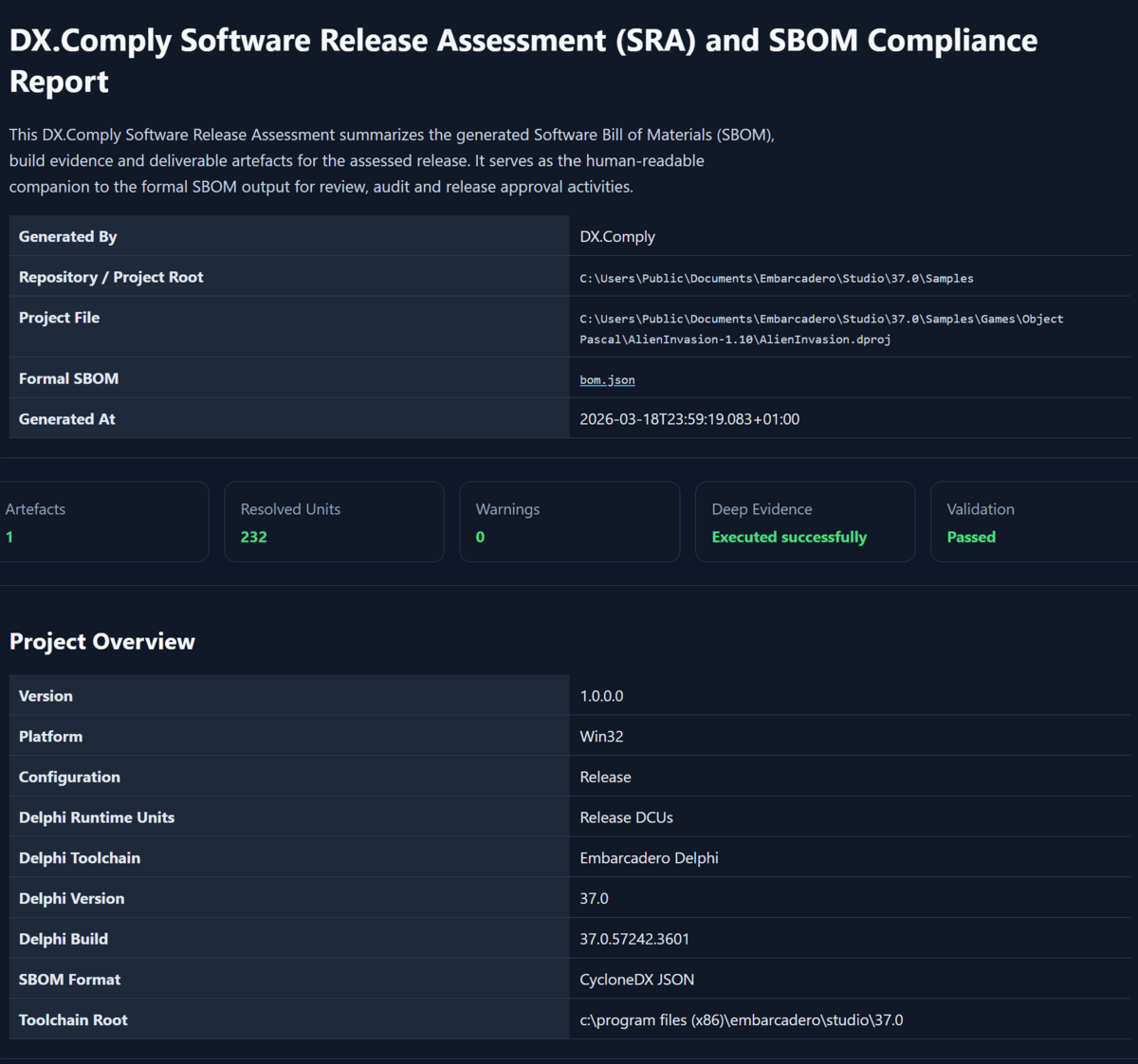 |
SBOM Output Example
See it for yourself: Example SBOM (JSON) from ConwaysLifeFMX in RADStudio13Demos, project
Object Pascal/RTL/Parallel Library/FMX/ConwaysLifeFMX.dproj, built Release/Win32 with a map file.
DX.Comply writes CycloneDX 1.6 JSON by default. Each linked unit is a library component, with SHA-256 and SHA-512 hashes when the file could be opened, and with an origin classification. The project's own outputs (the program, the package a package project builds, and .dcp) carry the product version and no package URL, the same as files in library mode. Another .exe, DLL, or .bpl next to the program, or a DLL found at a path named in source, carries the version from its own version resource (FileVersion, else ProductVersion), and no version when it has none. The fragment below shows the metadata component and the application file. The full document has more properties. The checked-in example file was written by an older version, which used the first 12 hex characters of the SHA-256 as the file version and a file: package URL.
{
  "bomFormat": "CycloneDX",
  "specVersion": "1.6",
  "metadata": {
    "component": {
      "type": "application",
      "name": "ConwaysLifeFMX",
      "version": "1.0.0.0",
      "bom-ref": "ConwaysLifeFMX"
    }
  },
  "components": [
    {
      "type": "application",
      "name": "ConwaysLifeFMX.exe",
      "version": "1.0.0.0",
      "bom-ref": "comp-0",
      "hashes": [
        {
          "alg": "SHA-256",
          "content": "c6cc9155675bb850c911a298c5cdfdf68e588b44df59cd8a98469429193f1da7"
        },
        {
          "alg": "SHA-512",
          "content": "b9e07e9250f6b8b9900130ddb6dabefa1a247f6af2971f854820b239ed511692fa7f848ad7e296e03709c01414bb19929091abb35c38563dec74e7beb429884b"
        }
      ]
    }
  ]
}
Installation
Installer (Delphi 13)
The installer in the current release is built for Delphi 13 (RAD Studio 37.0). Run it from the Releases page. It registers the IDE plugin for Delphi 13 and copies the command line tool onto the machine as dxcomply.exe in the installer's bin folder.
The command line tool does not use the IDE and does not compile the project. It reads a .dproj, .dpk, or .groupproj, or a Delphi 7 .dpr with its .dof and .cfg, together with a detailed MAP file from a build. That MAP file can come from an older Delphi.
GetIt
GetIt installs the IDE plugin only. It does not include dxcomply.exe. The command line tool comes from the release ZIP, from the Delphi 13 installer, or from building src/CLI/dxcomply.dproj.
Manual
- Open
DX.Comply.groupprojin RAD Studio. - Build and install the
DX.Comply.IDEdesign-time package. - Optionally build the
dxcomplyconsole application for command-line / CI use.
Quick Start
Option A: RAD Studio IDE (recommended)
- Install the
DX.Comply.IDEdesign-time package. - Open your project in RAD Studio.
- Choose Project > DX.Comply - SBOM > Generate SBOM... from the main menu.
- In the confirmation dialog, select the build configuration to use for MAP generation (the active IDE configuration is pre-selected). DX.Comply compiles the project via OTA with detailed MAP output, scans all evidence, and produces the SBOM.
- Done.
bom.json,bom.report.html, andbom.report.mdare in your project folder. To send all three to one folder, set SBOM and report directory under Tools > Options > Third Party > DX.Comply. The folder is created when it does not exist. Leave Report base path empty so the reports stay next tobom.json. A report base path overrides the report files only.
Option B: Command line / CI
dxcomply.exe is not part of a GetIt install. Use the copy from the release ZIP or the installer bin folder, or build src/CLI/dxcomply.dproj, which writes dxcomply.exe. The examples assume that executable is on PATH, or that the current directory is the folder that contains it.
The CLI tool expects an existing detailed MAP file. Build your project first with DCC_MapFile=3, then run:
dxcomply --project=MyApp.dproj --format=cyclonedx-json --output=bom.json --no-pauseFor Android, iOS, Linux, and macOS ARM, the linker writes an LLD map instead. Enable it with Project Options > Linker > Map file ARM > On; these targets have no Detailed setting. Android names the map lib<Project>.so.map, next to lib<Project>.so.
If the MAP file is in a non-standard directory, use --map-dir:
dxcomply --project=MyApp.dproj --map-dir=build\Win32\Release --output=bom.json --no-pausePaths in the .dproj can use $(Name) variables, for example <DCC_ExeOutput>$(MyProject_bin)</DCC_ExeOutput>. The CLI looks each one up in the process environment first, then in the user overrides from Tools > Options > Environment Variables of the detected Delphi version (HKCU\Software\Embarcadero\BDS\<version>\Environment Variables). A variable that is found in neither place stays in the path, and the CLI names it in a warning. A search path entry with such a variable is left out.
The detected Delphi version is the one in the BDS environment variable. When BDS is not set, the CLI uses the newest installed Delphi. The CLI always prints the version it used and where it came from. To choose another version, pass --bds-version=23.0 (or --bds-version=23) or set bdsVersion in .dxcomply.json. That version also sets $(ProductVersion) and the library paths.
A variable can hold several paths, for example MyLibs=C:\A;C:\B. As in MSBuild, the CLI expands the whole value first and then splits it on ;, so $(MyLibs) in DCC_UnitSearchPath adds two entries. A later property group can extend an earlier one with x;$(DCC_UnitSearchPath). In the first group that defines a property, $(DCC_UnitSearchPath) is the environment variable of the same name, or empty. An empty element such as <DCC_UnitSearchPath></DCC_UnitSearchPath> in a later group clears the inherited value.
To also generate the HTML/Markdown companion report from the CLI (the report ships disabled by default), pass --report. --report=html writes HTML only. --report=both writes HTML and Markdown. --report is the same as --report=both.
dxcomply --project=MyApp.dproj --report=html --no-pause
dxcomply --project=MyApp.dproj --report=both --no-pause
dxcomply --project=MyApp.dproj --report --no-pause
When building the same project for several targets, append the platform and configuration to the default filename so subsequent runs do not overwrite each other. The output file is bom.Win64.Release.json. With outputDir set, that file is written in the output directory. With --report set, the HTML report is bom.Win64.Release.report.html, next to the SBOM.
dxcomply --project=MyApp.dproj --platform=Win64 --config-name=Release --include-platform-in-output --no-pauseTo take the product version from git, pass --version-from-git-tag. DX.Comply reads the newest tag reachable from the checked-out commit in the project folder (git describe --tags --abbrev=0) and removes a leading v or V, so v2.1.0 becomes 2.1.0. In library mode without --project, the first --source-dir is used. --version wins when both are set. The tag also wins over product.version in a --ci config file. When git is not installed, the folder is not a git work tree, or there is no tag, DX.Comply prints a warning and uses the version it would use without the option.
dxcomply --project=MyApp.dproj --version-from-git-tag --no-pauseRun dxcomply --help for the full list of switches. See docs/CI-Integration.md for GitHub Actions / GitLab CI examples.
Option C: Older Delphi, with a detailed MAP file
The command line tool can write an SBOM for a project that was built with an older Delphi when the build produced a detailed MAP file.
- In the IDE that builds the project, set Map file to Detailed.
- Build the project. This produces a
.mapfile. - Run the CLI against the project file. Delphi 2007 and later use a
.dproj,.dpk, or.groupproj. A Delphi 7 project is the.dprtogether with its.dofand.cfg, or the.dpkwhen a package has no.dproj. Delphi 2005 and 2006 can use the.bdsproj. If a.dprojwith the same name is next to the.dpr, DX.Comply uses the.dproj, as Delphi does when it opens the project, and prints[INFO ] Using MyApp.dproj found next to MyApp.dpr.
dxcomply --project=MyApp.dpr --output=bom.json --no-pauseThe CLI reads the sibling .dof and .cfg. When both files define a setting, the .dof value is used. These projects have one Win32 option set, so --platform and --config-name are not applied. The built-in Win32 and Release defaults are not reported. A platform or configuration you set on the command line or in .dxcomply.json is reported and ignored. A blank package output directory uses the registry value Package DPL Output when Delphi 7's RootDir was found, and the project directory otherwise. The .map file must sit next to the output binary. If it is missing, the CLI stops. Library units come from a Delphi 7 install when Software\Borland\Delphi\7.0 is in the registry. The scan still runs when that install is missing; pass --delphi7-root or set delphi7Root in .dxcomply.json. For a .dproj, if the MAP file is not in the output directory taken from the project, pass --map-dir.
Tip: You can automate this with a Post-Build Event in a dedicated build configuration. Create a configuration named e.g.
SBOMthat enables detailed MAP output and runsdxcomplyas a post-build step. This way, a single build generates both your application and its SBOM.
See docs/LegacySupport.md for details.
What DX.Comply analyses
DX.Comply always performs a Deep-Evidence analysis based on the compiler-generated MAP file. This approach identifies linked units (PAS/DCU) with dependency resolution, SHA-256 hashes where the file could be opened, and origin classification. Whether the MAP file is generated by the IDE plugin or provided for CLI usage makes no difference to the analysis quality.
When an optional Deep-Evidence rebuild fails, the progress output names the project path, expected MAP path, working directory and command line. On failure DX.Comply also writes dxcomply-deep-evidence.log next to the project (paths and truncated build output only; never MAP contents).
| Evidence source | Details |
|---|---|
| Project metadata | Name, version, platform, configuration, DllSuffix |
| MAP file analysis | Extracts linked units from segment entries and line-number sections. For ARM and LLVM targets (Android, iOS, Linux, macOS ARM) it reads the LLD linker map: Delphi units from .o files, native components from .a archives |
| Unit resolution | Resolves each unit to its source/DCU/BPL file with SHA-256 and SHA-512 hashes when the file could be opened |
| Origin classification | Classifies each unit as Embarcadero RTL, VCL, FMX, Local project, or Third party |
| Build artefacts | The exe, dll, or bpl named by the project, plus other .exe, .dll, .bpl, and .dcp files in that output directory. SHA-256 and SHA-512 are recorded when the file could be opened |
| Compiler evidence | Parses .cfg and .rsp files for effective search paths and unit scopes |
Output formats
DX.Comply produces one machine-readable SBOM and, if you ask for them, one or two human-readable reports next to it. The SBOM is the machine-readable file. The reports are for people.
SBOM formats (machine-readable, pick one via --format)
| Format | Version | Description |
|---|---|---|
| CycloneDX JSON | 1.6 | Default. A common SBOM format for tooling |
| CycloneDX XML | 1.6 | XML variant for XML-based toolchains |
| SPDX JSON | 2.3 | SPDX 2.3 JSON, the SPDX default |
| SPDX JSON-LD | 3.0.1 | --format=spdx-json --spdx-version=3.0.1, or the file key "spdxVersion": "3.0.1" |
Human-readable companion reports (optional, opt-in via --report=<format>)
| Report | Description |
|---|---|
| HTML | SBOM report with unit evidence, artefacts, and the result of the internal structural check. Pass --report=html |
| Markdown | Shorter companion for review and archival. Pass --report=markdown |
--report=both (or bare --report) emits both. --report=none keeps companion reports off (the default).
Both reports open with three overview sections built from the same data as the SBOM:
- Origin summary. Component counts per origin (Embarcadero RTL/VCL/FMX, local project, third party, component manifest libraries, DLLs, runtime packages, other files), with links to the detail sections. The total equals the number of components in the SBOM. Third-party units are also counted per supplier from the component manifest, the rest as unknown supplier.
- Licences. Components grouped by the licence declared in the SBOM, plus a group for components without licence information. Copyleft licences that differ from the product licence get a review hint. The hint is not legal advice.
- Third-party units without manifest. Third-party units that no component manifest row matches, grouped by unit prefix, with the fields they are missing. The section is left out when the manifest covers every third-party unit. The CLI and the IDE log print the same count as one line.
--report-content chooses which of these parts a report contains. It changes the HTML and Markdown reports only. The SBOM always lists every component.
| Value | Report content |
|---|---|
all |
Default. The overview sections and the unit list |
overview |
The overview sections without the unit list |
units |
The unit list with SHA-256 hashes, without the overview sections |
Every value keeps the project data, the structural check, the artefacts with their hashes, and the warnings. --report-content does not turn reports on, so pass it together with --report. The .dxcomply.json key is report.content. In the IDE, the setting is Report content under Tools > Options > Third Party > DX.Comply.
dxcomply --project=MyApp.dproj --report=html --report-content=overview --no-pause--report-group-by-folder adds the source folder as a second level to the section Third-party units without manifest. A prefix used by two libraries in different folders then shows as two groups, for example Jv (C:\Libs\JVCL\run) and Jv (C:\Other\Jv). The default groups by unit prefix only. The .dxcomply.json key is report.groupByFolder (true or false). In the IDE, the setting is Group third-party units without manifest by source folder under Tools > Options > Third Party > DX.Comply. A report.groupByFolder key in the .dxcomply.json next to the project overrides it.
After it writes a file, DX.Comply runs its own structural check of required fields and value shapes. That check is not a validation against an official schema.
The checked-in example is docs/examples/ConwaysLifeFMX.cdx.json, CycloneDX 1.6, from ConwaysLifeFMX in Embarcadero/RADStudio13Demos, project Object Pascal/RTL/Parallel Library/FMX/ConwaysLifeFMX.dproj, Release/Win32 with a map file. It replaces the earlier AlienInvasion example. New CycloneDX output uses specVersion 1.6. The tool's own check is structural. It is not a validation against the official schema. SPDX JSON and CycloneDX XML are not checked against official schemas inside the tool.
SPDX 3.0.1 output is built from the same data as SPDX 2.3: the same packages, IDs, manifest libraries, licences and uses graph. It uses the Core, Software and SimpleLicensing profiles. Relationships with the same source and type are grouped into one Relationship element, and its completeness carries what CycloneDX writes as compositions: the built program is incomplete, a unit whose source was read is complete, and a manifest library is complete. The IDE expert writes CycloneDX JSON only, so the SPDX version applies to the CLI.
Generation time
DX.Comply writes the generation time inside the SBOM and inside the HTML and Markdown reports. The value is UTC, YYYY-MM-DDThh:mm:ssZ (for example 2026-10-10T08:31:18Z). Build mode and library mode both set it when they generate the file. The checked-in example was written by an older version and still shows a local offset.
| File | Where to look |
|---|---|
| CycloneDX JSON and XML | metadata.timestamp |
| SPDX 2.3 JSON | creationInfo.created |
| SPDX 3.0.1 JSON-LD | created on the CreationInfo element |
| HTML and Markdown reports | Generated At, in the opening table |
That report row is part of the header, so it stays when --report-content is overview or units. The file name stays the path from --output (default bom.json). Use that option when an archive name should include a date, for example --output=bom-2026-11-05.json.
BSI TR-03183-2
BSI TR-03183-2 version 2.1.0 (20 August 2025) asks for CycloneDX 1.6 or later, or SPDX 3.0.1 or later. CycloneDX output is 1.6. SPDX output is 2.3 by default, and 3.0.1 with --spdx-version=3.0.1. DX.Comply writes the fields it can fill from the build or from values you set. Where a unit's Pascal source was read, direct uses edges to other units already in the SBOM are written as well. A unit with no source stays a leaf. That is not a certification, and it is not full coverage of the technical guideline. The field list, including when a dependency set is complete, is in docs/BSI-TR-03183-2.md.
SBOM creator and header data
The SBOM creator is whoever creates the SBOM: the person, team, or organisation that runs DX.Comply for the product, which is often the manufacturer itself. It is not the tool. BSI TR-03183-2 section 5.2.1 requires the email address or URL of the SBOM creator, so you need it when you hand in the SBOM as part of the CRA technical documentation. Use an email address or an http(s) URL. A company name is rejected.
The same header also carries the product data that section 5.2.2 and CRA Annex II ask for. DX.Comply warns when one of these values is missing (see below):
| Field | Meaning | CLI flag | .dxcomply.json key |
IDE dialog field |
|---|---|---|---|---|
| SBOM creator | Email or http(s) URL of whoever creates the SBOM (BSI 5.2.1) | --sbom-creator=<email-or-url> |
sbomCreator |
SBOM creator |
| Supplier | Name of the manufacturer. Falls back to CompanyName in the project version info | --supplier=<name> |
product.supplier |
Supplier / manufacturer |
| Supplier URL | Contact URL of the manufacturer. Not needed when the supplier is an email address | --supplier-url=<url> |
product.supplierUrl |
Supplier URL |
| Licence | Distribution licence as SPDX expression, for example MIT or LicenseRef-Proprietary |
--licence=<SPDX expression> |
product.licence |
Licence |
| Version | Product version. Falls back to the project version info | --version=<version> |
product.version |
Product version |
There are three ways to set them. All of them end up in the same SBOM fields.
- Command line. Pass the flags above, for example
dxcomply --project=MyApp.dproj --sbom-creator=sbom@acme.example --licence=MIT. .dxcomply.json. Put the keys into the.dxcomply.jsonin the project folder (see Configuration) and run the CLI with--ci. A flag you pass on the command line wins over the file.- IDE. Choose Project > DX.Comply - SBOM > SBOM Header Data... The dialog edits the values for the active project and saves them in the
.dxcomply.jsonnext to the.dproj. Other keys in that file are kept, and an empty field removes its key. The SBOM creator is checked like on the command line, and the supplier URL must start withhttp://orhttps://. Because the dialog writes the same keys,dxcomply --cirun from the project folder produces the same header. When a generation in the IDE reports missing header data, DX.Comply offers to open the dialog right away and to generate the SBOM again after you save.
CRA and BSI header warnings
When the product header is missing data that the EU Cyber Resilience Act and BSI TR-03183-2 expect, DX.Comply prints a warning and still writes the SBOM. The process exit code stays unchanged unless --strict is set (see below). The CLI prints each line as [WARN ] without --verbose. The HTML and Markdown reports list the same lines under Warnings.
The CLI warnings name the flag and the .dxcomply.json key, as listed below. In the IDE the same warnings name the SBOM Header Data dialog instead, because the IDE has no command line.
- No supplier. Pass
--supplier=<name>, setproduct.supplier, or fill CompanyName in the project version info. - A supplier with no email address and no URL. Pass
--supplier-url=<url>or setproduct.supplierUrl. - No SBOM creator email or URL. Pass
--sbom-creator=<email-or-url>or setsbomCreator. - No product version, or the version is
0.0.0.0. Pass--version=<version>, setproduct.version, or set the version info in the project options. - The version is
1.0.0.0and it came from the project version info (the Delphi default for a new project). Pass--version=<version>, setproduct.version, or update the version info in the project options. - No distribution licence. Pass
--licence=<SPDX expression>or setproduct.licence. An SPDX identifier, an expression, or a name is written on the primary component the same way as a manifest library, and aslicenseDeclaredandlicenseConcludedon the SPDX package of the built program. The CycloneDX component of the built program (the.exe,.dllor.bplof the project) carries the same licence, and the licence overview of the reports lists it under the product licence. - The built exe, dll, or bpl was not found, so the SBOM has no hash for it. Build the project first, or check the output directory,
--platform, and--config-name. - Third-party units without supplier or licence (BSI TR-03183-2 sections 5.2.2 and 6.1). A unit gets both only from a component manifest row. Units without a row are grouped by unit prefix (
JvforJvComponent,SpringforSpring.Collections), and a row that lacksvendororlicenceis named on its own. Up to ten groups are listed, then one line counts the rest. Add a manifest row withvendorandlicenceto clear the warning.
Strict mode
--strict, or "strict": true in .dxcomply.json with --ci, makes these warnings fatal for a pipeline. The SBOM and the reports are still written. When at least one CRA/BSI warning was raised, dxcomply.exe prints them again under Strict mode: and exits with code 3. Without warnings the exit code is 0. Without --strict the exit codes do not change.
| Exit code | Meaning |
|---|---|
| 0 | SBOM generated |
| 1 | Generation failed |
| 2 | Invalid arguments |
| 3 | SBOM generated, but --strict is set and at least one CRA/BSI warning was raised |
Which binaries are listed
The SBOM lists the binary the .dproj builds (exe, dll, or bpl, including DllSuffix and the active configuration/platform output path). If that file is on disk it is hashed. Other .exe, .dll, .bpl, and .dcp files in the same output directory are listed too, for example a plugin DLL next to the exe.
Subfolders are not walked. setup\, tools\, and old build directories stay out of the SBOM, so the document is smaller than in previous versions: unrelated binaries are no longer listed. Runtime packages from the project, and DLLs referenced in source, are still listed even when those files were not found by the scan.
Pass --scan-dir=<path> (repeatable) or set scanDirs when you stage extra binaries on purpose. Each entry is scanned non-recursively. If the value contains **, subdirectories are included. A relative path is resolved from the project directory.
dxcomply --project=MyApp.dproj --scan-dir=redist --scan-dir=plugins\** --no-pause--scan-tree (or "scanTree": true) restores the previous recursive walk of the output directory. It is deprecated and will be removed in a future release. Prefer --scan-dir.
Each listed file gets a version. The binary the project builds gets the product version. Any other .exe, DLL, or .bpl gets the FileVersion from its own version resource, else its ProductVersion. A file that still has no version, such as a .res, a .map, or a third-party .dcp, gets its last modification time in UTC as an RFC 3339 timestamp, as BSI TR-03183-2 section 5.2.2 allows. Such a component carries the property net.developer-experts.dx-comply:versionSource = file-modification-time.
include and exclude still filter what was scanned. Patterns match the path relative to the directory being scanned. *.dll matches a DLL next to the exe. Patterns such as build/** matter when the scanned directory itself contains a build folder, which is the case for --scan-tree when the project has no output directory, and for a --scan-dir value that contains **.
Library mode
A component vendor or open source project often ships source, not a binary. --library writes an SBOM for that source release instead of a build. Nothing is compiled.
dxcomply --library --project=Source\MyLib.dproj --source-dir=Source --version=2.1.0 ^
  --repo-url=https://github.com/acme/mylib --licence=MIT --supplier="Acme" ^
--supplier-url=https://acme.example --sbom-creator=sbom@acme.example --no-pause- The root component has type
library, the name and version of the release, the licence, the supplier, and a package URL.--purl=<purl>sets it. Without it, a GitHub--repo-urlgivespkg:github/<owner>/<repo>@<version>. - With
--project(a.dproj,.dpk, or.dpr), the units in the.dpkcontains clause, or the.dpruses entries with aninpath, are listed, with their.dfmor.fmx. The package or program file itself is listed too. --source-dir=<dir>(repeatable, orsourceDirsin the config file) adds every.pas,.inc,.dpk,.dpr,.dproj,.dfm,.fmx,.res,.dcr, and.rcfile under that directory. A relative path is resolved from the project directory.includeandexcludefilter the walk.- Every file is one component of type
filewith its relative path, the release version, SHA-256, and SHA-512. File components have no package URL. - The
.dpkrequires clause becomes one component per package.rtl,vcl, andfmxareframeworkcomponents with the Delphi version. Other packages are listed by name. - CycloneDX compositions say which sets are complete. A
.dprhas no requires clause, so the required packages are markedunknown. - The CRA and BSI header warnings run as in build mode, except the warning about a built file that was not found.
--project is optional when at least one --source-dir is given. The config file keys are library, sourceDirs, product.purl, and product.repoUrl. See Library SBOM for the difference between build mode and library mode.
Configuration
Add a .dxcomply.json to your project folder and pass --ci so the CLI loads it:
{
  "output": "bom.json",
  "format": "cyclonedx-json",
  "platform": "Win32",
  "configName": "Release",
  "include": ["build/**"],
  "exclude": ["build/**/Debug/**", "**/*.dcu"],
  "scanDirs": ["redist"],
  "manifest": "components.json",
  "sbomCreator": "sbom@example.com",
  "strict": false,
  "product": {
    "name": "My Application",
    "version": "2.1.0",
    "supplier": "Acme GmbH",
    "supplierUrl": "https://acme.example",
    "licence": "MIT"
  },
  "report": {
    "enabled": true,
    "format": "both",
    "content": "all",
    "groupByFolder": false
  }
}
output is the SBOM file path. A relative path is resolved from the project directory. outputDir is an optional directory for that file and for the HTML and Markdown reports. It is a separate key so an existing "output": "bom.json" stays a file path.
"outputDir": "sbom"When outputDir is set and output is a file name with no directory of its own (including the default bom.json), the SBOM is written there. A relative outputDir is resolved from the project directory. An absolute outputDir is used as given. The directory is created when it is missing. --output=<file> is always a file path and wins over outputDir. A relative --output is still resolved from the project directory. An output value that already contains a directory, such as build/bom.json or C:\Archive\bom.json, stays that path.
--include-platform-in-output decorates the file name (bom.Win64.Release.json) and keeps the file in outputDir when that directory is set. The flag is ignored when --output is set.
report.output is an optional base path for the HTML and Markdown reports. When it is empty, the reports are written next to the SBOM. In the IDE, SBOM and report directory is the same directory as outputDir, and Report base path is the same override as report.output. An outputDir key in the .dxcomply.json next to the project wins over the IDE directory. The IDE writes bom.json into that directory. With --include-platform-in-output and no --output, the CLI decorates the file name and still writes it in that directory.
spdxVersion selects the SPDX version when format is spdx-json: 2.3 (the default) or 3.0.1 (the same value as --spdx-version).
configName is the build configuration (the same value as --config-name). platform matches --platform. Use these when the project is not built as Release|Win32.
product.supplierUrl is the supplier contact URL (--supplier-url). product.licence is the distribution licence of the product (--licence): an SPDX identifier, an SPDX expression, or a name. Leave a key out to omit that field.
scanDirs lists extra directories of binaries. Each entry is scanned non-recursively unless the value contains **. "scanTree": true restores the old recursive walk of the output directory. That switch is deprecated.
When --ci is set and the file exists, values are merged in this order:
- Built-in defaults (
Release,Win32,cyclonedx-json,bom.json). - Keys present in
.dxcomply.json. - Command-line options you actually pass. Those win over the file.
An option you leave off the command line does not override the file, even though that option has a default. dxcomply --ci --config-name=Debug uses Debug even when the file says "configName": "Release". dxcomply --ci with no --config-name uses the file's configName, or Release when the key is absent. The same rule applies to --platform, --format, --output, --product, --version, --supplier, --supplier-url, --licence, --sbom-creator, --report, --report-content, --report-group-by-folder, --include, --exclude, --map-dir, --manifest, --strict, --spdx-version, and --no-composition-evidence.
If you pass --include or --exclude, that list replaces the file's list. --report overrides the file's enabled flag and format, and leaves the file's report output path as it is. --report-content overrides report.content only.
Without --ci, the file is not read. --config=<path> only chooses which file --ci loads (the default path is .dxcomply.json).
deepEvidence.mode may be always or when-missing. The old deepEvidence.build boolean is ignored.
Component manifest
An optional components file adds one library component for each matched row and fills in supplier, licence, version, type, and package URL. The file shape is DX.Comply's component manifest (see the sample and the field notes below). A sample is in docs/samples/components.sample.json.
schema_version "1.0" is the version of this DX.Comply manifest. It is not an industry standard. The SBOM itself is CycloneDX 1.6 or SPDX. A missing schema_version, a value that is not a string, or any string other than "1.0", is a warning, and the file is still read.
dxcomply --project=MyApp.dproj --manifest=components.json --no-pauseThe same path can live in .dxcomply.json as "manifest". A relative path is resolved from the project directory. Without --ci, the CLI does not read .dxcomply.json, so pass --manifest on the command line. With --ci, the file supplies manifest unless you also pass --manifest. The flag wins. The IDE expert reads the same key from the project folder and has no extra options field.
The units come from the MAP file, including a Delphi 7 .dpr with its .dof and .cfg. Each row matches those units by units_exact and/or units_prefix (case-insensitive). The unit name is tried as written and again with one known scope prefix removed (System., Vcl., Winapi., and the other Delphi scopes). An exact hit beats own_code_units, those beat a prefix, and a library prefix beats own_code_prefixes. Among prefixes the longest matching prefix wins, whatever the order of the rows, so a row with Neslib.Xml gets Neslib.Xml.Reader even when a row with Neslib comes first. On equal length, and for exact names, the first matching row wins.
units_exclude lists unit names that the prefixes of that row do not match. This helps with a short prefix: "units_prefix": ["Ab"], "units_exclude": ["AboutBox"] gives every Ab* unit to the row except AboutBox, which can still match another row or stay unmatched. A prefix shorter than 3 characters gets a warning, but it is still applied.
own_code_units and own_code_prefixes mark the project's own units. Those units stay in the evidence. They are not dropped, and they are not attributed to a third-party library. Unmatched units stay as they are: one component each, linked from the program that was built.
A matched unit stays as its own evidence component (hash, origin). The SBOM adds one library component for the row (name, version, type, supplier and author from vendor, optional vendor_url). The program that was built depends on that library, and the library depends on the matched units. Other binaries stay linked from that program. This is written for CycloneDX JSON, CycloneDX XML, SPDX 2.3 JSON, and SPDX 3.0.1 JSON-LD.
licence (British spelling) is an SPDX identifier such as MIT (written as license.id), an SPDX expression such as MPL-1.1 OR LGPL-2.1-or-later (written as expression), or any other text such as Commercial or Proprietary (written as license.name). licence_url is optional and is omitted for expressions. license and license_url are accepted as aliases. type is library, framework, or application.
If vendor is an email address, that address is also written as the supplier contact. vendor_url is the URL. A company name is not rewritten into an email.
There is no required purl field. When it is absent, DX.Comply writes pkg:delphi/<name>@<version> with the name and version percent-encoded. pkg:delphi is not a registered package-url type. Scanned files have no package URL. Set purl on a row when you want a different locator.
A file that cannot be read (missing, not JSON, or not an object or array) stops generation. The message names the file and the reason. Missing fields, a short prefix, or an unrecognised licence name are warnings, and the SBOM is still written. A row with match rules that hits no unit is reported as a warning. The root supplier is the application publisher. It is used only when --supplier and product.supplier are both empty. Its URL is copied only when --supplier-url and product.supplierUrl are also empty.
Libraries that ship no metadata
Most Delphi libraries ship without an SBOM or a components file. You write the rows for them yourself, in your own components file. That file belongs to your product and is versioned with it.
- Run DX.Comply once with
--report=htmland open the report. The section Third-party units without manifest lists the units without a row, grouped by unit prefix. - Add one row per library to your components file:
name,version,vendor,licence, andunits_prefixorunits_exactfor the units in the list. Take the licence and the version from the library's licence file, its readme, or your purchase records. - Run DX.Comply again with
--manifest=<file>(or themanifestkey in.dxcomply.json). The rows you added leave the list, and the units get supplier and licence in the SBOM. A row that matches no unit is reported as a warning, so a typo in a prefix shows up.
Repeat until the list is empty, or until only units remain whose supplier you cannot name. With --strict, a CI build fails while that list is not empty.
The EU Cyber Resilience Act: what you need to know
Regulation (EU) 2024/2847 entered into force on 10 December 2024. If you place software on the EU market, you must:
- Document software components in your product (SBOM)
- Manage and disclose vulnerabilities
- Provide security updates throughout the support lifecycle
| Date | Milestone |
|---|---|
| 11 Sep 2026 | Vulnerability and incident reporting obligations begin |
| 11 Dec 2027 | Full CRA compliance mandatory for all products on the EU market |
What counts as a valid SBOM?
The CRA requires (Annex I, Part II):
- A commonly used, machine-readable format. The CRA names no format and no version. The versions come from BSI TR-03183-2 version 2.1.0: CycloneDX 1.6 or later, or SPDX 3.0.1 or later. DX.Comply writes CycloneDX 1.6, SPDX 3.0.1, and SPDX 2.3 for tools that still need it.
- Coverage of at least top-level dependencies
- One SBOM per software version
You do NOT submit the SBOM anywhere. You generate it per release, archive it, and make it available only if a market surveillance authority formally requests it.
DX.Comply lists the units, packages and DLL names it can see from the build, with hashes where it could open the file. A components file can fill supplier, version and licence on the libraries it matches. Units that do not match a row still have none of those. You still need the rest of the CRA technical file: the vulnerability handling process, the disclosure policy, how updates are delivered, and the risk assessment. Vulnerability management and incident reporting are outside the scope of this tool.
What to do with your SBOM
- Archive it with each release. Store
bom.jsonalongside your release artefacts. - Keep it for at least 10 years after the product is placed on the market, or for the support period if that is longer. CRA Article 13(13) sets this for the technical documentation, and the SBOM is part of it.
- Be ready to hand it over if asked. Market surveillance authorities can request it (Article 52).
- Sharing with customers is optional. That choice is yours (Annex II, Part I, point 9).
FAQ
Why does Generate SBOM in the IDE compile my project every time?
The IDE always runs a Deep-Evidence build so the MAP file matches the sources you have open now. A stale MAP would describe an older link set. The CLI does not compile. You build with a detailed MAP yourself, then run dxcomply.
When should I use --library instead of a normal product SBOM?
Use --library when you ship source (a component set, GetIt package, or GitHub release), not a binary of yours. It needs no compile and no MAP. It hashes the source units you point at. That is a source inventory for the release. It is not proof that a shipped DLL or BPL matches those bytes. Product apps that link the library still generate their own build-mode SBOM. See Library mode and Library SBOM.
We only have old precompiled DLLs (for example Delphi 2007). Source exists, but there is no MAP and no working build. What goes into the SBOM?
For each app that loads those DLLs, the product SBOM still lists the DLL binaries it finds (path, size, hash, PE version when present). That is the shipped artefact. To describe composition inside a DLL, either rebuild it once with a detailed MAP and run build mode, or run --library on the DLL's sources. Third-party code inside those sources still needs a separate declaration (vendor SBOM, or your component manifest).
Is a GetIt "has SBOM" flag enough for the CRA?
No. The manufacturer archives a machine-readable SBOM per product version with the release. A marketplace flag alone is not the technical documentation. Prefer attaching the SBOM to the release (and keeping a hash registry if you publish many artefacts). See What to do with your SBOM.
Where is the time an SBOM was generated?
Inside the file. See Generation time. CycloneDX JSON and XML use metadata.timestamp. SPDX 2.3 uses creationInfo.created. SPDX 3.0.1 uses created on the CreationInfo element. The HTML and Markdown reports show the same value as Generated At. Pass --output when the archive file name should include a date, for example --output=bom-2026-11-05.json.
Which SBOM format should I pick?
CycloneDX 1.6 JSON, the default, unless your customer or toolchain asks for something else. It meets the TR-03183-2 minimum and carries dependency completeness. Pick --format=spdx-json --spdx-version=3.0.1 when SPDX is required. SPDX 2.3 is below the TR-03183-2 minimum. Use it only for tools that cannot read SPDX 3.
The HTML report is too long. Can I leave out the unit list?
Yes. --report-content=overview writes the origin summary, suppliers, and licences without the list of all units. --report-content=units writes only the unit list with SHA-256 hashes. The default all writes both. The SBOM always stays complete. See Human-readable companion reports.
A library I use has no SBOM and no component manifest. How do I add its supplier and licence?
Add a row for it to your own components file and pass it with --manifest. The report section Third-party units without manifest shows which units still need a row. See Libraries that ship no metadata.
Library SBOM vs product SBOM: which one do I keep?
Keep both when both apply. The library author archives the --library SBOM for each source release. Each product manufacturer archives the build-mode SBOM for each shipped app version. Downstream SBOMs do not replace the manufacturer's archive duty.
Requirements
| Mode | Requirement |
|---|---|
| IDE plugin | Release installer: Delphi 13. The design-time package is the IDE integration. |
| CLI tool | Windows executable from the release ZIP, the installer bin folder, or a build of src/CLI/dxcomply.dproj. GetIt does not include it. Needs a .dproj, .dpk, .groupproj, or a Delphi 7 .dpr with .dof and .cfg, and a detailed MAP file. It does not compile the project. |
| Platform | Windows build host |
No internet connection is required. All processing is local.
Documentation
| Document | Description |
|---|---|
| Architecture | Engine pipeline, component overview, unit origin classification |
| CI Integration | Command-line usage, GitHub Actions examples, CI configuration |
| Legacy Support | MAP files from older Delphi versions, and which project files the CLI accepts |
| Library SBOM | Build mode and library mode, and what each SBOM contains |
| FAQ | Common questions on library mode, old DLLs, generation time, and CRA archive |
| Example SBOM (JSON) | CycloneDX 1.6 from ConwaysLifeFMX in RADStudio13Demos, Release/Win32 with a map file |
| Component manifest sample | Optional components.json (supplier, licence, version, type, package URL) |
License
Open source under the MIT License. Copyright 2026 Olaf Monien.
Official sources
| Source | Link |
|---|---|
| Regulation (EU) 2024/2847: full text | EUR-Lex |
| EC Digital Strategy: CRA overview | EC |
| ENISA: SBOM Landscape Analysis | ENISA |
| BSI TR-03183-2: Software Bill of Materials | BSI |
DX.Comply is developed by Olaf Monien as part of the DX component suite.