

Catalog · How the catalog works
MaterialDesignIcons-CSharp-Consts

MaterialDesignIcons as C# consts
- ★ 1 on GitHub
Anyone may press Interesting, signed in or not. It helps others find this project.
README
MaterialDesignIcons-C#-Consts
This C# class allows you to use MaterialDesignIcons project directly from your C# code: benefit from autocomplete and avoid typos.
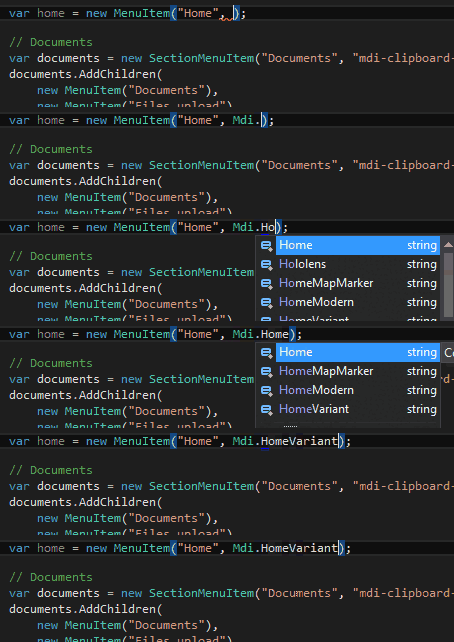
How to use this
Add the nuget package as a depency in your project:
PM> Install-Package MaterialDesignIcons-CSharp-ConstsEach Mdi.* const contains its icon's corresponding mdi class as value:
public const string FlipToFront = "mdi-flip-to-front";
public const string Floppy = "mdi-floppy";
public const string Flower = "mdi-flower";
public const string Folder = "mdi-folder";
public const string FolderAccount = "mdi-folder-account";
public const string FolderDownload = "mdi-folder-download";
Example
For example, you could use it in your own menu system:
// MenuItem.cs
public MenuItem(string title, string href, string icon) { ... }

// NavigationHelper.cs
this.items.add(new MenuItem("Home", "#", Mdi.HomeVariant));<!-- _Menu.cshtml -->
<a href="@menuItem.Href">
<i class="mdi @menuItem.Icon"></i>
@menuItem.Title
</a>How to update MaterialDesignIcons.cs.pp file
Note: you usually don't want to do that, except if some icons are missing from the generated file.
The generate.py script generates MaterialDesignIcons.cs.pp from MaterialDesignIcons input file.
- Run
python generate.py: _variables.scss will be downloaded and parsed from MaterialDesignIcon's repository to updateMaterialDesignIcons.cs.pp. - Open an issue here so I can update the nuget package
- You could also copy
MaterialDesignIcons.cs.ppinto your project (don't forget to drop the.ppextension & update the namespace)