

Catalog · How the catalog works
UserActivityCounter

A simple app to track your activity and presence time while working at your PC
- ★ 1 on GitHub
Anyone may press Interesting, signed in or not. It helps others find this project.
README
User Activity Counter
Tracks your activity and presence time while working at your PC.
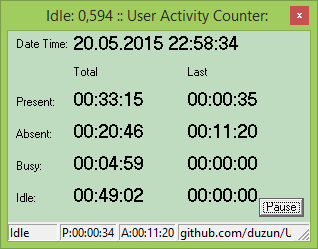
Installation
Copy .\dist\UserActivityCounter.exe somewhere in your system (eg. C:\Program Files\UserActivityCounter.exe),
then copy .\dist\Install.cmd to the same folder and run it once.
Next time you start the PC, UserActivityCounter should start automatically.
Usage
Press Ctrl+Space to change the default absent timeout (in sec).
By default when you close the window of UserActivityCounter, it goes to system tray.
If you want to close the application, press Ctrl+Alt+Esc.
Reporting CSV format
UserActivityCounter saves actvity information in a CSV file (comma separated values) in the same folder from where the application has been started.
First row of the file contains column names:
- ~ date ~ there might be several rows per day, each with the same date
- ~ came ~ the time user first time touches the PC
- ~ left ~ the time user last time touched the PC before leaving
- ~ pres. ~ amount of time user spend at the PC
- ~ abs. ~ amount of time user has been absent
- ~ t.pres ~ total presence time per session/day
- ~ t.abs. ~ total absence time per sesion/day
- ~ busy ~ amount of time user has been actively working (constant mouse & keyboard events)
- ~ down ~ the time system/application has been closed