

HyBridge

Simple Hysteria2 client and server configurator
- Active · last change 10-11-2026
- ★ 2 on GitHub
README
HyBridge
Simple Hysteria2 client and server configurator.
Dependencies:
- RPM: systemd gtk2 libproxy.so.1()(64bit)
- DEB: systemd libgtk2.0-0 libproxy1v5
Lazarus: LazBarcodes (from the Network Packet Manager)
Working directory: ~/.config/hybridge
Configurations/Certificates: ~/.config/hybridge/config
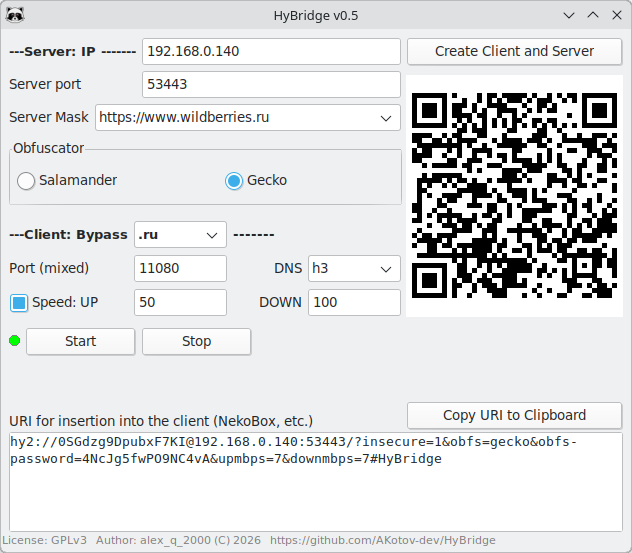
How to use
- Install the hysteria2 server on your VPS:
bash <(curl -fsSL https://get.hy2.sh/) - Install
HyBridgeon your computer, enter your VPSIP, and click theCreate Client and Serverbutton - Be sure to save the provided configuration archive
hybridge-config.tar.gz - Copy the server configuration and certificate from
hybridge-config.tar.gz(./config/server directory inside the archive) to/etc/hysteria/{cert.pem,config.yaml}on your VPS - Activate and start the Hysteria server on your VPS:
systemctl enable hysteria-server; systemctl restart hysteria-server- Click the
Startbutton in theHyBridgeclient window and access the open internet
The speed limit settings (UP/DOWN) are useful when configuring mobile devices or connections with asymmetric bandwidth. If you are unsure, leave them unchecked to use Auto mode, which allows the client to automatically adapt to the available network capacity.
The system proxy is configured automatically. Supported DEs: Budgie, GNOME, MATE, Cinnamon, KDE. XFCE, LXDE and LXQt support system proxy mode when XDE-Proxy-GUI is installed.
Note
-
QUIC traffic may be throttled or restricted by some ISPs in Russia. For this reason, HyBridge enables obfuscation by default. DNS-over-QUIC (DoQ) are not included in the DNS transport list, as they may not work reliably on affected networks.
-
If you modify the
Serverconfiguration (GUI), you must recreate both the Client and Server configurations. If only the client settings are changed, recreating both configurations is not required. -
For Android smartphones, use the NekoBox client.
DNS Transports...
URL: https://sing-box.sagernet.org/configuration/dns/server/
type: tcp - DNS over TCP
    ?????? TCP/53
ip.addr == 1.0.0.1 && tcp.port == 53

type: udp - DNS over UDP
    ?????? UDP/53
ip.addr == 1.0.0.1 && udp.port == 53

type: h3 - DNS over HTTP3 (DoH3)
    ?????? HTTP/3 + QUIC/UDP/443
ip.addr == 1.0.0.1 && udp.port == 443

type: tls - DNS over TLS (DoT)
    ?????? TLS + TCP/853
ip.addr == 1.0.0.1 && tcp.port == 853

type: https - DNS over HTTPS (DoH)
    ?????? HTTPS + TLS + TCP/443
ip.addr == 1.0.0.1 && tcp.port == 443

type: quic - DNS over QUIC (DoQ) - blocked in Russia
    ?????? QUIC + TLS 1.3 + UDP/853
ip.addr == 1.0.0.1 && udp.port == 853