

Catalog · How the catalog works
gridprinter

A package to simplify printing of string grids and other descendants of TCustomGrid. Contains also a print preview dialog, as well as standard actions.
- ★ 2 on GitHub
Anyone may press Interesting, signed in or not. It helps others find this project.
README
GridPrinter
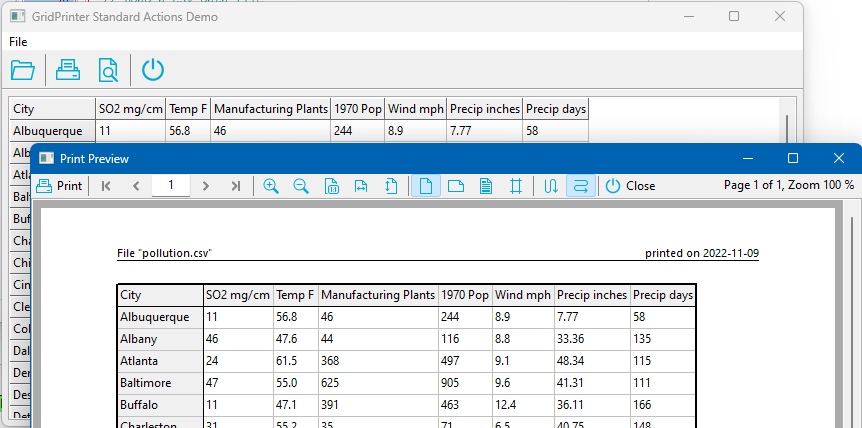
TGridPrinter is a component to simplify printing of string grids or other descendants of TCustomGrid. It is bundled together with a ready-made print preview dialog, TGridPrintPreviewDialog, as well as standard actions to trigger printing or to show the preview dialog without writing a single line of code.
Author: Werner Pamler
License: Modified LGPL-2 (with linking exception, like Lazarus LCL).
Download and Installation
Release version
The package is made available for installation by the Online-Package-Manager (OPM). Additionally, a zip file with the most recent release version can be found at Lazarus CCR at SourceForge. Unzip the file into any folder, load gridprinterpkg.lpk into Lazarus and click Use > Install.
Development version
The current development version is hosted at Lazarus CCR (SVN). Use SVN to check it out, or download the zipped snapshot from that page. Install by loading gridprinterpkg.lpk and clicking Use > Install.
Getting Started
How can I print a StringGrid?
- Drop a
TGridPrintercomponent on the form. - Link its
Gridproperty to the StringGrid you want to print. - In the
OnClickhandler of a button or menu item, call thePrintmethod.
procedure TForm1.PrintButtonClick(Sender: TObject);
begin
  GridPrinter1.Print;
end;
How can I see a preview before printing?
- Drop a
TGridPrintPreviewDialogon the form. - Link its
GridPrinterproperty to theTGridPrinterinstance. - Call the
Executemethod of the preview dialog.
procedure TForm1.PrintPreviewButtonClick(Sender: TObject);
begin
  GridPrintPreviewDialog1.Execute;
end;
The preview dialog allows you to scroll pages, zoom, change orientation, adjust margins by dragging, and add headers/footers – and print from there as well.
Selecting a printer
TGridPrinter has a property ShowPrintDialog which controls whether a print dialog is shown before printing. The possible values are:
gpdNone– no dialoggpdPageSetup– showsTPageSetupDialog(paper size, orientation, margins)gpdPrintDialog– showsTPrintDialog(printer, copies, page range)gpdPrinterSetup– showsTPrinterSetupDialog(printer, paper size, orientation)
Applying OnPrepareCanvas formatting to printout
Both the grid and the TGridPrinter fire an OnPrepareCanvas event. You can share the same event handler, but you must use the correct canvas depending on the sender.
procedure TForm1.PrepareCanvasHandler(Sender: TObject; ACol, ARow: Integer; AState: TGridDrawState);
var
  lCanvas: TCanvas;
begin
  if Sender = StringGrid1 then
    lCanvas := StringGrid1.Canvas
  else if Sender = GridPrinter1 then
    lCanvas := GridPrinter1.Canvas
  else
    raise Exception.Create('Unknown sender of OnPrepareCanvas.');

  if ARow < StringGrid1.FixedRows then
    lCanvas.Font.Style := [fsBold];
end;
Printing a DBGrid
Printing a TDBGrid requires extra work because the grid only holds a small portion of the dataset. You need to provide event handlers for OnGetRowCount, OnBeforePrint, OnNewLine, and OnGetCellText. See the example projects (dbgrid2) in the GridPrinter installation folder for details.
Example snippets:
procedure TForm1.GridPrinter1GetRowCount(Sender: TObject; AGrid: TCustomGrid;
  var ARowCount: Integer);
var
  dbGrid: TDBGrid;
begin
  dbGrid := AGrid as TDBGrid;
  dbGrid.DataSource.DataSet.Last;
  dbGrid.DataSource.DataSet.First;
  ARowCount := dbGrid.DataSource.DataSet.RecordCount + 1;  // +1 for header row
end;

procedure TForm1.GridPrinter1BeforePrint(Sender: TObject);
begin
  DBGrid1.DataSource.DataSet.First;
end;

procedure TForm1.GridPrinter1NewLine(Sender: TObject; AGrid: TCustomGrid;
  ARow: Integer);
var
  dbGrid: TDBGrid;
begin
  dbGrid := AGrid as TDBGrid;
  BufDataset1.RecNo := ARow;  // RecNo starts at 1
end;

procedure TForm1.GridPrinter1GetCellText(Sender: TObject; AGrid: TCustomGrid;
  ACol, ARow: Integer; var AText: String);
var
  dbGrid: TDBGrid;
  col: TColumn;
  colOffs: Integer;
begin
  AText := '';
  dbGrid := AGrid as TDBGrid;
  if dgIndicator in dbGrid.Options then colOffs := 1 else colOffs := 0;
  if ACol < colOffs then Exit;
  col := dbGrid.Columns[ACol - colOffs];
  if ARow = 0 then AText := col.FieldName
  else AText := col.Field.AsString;
end;
Printing a page number
Enable the header or footer, set its Visible property to True, and enter text with the $PAGE symbol (e.g., '|$PAGE|' for centered page number). Other symbols: $PAGECOUNT, $DATE, $TIME, $FILENAME, etc.
Documentation
TGridPrinter
Public methods
function CreatePreviewBitmap(APageNo, APercentage: Integer): TBitmapfunction GetCellText(ACol, ARow: Integer): Stringprocedure Print– main methodprocedure ScaleToPages(NumHor, NumVert: Integer)function ScaleX(AValue: Integer): Integerfunction ScaleY(AValue: Integer): Integerprocedure UpdatePreview
Public properties (read-only)
Canvas: TCanvasColCount: IntegerColWidth[AIndex: Integer]: DoubleFooterMargin: IntegerHeaderMargin: IntegerPageHeight, PageWidth: IntegerPageRect: TRectPixelsPerInchX, PixelsPerInchY: IntegerPadding: IntegerPageCount: IntegerPrintPageNumber: IntegerPrintScaleToNumHorPages, PrintScaleToNumVertPages: IntegerPrintScalingMode: TGridPrnScalingModeRowCount: IntegerRowHeight[AIndex: Integer]: Double
Published properties and events
Properties
Grid: TCustomGrid– link to the grid to print.BorderLineColor, BorderLineWidthFileName: String– used in header/footer symbols.FixedLineColor, FixedLineWidthFooter: TGridPrnHeaderFooterFromPage, ToPage: IntegerGridLineColor, GridLineWidthHeader: TGridPrnHeaderFooterMargins: TGridPrnMarginsMonochrome: BooleanOptions: TGridPrnOptions– includes centering, grid lines, borders, etc.Orientation: TPrinterOrientationPrintOrder: TGridPrnOrder– rows first or columns first.PrintScaleFactor: DoubleShowPrintDialog: TGridPrnDialog
Events
OnAfterPrint,OnBeforePrintOnGetCellText,OnGetRowCount,OnGetColCountOnLinePrinted,OnNewLine,OnNewPageOnPrepareCanvasOnPrintCellOnUpdatePreview
TGridPrnHeaderFooter
Class for header/footer lines.
Published properties
Font: TFontLineColor, LineWidthSectionSeparator: String(default '|')ShowLine: BooleanText: String– supports symbols:$DATE,$PAGECOUNT,$PAGE,$FULL_FILENAME,$FILENAME,$PATH,$TIMEVisible: Boolean
Public properties
ProcessedText[AIndex: TGridPrnHeaderFooterSection]: StringSectionText[AIndex: TGridPrnHeaderFooterSection]: String
TGridPrnMargins
Margin parameters (in millimeters):
Left, Top, Right, BottomHeader– margin to top of headerFooter– margin to bottom of footer
TGridPrintPreviewDialog
(In unit GridPrnPreviewDlg)
Public methods
procedure Execute– main method.
Published properties
FormParams: TGridPrintPreviewFormParamsGridPrinter: TGridPrinterOptions: TGridPrintPreviewOptions– controls visibility of toolbar elements (navigation, zoom, orientation, margins, header/footer setup, print order, centering, scaling, page setup).Zoom: Integer– scaling factor in percent (default 100).ZoomMode: TGridPrintPreviewZoomMode–zmCustom,zmFitWidth,zmFitHeight.
TGridPrintPreviewFormParams
Left, Top, Width, Height: IntegerPosition: TPosition– e.g.,poMainFormCenter,poScreenCenter.
Preview form functionality
The preview dialog includes a toolbar with the following buttons (icons are taken from the Lazarus general-purpose image collection by Roland Hahn):
| Icon | Description |
|---|---|
 |
Sends the grid to the printer. |
 |
Displays the first page. |
 |
Displays the previous page. |
 |
Displays the next page. |
 |
Displays the last page. |
 |
Enlarges the preview. |
 |
Reduces the preview. |
 |
Original size (100%). |
 |
Scales to fill the width. |
| Scales to fill the height. | |
| Switches to portrait orientation. | |
| Switches to landscape orientation. | |
| Opens dialog to set up header/footer. | |
| Displays margins as draggable lines. | |
| Prints rows first for large grids. | |
| Prints columns first. | |
| Centers grid horizontally. | |
| Centers grid vertically. | |
| Opens a dialog to set scale factor. | |
| Dropdown menu with page setup options. |
GridPrinter Actions
(Unit GridPrnActions)
TGridPrinterAction
When its GridPrinter property is linked to a TGridPrinter instance, and the action is assigned to a control’s Action property, clicking the control executes the Print method without any additional code.
TGridPrintPreviewAction
When its PreviewDialog property is linked to a TGridPrintPreviewDialog instance, clicking the control runs the Execute method of the preview dialog.
Modifications
This version of GridPrinter has been modified from the original by Werner Pamler.
Original:
- Author: Werner Pamler
- License: Modified LGPL-2 (with linking exception, like Lazarus LCL)
- Source: GridPrinter on Free Pascal wiki
Modifications:
- Modified for use in Notetask application (© 2024 Alexander Tverskoy)
- Enhancements:
- Enhanced tag printing support
These modifications are distributed under the same license as the original: Modified LGPL-2 with linking exception.
--
This README is based on the GridPrinter wiki page (last edited 14 December 2022).