

Catalog · How the catalog works
VIBE-CMD

Modern File Manager for Windows 11 (Delphi FMX, Fluent Design)
- ★ 2 on GitHub
Anyone may press Interesting, signed in or not. It helps others find this project.
README
V!BE CMD
Power of a classic file manager. Built for today.
Two-panel file manager for Windows 10 and 11. Dual panes, tabs, real previews, and Fluent design — without a pile of plugins.
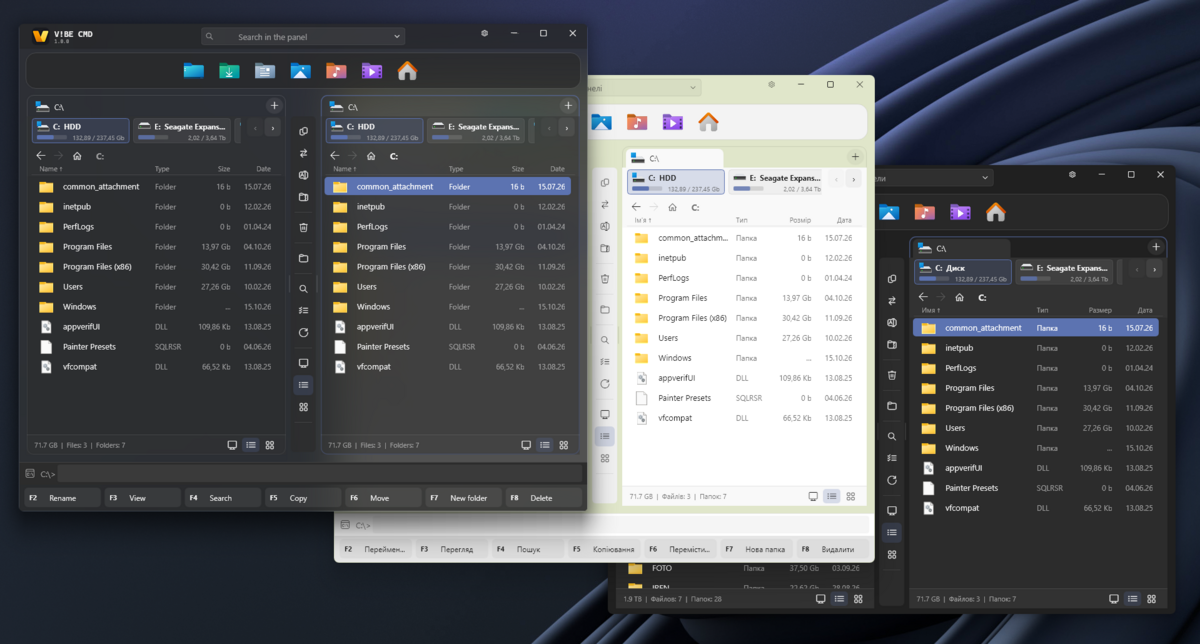
Also: Українською · ---
Download
Public beta — current build:
Unzip anywhere and run VibeCmd.exe. No installer. Settings are stored next to the program in VibeSetting.ini.
For 7Z, RAR, CAB, and ISO archives, 7-Zip must be installed on your system.
Additionally, place ffmpeg.exe in the same folder as the application to enable audio and video conversion.
---
What it is
Explorer is fine for one folder. V!BE CMD is for work that moves between two places: disk and flash drive, project and archive, source and destination.
- Commander layout. Left is source, right is destination. Copy and move go to the other panel. The active panel is the one with the cursor.
- Fluent. Own chrome, tabs, cards and title. Light, dark, or match the system. Window material: Normal, Mica, Acrylic. Follows the Windows accent color.
- See it now. Image, document, spreadsheet, audio, video, font, EXE, folder stats and archive contents open in preview — no extra program.
---
Features
File work
- Dual panels with tabs. Each tab keeps its path. Tabs restore on next launch.
- Details and tiles with real thumbnails. Smooth zoom.
- Breadcrumbs, drive bar (HDD / SSD / network / flash / WPD), Home menu.
- Selection like Explorer (drag box) or classic commander (right button). Mask, invert, same type.
- Background copy, move, delete. Pause, skip, cancel, send to background.
- Conflict dialog with side-by-side preview, size, date and “newer” mark.
- Network paths without freezing the window. MTP / WPD devices as folders.
- Archives open as folders: ZIP, TAR, GZ natively; 7Z, RAR, CAB, ISO via 7-Zip.
Quick View
Open in the other panel (Ctrl+Q) or a separate window (F3).
| Kind | Formats |
|---|---|
| Images | PNG, JPEG, WEBP, BMP, GIF, ICO/CUR, HEIC/AVIF (with system codecs) |
| Vector | SVG, CDR, EPS, EMF, WMF, Lottie |
| Documents | PDF, AI (PDFium), DOCX, ODT, RTF — own parsers, no Word |
| Spreadsheets | XLSX, XLSM, CSV, TSV — own grid, no Excel |
| Design | PSD / PSB composite |
| Media | Video and audio, waveform, frame grab |
| Code & text | Monospace view, syntax highlight, encodings |
| Executables | PE info: architecture, signature, imports, version |
| Folders | Panorama: size breakdown by type |
Image tools inside the viewer: crop, rotate, flip, resize, save as. Edits stay in memory until you save.
Tools
- Find files. Mask, date range, text inside files, send results to a panel.
- Batch rename. Masks
\[N] \[E] \[C] \[Y] \[M] \[D], counter, case, find and replace, live preview. - Search in panel. Filter the current list as you type.
- Dock. Pin apps, folders and files. Own icons, drag to reorder.
- Themes. Match system / Dark / Light, Normal / Mica / Acrylic, optional color tint, list font size.
---
Keys
| Key | Action |
|---|---|
F2 / F9 |
Rename |
F3 |
Quick View (window) |
F4 / Alt+F7 |
Search |
F5 |
Copy to the other panel |
F6 |
Move to the other panel |
F7 |
New folder |
F8 / Delete |
Delete |
Shift+Delete |
Delete without Recycle Bin |
Alt+F5 |
Pack to archive |
Ctrl+Q |
Show / hide Quick View in the panel |
Ctrl+T / Ctrl+W |
New tab / close tab |
Ctrl+M |
Batch rename |
Ctrl+B |
Branch view |
Tab |
Switch active panel |
Space / Insert |
Mark and move on |
+ / - / \* |
Select by mask / unselect / invert |
Ctrl+A |
Select all |
The bottom key bar mirrors the main actions.
---
Requirements
- Windows 10 (1903+) or Windows 11
- For HEVC / some MKV: HEVC Video Extensions from the Store, or open in an external player
- For 7Z / RAR / CAB / ISO: 7-Zip installed
- For full PDF / AI pages:
pdfium.dllnext to the executable
---
Status
Public beta. Core file operations, Quick View, archives, search and batch rename are in daily use. Expect rough edges on edge cases — feedback is welcome.
This is not a claim to replace every Total Commander plugin. The goal is the everyday path: two panels, a clear preview, and operations that do not block the window.
---
Feedback
Issues and ideas: open a ticket in this repository.
---
License
Beta builds are free to try. Final license is not fixed yet.