

Catalog · How the catalog works
delphi-ipc

Send structured messages between Windows processes over WM_COPYDATA, with a portable, tested frame.
- ★ 2 on GitHub
Anyone may press Interesting, signed in or not. It helps others find this project.
README
WinIPC
Send structured messages between Windows processes over WM_COPYDATA.
WM_COPYDATA is the Win32 mechanism built for exactly this: handing a block of
bytes to another process's window, with the kernel marshalling it across the
boundary. No sockets, no named pipes, no shared files — just two processes and
a window. WinIPC wraps it in a small typed API and a self-describing frame.
// receiver
Server := TIpcServer.Create('my-channel', OnMessageHandler);
// ... in your idle loop:
Server.ProcessPending;

// sender, in another process
Msg.Kind := 1;
Msg.Payload := 'hello, other process';
TIpcClient.Send('my-channel', Msg);
Quick start
git clone https://github.com/ramonruanxc/delphi-ipc.git
cd delphi-ipc
Delphi XE7 or later — open demo/Demo.dpr and press F9. There is nothing
to configure: every unit is referenced from the .dpr with its path, and the
IDE creates its own project file for your Delphi version. Win32 is the default
target; for Win64, add the Windows 64-bit platform under Target Platforms
in the Project Manager and press F9 again. Under the debugger the console waits
for Enter so the result stays readable.
Free Pascal 3.2.2 — from the repository root, one command builds and runs
it (cmd.exe or PowerShell 7+; in Git Bash write demo/Demo.exe):
fpc demo/Demo.dpr && demo\Demo.exeExpected output (process ids vary):
WinIPC demo: one message between two processes over WM_COPYDATA
  receiver  pid 60736  listening on "winipc-demo-60736"
  sender    pid 29504  started as a separate process
  received  kind=1  "hello from another process"
  sender    delivered.
OK: process 29504 sent "hello from another process" to process 60736 over WM_COPYDATA.
The demo starts a second copy of itself as the sender, so the message really
crosses a process boundary. It exits with code 0 after the OK: line, or
prints FAILED: and exits with 1.
Compiler status. Free Pascal 3.2.2 is verified in CI: framing tests on Linux; transport tests, demo build and demo run on Windows. Delphi XE7 and later is the intended target, but no Delphi compiler has built or run this code yet (Community Edition refuses command-line builds), so treat Delphi support as untested and please report anything F9 turns up.
Execution flow
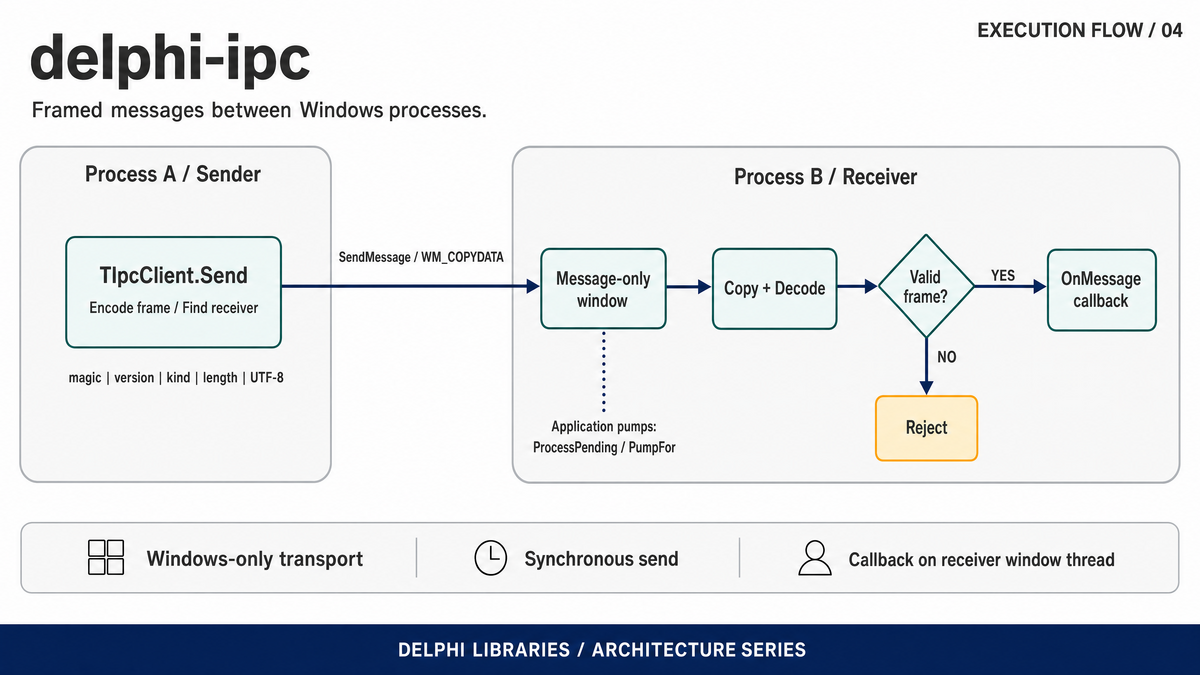
The client encodes a message and sends it synchronously through Windows WM_COPYDATA. The receiving application pumps its message-only window, validates the frame and invokes its callback on that window's owning thread.
Install
With Boss:
boss install github.com/ramonruanxc/delphi-ipcOr add src to your search path. Targets Delphi XE7 or later (not yet
compiled with Delphi, see Compiler status above) and Free Pascal 3.2 in
Delphi mode. The transport is Windows-only; the framing builds anywhere.
How it works
The receiver is a message-only window. TIpcServer creates a window
parented to HWND_MESSAGE: it never shows, is not enumerated as a top-level
window, and exists only to receive messages — exactly what a background IPC
endpoint wants. The channel name becomes the window class, so a sender finds it
with FindWindowEx under HWND_MESSAGE.
The sender uses SendMessage, never PostMessage. The kernel only marshals
the buffer across the process boundary for the duration of a synchronous
SendMessage. A posted message would hand the receiver a pointer into the
sender's address space — a bug that looks like it works until the sender frees
the buffer.
Cross-integrity delivery is allowed explicitly. When one process runs
elevated and the other does not, User Interface Privilege Isolation silently
drops the message. TIpcServer calls ChangeWindowMessageFilterEx to allow
WM_COPYDATA through, so an elevated app can receive from a normal one.
The payload is a self-describing frame. WinIPC.Message encodes a
(kind, payload) pair as magic | version | kind | length | bytes, and
decoding validates every field. A frame that claims more payload than it
carries — the classic buffer-overrun trap — is rejected, not trusted. This part
has no Windows dependency and is where most of the tests live.
API
TIpcMessage = record
  Kind: UInt32;      // caller-defined message kind
  Payload: string;   // carried as UTF-8 on the wire
end;

TIpcServer = class
  constructor Create(const AChannel: string; AOnMessage: TIpcMessageEvent);
  function ProcessPending: Integer;        // dispatch queued messages, no block
  function PumpFor(ATimeoutMs: Cardinal): Boolean;  // block until one arrives
  property Handled: Int64;                 // count of valid messages received
end;

TIpcClient = class
  class function Send(const AChannel: string;
    const AMessage: TIpcMessage): TIpcSendResult;   // srDelivered / srNoServer / ...
end;
ProcessPending is for an app with its own message loop — call it when idle.
PumpFor is for a program whose only job is to wait for IPC.
Note on PumpFor: a WM_COPYDATA sent from another thread or process is
dispatched as a side effect of PeekMessage, which still returns False.
Delivery is therefore judged by the Handled counter, not by whether the pump
loop saw a queued message — a distinction that is easy to get wrong and is
pinned by a test.
Building from a clone
Every .dpr lists its units with explicit in '...' paths, so opening one in
the Delphi IDE and pressing build works with nothing to configure — no search
path, no library path.
Free Pascal honours the in clause too, but resolves it against the current
directory rather than the .dpr's, so a build from the repository root adds
-Fusrc (and -Futests for the test suites). Every example below includes
them.
Sources are UTF-8. The files whose string literals contain non-ASCII text start with a UTF-8 BOM, so that Delphi reads them as UTF-8 instead of the system ANSI code page; Free Pascal honours the same BOM.
Demo
demo/Demo.dpr is two real processes. Run with no arguments (see Quick
start), it receives in its own process and starts a second copy of itself to
send. To drive the two sides by hand instead, open two consoles:
Demo.exe server
Demo.exe client "hello from the other process"
The server prints each message it receives; every client run is a separate process crossing the boundary.
Running the tests
The framing suite is portable and is the Linux CI coverage:
fpc -Mdelphi -Fusrc -Futests -FUbuild -obuild/CoreTests tests/CoreTests.dpr
./build/CoreTests
The full suite adds the WM_COPYDATA transport and runs on Windows. It performs a real cross-thread round trip in one process — a server window on the main thread, a worker thread sending to it — which exercises the same kernel marshalling path as a true cross-process send, without a second executable:
fpc -Mdelphi -Fusrc -Futests -FUbuild -obuild/WinTests.exe tests/WinTests.dpr
./build/WinTests.exe
CI runs both: the framing job on Linux, the transport job on Windows.
Licence
MIT. See LICENSE.