

DiskLED

DiskLED 3 — resident system monitor for Windows 10/11 (Delphi VCL)
- Active · last change 10-10-2026
- ★ 2 on GitHub
README
DiskLED
Windows XP 時代に Delphi 4.0 で作られた常駐モニター(HDD / ネットワーク / CPU / メモリ)を、現代の Windows(Windows 11 など)向けに基本設計から再構築したアプリケーションです。
ダウンロード
概要
- 開発環境: Delphi Community Edition(個人開発・無料配布)/VCL・64-bit
- 対象: Windows 10 / 11
- 外観: ユーザー導入の旧スキン(
.dla)は非対応。内部は layout.cfg ベースの表示モード(Original / Crystal / Metalic / Info Bar / Vintage)。assets/<id>/layout.cfgを足せばモード追加可能 - 更新頻度: 最低 10 fps、デフォルト 15 fps。見た目のコマが変わらないときは再描画しない
- プロセス: 単一起動のみ(2つ目以降は起動を抑制し、既存へフォーカス等)
- スケール:
- CPU / 物理メモリ / SWAP … 0~100%
- ディスク/ネット速度 … デバイス上限 → だめなら実測オートセンス(手動レンジは二期)
- Ping … 応答時間を 4 段階(正常/やや遅い/遅い/タイムアウト)で表示
- 非採用: ユーザー向けスキン配布(
.dla)、SSTP、サウンド全般、フローティング、複数起動、ダッシュボード描画の Direct2D 移行(レンダーターゲットのリサイズ/デバイスロスト管理がカード単位の独立ウィンドウ構成で煩雑化するため。GDI+ への統一に留める)、ダッシュボードの CRT/キャラクター表示タイプ(作業量に対して得られるものが小さく、縦横比を自由に変えられるダッシュボードでは文字グリッドの設計が難しいため) - 非採用(権限・API 方針上): アクセス中のファイル一覧(ETW カーネルプロバイダ=管理者権限が必要)、メモリ内訳 Standby/Modified・GPU VRAM 内訳(いずれも非公開 API 依存。一般権限・公式 API 優先の方針に反する。GPU 使用率は PDH で公式に取れるため対象)
主な機能
「今アクセスしているか/どのくらい負荷か」が一目で分かる常駐デスクトップガジェット。
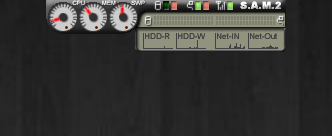
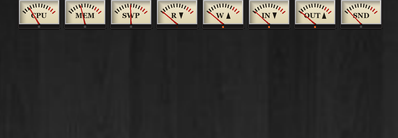
- 表示モード切替(Original / Crystal / Metalic / Info Bar / Vintage。Vintage はアナログ VU メーター風、3.1.2〜)
- 表示サイズ:コンパクト/フル。タスクトレイ LED(トレイアイコン自体がディスク/ネットのアクセス LED)はウィンドウと併用・単独のどちらも可(3.2.0〜。3.1.1〜3.1.2 は排他 3 択)
- ガジェット本体の表示倍率を自動/100%/150%/200% から選択(3.2.0〜)
- CPU、MEM、SWAP(仮想メモリ)メーター
- Disk R/W LED+速度バー、Net 送受信 LED+速度バー
- Ping:応答段階表示。ダッシュボードの「Ping/経路」ページで、宛先までの往復時間が経路上のどの区間で費やされているかをウォーターフォールで表示し、ホップごとの RTT・損失・ジッター・前回比・事業者名(任意)を一覧表示(3.3.0〜。3.1.1〜3.2.x は専用ウィンドウでの Tracert 表示)
- 最前面表示、トレイアイコン、スタートアップ登録、単一起動の強制
- 右クリックメニューから位置をリセット(画面外に外れた本体ウィンドウの復旧、3.1.1〜)
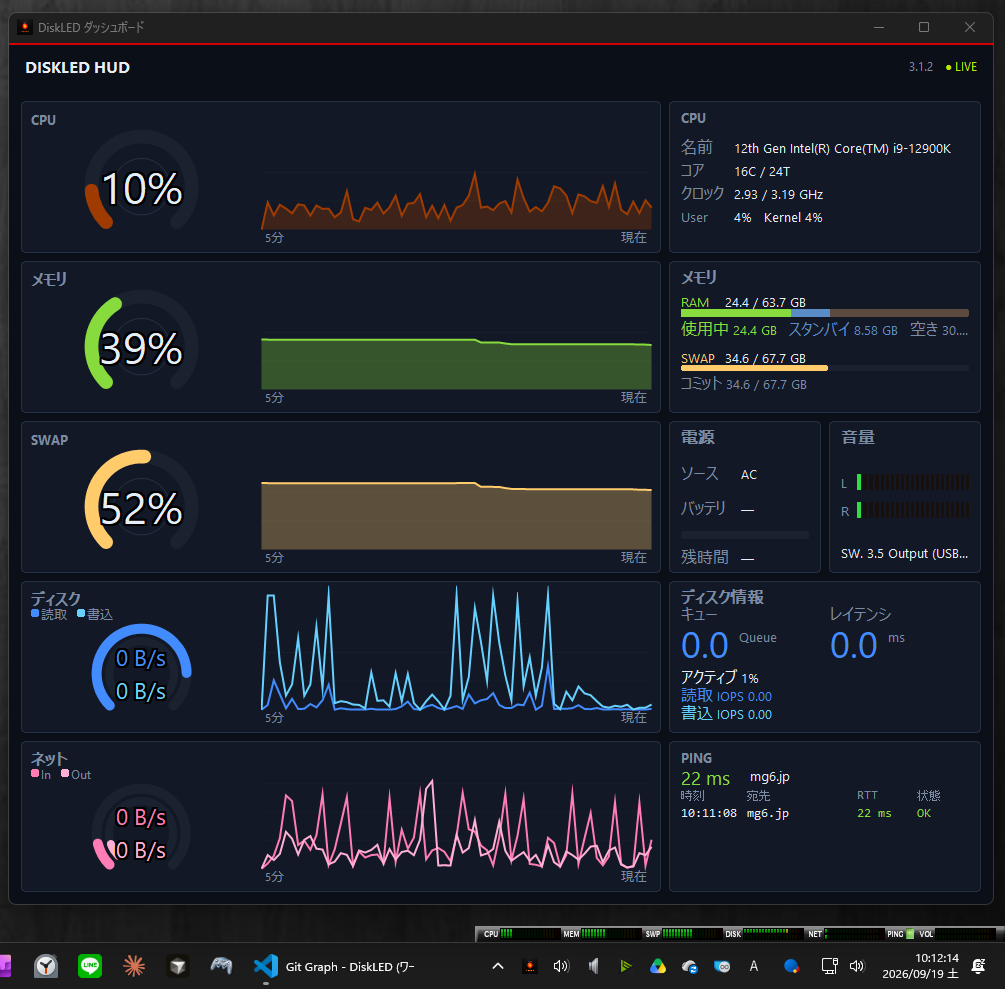
- ダッシュボード(別ウィンドウ)。CPU/メモリ/SWAP/ディスク/ネットのドーナツ・推移グラフ、ディスクレイテンシ(3.1.1〜)、GPU 使用率(CPU カードに同居、3.2.0〜)、電源(再生音量)、Ping 履歴などを表示。「プロセス」ページでリソース別(CPU/メモリ/I/O)の上位プロセス、「Ping/経路」ページで経路を表示(3.3.0〜)
- ブラウザで動くスキン編集ツール Asset Editor(
asset-editor/、3.2.0〜)
Crystal はコンパクトのみ。Info Bar・Vintage はフル表示ありだが推移グラフは無し。
監視対象
- ディスク: 全物理ディスクの I/O を合算(システム全体の「HDDランプ」相当)
- ネットワーク: 実 NIC のみ合算(VPN・ループバック・仮想アダプタは除外を試みる)
- Ping: 指定ホスト(既定 mg6.jp)、またはデフォルトゲートウェイ自動検出。間隔は 最低 5 分、閾値はオプションで変更可
UI・描画
- 透過: 旧スキン同様、カラーキー透過で非矩形ウィンドウを再現する
- 設定ファイル: 基本は exe と同じフォルダの
DiskLED.ini(書込不可時は%AppData%\DiskLED\DiskLED.iniへフォールバックする) - メーター追従: 上昇は指数で速く、下降は定速の余韻(fps 非依存)。動きは表示モードの
layout.cfg[Ballistic]で指定(3.0.1 以降) - 対数スケール: ネット速度はオプションで直線(既定)または対数。ディスクはオートセンスの直線。CPU/MEM/SWAP は常に直線
- 権限: 管理者不要で動く範囲に限定(ICMP Ping も一般権限で実施)
配布・その他
- 配布形態:
- 正式配布は Inno Setup インストーラー(
DiskLED_Setup_<version>.exe、ユーザー権限・既定%LocalAppData%\Programs\DiskLED) - 併せてポータブル zip(
DiskLED-<version>-portable.zip)も利用可能 - Microsoft Store 版も配布(Store 経由で自動更新)
- 正式配布は Inno Setup インストーラー(
- 言語: 既定(Auto)は英語。OS の UI 言語が日本語のときだけ日本語。オプションで Auto / 日本語 / English を手動選択可(3.2.0〜、反映は次回起動)
- ライセンス: 著作権は SoRaMiMi(旧版開発者と同一)。
assets/以下も同様。公式配布物は無償利用可。ソースの改変・再配布は不可。改善・デバッグの協力は共同開発者(リポジトリ編集権限の付与)として行う。詳細はLICENSE.txt
DiskLED (English)
This application rebuilds a resident monitor (HDD / network / CPU / memory) originally written in Delphi 4.0 in the Windows XP era, from a fresh design for modern Windows (Windows 11 and others).
Download
- GitHub Releases page
- Microsoft Store Store listing
Overview
- Development environment: Delphi Community Edition (personal development, free distribution) / VCL · 64-bit
- Target: Windows 10 / 11
- Appearance: User-supplied legacy skins (
.dla) are not supported. Internally, display modes are layout.cfg-based (Original / Crystal / Metalic / Info Bar / Vintage). Modes can be added by placingassets/<id>/layout.cfg - Refresh rate: Minimum 10 fps, default 15 fps. The window is not redrawn while sprite frames stay the same
- Process: Single instance only (later launches are suppressed and focus is given to the existing instance, etc.)
- Scales:
- CPU / physical memory / SWAP … 0–100%
- Disk / network speed … device maximum → if that fails, measured auto-sense (manual range is a later phase)
- Ping … response time shown in 4 levels (OK / somewhat slow / slow / timeout)
- Not adopted: User-facing skin distribution (
.dla), SSTP, sound in general, floating, multiple instances, moving dashboard drawing to Direct2D (render-target resizing and device-loss handling get unwieldy with each card being its own window; drawing is unified on GDI+ instead), a CRT / character-cell dashboard style (little gain for the work involved, and a character grid is hard to design for a dashboard whose aspect ratio is freely resizable) - Not adopted (privilege / API policy): List of files currently being accessed (ETW kernel provider = requires administrator rights), memory Standby/Modified breakdown and GPU VRAM breakdown (both depend on undocumented APIs, against the "prefer non-elevated, official APIs" policy; GPU utilization is in scope since PDH exposes it officially)
Key features
A resident desktop gadget that shows at a glance whether something is being accessed and how much load there is.
- Display mode switching (Original / Crystal / Metalic / Info Bar / Vintage; Vintage is an analog VU-meter style, since 3.1.2)
- Display size: Compact / Full. The task-tray LED (the tray icon itself becomes a disk / network access LED) can be shown alongside the window or on its own (since 3.2.0; 3.1.1–3.1.2 had a mutually exclusive 3-way choice)
- Display scale of the gadget: Auto / 100% / 150% / 200% (since 3.2.0)
- CPU, MEM, SWAP (virtual memory) meters
- Disk R/W LED + speed bar, Net in/out LEDs + speed bar
- Ping: response-level display. The dashboard's Ping / Route page shows, as a waterfall, which segments of the path the round trip to the target is spent in, with each hop's RTT, loss, jitter, change from last time and (optionally) network operator (since 3.3.0; 3.1.1–3.2.x showed a Tracert-style list in a separate window)
- Always-on-top, tray icon, startup registration, enforce single instance
- Reset position from the right-click menu (recovers a main window that has drifted off-screen, since 3.1.1)
- Dashboard (separate window). Donut/history graphs for CPU / memory / SWAP / disk / network, disk latency (since 3.1.1), GPU utilization (shown in the CPU card, since 3.2.0), power (playback volume), Ping history, and more. A Processes page lists the top processes per resource (CPU / memory / I/O) and a Ping / Route page shows the route (since 3.3.0)
- Browser-based skin editor Asset Editor (
asset-editor/, since 3.2.0)
Crystal is compact-only. Info Bar and Vintage have a full view but no history graph.
What is monitored
- Disk: Sum of I/O of all physical disks (system-wide “HDD lamp” equivalent)
- Network: Sum of real NICs only (VPN, loopback, and virtual adapters are excluded where possible)
- Ping: Specified host (default mg6.jp), or auto-detect the default gateway. Interval is at least 5 minutes; thresholds can be changed in Options
UI / drawing
- Transparency: Color-key transparency, like the old skins, to reproduce a non-rectangular window
- Settings file: Basically
DiskLED.iniin the same folder as the exe (falls back to%AppData%\DiskLED\DiskLED.iniwhen that folder is not writable) - Meter follow: Fast exponential rise, constant-speed fall (fps-independent). Motion is set per display mode in
layout.cfg[Ballistic](since 3.0.1) - Log scale: Network speed can be linear (default) or logarithmic in Options. Disk stays auto-sense linear. CPU / MEM / SWAP stay linear
- Privileges: Limited to what works without administrator (ICMP Ping is also done as a standard user)
Distribution and other
- Distribution:
- Official distribution is the Inno Setup installer (
DiskLED_Setup_<version>.exe, per-user, default%LocalAppData%\Programs\DiskLED) - A portable zip (
DiskLED-<version>-portable.zip) is also available - Also distributed via the Microsoft Store (auto-updates through the Store)
- Official distribution is the Inno Setup installer (
- Language: English by default (Auto). Japanese only when the OS UI language is Japanese. Auto / Japanese / English can be chosen in Options (since 3.2.0; takes effect on next launch)
- License: Copyright is SoRaMiMi (same as the previous version’s author). Same for
assets/. Official packages may be used free of charge. Modification and redistribution of the source are not permitted. Help with improvements and debugging is as a co-developer (granted repository write access). Details inLICENSE.txt