

Catalog · How the catalog works
McSimpleProp

A Delphi / Lazarus / C++Builder simple and small class to manage properties
- ★ 2 on GitHub
Anyone may press Interesting, signed in or not. It helps others find this project.
README
McSimpleProp
A Delphi / Lazarus / C++Builder simple and small class to manage properties nested within tabs of a TPageControl and a navigation control using a TTreeView.
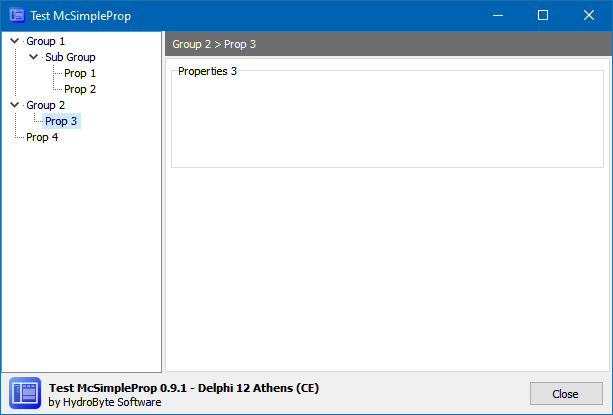
Motivation
- Simple Object-Pascal native code.
- Just one unit (
McSimpleProp), just one class(TMcSimpleProp). - Not a visual component; just an unit and simple class.
- Compatible (aimed):
- Delphi 7 up to now.
- Lazarus.
- C++Builder 2006 up to now.
- Tested with:
- Delphi 12 (CE)
- Lazarus 2.3.0 (FPC 3.2.2)
- BDS 2006 (BCB and Delphi)
- C++Builder 10.2 (Pro)
How to use it
See test folder for structured examples.
Add McSimpleProp unit to your project.
Into a TForm or a TFrame descendant unit, add a TTreeView and a TPageControl similar to this layout:
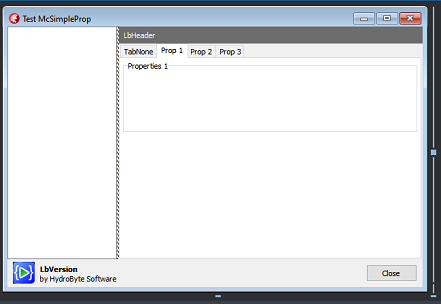
Into the designer, add pages to the TPageControl and setup each TTabSheet's Caption property using names that will be shown into the TTreeView navigator.
Hint: You can create a special tab with
PageIndex = 0to be shown when a Group node is selected. The test projects use this in order to show the "Please select an option on the left." message.
Into your code, add some nodes associated with tabs, like the following example.
procedure TFormMain.FormCreate(Sender: TObject);
var
  node: TTreeNode;
begin
  // McSimpleProp setup
  fMcSimpleProp := TMcSimpleProp.Create(TreeView, PageControl);
  // ... add nodes
  node := fMcSimpleProp.AddNode('Group 1'   , nil , false);
  node := fMcSimpleProp.AddNode('Sub Group' , node, true );
  node := fMcSimpleProp.AddNode(Tab1.Caption, node, true );
  node := fMcSimpleProp.AddNode(Tab2.Caption, node, false);
  node := fMcSimpleProp.AddNode('Group 2'   , nil , false);
  node := fMcSimpleProp.AddNode(Tab3.Caption, node, true );
  node := fMcSimpleProp.AddNode(Tab4.Caption, nil , false);
  // ... prepare controls
  fMcSimpleProp.Prepare;
  // ... select node related to Tab1 by default
  fMcSimpleProp.SelectNodeByText(Tab1.Caption);
  // ... or simulate a LastTab selected by its index.
  fMcSimpleProp.SelectNodeByTabIndex(3);
end;
You can use aNode = nil to create nodes at TTreeView's first level.
If aNode is assigned, then you can add child (isParent = true) or sibling (isParent = false) nodes to it.
Finally, in order to respond to the user selection on the navigator, create a TTreeView's OnChange event handler.
procedure TFormMain.TreeViewChange(Sender: TObject; Node: TTreeNode);
begin
  fMcSimpleProp.SelectTabByText(Node.Text);
  LbHeader.Caption := fMcSimpleProp.GetNodePath(Node);
end;
Hint: The
TLabelcomponent showing thepathis optional.