

Catalog · How the catalog works
pobatch

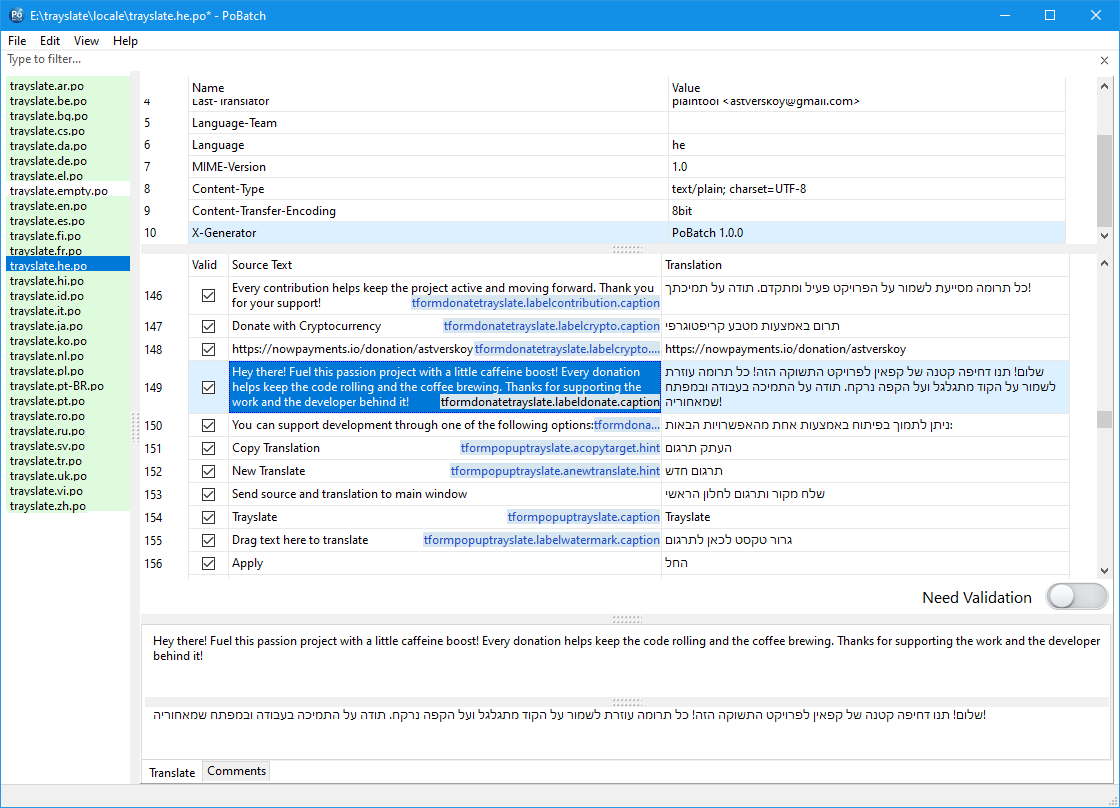
PoBatch is an easy-to-use PO file editor for l10n workflows. It displays source strings and translations in a grid, allowing selection of columns or rows and bulk copy and paste operations. Batch actions across a whole folder - copy source, clear fuzzy, sync with POT, translate - make it easy to keep hundreds of PO files up to date at once.
- ★ 2 on GitHub
Anyone may press Interesting, signed in or not. It helps others find this project.
README

PoBatch
PoBatch is an easy-to-use PO file editor for l10n workflows. It displays source strings and translations in a grid, allowing selection of columns or rows and bulk copy and paste operations. This makes it easy to quickly update translations within a PO file.
[!WARNING] This project is still under active development.
While it is already functional and useful, some features may continue to evolve and occasional issues may still occur. As a general best practice, it is recommended to keep backup copies of your translation files.
<!--
Installation
Windows
Several installer options are available on the releases page:
| Description | Files |
|---|---|
| User installer (MSI) — installs the application for the current user | pobatch‑x64.msi |
pobatch‑x86.msi |
|
| System installer (MSI) — installs the application for all users on the system | pobatch‑x64‑allusers.msi |
pobatch‑x86‑allusers.msi |
|
Portable version — saves its settings to form_settings.json if it is near the executable; otherwise, in the user directory |
pobatch‑x86‑x64‑portable.zip |
Download the installer from the releases page, run it, and follow the on-screen instructions. After installation, you can launch PoBatch from the Start menu or from the desktop shortcut.
Linux
Debian-like systems (Debian, Ubuntu, etc.)
Download the appropriate .deb package for your system from the releases page, or use wget directly. An example of using wget is provided on the release page.
If you downloaded the package manually, you can also install it via:
sudo dpkg -i /path/to/pobatch.debIf there are missing dependencies, fix them by running:
sudo apt-get install -fRPM-based systems (Fedora, RHEL, CentOS, openSUSE, etc.)
Download the appropriate .rpm package for your system, or use wget directly. An example of using wget is provided on the release page.
If you downloaded the package manually, you can also install it via:
sudo dnf install /path/to/pobatch.rpmIf there are missing dependencies, fix them by running:
sudo dnf install -y gtk2-->
Building from Source
Requirements
- Lazarus 4.8
- Git (Windows only)
Build Instructions
Windows
- Clone the repository:
git clone https://github.com/plaintool/pobatch - Open the project directory and run:
build.cmd
Linux
- Clone the repository:
git clone https://github.com/plaintool/pobatch - Open the project directory and run:
make
The compiled executable will be available in the project directory.
Console mode
Besides the graphical interface, PoBatch can run batch operations directly from the command line — useful for scripts, CI/CD pipelines, and headless automation. When a known command is present, the application performs the operation and exits without showing the main window.
Usage
pobatch <command> <target> [options]Run pobatch --help to print the full list of commands, targets, and options at any time.
Commands
| Command | Description |
|---|---|
copy-source |
Copy source text into empty translations |
clear-fuzzy |
Clear translations of fuzzy entries |
clear-all |
Clear all translations (headers are preserved) |
mark-valid |
Remove the fuzzy flag from all entries |
sync-pot |
Synchronize with the reference POT file |
translate |
Translate empty entries via the configured service |
new-from-pot |
Create new PO files from a POT for the given languages |
rename |
Rename files by base name |
Targets
One target is required for most commands.
| Target | Description |
|---|---|
--file <path> |
Process a single PO or POT file |
--dir <path> |
Process all PO and POT files in a directory |
--files <p1;p2> |
Semicolon-separated list of files |
Options
| Option | Description |
|---|---|
--pot <path> |
Reference POT file (sync-pot, new-from-pot) |
--langs <c1,c2> |
Target language codes (new-from-pot) |
--name <base> |
New base name (rename) |
--config <path> |
Translation config file (name or full path) |
--source <lang> |
Source language code (default: en) |
--target <lang> |
Target language code |
-h, --help |
Show help and exit |
[!NOTE] Without
--config, PoBatch uses the translation profile that was last selected in the GUI. Pass--configto override it explicitly — for example--config config/mymemory.ini.
Examples
# Copy source text into empty translations across a whole directory
pobatch copy-source --dir ./locale

# Remove the fuzzy flag from a single file
pobatch mark-valid --file ./locale/app.ru.po

# Synchronize every PO in a directory with its matching POT
pobatch sync-pot --dir ./locale

# Translate all empty entries into Russian using a specific profile
pobatch translate --dir ./locale --target ru --config config/mymemory.ini

# Create Russian and German PO files from a template
pobatch new-from-pot --pot ./locale/app.pot --langs "ru,de"

# Rename all files in a directory to a new base name
pobatch rename --dir ./locale --name myapp
POT files are skipped by translation and clearing commands, since they contain no translations. rename touches every file, including POT — this keeps the <base>.pot pairing valid for later sync-pot runs.
Automation notes
- Windows: the application is linked as a GUI binary, so
cmd.exereturns the prompt before the operation finishes. In scripts and CI, either redirect the output (pobatch ... > log.txt 2>&1) or usestart /wait "" pobatch.exe ...to wait for completion. - Linux / macOS:
--helpruns without an X server, but commands that load a document still need a graphical session. Usexvfb-run -a pobatch ...inside headless CI environments. - Exit code is
0on success and1on error, so the result can be checked directly in shell scripts.
Donate 💖
If you like PoBatch and want to support its development, you can send a donation:
You can support PoBatch development through one of the following options:
💳 Donate with Bank Card or PayPal
₿ Donate with Cryptocurrency
Every contribution helps improve PoBatch and keep the project active. Thank you for your support! 🙏
Licensing
PoBatch is licensed under the GPL v3 license. See the LICENSE file for details.
The PoBatch application uses third-party resources licensed as described in the THIRD_PARTIES file.